Docker service startup error: Job for docker.service failed because the control process exited with error code.
tags: Docker issues
Error message: Job for docker.service failed because the control process exited with error code. See "systemctl status docker.service" and "journalctl -xe" for details.
surroundings:The local environment is the Centos7 system installed on VirtualBox.
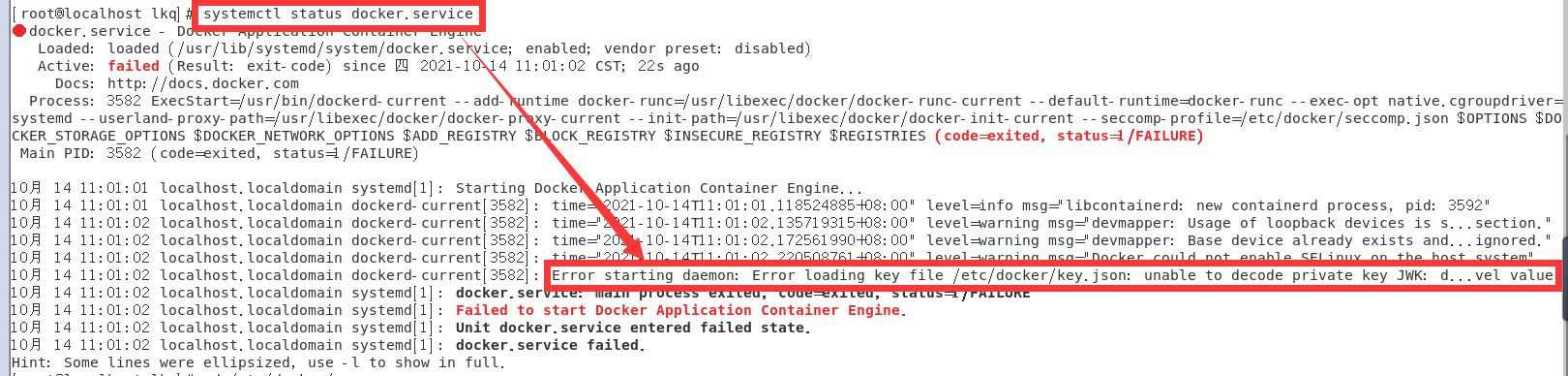
Docker service status:Use the command systemctl status docker.service according to the prompt to check the status of the docker service, and find the following status information:

solution:Uninstall docker and reinstall new docker.
Solution steps:
1. Uninstall Docker. The old version of docker is uninstalled without being installed successfully.
(1) View the installed packages: yum list installed | grep docker
The old version installed on this machine: docker.x86_64, docker-client.x86_64, docker-common.x86_64
(2) Delete the installed Docker related packages:
yum -y remove docker.x86_64
yum -y remove docker-client.x86_64
yum -y remove docker-common.x86_64
2. Install Docker
(1) Check the kernel version [Docker requires that the kernel version of the Centos system is higher than 3.10]
¡Uname -r ¡[the kernel version of this machine: 3.10.0-327.el7.x86_64]
(2) Update the yum package to the latest (it may take a long time, wait slowly ...)
yum update
(3) Install required software packages. [Yum-util provides the yum-config-manager function, and the other two are the dependencies required by the devicemapper driver]
yum install -y yum -utils device-mapper-persistent-data lvm2
(4) Set yum source
yum install -y yum -utils device-mapper-persistent-data lvm2
(5) View the docker version of the warehouse
yum list docker-ce --showduplicates | sort -r
(6) Install docker
yum install docker-ce
(7) Start docker, set boot to start docker.
systemctl start docker
systemctl enable docker
Systemctl stop docker [Supplement: This is the command to close docker]
(8) View version
docker version

(9) To check whether the startup is successful, you can use the search command.
docker search mysql

(10) View log status
systemctl status docker.service

Intelligent Recommendation
Job for docker.service failed because the control process exited with error code
Job for docker.service failed because the control process exited with error code. See “systemctl status docker.service” and “journalctl -xe” for details Solution Perform the fo...
【centOS7】Job for docker.service failed because the control process exited with error code
Job for docker.service failed because the control process exited with error code Start the docker error Command line promptsjournalctl -xeLook at the wrong details, but I don't see a large string of s...
"Job for docker.service failed because the control process exited with error code."
Docker the day before is OK, and start the next day with the systemctl start docker command. It took me two hours to find the problem, and I searched it all over the place, read blogs online, wasted a...
Job for docker.service failed because the control process exited with error code.
This problem is purely a cheating person~~~ First, let me introduce whether the server used is Huawei Kirin v10 server or an arm architecture. I used a one-click installation to package docker+k8s, bu...
Docker service launch error: job for docker.service failed Because The Control Process EXITED with ERROR
Reporting error message: Job for docker.service failed Because The Control Process Exited with error code. See "Systemctl Status Docker.service" and "journalctl -xe" for details. U...
More Recommendation
CentOS 7 docker startup failure problem: Job for docker.service failed because the control process exited with error
I. Introduction I recently failed to start after installing Docker successfully while learning Docker. The following error occurred: Second, the solution: Step 1: Modify the configuration file /etc/sy...
Yum install docker error: Job for docker.service failed because the control process exited with error code
I. Check the Linux kernel version, CenterOS7 install docker requires the kernel version is above 3.10: uname -r 2. Use the yum command to install: yum install docker Start Docker: systemctl start dock...
Job for docker.service failed because the control process exited with error code error when docker starts
problem analysis The Ethereum environment needs to use docker, and then many times the virtual machine does not have docker self-starting, so when restarting docker, it often appears: Job for docker.s...
docker error:. Job for docker.service failed because the control process exited with error code See "sy ...
centos start docker Service error: Job for docker.service failed because the control process exited with error code. See "systemctl status docker.service" and "journalctl -xe" for ...
Docker start error: Job for docker.service failed because the control process exited with error code
Start Docker title the following error: Job for docker.service failed because the control process exited with error code. See “systemctl status docker.service” and “journalctl -xe&rd...