[Unity] Rotation in Unity 3D
tags: unity
Rotation in Unity 3D
1. Rotation in Unity 3D
In Unity, rotation can usually be represented by a three-dimensional vector (x, y, z). Actually this is Euler angle. The three components are the rotation angles around the x-axis, y-axis and z-axis.
To rotate a GameObject, you can directly pass the following code:
transform.Rotate(xAngle, yAngle, zAngle);Then there are the following questions:
- What set of bases does the x-axis, y-axis, and z-axis refer to? Is it the xyz axis in the world coordinate system, or the xyz axis in the local coordinate system? Is it something else?
- What is the positive direction of rotation?
- What is the order of rotation?
Answer one by one below.
Second, the rotation axis
First, to answer the first question, which coordinate system is the base of the rotation axis? Divided into the following three cases.
1. Rotation axis: Rotation value of Transform in Inspector

For this case, there is a clear explanation in Unity Doc,
The position, rotation and scale values of a Transform are measured relative to the Transform’s parent. If the Transform has no parent, the properties are measured in world space.
That is, the rotation axis of the Transform component in the Editor is the model space coordinate axis of the parent node. If there is no parent node, the rotation axis is the world space coordinate axis.
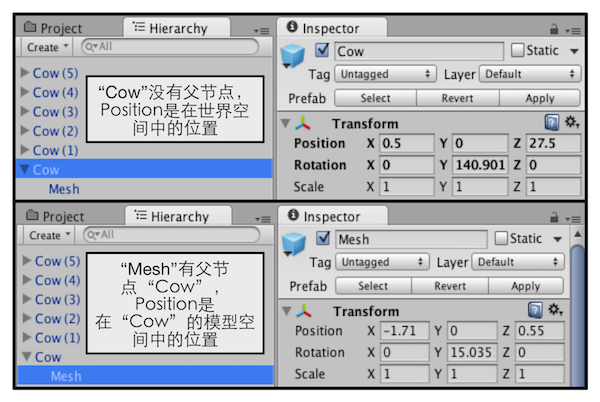
The figure above shows that if the Transform has a parent node, such as "Mesh" in the figure, the Position will be the position in the model space of its parent node (here "Cow"); if there is no parent node, the Position will be in world space In the location. Similarly, Rotation and Scale in Transform are the same.
2. Rotation axis: Use Rotate function in Script, rotate in Space.Self
public void Rotate(Vector3 eulerAngles, Space relativeTo = Space.Self);
public void Rotate(float xAngle, float yAngle, float zAngle, Space relativeTo = Space.Self);
public void Rotate(Vector3 axis, float angle, Space relativeTo = Space.Self);
There are the above three overloaded functions, and the first one is mainly used here as an example. There are two values for the second parameter: Space.Self or Space.World.
Use the following code to test the function of the above function.
using UnityEngine;
using System.Collections;

public class Rotate : MonoBehaviour {
    public Space m_RotateSpace;
    public float m_RotateSpeed = 20f;

    // Update is called once per frame
    void Update()
    {
        transform.Rotate(Vector3.up * m_RotateSpeed * Time.deltaTime, m_RotateSpace);
    }
}
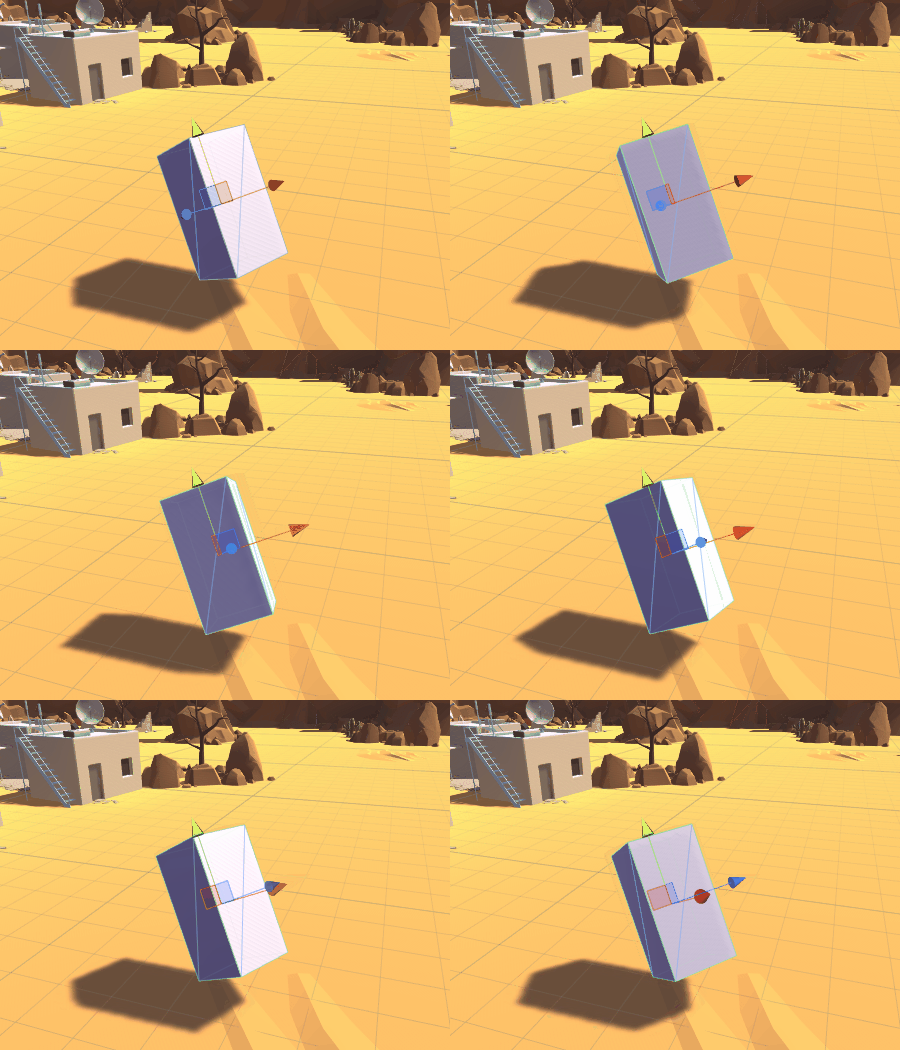
The test in the scene is a cuboid, the rotation of the parent node is (30,30,0), and the initial rotation of the cylinder is (0,0,0). After setting Rotate Space to Self in the Inspector, the operation result is shown in the figure below. It can be seen that the cuboid rotates around the Y axis of the local coordinate system.
It is concluded that the rotation in Space.Self, the axis of rotation is the coordinate axis of the local coordinate system.
3. Rotation axis: Use Rotate function in Script, rotate in Space.World
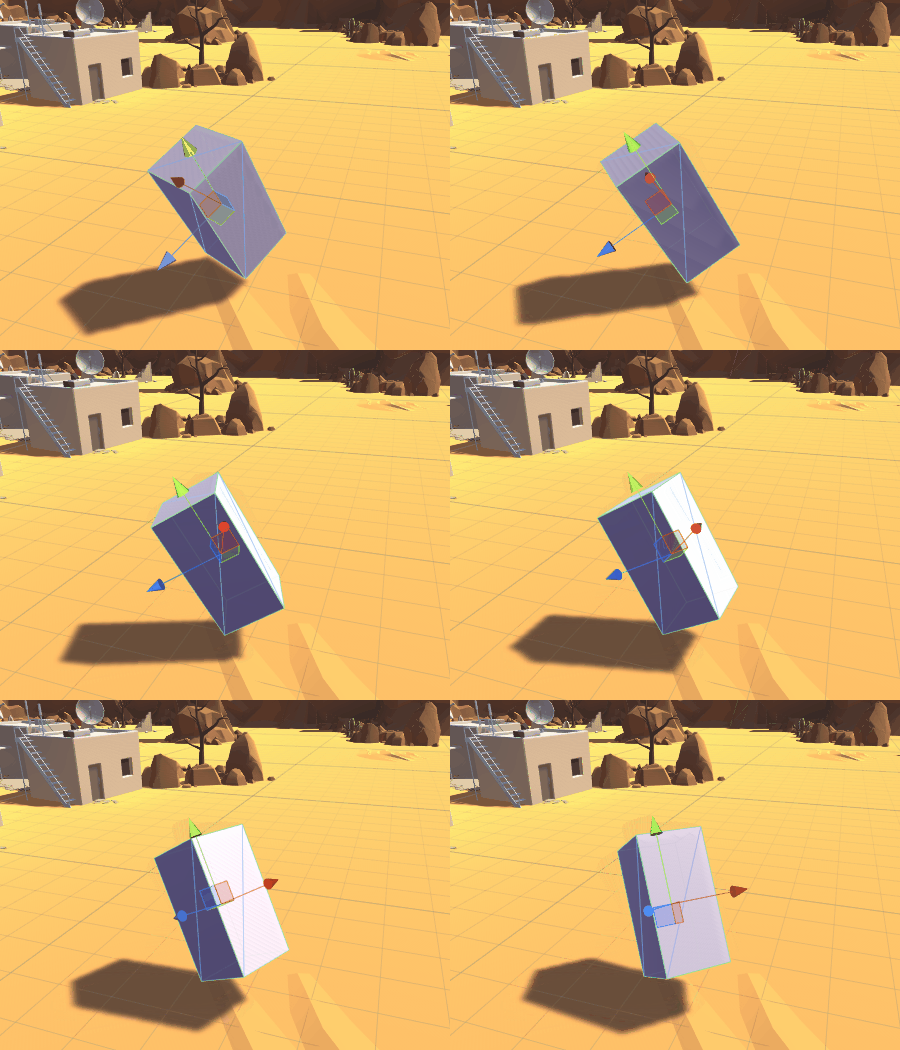
After setting Rotate Space to World in the Inspector, see the figure below. Here we know that the Y axis of the parent node of the cuboid is not the Y axis of the World, and the cuboid here is rotated around the Y axis in the world coordinate system.
So conclude: rotate in Space.World, the axis of rotation is the coordinate axis of the world coordinate system.
4. Static Euler Angle and Dynamic Euler Angle
The problem of the rotation axis mentioned above has a corresponding concept in mathematics. This is called static Euler angle and dynamic Euler angle.
So-calledStatic Euler Angle, That is, the rotating axis uses a stationary reference frame.Dynamic Euler angle, The rigid body itself is used as the reference system, so the reference system rotates as the rigid body rotates.
Therefore, using Space.World rotation and rotation in the Inspector are static Euler angles; using Space.Self rotation is dynamic Euler angles.
3. The positive direction of rotation
Coming to the second question, since the local coordinate system and the world coordinate system in Unity are both left-handed coordinate systems, the positive direction of rotation here can be determined by the right-hand rule.
Fourth, the order of rotation
Let's look at the third problem, the order of rotation, that is, our Euler angle (xAngle, yAngle, zAngle) is composed of three components, which correspond to rotation around the x axis, rotation around the y axis and rotation around the z axis, then How does it rotate around these three axes?
Here we also discuss the situation of static Euler angle and dynamic Euler angle.
1. Static Euler Angle
This situation corresponds to the rotation using Space.World described above, and the rotation in the Inspector. Even if the rotation axis remains unchanged during the rotation, the order of rotation will determine the final rotation result. We will clearly understand the following example:
- Case 1: First rotate 90 degrees around the x-axis of the world coordinate system, and then rotate 90 degrees around the y-axis of the world coordinate system
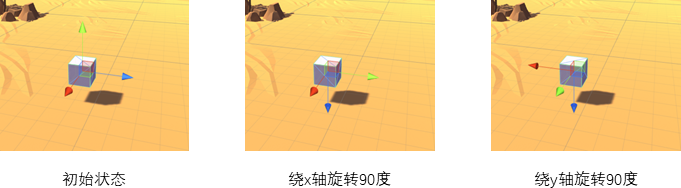
- Case 2: First rotate 90 degrees around the y-axis of the world coordinate system, and then rotate 90 degrees around the x-axis of the world coordinate system
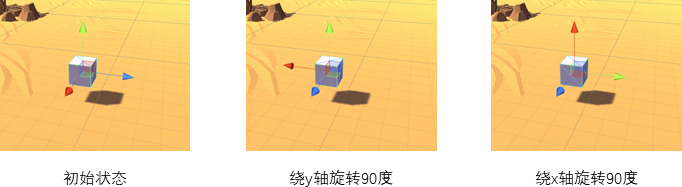
It can be seen that due to the different rotation order, the result of the rotation is ultimately different! (The essence is because the matrix multiplication does not satisfy the commutation law)
There is generally no set formula for the order of rotation, so it is necessary to specify the order explicitly when using it. There is a special term for this, calledCompliance. If the rotation in the coordinate system, first rotate around the x axis, then around the y axis, and finally around the z axis, it is called X-Y-Z compliance. And so on.
For Unity, you can see from the documentation that its transform.Rotate() uses Z-X-Y compliance.So if in Unity, use static Euler angle rotation (90,90,0) to get the situation of the first case.
2. Dynamic Euler Angle
This situation corresponds to using Space.Self for rotation as described above. In addition to the compliance problem mentioned above (the same is ZXY compliance), the dynamic Euler angle also has a doubt: for example, an object, the initial state is marked as A, and it rotates in ZXY compliance (90, 90, 0), because there is no For the z-axis rotation, the first step is of course to rotate 90 degrees around the current x-axis. At this time, the state is recorded as B. Then when the second step is to rotate 90 degrees around the y-axis, it is around the y-axis at the initial state A Rotate, or rotate around the y-axis in the B state at this time?
First look at the difference between the two:
- Case 1: Rotate on the y axis in state A
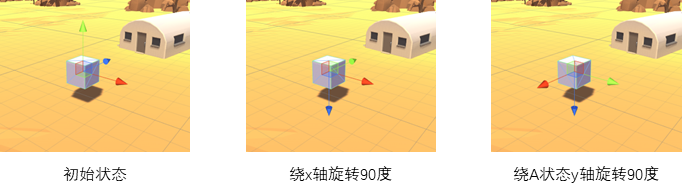
- Case 2: Rotate on the y-axis in state B
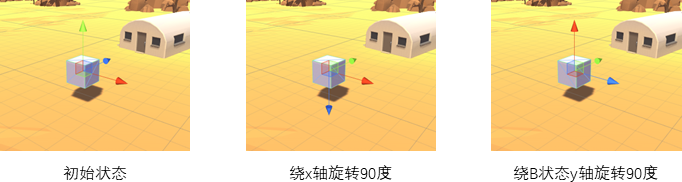
What is the situation in Unity? Run the following code directly to see the result:
void Start () {
    transform.Rotate(90, 90, 0, Space.Self);
}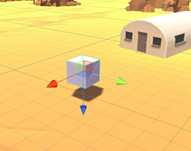
It can be found that the situation in Unity is the same as the situation one. So when the second step is to rotate around the y-axis by 90, it is around the y-axis in the initial state A.
In order to get the effect in the second case, you can rotate it twice and run the following code:
void Start () {
    transform.Rotate(90, 0, 0, Space.Self);
    transform.Rotate(0, 90, 0, Space.Self);
}
It can be found that the effect at this time is the same as in case one.
In the end, our conclusion is: Every time Unity uses Space.Self for Rotate, it rotates around the coordinate axis of the local coordinate system at the time of calling.
3. Equivalent forms of static Euler angle and dynamic Euler angle
Static Euler angle and dynamic Euler angle can be converted to each other.
The transformation rule is: in the static Euler angle, the rotation angle (a, b, c) according to a certain rule such as XYZ under a certain coordinate system E is equivalent to the dynamic Euler angle, rotating under E (0, 0, c), rotate in the rotated coordinate system E'(0, b, 0), rotate in the rotated new coordinate system E" (a, 0, 0).
Rotate in Space.Self with ZXY normal rotation angle (a, b, c), which is equivalent to rotating in Space.Self (0, b, 0), and rotating in new Space.Self (a, 0, 0), rotate (0, 0, c) in the updated Space.Self.
Let us prove that the above two rotations are equivalent. Through the compound rotation matrix.
Remember:
The rotation matrix for rotating c around the Z axis in coordinate system E is Rz,
The rotation matrix for rotating a around the X axis in coordinate system E is Rx,
The rotation matrix of rotation b around the Y axis under coordinate system E is Ry;
The matrix for rotating b around the Y axis in coordinate system E is Rb (Rb == Ry),
The rotation matrix of the X-axis rotation a around the coordinate system E after rotating b around the Y-axis is the Ra,
The rotation matrix of the Z-axis rotation c around the coordinate system E'in the new coordinate system E" after the rotation a around the X axis is Rc.
In addition, here the inverse of the matrix R is denoted as R~.
Proof: Rz * Rx * Ry == Rb * Ra * Rc
prove:
Rb == Ry, which can be seen by the same definition.
Ra = (Rb~) * Rx * Rb, to get the rotation matrix Ra of the X-axis rotation a around the coordinate system E under the new coordinate system E'after rotating around the Y axis b, first apply Rb~ to the coordinate system E Next, rotate a around the X axis in coordinate system E, and finally use Rb to turn back to coordinate system E'.
Rc = ((Rb * Ra)~) * Rz * (Rb * Ra), the reason is the same as above.
So have,
Right = Rb * Ra * Rc
= Rb * Ra * ((Rb * Ra)~) * Rz * (Rb * Ra)
= Rz * Rb * Ra
= Rz * Rb * (Rb~) * Rx * Rb
= Rz * Rx * Rb
= Rz * Rx * Ry = left
Proof!
From the code point of view, the following two functions are equivalent.
private void RotateStatic(float a, float b, float c)
{
    // Static Euler angle, rotate a, b, c angle around the z, x, y axis of the local coordinate system when Rotate is called
    transform.Rotate(a, b, c, Space.Self);
}

private void RotateDynamic(float a, float b, float c)
{
    // Dynamic Euler angle, rotate b angle around the y-axis of the local coordinate system when Rotate is called
    transform.Rotate(0, b, 0, Space.Self);
    // Dynamic Euler angle, rotate a around the y-axis of the local coordinate system when Rotate is called
    transform.Rotate(a, 0, 0, Space.Self);
    // Dynamic Euler angle, rotate c angle around the y-axis of the local coordinate system when Rotate is called
    transform.Rotate(0, 0, c, Space.Self);
}
5. Gimbal Lock
1. What is a universal joint lock
2. How to produce a universal joint lock
3. The problem of universal joint lock
3. Try to avoid universal joint lock during Euler rotation
Six, quaternion (Quaternion) rotation
1. What is quaternion
2. Rotate with quaternion
reference
- Rotation in Unity
- Euler angle and gimbal deadlock
- Chapter 4 of "Introduction to Unity Shader"
Intelligent Recommendation
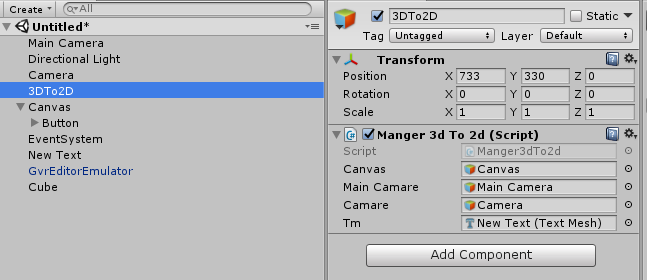
Unity 3d to 2d then 3d
I used the daydream platform to test, currently other platforms have not tested The general idea is that in PlayerSettings, select Virtual Reality Supported and then select the corresponding platform....
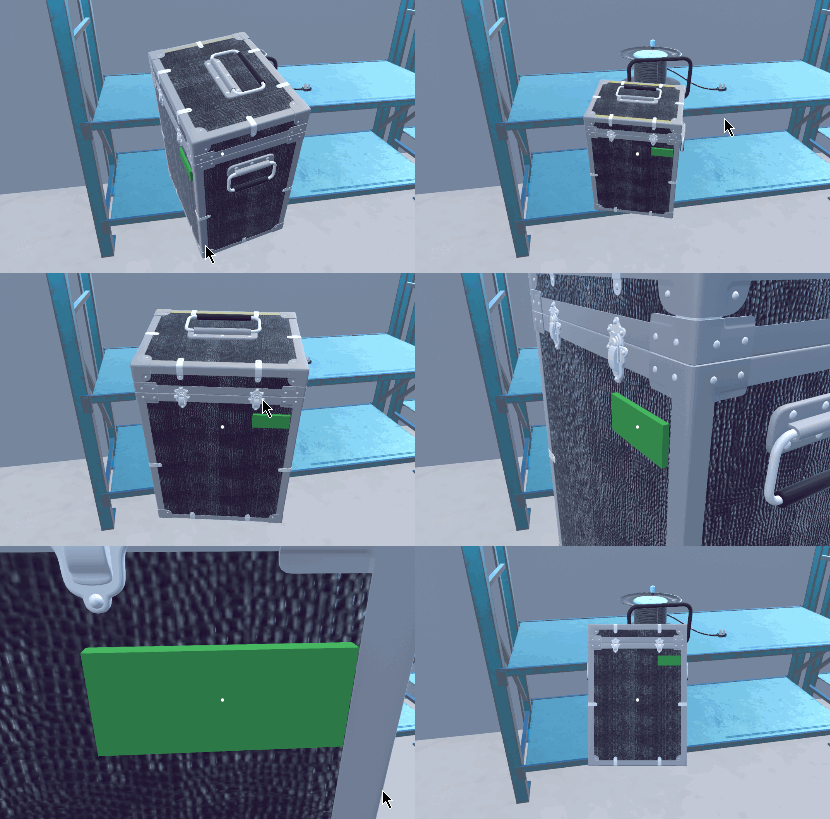
Unity 3D Observation Object Rotation View the problem of the world coordinates and local coordinate rotation rotation objects
About Unity 3D rotating objects Before getting a demand, you need to check the damage status and the expiration of the object. That is to say, 360 ° to view the object, and a focus function to vie...

[Unity programming] Euler rotation in Unity
Definition of Euler angle Before writing this blog, I searched a lot about the definition of Euler angle on the Internet, and found that most of the definitions are quoted from Wikipedia. I also quote...
[Unity 3D] Unity 3D performance optimization (a)
Heard a lot of complaints with the Unity 3D game development engine programmer efficiency is too low, too high resource consumption, including myself in the past, the development of the project also h...
[Unity 3D] Unity 3D performance optimization (b)
IsAlive U3D particle system scripting interface believe many people have used, ParticleSyetem class series interface has a parameter of type bool --withChildren, the same can be directly applied to th...
More Recommendation

Unity 3D notes compiled by C# programmers (10): Unity3D displacement and rotation 3D mathematical model
I encountered a function I wanted to do, but I couldn't realize it. The core reason was that I didn't have a thorough understanding of U3D's 3D mathematical concepts. Therefore, I will study it system...
Unity around rotation
Freely define the angle of rotation, position, speed, radius...

Control the rotation of characters in Unity
Hang this script on the cube (the cube must have a collider) ...