OpenGL since 1.0-the attributes of points and lines
We have talked about color attributes in the previous section. Color attributes are a kind of attributes. In this section, we will look at how OpenGL handles attribute information from the perspective of attribute objects.
1. Point attributes
In general, we can set two attributes of a point: color and size. Let's take a look at the following example, everything is self-explanatory.
#include <GL/glut.h>
void display(void)
{
    glClear(GL_COLOR_BUFFER_BIT);
    glClearColor(1, 1, 1, 1);
    glViewport(0, 0, 400, 100);

    glViewport(0, 0, 100, 100);
    glPointSize(10.0f); glColor3f(1, 0, 0);//Point attributes
    glBegin(GL_POINTS);
    glVertex2f(0.0f, 0.0f);
    glEnd();

    glViewport(100, 0, 100, 100);
    glPointSize(20.0f); glColor3f(0, 1, 0);
    glBegin(GL_POINTS);
    glVertex2f(0.0f, 0.0f);
    glEnd();

    glViewport(200, 0, 100, 100);
    glPointSize(30.0f); glColor3f(0, 0, 1);
    glBegin(GL_POINTS);
    glVertex2f(0.0f, 0.0f);
    glEnd();

    glViewport(300, 0, 100, 100);
    glPointSize(40.0f); glColor3f(1, 1, 0);
    glBegin(GL_POINTS);
    glVertex2f(0.0f, 0.0f);
    glEnd();

    glFlush();
}
int main(int argc, char ** argv)
{
    glutInit(&argc, argv);
    glutInitDisplayMode(GLUT_RGB | GLUT_SINGLE);
    glutInitWindowSize(400, 100);
    glutInitWindowPosition(100, 100);
    glutCreateWindow("Hello OpenGL");
    glutDisplayFunc(display);
    glutMainLoop();
    return 0;
}
Although the code is long, we only care about two lines of code.
glPointSize(10.0f); //Point size
glColor3f(1, 0, 0);//Point color
These two lines of code respectively represent the two attributes of the point: size and color. We have explained the color attributes very thoroughly before, let's focus on the size or size attributes. The size of a point in OpenGL is an integral multiple of the pixel size, so as shown in the example, a large point is displayed as a pixel square. OpenGL uses the glPointSize(size) function to set the size of a point, where size is specified with a positive floating point number, and the number of horizontal and vertical pixels that display the point is the size of size.
Second, the attributes of the line
Line segments can be displayed using three basic attributes: color, line width and line style.
#include <GL/glut.h>
#include <math.h>
double Pi = 3.1415926;
void display(void)
{
    GLfloat r = 1.2f;
    GLfloat verA[2] = { 0, r };
    GLfloat verB[2] = { -r*sin(0.4*Pi), r*cos(0.4*Pi) };
    GLfloat verC[2] = { -r*sin(Pi / 5), -r*cos(Pi / 5) };
    GLfloat verD[2] = { r*sin(Pi / 5), -r*cos(Pi / 5) };
    GLfloat verE[2] = { r*sin(0.4*Pi), r*cos(0.4*Pi) };
    glEnable(GL_LINE_STIPPLE);//Enable line type
    glLineStipple(1, 0x0101);//Set the line type to dashed line
    glLineWidth(6.0f);//Line width
    glClear(GL_COLOR_BUFFER_BIT);
    glBegin(GL_LINE_LOOP);
    glVertex2fv(verA);
    glColor3f(1.0f, 0, 0);
    glVertex2fv(verC);
    glColor3f(0, 1.0f, 0);
    glVertex2fv(verE);
    glColor3f(0, 0, 1.0f);
    glVertex2fv(verB);
    glColor3f(1.0, 1.0, 1.0);
    glVertex2fv(verD);
    glEnd();
    glFinish();
}
int main(int argc, char ** argv)
{
    glutInit(&argc, argv);
    glutInitDisplayMode(GLUT_RGB | GLUT_SINGLE);
    glutInitWindowSize(400, 400);
    glutInitWindowPosition(500, 300);
    glutCreateWindow("Hello OpenGL");
    glutDisplayFunc(display);
    glutMainLoop();
    return 0;
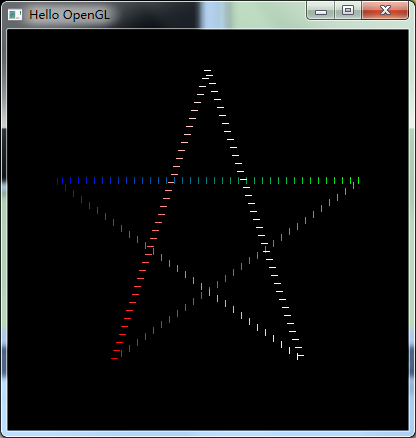
}
I believe you can find the core code at a glance. , Let's analyze them one by one.
We won't go into details about the color attributes. The line width attributes are similar to the point size attributes, and they are relatively simple. The most interesting thing for us is undoubtedly the linear attribute.
Before using the current line type to display line segments, you must first activate the OpenGL line type feature:
glEnable(GL_LINE_STIPPLE);OpenGL uses the glLineStipple function to set the line style. It has two parameters. The second parameter introduces a 16-bit integer describing how to display the line segment. A bit with a value of 1 corresponds to an "on" pixel, and a bit with a value of 0 corresponds to an "off". "Pixels. This mode is applied to the line path from the low bit. In our example, the parameter is 0x0101, and the corresponding binary number is 0000000100000001, which is a triple-width dot mode. The dotted line is represented by dots, and the interval between dots is wide. It should be noted that because we set the line width to 6, the dashed lines seem to be connected by dashed lines, but here it is obvious that the dashed line direction is perpendicular to the direction of the dashed line, which indicates that the width represents the width of the dashed line, not The interval is wide. The first parameter represents the number of repeated applications for each bit. Let's try to change this parameter to 4 and see the result.

The result is also obvious. The dots and intervals are widened in the direction of the dotted line. This is the result of repeating each bit 4 times.
Let’s show you a few more examples for your understanding.
The second parameter is changed to 0x1c47:

The second parameter is changed to 0x00ff:

Have we finished this code? Obviously, everyone still has doubts.
Why are the colors in the picture so colorful? We obviously only set the color four times. Let's learn a new function:
glShadeModel(GL_SMOOTH);This function specifies that the line segment is displayed in a linear interpolation mode of the colors of the two ends, that is, to achieve such an effect of color gradient. In fact, we did not use this function in the code, because the color gradient is a default effect in OpenGL. We can change the function parameter to GL_FLAT to cancel the color gradient effect, and instead always use the color at the end of the line segment to represent the entire line segment.
Intelligent Recommendation
Computer graphics and OpenGL learning three (attributes of primitive 2: attributes of dots and lines)
2. Point and line attributes 2.1 Point attribute function The color of the point is controlled by the current color of the display color. The size of the point is controlled by the following function ...

OpenGL - basic elements (including points, lines, circles, etc.)
table of Contents point Common function Code line Common function Code circle Code Pentagram Code Sinusoidal image Code All code Partial screenshot point Common function Point common function function...
OpenGL Getting exercise - points, lines, polygons and simple manipulation
Drawing some of the details of geometry: You can set the point size A line can set the width; may be a straight line drawn dashed. The method of polygon rendering two surfaces may be provided, respect...
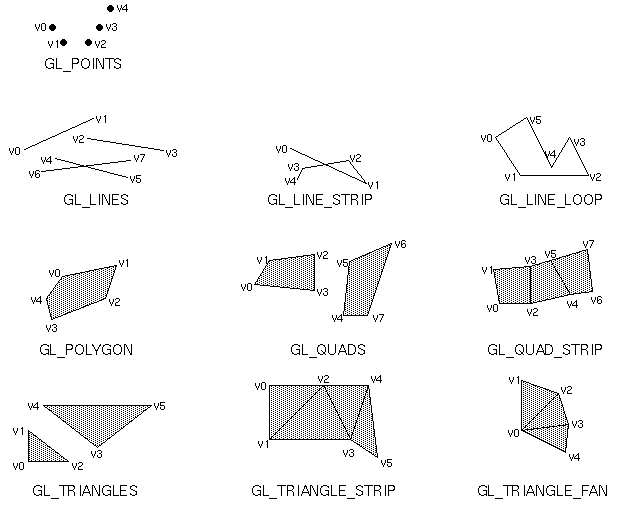
OpenGL study notes: drawing points, lines and polygons (Lesson 1)
mineOperating environment: Specifying vertices in OpenGL, OpenGL provides a series of functions. They all start with glVertex, followed by a number and 1~2 letters. E.g: The number indicates the numbe...
OpenGL study notes: drawing points, lines and polygons (Lecture 2)
1. About points The point size is 1 pixel by default, but it can be changed. The changed command is glPointSize, and its function prototype is as follows: void glPointSize(GLfloat size); The siz...
More Recommendation
Android OpenGL ES-Introduction to the parameters of drawing lines, areas and points
draw call glDrawArrays(int mode, int first, int count) method mode parameters can be selected...
The android platform uses Opengl to achieve the drawing of points, lines and triangles
Graphic drawing steps 1.1 Customize MyGLView to inherit GLSurfaceView 1.1.1 Initialize GLSurfaceVeiw init(); init implementation private viod init(){ } //Internal class Implement Renderer interface Se...
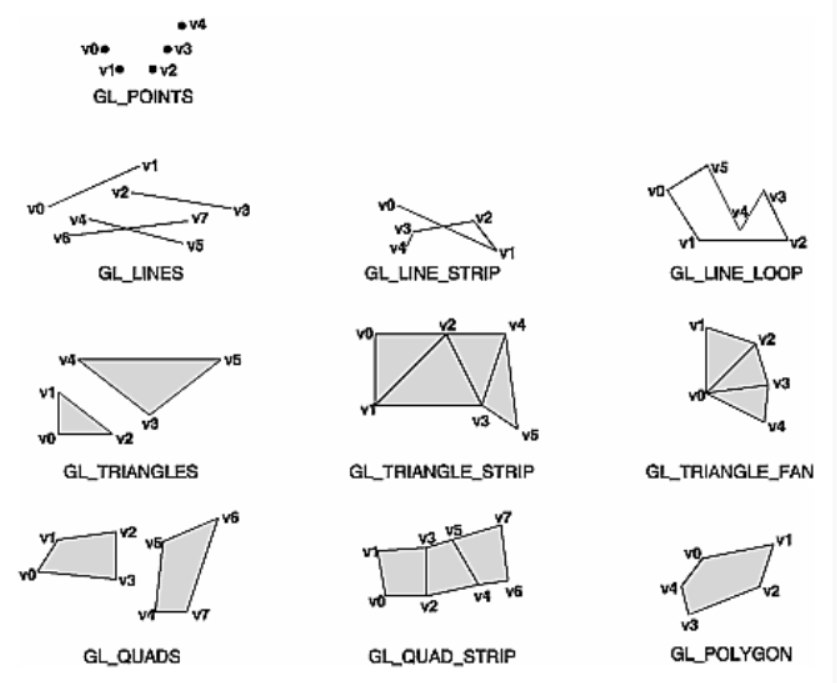
OpenGL API Learning (180) Points Lines Triangles Quads Drawing Rules
The drawing direction of each graphic default is the same, either counterclockwise (default direction) or clockwise. 1、GL_TRIANGLES Draw a triangle every three vertices. The first triangle uses...

OpenGL started from 1.0-the first OpenGL program
I believe you have already experienced the simplicity of OpenGL drawing function. The next article will take you to learn more about drawing graphics....

OpenGL starting from 1.0--OpenGL display table (on)
At the beginning of this article, we bring you a real challenge. Let us brainstorm how to implement the window reshaping function so that the center position of the hexagon is not affected by the chan...