day5 (css stylesheets and selector)
day5 (css stylesheets and selector)
The introduction of CSS style sheets
Internal style sheet
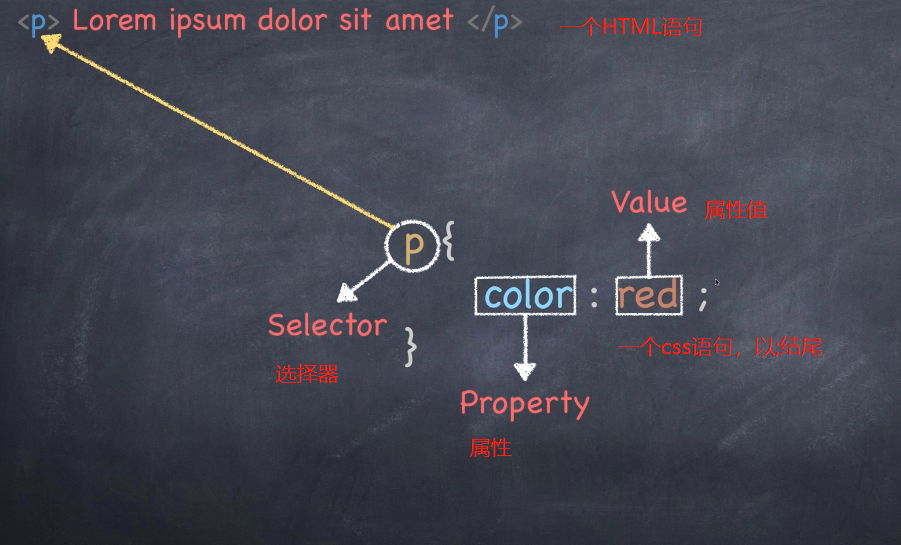
Inline CSS code set is written in the head tag of the HTML document in the head, and is defined by style tags, the basic syntax is as follows:
<head>
<style type="text/CSS">
Selector {Attribute 1:Property values 1; 2 properties:Attribute value 2; 3 properties:Property Value 3;}
</style>
</head>
1. html5 may be omitted but will be written general, fairly standard
2. Usually the label in the head, may be placed in other positions
Inline type (inline style)
Inline styles, but also called inline style, the line between style, inline styles. Is set by the style element in the style attribute tags, the basic syntax is as follows:
<Label name style="Attribute 1:Property values 1; 2 properties:Attribute value 2; 3 properties:Property Value 3;"> Content </Label name>
An external style sheet (outer chain)
Chain is all-in style in one or more of the extension .CSS external style sheet file linked by the link tag to the external style sheet file HTML document, the basic syntax is as follows:
<head>
  <link href="CSS file path" type="text/CSS" rel="stylesheet" />
</head>
single-label link, which head on the head
URL 1.herf, defined external style files, can be a relative path, or an absolute path
2.type, the type of connection documents, text / CSS represents a css file
3.rel define the relationship between the current document and the linked documents, you need to specify here stylesheet, it indicates that the link is a style sheet file
The table below summarizes three styles
| Style Sheets | advantage | Shortcoming | Usage | Control range |
|---|---|---|---|---|
| Inline Style Sheets | Writing convenient, high weight | There is no separation of style and structure | less | A label control |
| Internal style sheet | Separation of part of the structure and style | Not completely separated | More | A control tag page |
| External style sheet | Complete separation of style and structure | Need to introduce | Most wall cracked recommended | Control of the whole site |
Label display mode (display)
Type (display mode) of the label
HTML tags and labels are generally divided into blocks both types of the row labels are also called intra-block element and the row element. details as follows:
Block-level elements (block-level)
Common block elements have <h1> ~ <h6>, <p>, <div>, <ul>, <ol>, <li> etc., wherein <div> tag is the most typical block element.
Each block elements One row, width and height may be provided, alignment and other attributes, and page layout commonly used in the building structure
Characteristics of block-level elements
- Always start a new line
- Height, line height, margins and padding can be controlled
- 100% of the width of the container is
- Inline element can be accommodated, and other block elements
Inline element (inline-level)
Common inline elements have <a>, <strong>, <b>, <em>, <i>, <del>, <s>, <ins>, <u>, <span> etc., wherein <span> the most typical label inline elements.
Inline elements (inline elements) and no separate space, by content (text, images) to hold up the structure,generalWidth and height can not be set, alignment and other attributes, common domain control page text style
Features inline elements:
- And adjacent rows within the element on the same line
- Invalid width and height, the vertical single invalid horizontal padding, margin can be set
- The default width is the width of the content itself '
- Inline elements to accommodate the line of text or other elements
1. link which can not put links
 2. The element can be placed inline block-level tag
Block-level elements and inline elements difference
Characteristics of block-level elements
-
Always start a new line
-
Height, line height, margins and padding can be controlled
-
100% of the width of the container is
-
Inline element can be accommodated, and other block elements
Features inline elements:
- And adjacent rows within the element on the same line
- Invalid width and height, the vertical single invalid horizontal padding, margin can be set
- The default width is the width of the content itself
- Inline elements to accommodate the line of text or other elements
Inline block elements (inline-block)
There are several elements within the row of special labels - <img />, <input />, <td>, width and height can be provided to them and alignment properties, some of the information may refer to them as internal row block elements.
Row within the block element features:
- And the adjacent element (inline elements or block elements within a row) on one line, but there will be a gap between the
- The default width is the width of the content itself
- Line height, width and height can be controlled
Label display mode switching display
Conversion block elements within the element row
display:inline
Transfer block-level inline
display:block;
Within the block-level element row switch element within the block
display:inline-block;
CSS selectors compound
Compound is selected from two or more base selector, a combination of different ways, the purpose can be selected more accurately target finer element tag.
Intersection selector
By the two selectors composition tag selector, the second selector class there is no space between the two selectors
p .p1{
			color: red;
		}
Intersection with a relatively small
And set selector
And select Set UsedcommaLink, any form of selectors can be used as part of the union selectors
div,p{
		color: red;
	}
Descendant selectors
Also referred to as comprising a selector, withBlankConnection, children and grandchildren can be selected
Note: The outer label EDITORIAL inner label written on the back, the middle of a space division
Child element selector
Contain only child elements, EDITORIAL their parent tag label written on the back, with the middle> connection
Attribute selectors
Select the tab selector with some special attributes we call attribute selectors
div[class^=font]{
			color: red;
		}
		div[class$=font]{
			color: blue;
		}
		div[class*=font]{
			color: pink;
		}
Label name [attribute name = attribute value ^] {attribute name 1: 1 attribute value;
}
^ Starting position
$ End position
* Anywhere
Pseudo-element selector (CSS3)
1.E :: The first word or first-letter word text
2.E :: first-line first line of text
3.E :: selection, you can change the selected text style
4.E :: before and E :: after
Create an element at the beginning and end of elements inside the E position, the element is inline elements, it must be combined with the use of the content property
Pseudo-class is a colon. Pseudo-element is two colons
CSS writing specifications
To develop good coding standards, this is the beginning of specialization
Space specifications
[Force] {selector and must contain spaces between
.one { }
[Mandatory] attribute name and after: No spaces are allowed between: between property value and must contain spaces
font-size: 12px;
Select Specification
[Forced] when including a plurality of selectors, each selector statement must be on a separate line
.one, .two, .three {} writing error
.one, correct wording
.two,
.three { }
[Proposed] the nested hierarchy selectors should not be greater than three
Property Specification
[Mandatory] attribute definition must be on a separate line
Must add a semicolon after the attribute definition [mandatory]
CSS background (background)
CSS can add background colors and background images, as well as to carry out the picture settings.
| background-color | background color |
|---|---|
| background-image | Background image address |
| background-repeat | Whether tile |
| background-position | Background-position |
| background-attachment | Fixed or scrolling background |
| Co-wrote the background (composite attribute) | |
| background: the background color of the background picture address background tile background background scroll position |
Background image (image)
grammar:
background-image : none | url (url)
none no background
Background image url address
Background tile (repeat)
grammar:
background-repeat : repeat | no-repeat | repeat-x | repeat-y
Background-position (position)
grammar:
background-position : length || length

background-position : position || position
Background attachment
grammar:
background-attachment : scroll | fixed
Background shorthand
Writing order the official value of the property background and there is no mandatory standard. For readability, it is recommended you write the following:
background: the background color of the background picture address background tile background background scroll position
background: color url(image.jpg) repeat-y scroll 50% 0 ;
Transparent background (CSS3)
CSS3 support background translucent wording syntax is:
background: rgba(0,0,0,0.3);
Background scaling (CSS3)
Its parameters are as follows:
A) The unit of length may be provided (px) or percentage (percentage set, with reference to the width and height of the box)
b) set to cover, it will automatically adjust the zoom ratio to ensure pictures are always filling up the background area, if the overflow section will be hidden. The most we usually use cover
c) setting will automatically adjust the zoom to contain, to ensure that pictures are always displayed completely in the background area.
Multi-background (CSS3)
Comma-separated may be provided multi-instance, the layout can be used for the adaptive approach is separated by commas like.
- An element can set multiple background images.
- Between each attribute separated by commas.
- If there is an intersection between a set of multiple background (i.e., there is an overlapping relationship), in front of the background will be overlaid on top of the background behind the FIG.
- In order to avoid covering the background color image, the background color is usually defined in the last group,
Intelligent Recommendation
How to load CSS stylesheets only on IE
Foreword: IE has always been a special browser, we can use some methods to specify that the style sheet is only loaded under IE browser. IE9 and lower than IE9 version: Conditional comment statements ...
Dynamic loading with javascript javascript script / css stylesheets
Reproduced in: https: //www.cnblogs.com/heitou/archive/2011/06/21/2086205.html...
Conditional Stylesheets vs CSS Hacks? Answer: Neither!
…or… <html>’s conditional classes From what I’ve seen a good number of developers these days are split between conditional stylesheets and css hacks. You’re ...

About Myeclipse is not recognized (read) part of css stylesheets
Two days before going to write big job, and then spend the semester to write the code found invalid css import (import from external Myeclipse), examined the path, encoding, etc. will not work, I even...
[CSS] -Cascading styleSheets layered style table
Table of contents 0. CSS introduction 1. CSS statement composition 2. How to select the CSS selector 1) The method and selector of the CSS selector: 2) Three common methods: 3. Add CSS method 1...
More Recommendation
day5 css
css css color: red;background: green" color settings priority choice (priority is lower large range) loading order (priority after loading large) specific priority (color:! Red important; ·...

Day5: html and css
Day5:htmlwithcss How to achieve the box centering problem, to make the box horizontally centered, to satisfy the fast element, and the width of the box should be defined. Then the value isautoJust fin...
CSS study notes (Day5)
One, CSS box model 1. Box model The padding, border, and padding are optional, and the default value is zero; however, many elements will be set by the user agent style sheet for padding and padding. ...