[C # / WPF] Image transform UNDO undo - use stack command stack
tags: C# WPF Undo Revoke Command stack
Demand:
There is a picture in the layer that can be translated, scaled, rotated to the layer, and the UNDO undo function is now required to make the layer reply to the status of the last step.
About the translation, scaling, rotation of the image, can refer to the other blog in the next:
Question:
C # System's own UNDO is revoked for text editing, and the project requirements are revoked for the modification of the Transform transform attribute of the layer picture.
Idea:
- The layer is a custom class. In addition to including this image, the layer object has a large number of attributes (such as many other custom properties), if you do Undo revocation is to record every step in each step in each step Attribute, then the List data will be very large, and there is a lot of attribute data that is not required when Undo cancels.
- Change to record various operation commands Command, such as translation, only the command is a translation operation, and record the amount of translapsed X, Y value variation. The subsequent UNDO cancellation is to perform the reverse direction.
- Because undo cancellation is a multi-step, you can return step by step, so consider using the Stack stack data structure to record each step (not using a List linear).
- Property Design of Command Stack:
- A enumeration property of a recording operation type, such as recording the current modification operation is an image amplification, then the image is reduced when Undo cancels.
- A float [] array that records additional data, such as the translation of the current modified operation to the right shift 100, the Y axis moves up to 200, then the undo cancels the reverse direction, that is, X axis to left shift 100, Y axis Move down 200. Of course, because the image may have many other types of data, in order to command the verge of the stack, this array type can be changed to Object [], and any additional data can be stored.
The following defines such a command stack: CommandStack
public class CommandStack
{
    // Type of recording operation
    public enum CommandType
    {
        Move,       // Translation
        ZoomIn,     // Zoom
        ZoomOut,    / / Reduce
        RotateLeft,     // Turn left
        RotateRight,    // Turn right
    }

    // Command the element object stored in the stack
    public class CommandInfo
    {
        public Image img { get; set; } // Operated front desk image control
        public CommandType CommandType { get; set; } // Type of operation
        public object[] Object { get; set; }         // Record the data of the operation
    }

    public static Stack UndoStack; // Undo revoked stack
    static CommandStack()
    {
        UndoStack = new Stack(); // Instantiate in the constructor
    }

    /// <summary>
    ///  Add an element to the Undo revoked command stack
    /// </summary>
    /// <param name="commandimgType">Operated image control</param>
    /// <param name="commandType">Type of command</param>
    /// <param name="obj">Accompanying data</param>
    public static void Add(Image img, CommandType commandType, object[] obj = null)
    {
        CommandInfo commandInfo = new CommandInfo();
        commandInfo.Image = img;
        commandInfo.CommandType = commandType;
        commandInfo.Object = obj;

        // In the press, there is no consider the capacity of the stack here.
        UndoStack.Push(commandInfo);
    }

}
TRANSFORM group in the front desk XAML:
<Image x:Name="targetImage">
    <Image.RenderTransform>
        <TransformGroup>
            <TranslateTransform/>
            <ScaleTransform/>
            <RotateTransform/>
        </TransformGroup>
    </Image.RenderTransform>
</Image>
After the image is translated, the translation operation is recorded in the command stack: the X-axis positive direction + 100, the Y axis positive direction +200.
CommandStack.Add(targetImage, CommandType.Move, new object[]{ 100, 200 });The UNDO Undo button operation:
public void UndoCommand()
{
    if (CommandStack.UndoStack.Count == 0)
    {
        // has been revoked to the head
        MessageBox.Show("I can't revoke it now!");
        return;
    }

    / / Stack top element outlet and get its reference
    CommandStack.CommandInfo commandInfo = CommandStack.UndoStack.Pop() as CommandStack.CommandInfo;

    // Get the operational image control
    Image img = commandInfo.Image;

    / / Classification processing according to the type of operation
    switch (commandInfo.CommandType)
    {
        case CommandStack.CommandType.Move:     // revoke the translation, X, Y value to take the opposite value
            double translationX = commandInfo.Parameters[0]; // Note: It is a translation of the last position, not the offset with respect to the original location!
            double translationY = commandInfo.Parameters[1];
            UndoMove(img, translationX, translationY);
            break;

        case CommandStack.CommandType.ZoomIn:   // revoke the magnification, that is, zoom
            ZoomOut(img);
            break;

        case CommandStack.CommandType.ZoomOut:  // revoke the shrinkage, that is, zoom
            ZoomIn(img);
            break;

        case CommandStack.CommandType.RotateLeft:   // revoke the left turn, that is, right turn
            RotateRight(img);
            break;

        case CommandStack.CommandType.RotateRight:  // revoke the right turn, that is, turn left
            RotateLeft(img);
            break;
    }
}


/// <summary>
///  Revoke translation
/// </summary>
/// <param name="img">Image controlled front desk control</param>
/// <param name="translationX">The X axis relative to the last shift is not relative to the original position!</param>
/// <param name="translationY">The Y-axis relative to the last shift is not relative to the original position!</param>
private void UndoMove(Image img, double translationX, double translationY)
{
    TransformGroup tg = img.RenderTransform as TransformGroup;
    var tgnew = tg.CloneCurrentValue();
    if (tgnew != null)
    {
        TranslateTransform transform = tgnew.Children[0] as TranslateTransform;
        transform.X += translationX;
        transform.Y += translationY;

        / / Re-give the image assignment Transform transform attribute
        img.RenderTransform = tgnew;
    }
}


/// <summary>
///  Image reduction
/// </summary>
/// <param name="img">Image controlled front desk control</param>
public void ZoomOut(Image img)
{
    TransformGroup tg = img.RenderTransform as TransformGroup;
    var tgnew = tg.CloneCurrentValue();
    if (tgnew != null)
    {
        ScaleTransform st = tgnew.Children[1] as ScaleTransform;
        img.RenderTransformOrigin = new Point(0.5, 0.5);
        if (st.ScaleX >= 0.2)
        {
            st.ScaleX -= 0.05;
            st.ScaleY -= 0.05;
        }
        else if (st.ScaleX <= -0.2)
        {
            st.ScaleX += 0.05;
            st.ScaleY -= 0.05;
        }
    }

    / / Re-give the image assignment Transform transform attribute
    img.RenderTransform = tgnew;
}


/// <summary>
///  Picture
/// </summary>
/// <param name="img">Image controlled front desk control</param>
public void ZoomIn(Image img)
{
    TransformGroup tg = img.RenderTransform as TransformGroup;
    var tgnew = tg.CloneCurrentValue();
    if (tgnew != null)
    {
        ScaleTransform st = tgnew.Children[1] as ScaleTransform;
        img.RenderTransformOrigin = new Point(0.5, 0.5);
        if (st.ScaleX > 0 && st.ScaleX <= 2.0)
        {
            st.ScaleX += 0.05;
            st.ScaleY += 0.05;
        }
        else if (st.ScaleX < 0 && st.ScaleX >= -2.0)
        {
            st.ScaleX -= 0.05;
            st.ScaleY += 0.05;
        }
    }

    / / Re-give the image assignment Transform transform attribute
    img.RenderTransform = tgnew;
}

/// <summary>
///  Picture left turn
/// </summary>
/// <param name="img">Image controlled front desk control</param>
public void RotateLeft(Image img)
{
    TransformGroup tg = img.RenderTransform as TransformGroup;
    var tgnew = tg.CloneCurrentValue();
    if (tgnew != null)
    {
        RotateTransform rt = tgnew.Children[2] as RotateTransform;
        img.RenderTransformOrigin = new Point(0.5, 0.5);
        rt.Angle -= 5;
    }

    / / Re-give the image assignment Transform transform attribute
    img.RenderTransform = tgnew;
}

/// <summary>
///  Image right transfer
/// </summary>
/// <param name="img">Image controlled front desk control</param>
public void RotateRight(Image img)
{
    TransformGroup tg = img.RenderTransform as TransformGroup;
    var tgnew = tg.CloneCurrentValue();
    if (tgnew != null)
    {
        RotateTransform rt = tgnew.Children[2] as RotateTransform;
        img.RenderTransformOrigin = new Point(0.5, 0.5);
        rt.Angle += 5;
    }

    / / Re-give the image assignment Transform transform attribute
    img.RenderTransform = tgnew;
}
Exterior:
If you still want to do a redo redo function, that is, the reversible function with Undo, you can consider two Stack stacks.
Add a Redostack Stack in the CommandStack class, the idea is to store the elements removed when the undotack stack is stored in the Redostack Stack when Undo revokes!
Intelligent Recommendation

Command Mode-Undo Recovery
This example comes from the example program provided by Yan Hong, taking line drawing as an example: Command interface Command: Add line command class AddLineCommand: Command collection class C...
Undo operation of git command
Article Directory Undo `git add .` Undo `Git init` Enter your hand slip under a general directorygit initwithGit add . Undogit add . Undo method: UndoGit init...
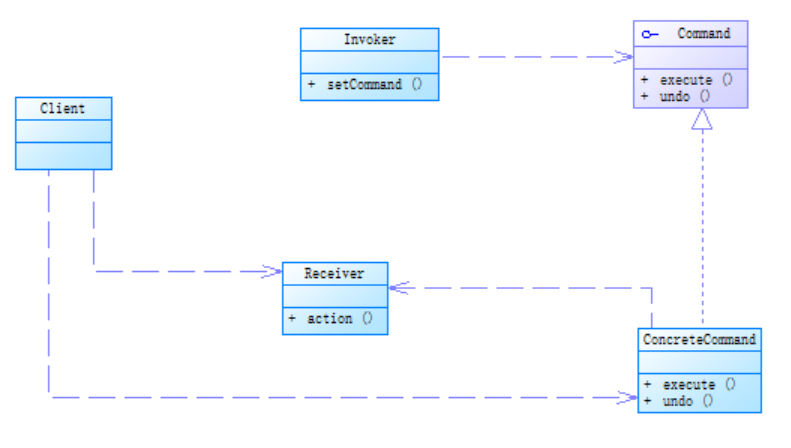
Command mode undo, redo
Example of getting started with command mode: Why do we need undo Many times, after we finish the operation, after the command, we find that this function is not what we want. For example, we accident...
git command-undo changes
git command-undo modification If you add wrong content to the file, you can undo the modification eg: Solution: You can delete the last line and manually restore the file to the state of the previous ...
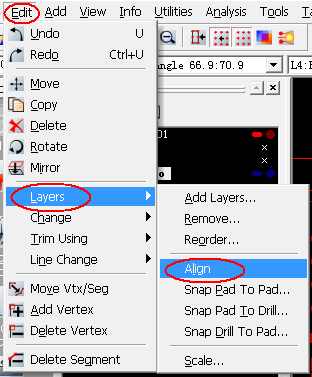
CAM350 Align stack (NOT UNDO-able Align layer:! 1 to base pt :)
NOT UNDO-able when CAM350 laminate Align layer:! 1 to base pt: This is not an error, the procedure below using the Align feature can successfully laminate. 1, the scale is set to0.001:0.001 2, ClickAl...
More Recommendation
Notes on the actual use of undo
Need to delete large amounts of data from time to time because of work needs Due to the ability problem, I am afraid to schedule the deletion. And due to performance issues, only 4G undo tablespace on...

Use command mode to implement a simple calculator that supports undo
1. The supported operators are "+", "-", "*", "/" 2. The undo symbol is "<" 3. For example, enter "1", "+", "2", &quo...

Use command mode in Unity to realize undo and playback operations (1)
Regarding the command mode, I won't do too much detail here. There will be many articles on the Internet, so I will go directly to today's topic, how to show the idea of command mode in Unity. First...
All git undo and rollback command
after revocation git add: After git commit revoked: Undo all local changes to the code: Native code fall back to be consistent with the remote git repository git push revoked: git merge revoked:...