Python upgrade and install pip
reference:
Two methods
Method one,
Use commands directly
 python -m pip install --upgrade pip
 or
 pip install --upgrade pip
Method 2: If the upgrade is not successful, manually uninstall and then reinstall the new version
1, uninstall pip
python -m pip uninstall pip2, download the new version of pip
Official website:https://pypi.org/project/pip/#files
Download pip-10.0.1.tar.gz (1.2 MB) in the downloadfile,
3. Unzip the file and install
Enter the directory where setup.py in pip is located
python setup.py install4. Set environment variables
pip is installed by default in the scripts folder of python
Enter the scripts folder of python to see pip, so set this path as an environment variable
Intelligent Recommendation
Solve python -m pip install --Upgrade PIP upgrade unsuccessful issues
Solve python -m pip install --Upgrade PIP upgrade unsuccessful issues Upgrade is unsuccessful, because the server connection timeout, you can use the following code to try...
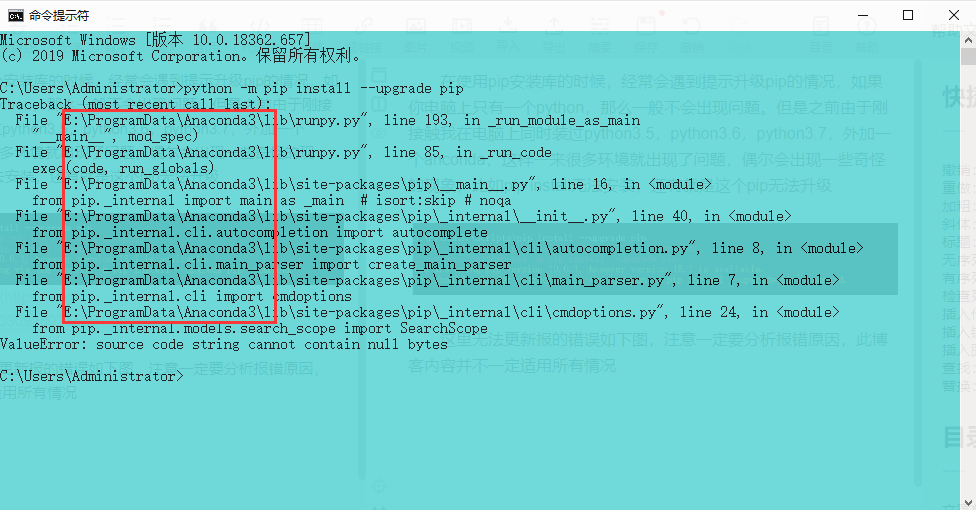
python -m pip install --upgrade pip command, it can not be upgraded pip
When using pip install the library, often encounter the situation that prompted the upgrade pip, if you have only one computer python, it is generally not a problem. But before I installed the same ti...
PIP upgrade Python -m PIP Install -u PIP SetupTools error
python -m PIP Install -U PIP Setuptools always report an error Problem description Cause analysis: External network source Solution: python -m pip install --upgrade pip -i https://pypi.douban.com/simp...
Upgrade python 2.6.6 to 2.7.10 and install setuptools and pip
View the version of python #python -V Python 2.6.6 1. Download Python-2.7.10 https://www.python.org/ftp/python/ According to official resources, you can download the latest version. 2. Decompression 3...
Upgrade python 2.6 to 2.7, and install pip
Since CentOS6 comes with Python version 2.6.6, most of the actual use is 2.7.x version. Then manually upgrade. View the version of python #python -V Python 2.6.6 Installation dependence 1. Download Py...
More Recommendation
Python upgrade pip and install opencv, moviepy packages
Create a new python directory path in environment variables python -m pip install --upgrade pip upgrade pip, pip install opencv-python install opencv package pip install moviepy installs moviepy packa...
Use PIP in Python Install Upgrade Uninstall Pack
The following statement is completed in the Jupyter Notebook, so there is an exclamation point in front of each sentence. If you do it directly on the command line window, you can remove the exclamati...
Solve Python upgrade caused PIP Install error
Recently, an Excel data has to be dealt with, and I found that the PIP installation relying on the library. File "/usr/local/python3/lib/python3.6/site-packages/pkg_resources/__init__.py", l...

Install and upgrade pip, but python -m pip install --upgrade pip reports an error.
Generally, when we install or call the pip library, we will tell you that the pip version is low and you need to upgrade. For example, my local machine is as follows. I. I cd directly to my pip direct...

Failed in Python using python -m pip install --upgrade pip pip upgrade
Failed in Python using python -m pip install --upgrade pip pip upgrade In the process of learning Python, you need to install pygame modules, shot in error when I execute the following command to inst...