MATLAB image processing-homomorphic filtering (code and examples)
tags: MATLAB image processing matlab Computer vision

An image f(x,y) can be represented by its incident light component and reflected light component, and the relationship is as follows
f(x,y)=i(x,y)r(x,y)
The image f(x,y) is produced by the combined action of the illuminance field i(x,y) generated by the light source and the reflection coefficient field r(x,y) of the target.
This model can be used as the basis for simultaneously compressing the brightness range of the image and enhancing the contrast of the image in the frequency domain.
But in the frequency domain, the frequency components of the contrast field and reflection coefficient field cannot be directly operated independently.
If defined:

Then there are:

or

Here I(u,v) and R(u,v) are the Fourier transform of lni(x,y) and lnr(x,y) respectively.
The method of homomorphic filtering is to use the above formula to separate the illumination component and the reflection component in the image. In this way, the homomorphic filter function can act on these two components separately.
The illumination component in the image tends to change slowly, while the reflected component tends to change drastically, especially at the junction of different objects. Due to this characteristic, the low-frequency component of the Fourier transform of the natural logarithm of the image is related to the illumination component, and the high-frequency component is related to the reflection component.
The homomorphic filtering process is as follows:

Flow chart of homomorphic filtering

Homomorphic filtering has several parameters:
rH
rL
c% is between rH and rL
D0
Achieve different effects by adjusting these parameters:

Code example:
% Parameter declaration
rH = 1;
rL = 0.1;
 c = 0.2;% is between rH and rL
D0 = 0.2;

image = imread('path');
[M, N] = size(image);
 % Logarithm
img_log = log(double(image) + 1);

 % Shift to the center, judgment sentence replaces index calculation
img_py = zeros(M, N);
for i = 1:M
   for j= 1:N
       if mod(i+j, 2) == 0
           img_py(i,j) = img_log(i, j);
       else
           img_py(i,j) = -1 * img_log(i, j);
       end
   end
end

 % Perform Fourier transform on the filled image
img_py_fft = fft2(img_py);

 % Homomorphic filter function
img_tt = zeros(M, N);
deta_r = rH - rL;
D = D0^2;
 m_mid=floor(M/2);% center point coordinates
n_mid=floor(N/2);

for i = 1:M
   for j =1:N
        dis = ((i-m_mid)^2+(j-n_mid)^2);
        img_tt(i, j) = deta_r * (1-exp((-c)*(dis/D))) + rL;
   end
end

 % Filtering
img_temp =   img_py_fft.*img_tt;

 % Inverse transformation, take real part, absolute value
img_temp = abs(real(ifft2(img_temp)));

 % Indexed
img_temp = exp(img_temp) - 1;


 % Normalization
max_num = max(img_temp(:));
min_num = min(img_temp(:));
range = max_num - min_num;
img_after = zeros(M,N,'uint8');
for i = 1 : M
    for j = 1 : N
        img_after(i,j) = uint8(255 * (img_temp(i, j)-min_num) / range);
    end
end

 subplot(1,2,1), imshow(image), title('original image');
 subplot(1,2,2), imshow(img_after), title('after transformation');
The effect is as follows:
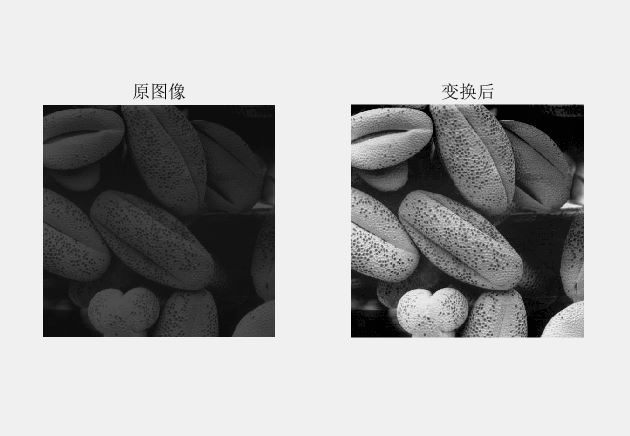
It can be seen that the homomorphic filtering effect is quite good compared to other image enhancement methods.
Finally, the Matlab implementation of the commonly used two-dimensional discrete Fourier transform is attached.
Function fft2 — fast Fourier transform
Format 1: F = fft2(f)
Format 2: F = fft2(f, P, Q)
function ifft2 — inverse fast Fourier transform
Format: f = ifft2(F)
Function fftshift — Move the origin of the transformation to the center of the frequency rectangle
Format: Fc =fftshift(F)
function ifftshift — fftshift
Inverse operation of function
Format: F = ifftshift(Fc)
Intelligent Recommendation

Homomorphic filtering (with source code) 1
introduction An imagef(x,y)f(x,y)The product of the illuminance, because the relative change in illuminance is small, can be regarded as the low-frequency component of the image, and the reflectivity ...
Digital image processing study notes 7: frequency domain filtering 3 (homomorphic filtering)
Article Directory Preface 1. The principle of homomorphic filtering 1. Processing principle 2. Homomorphic filter template and MATLAB code 1. Homomorphic filter 2. MATLAB code Three, change the parame...
Digital image processing - frequency domain enhancement (low pass filtering) (high pass filtering) (band pass and band stop filtering) (homomorphic filtering)
1. Main steps: airspace (Fourier transform, convolution)>>>frequency domain (multiplication with transfer function, processing, inverse Fourier transform)>>>airspace 2. Common freque...

Mean filtering of Matlab image processing
clear all close all clc %%%%%%%%%%%%%%%%%%%%%%%%%%%%%%% Read in the image to be detected x= imread('lena1.jpg'); xx=x; figure, imshow(x); fR=xx(:,:,1);%R component fG=xx(:,:,2); %G component fB=xx(:,:...
[Image processing] MATLAB: spatial filtering
Linear spatial filtering (imfilter) Linear operation involves multiplying each pixel in the neighborhood with the corresponding coefficient, and then accumulating the result to get the res...
More Recommendation

Digital image processing Matlab code [2 brightness transformation and spatial filtering]
Yunnan tourism is over, and there is not much time at home, emmmm, I have to train, it hurts -----------------------------------------------------------------------------------------------------------...
Homomorphic Filter for Digital Image Processing
Introduction to Homomorphic Filtering It is an image processing method that combines frequency filtering and spatial gray scale transformation. It uses the image's illuminance/reflectance model as the...
Image enhancement processing: Homomorphic filtering and Retinex algorithm (3) Retinex neighborhood algorithm: SSR, MSR, MSRCR
The basic knowledge about Retinex will not be mentioned here.Having already introduced, this article will continue to talk about the implementation of the neighborhood-based Retinex algorithm, which i...
Image enhancement processing: Homomorphic filtering and Retinex algorithm (2) McCann Retinex and McCann99 Retinex iterative algorithms
inThe homomorphic filtering algorithm is introduced in the video. This video continues to summarize the retinex algorithm, but before starting, I will introduce the concept of color constancy: Color c...