bootstrap4: css typesetting
tags: bootstrap4 tutorial
Example:
<!doctype html>
<html lang="en">
<head>
    <meta charset="UTF-8">
    <meta name="viewport"
          content="width=device-width, user-scalable=no, initial-scale=1.0, maximum-scale=1.0, minimum-scale=1.0">
    <meta http-equiv="X-UA-Compatible" content="ie=edge">
    <link rel="stylesheet" href="../css/bootstrap.min.css">
    <title>Document</title>
</head>
<body>
<div class="container">
    <!--h1,h6-->
    <div class="row mb-4">
        <div class="col-6">
            <h1>h1 bootstrap h1</h1>
            <h2>h2 bootstrap h2</h2>
            <h3>h3 bootstrap h3</h3
            <h4>h4 bootstrap h4</h4>
            <h5>h5 bootstrap h5</h5>
            <h6>h6 bootstrap h6</h6>
        </div>

        <div class="col-6 mb-4">
            <!--h1 ,h6-->
            <h1 class="h1">h1 bootstrap h1</h1>
            <h2 class="h2">h2 bootstrap h2</h2>
            <h3 class="h3">h3 bootstrap h3</h3
            <h4 class="h4">h4 bootstrap h4</h4>
            <h5 class="h5">h5 bootstrap h5</h5>
            <h6 class="h6">h6 bootstrap h6</h6>
        </div>
    </div>
<!--text-The muted subtitle is lighter and smaller than the normal title-->
    <div class="row mb-4">
        <div class="col-12">
            <h3>title</h3>
            <small class="text-muted">small title</small>
        </div>
    </div>
<!--Bigger headline-->
    <div class="row mb-4" >
        <div class="col-12">
            <p class="display-1">display-1</p>
            <p class="display-2">display-2</p>
            <p class="display-3">display-3</p>
            <p class="display-4">display-4</p>
        </div>
    </div>
<!--        Display of paragraphs-->
    <div class="row mb-4">
        <div class="col-12">
            <p>Here is a normal paragraph</p>
            <p class="lead">This is not an ordinary paragraph</p>
        </div>
    </div>
<!--        Inline text element-->
    <div class="row mb-4">
        <div class="col-12">
            <p>here is<mark>Mark text</mark></p>
            <p><del>delete</del></p>
            <p><s>delete</s></p>
            <p><ins>Underscore</ins></p>
            <p><u>Underscore</u></p>
            <p><small>Small text</small></p>
            <p><strong>Bold</strong></p>
            <p><em>Italic</em></p>
        </div>
    </div>
<!--        Abbreviation-->
    <div class="row mb-4">
        <div class="col-12">
            <p><abbr title="attribute">attribute</abbr></p>
            <p><abbr title="attribute" class="initialism">attribute</abbr></p>
        </div>
    </div>
<!--        Quote block-->
    <blockquote class="blockquote">
        <p>Quote block</p>
    </blockquote>
<!--        source-->
    <blockquote class="blockquote">
        <p class="mb-0">Don't wait,White boy head,Empty and sad</p>
        <footer class="blockquote-footer">From<cite>Yue Fei</cite></footer>
    </blockquote>
    <blockquote class="blockquote text-center">
        <p class="mb-0">Don't wait,White boy head,Empty and sad</p>
        <footer class="blockquote-footer">From<cite>Yue Fei</cite></footer>
    </blockquote>
    <blockquote class="blockquote text-right">
        <p class="mb-0">Don't wait,White boy head,Empty and sad</p>
        <footer class="blockquote-footer">From<cite>Yue Fei</cite></footer>
    </blockquote>
<!--        Unordered list list-unstyled remove style-->
    <ul class="list-unstyled">
        <li>outer li</li>
        <li>
            <ul>
                <li>inner li</li>
                <li>inner li</li>
                <li>inner li</li>
                <li>inner li</li>
                <li>inner li</li>
            </ul>
        </li>
        <li>outer li</li>
        <li>outer li</li>
        <li>outer li</li>
        <li>outer li</li>
    </ul>
<!--        Inline list,  Horizontal arrangement-->
    <ul class="list-inline">
        <li class="list-inline-item">inline-item</li>
        <li class="list-inline-item">inline-item</li>
        <li class="list-inline-item">inline-item</li>
        <li class="list-inline-item">inline-item</li>
    </ul>
<!--        Level description-->
    <dl class="row">
        <dt class="col-4">I am the content</dt>
        <dd class="col-8">I am the content I am the content I am the content I am the content I am the content</dd>
        <dt class="col-4">I am the content</dt>
        <dd class="col-8">I am the content I am the content I am the content I am the content I am the content</dd>
        <dt class="col-4">I am the content</dt>
        <dd class="col-8">
            <dl class="row">
                <dt class="col-4">I am the content</dt>
                <dd class="col-8">I am the content I am the content I am the content I am the content I am the content</dd>
            </dl>
        </dd>
    </dl>
</div>

</body>
</html>
Intelligent Recommendation

Bootstrap--typesetting of global CSS style
The layout style of Bootstrap is roughly the same as the basic elements of html. There is no big difference, that is, the elements are styled. (1) Title All title tags in the HTML,<h1> To<h6&...
Use CSS typesetting cutting and filters
1. typesetting Character spacing (between the English text): letter-spacing; word spacing: word-spacing; English Wrap: word-break; Chinese wrap: word-wrap; wrap is not mandatory: whitespace: nowrap, b...

CSS based on window unit typesetting
1. Use window units for typesetting Here is another reason why you should consider using window units for typesetting-according to the client's browser, the window units will be automatically recalcul...
3 CSS style and typesetting boundary
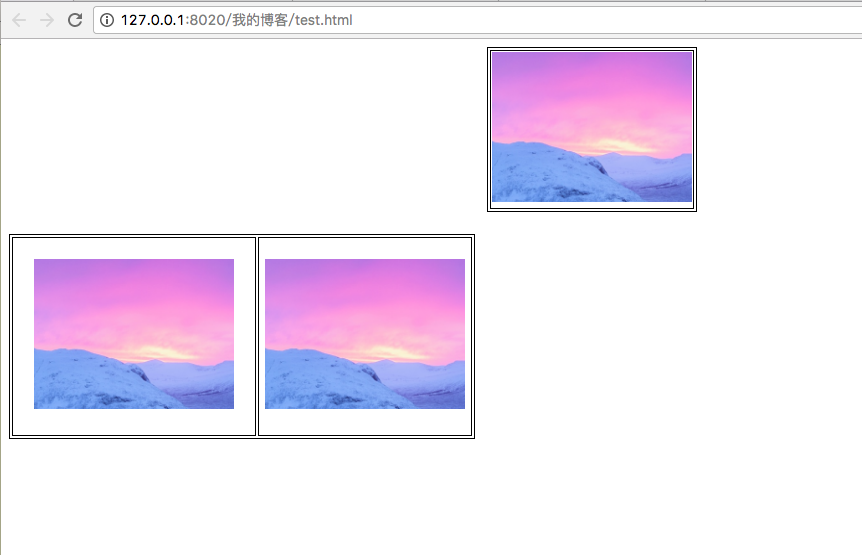
2019 Unicorn Enterprise Heavy Recruitment Python Engineer Standard >>> CSS boundary setting CSS boundary syntax Rendering Reference Code <html> <head> <meta charset = "UTF...
Commonly used css code, excerpted from Bootstrap4.css
# Create a new general.css file...
More Recommendation
2017IFE - Simulate newspaper typesetting via HTML and CSS
Foreword 2017-Baidu Front-end Technology College coding task:Simulate newspaper typesetting via HTML and CSS Mission purpose Gain insight into the settings of fonts, backgrounds, colors, etc. in CSS F...
HTML and CSS learning record (5) ---- typesetting
Text layout - font We can use css styles set the font, size, color, style and other text attributes to the page. Let's look at an example, the following code implements: set the font to Times New Roma...
[Hello CSS] Chapter 6-Document Flow and Typesetting
Author: Chen big head github: KRISACHAN Normal flow what is"Normal flow”? is actually what we say every dayDocument flow”。 inW3CThe corresponding in the official document is "nor...
Understand the impact of css negative margins on typesetting
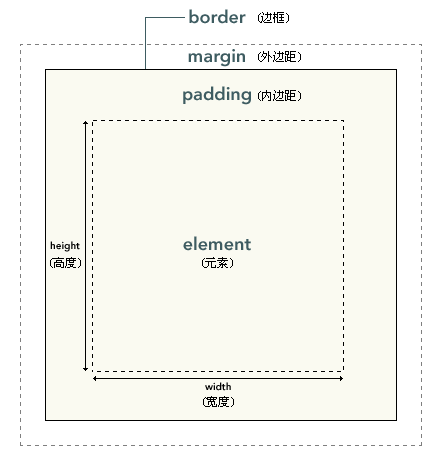
When using css layout, to understand how the browser renders according to css attributes, I think it is very important to control the layout. Generally, I think of the elements as boxes, boxes There a...
[CSS] writing-mode realizes ancient poetry typesetting
writing-mode realizes typesetting of ancient poems 1、writing-modeProperty reference MDN document writing-mode 2. Get started quickly There are three main optional values for this attribute:horizonta...