[Image Basics] Adaptive Brightness Contrast Adjustment Algorithm C++
tags: OpenCV
The brightness and contrast adjustment formula, where alpha is responsible for contrast and beta is responsible for brightness.
O(x,y) = alpha * I(x,y) + beta
If you want to adjust the brightness and contrast automatically, it means automatic adjustmentalpha with beta
If you want to change the minimum value to 0 and the maximum value to 255, the formula is as follows.
input range = max(I) - min(I)
wanted output range = 255;
alpha = output range / input range = 255 / ( max(I) - min(I) )
min(O) = alpha * min(I) + beta
beta = -min(I) * alpha
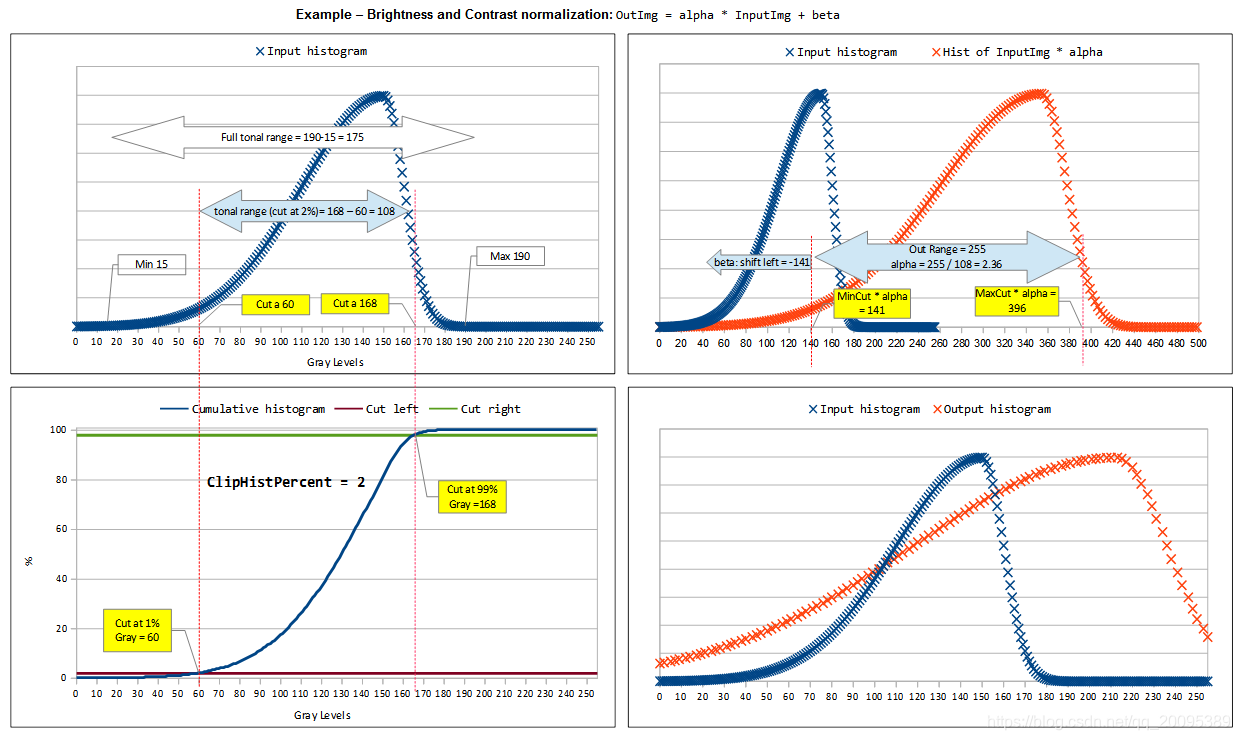
Histogram pruning
- Pan -> Brightness
- Pruning -> Redefine the extent of the histogram
The following figure is for understanding
Code
Here I added two parameters to adjust the minimum brightness and histogram range.
// clipHistPercent pruning (how many percentages of total pixels are cut)
// histSize finally sets the range of all gray values to
// lowhist minimum gray value
void BrightnessAndContrastAuto(const cv::Mat &src, cv::Mat &dst, float clipHistPercent=0, int histSize = 255, int lowhist = 0)
{
CV_Assert(clipHistPercent >= 0);
CV_Assert((src.type() == CV_8UC1) || (src.type() == CV_8UC3) || (src.type() == CV_8UC4));
float alpha, beta;
double minGray = 0, maxGray = 0;
//to calculate grayscale histogram
cv::Mat gray;
if (src.type() == CV_8UC1) gray = src;
else if (src.type() == CV_8UC3) cvtColor(src, gray, CV_BGR2GRAY);
else if (src.type() == CV_8UC4) cvtColor(src, gray, CV_BGRA2GRAY);
if (clipHistPercent == 0)
{
// keep full available range
cv::minMaxLoc(gray, &minGray, &maxGray);
}
else
{
cv::Mat hist; //the grayscale histogram
float range[] = { 0, 256 };
const float* histRange = { range };
bool uniform = true;
bool accumulate = false;
calcHist(&gray, 1, 0, cv::Mat (), hist, 1, &histSize, &histRange, uniform, accumulate);
// calculate cumulative distribution from the histogram
std::vector<float> accumulator(histSize);
accumulator[0] = hist.at<float>(0);
for (int i = 1; i < histSize; i++)
{
accumulator[i] = accumulator[i - 1] + hist.at<float>(i);
}
// locate points that cuts at required value
float max = accumulator.back();
int clipHistPercent2;
clipHistPercent2 = clipHistPercent * (max / 100.0); //make percent as absolute
clipHistPercent2 /= 2.0; // left and right wings
// locate left cut
minGray = 0;
while (accumulator[minGray] < clipHistPercent2)
minGray++;
// locate right cut
maxGray = histSize - 1;
while (accumulator[maxGray] >= (max - clipHistPercent2))
maxGray--;
}
// current range
float inputRange = maxGray - minGray;
alpha = (histSize - 1) / inputRange; // alpha expands current range to histsize range
beta = -minGray * alpha + lowhist; // beta shifts current range so that minGray will go to 0
// Apply brightness and contrast normalization
// convertTo operates with saurate_cast
src.convertTo(dst, -1, alpha, beta);
// restore alpha channel from source
if (dst.type() == CV_8UC4)
{
int from_to[] = { 3, 3};
cv::mixChannels(&src, 4, &dst,1, from_to, 1);
}
}
Intelligent Recommendation
OpenCV image brightness, contrast adjustment
2019 Unicorn Enterprise Heavy Glour Recruitment Python Engineer Standard >>> Reprinted on: https: //my.oschina.net/u/1426828/blog/655483...
OpenCV adjustment image brightness and contrast
Image transformation theoretical formula The image transformation can be regarded as the following: Pixel Converting -Point Operation: Personal point of pixel value adjustment Neighborhood operation -...
C ++ OpenCV system learning (3) - image mixing, adjustment brightness and contrast
Image mix 1.1 Linear mixing F0 and F1 represent two images, G (x) is a mixed image, 1.2 related API addWeight(src1,alpha,src2,beta,gamma,dst,dtype), Note that the size of the two images and the type m...
[VC++, OpenCV3.4] Image brightness and contrast adjustment
1. Image transformation can be seen as pixel transformation (point operation) and neighborhood operation on the region. Adjusting image brightness and contrast is a pixel transform-point operation. Wh...

More Recommendation

Opencv learning 7 image brightness and contrast adjustment
Image brightness and contrast adjustment Sometimes the image we get is too dark for the subsequent image processing, we need to first increase the brightness of the image. In OpenCV, it is actually a ...

Simple code for grayscale image brightness contrast adjustment
Code: effect: Reprinted at: https://www.cnblogs.com/bluebean/p/5631159.html...

Opencv image brightness and contrast adjustment(08)
This article is full of dry goods, by adjusting the pixel value of the image, to change the contrast and brightness of the image. The following first introduces several knowledge points that need to b...
OpenCV learning 5-image brightness and contrast adjustment
Mathematical principles: Main code: Original image: Enhanced image: ...