SAP CDS View syntax advanced (aggregation, JOIN, UNION)
In the previous blog"SAP CDS View basic syntax (create your first CDS View)"
In , I introduced the basic syntax of CDS View. In this blog, I will introduce some advanced usage of CDS operations, including three parts: aggregation, JOIN and UNION.
1 gather
use:
Complete aggregation operations, such as MIN, MAX, COUNT, SUM, etc.
grammar:
@AbapCatalog.sqlViewName: 'ZDEMO_CDS_SQL'
@AbapCatalog.preserveKey: true
define view ZDEMO_CDS_DDL
  as select from sflight
{
  planetype,
  min(price) as min_price,
  max(price) as max_price,
  sum(price) as sum_price,
  count(*)   as count_planes

}
group by
  planetype
Explanation:
- When using aggregate operations, usegroup bySpecify the aggregated items, that is, according to which fields to group statistics.
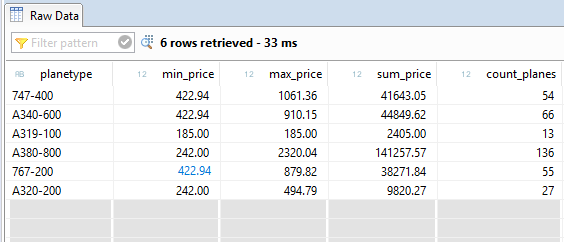
running result:
2 Having statement in aggregate operation
use:
Specify the filter conditions during the aggregation operation
grammar:
@AbapCatalog.sqlViewName: 'ZDEMO_CDS_SQL'
@AbapCatalog.preserveKey: true
define view ZDEMO_CDS_DDL
  as select from sflight
{
  planetype,
  min(price) as min_price,
  max(price) as max_price,
  sum(price) as sum_price,
  count(*)   as count_planes

}
group by
  planetype
having
  planetype = '747-400'
  or count(*)  > 60
Explanation:
- HavingThe condition fields specified in can only be a subset of the fields in group by;HavingYou can also use the intermediate result set of the aggregation operation as the deletion condition
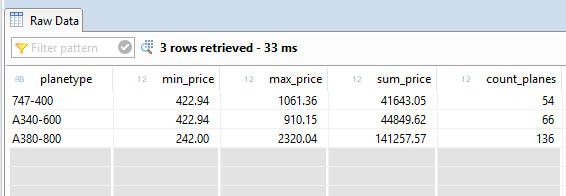
running result:
3 JOIN
use:
CDS supports Inner Join, Left Outer Join, Right Outer Join
grammar:
@AbapCatalog.sqlViewName: 'ZDEMO_CDS_SQL'
@AbapCatalog.preserveKey: true
define view ZDEMO_CDS_DDL
  as select from sbook   as a
    inner join   sflight as b on  a.carrid = b.carrid
                              and a.connid = b.connid
                              and a.fldate = b.fldate
{
  a.carrid    as airline_code,
  a.connid    as connection_number,
  a.fldate    as flight_date,
  a.customid  as customer_id,
  b.planetype as planetype
}
where
  a.carrid = 'DL'
Explanation:
- The usage of Inner Join, Left Outer Join, Right Outer Join is the same as that of ABAP OPEN SQL
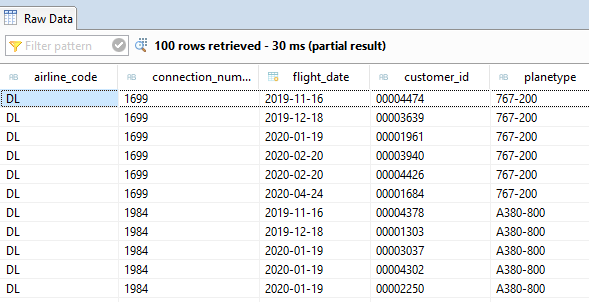
running result:
4 UNION
use:
UNION the result set of two SELECT
grammar:
@AbapCatalog.sqlViewName: 'ZDEMO_CDS_SQL'
@AbapCatalog.preserveKey: true
define view ZDEMO_CDS_DDL
  as select distinct from sbook
{
  carrid as airline_code,
  connid as connection_number,
  fldate as flight_date
}
where
  carrid = 'DL'

union

select distinct from sflight
{
  carrid as airline_code,
  connid as connection_number,
  fldate as flight_date
}
where
  planetype = '747-400'
Explanation:
- UNIONYou can merge the result sets of two SELECTs and remove duplicate entries by yourself
- UNION ALL Combine the result set and keep duplicate entries
- The two merged result sets must have the same number of fields
- The column types of the combined result set must be compatible
- The field names must be the same
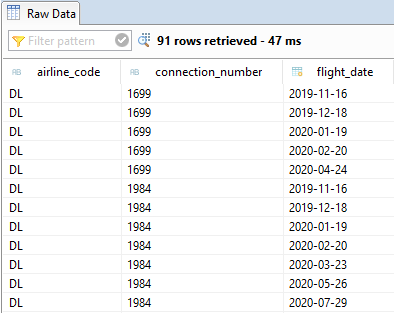
running result:
5 Summary
In this article, we further introduce the operation syntax of SAP CDS View. I believe that through these two blogs, all students should have learned to create CDS View and complete operation logic with CDS View. There are many other uses of CDS View, and interested students can check the help files of ABAP.
High-quality SAP technical blog, welcome to follow ️, like , forward !
Intelligent Recommendation

Use ODBC SAP ABAP CDS View in Excel
Consuming CDS View Entities Using ODBC-Based Client Tools This article introduces the method of visiting the ABAP system CDS View data based on the ODBC (Open DataBase Connectivity) SQL statement. ODB...
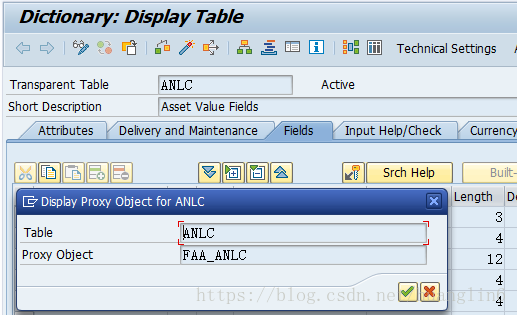
JOIN ANLC no data problem in cds view
Business scenario, today found a problem in the creation of CDS VIEW, ANLA and ANLB through the company + asset number join up no problem, but as soon as you join the ANLC will not find the data, SE16...
SAP CDS view self-study tutorial 4: The mystery of SAP CDS view annotation @OData.publish
In part1 of this tutorial, the old way to create OData service on top of CDS view is introduced. In SAP Help Generate Service Artifacts From a CDS View a new annotation is described: @OData.publish: t...
SAP CDS view self-study tutorial 2: When SAP CDS view is activated, what happens behind the scenes
You paste the following source code for a simple CDS view into ABAP development studio and activate it: And you would like to know what objects are automatically generated during CDS view activation. ...
SAP CDS view self-study tutorial ten: SAP CDS view extensibility (Extensibility) realization principle
table of Contents Part1 – how to test odata service generated by CDS view Part2 – what objects are automatically generate after you activate one CDS view Part3 – how i...
More Recommendation
SAP CDS view self-study tutorial VI: How to consume table function in CDS view
Let’s try to resolve one real issue now. What we want to achieve is: in CRM we need a CDS view which returns the service order guid together with its Sold-to Party information, “Title&rdqu...
SAP CDS view self-study tutorial 5: How to develop CDS view that supports Odata navigation
So far we have a working CDS view ready for us to create a UI5 application on top of it via Smart Template in WebIDE within just a couple of minutes. Once done, the UI5 application will display the da...

Access Control Implementation of SAP S/4HANA CDS View: Introduction to DCL
From my colleague Xu Miles Authorization Objects are business concept, they are distinguished by business scenario. Therefore, there might be a lot of Authorization Objects using the same Authorizatio...
SAP ABAP CDS view in the ABAP notes in the background is how it is resolved?
We write in ABAP Development Tool in SAP CDS view, a view that begin with @ to maintain these comments, like annotation Java Spring applications in a wide range, is a way for the development object ma...
Specific examples of a SAP S / 4HANA CDS view extension of
(1) create a CDS view with following source code: Once activated, you see two fields in SQL view as expected. (2) Create another CDS view which extends the view created in step one with additional two...