Use shell to generate session templates for MOBAXTERM
Article catalog
1 Introduction
- In fact, this is a flower whistle.
- I usually use virtual machines to run some Linux tests, daily habits are machines that clone the DHCP network, so each IP will be new.
- So, every time I use MOBAXTERM to connect new machines, I need to create new sessions (sometimes more machines, one is really annoying)
- So I have the following Operations.
2, exporting the SESSION Template for Mobaxterm
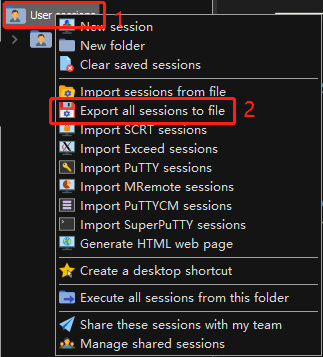
- in
User sessionsRight click here - select
Export all sessions to file, Export template for sessions - The exported template name is:
MobaXterm Sessions.mxtsessions(As long as the suffix is.mxtsessionsYou can import MOBAXTERM) - Let's take a look at the contents of the exported template
[Bookmarks]
SubRep=
ImgNum=42
192.168.72.002 (root)=#109#0%192.168.72.002%22%root%%-1%-1%%%22%%0%0%0%%%-1%0%0%0%%1080%%0%0%1#MobaFont%10%0%0%0%15%236,236,236%30,30,30%180,180,192%0%-1%0%%xterm%-1%-1%_Std_Colors_0_%80%24%0%1%-1%<none>%%0#0# #-1
3. Use the shell script to generate .MXTSESSSIONS file
#!/usr/bin/env bash
set -e
PWD=$(cd `dirname $0`; pwd)
iphead="192.168"
ipbody="72"
user='root'
xterm='%%-1%-1%%%22%%0%0%0%%%-1%0%0%0%%1080%%0%0%1#MobaFont%12%0%0%0%15%236,236,236%30,30,30%180,180,192%0%-1%0%%xterm%-1%-1%_Std_Colors_0_%80%24%0%1%-1%<none>%%0#0# #-1'

function deploytxt (){
  seq 2 254 > ${PWD}/${iphead}.${ipbody}.0.txt
  sed -i "s/^/${iphead}.${ipbody}./g" ${PWD}/${iphead}.${ipbody}.0.txt
  printf "\e[1;32m ${iphead}.${ipbody}.0.txt is created in ${PWD}/\e[0m\n"
}

function deploymxtsessions () {
cat > ${PWD}/${iphead}.${ipbody}.0.mxtsessions <<"eof"
[Bookmarks]
SubRep=
ImgNum=42
eof
printf "\e[1;32m ${iphead}.${ipbody}.0.mxtsessions example is created in ${PWD}/\e[0m\n"
}

function complatemxtsessions () {
  for ip in $(cat ${PWD}/${iphead}.${ipbody}.0.txt)
  do
    echo "${ip[@]} (${user})=#109#0%${ip[@]}%22%${user}${xterm}" >> ${PWD}/${iphead}.${ipbody}.0.mxtsessions
  done && \
  rm -f ${PWD}/${iphead}.${ipbody}.0.txt && \
  printf "\e[1;32m ${iphead}.${ipbody}.0.mxtsessions is created in ${PWD}/\e[0m\n"
}

function main () {
deploytxt
deploymxtsessions
complatemxtsessions
}

main
linux-oz6w:~ # sh mxtsessions.sh
 192.168.72.0.txt is created in /root/
 192.168.72.0.mxtsessions example is created in /root/
 192.168.72.0.mxtsessions is created in /root/
linux-oz6w:~ # ll | grep mxtsessions
-rw-r--r-- 1 root root 54172 Jan  8 06:27 192.168.72.0.mxtsessions
-rw-r--r-- 1 root root  1122 Jan  8 06:08 mxtsessions.sh
`Once the script is executed, 192.168.72.0.mxtsessions can be generated from the virtual machine to the host, you can import to MOBAXTERM`
4, import to MOBAXTERM
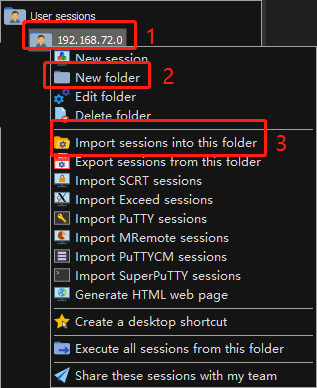
- in
User sessionsRight click here - First
New folder(This step is to create a directory, put the sessions of the 192.168.72.0 section of the segment of this section, forced the disorder, can not operate) - in
192.168.72.0Right click here - point
Import sessions into this folder, Choose to export192.168.72.0.mxtsessions,pointYesYou can (if you don't create a directory, pointImport sessions from file)
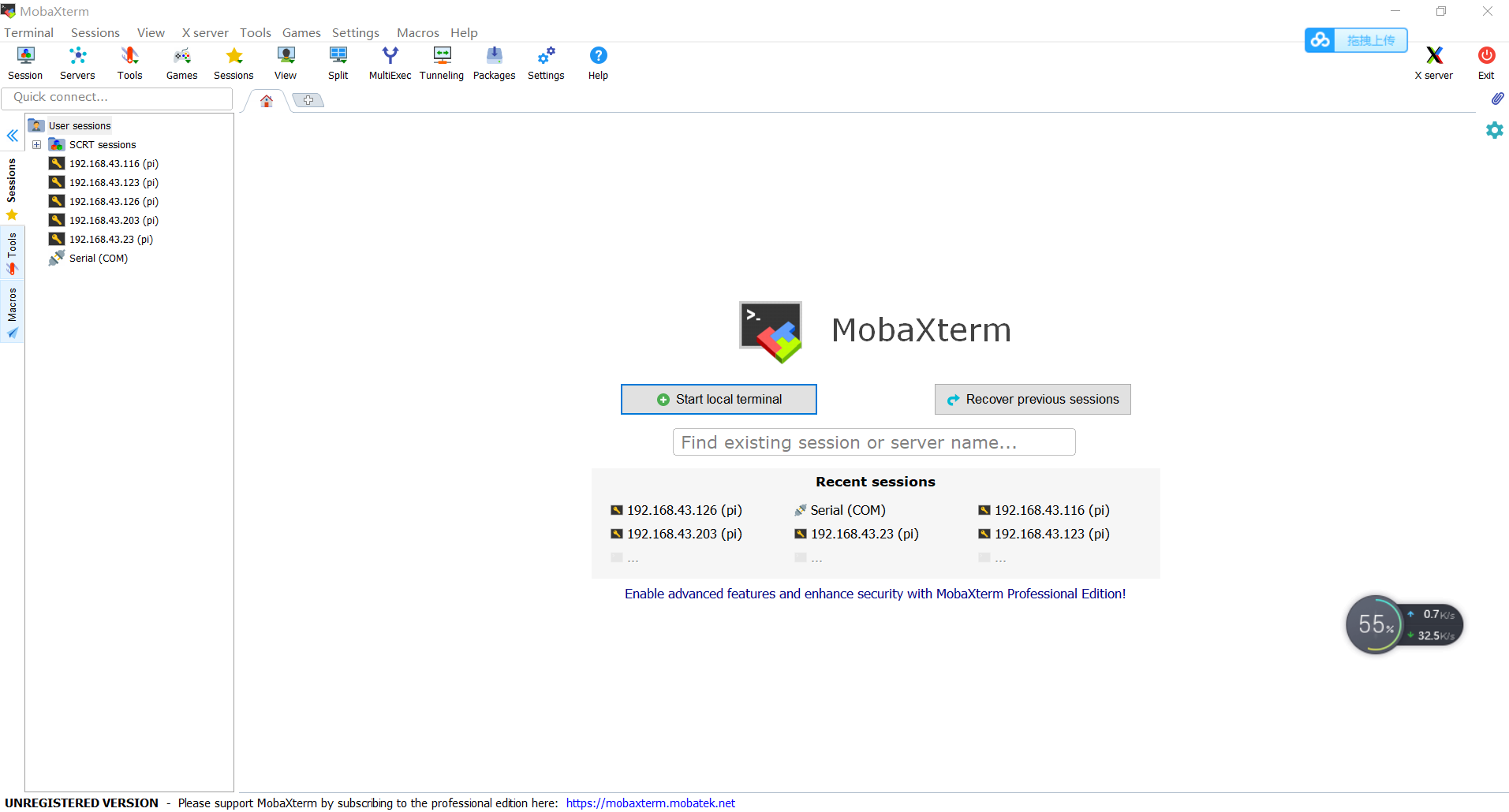
5, renderings

- Too long, take a part
Intelligent Recommendation
Download mobaxterm and use mobaxterm to log in to Linux remotely
mobaxterm official website download Download and install version Install Double-click to install Change the path Click install to install Complete the installation Use mobaxterm to log in to linux rem...
How to use MobaXterm
Method / step...

MobaXterm tool installation, use
MobaXterm is a full-featured terminal software that supports SSH connections and supports protocols such as FTP and serial ports. MobaXterm download:http://mobaxterm.mobatek.net/download.html Remarks:...
| Installation and use of MobaXterm
Official website:https://mobaxterm.mobatek.net/ Baidu Cloud: Link: Password: inuw 1. First take a look at what SSH is, defined as follows: SSH is a protocol that guarantees that users can log in to th...

Installation and use of MobaXterm
Installation and use of MobaXterm Installation and use of MobaXterm installation 1 Download URL:https://mobaxterm.mobatek.net/,select“Download”, Choose the free version to download. 2 Unzi...
More Recommendation
MobaXterm installation and simple use
download Download address: Baidu network disk: https://pan.baidu.com/s/1cM2UvtgeCWot_FienVubGg Extraction code: 4qr9 2. Unzip and run the installation package 3. Click next 4. accept next 5. Select th...
MobaXterm software installation and use
MobaXterm software installation and use 1. MobaXterm software installation 2. Use of MobaXterm 1. MobaXterm software installation Link: https://pan.baidu.com/s/1m2zYOCBNi8k6aWkZi782XQ Extraction code:...
Installation and use of MobaXterm software
Installation and use of MobaXterm software 1. MobaXterm installation package link and installation: Baidu cloud disk link: https://pan.baidu.com/s/1yuqysiGIRocw9kHn3MBIoQ MobaXterm is a terminal softw...
Use MobaXterm to connect to CentOS
Use MobaXterm to connect to CentOS One, install ifconfig yum install ifconfig command installation There will be Nothing to do situation, no hurry, we use yum search ifconfig command query Check that ...
About the use of MobaXterm
About the use of MobaXterm To use the server, you must first download the software with SSH connection function (xshell) and FTP (FileZilla) to upload files. The functions of these two softwares can b...