GuiLite learning reference
Knowledge Points of UI Framework GuiLite Design Principles
Here I want to share with you an ultra-lightweight UI framework (currently supported: iOS, Android, Linux, Windows, Mac, VR, microcontroller and Docker), the code is on github:
https://gitee.com/mirrors/GuiLite
https://www.ctolib.com/idea4good-GuiLite.html
The running effect can be seen in this video:
I am GuiLite
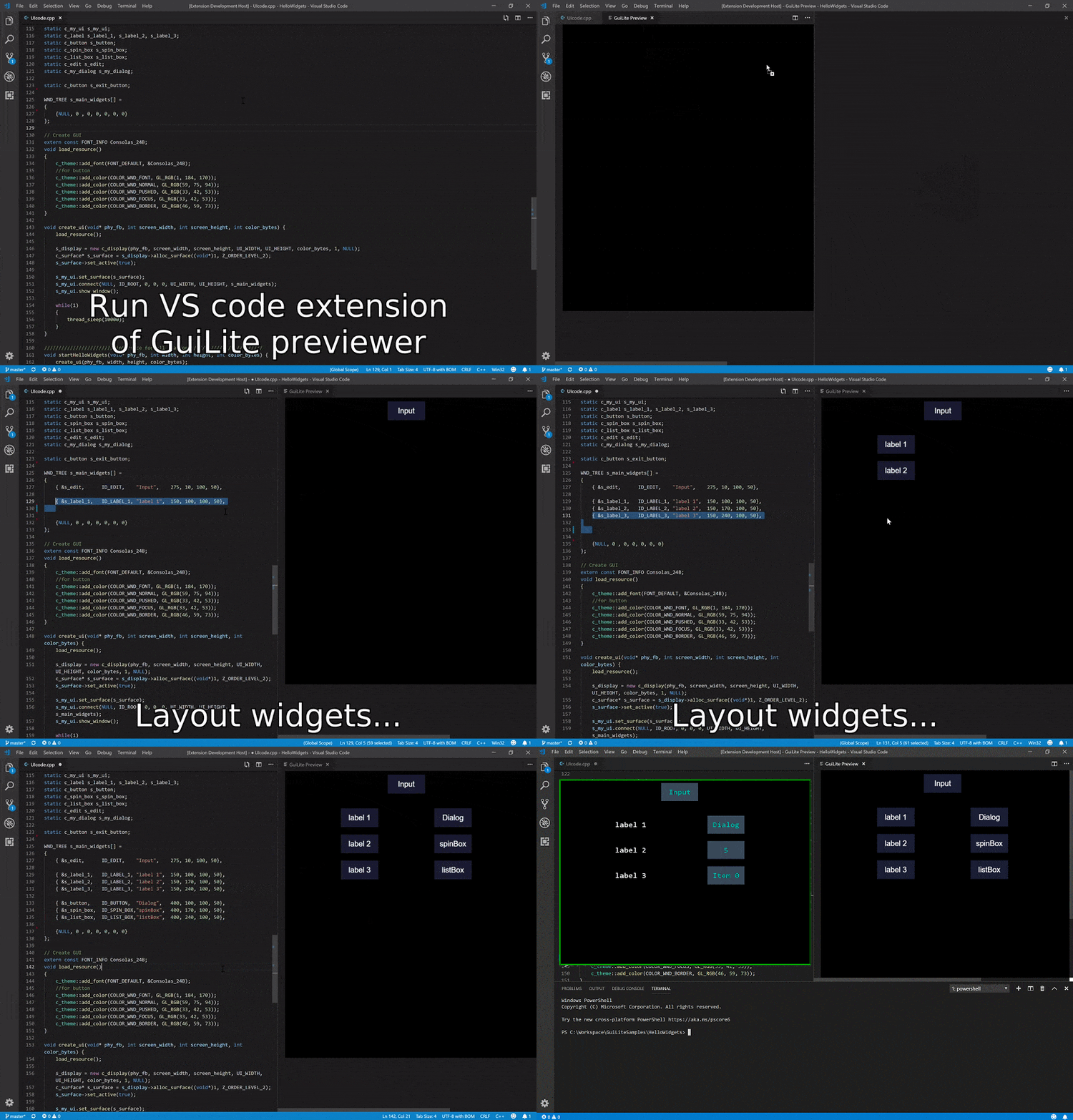
Of course, as a modern GUI library, it is regrettable that there is no "what you see is what you get" GUI editing/design tool, so GuiLite also supports "what you see is what you get" GUI editing capabilities, but it is different from ordinary editors. , It's played like this:
The UI framework is a very complex system, involving a lot of knowledge points, including the basic knowledge of C language, especially pointers, function pointers, memory distribution, basic knowledge of Linux, such as message queue, framebuffer, multi-thread, multi-thread synchronization , Etc., data structures, algorithms (such as linked lists, queues, etc.), window.netframework framework design ideas, design patterns such as mvc, observer, singleton, factory, etc. There are a lot of knowledge points, and each knowledge point is organically combined to form a knowledge network and form a system.
Today I will learn the basics of UI framework by learning GUIlite. Before writing the article, I hope that the article can follow the logical sequence and record the main frame <orderly unfolding, threading and cocooning> for future reference
In general, what components need to be included in the UI framework? Let me sort it out:
1. Window: First of all, the UI frame is to be displayed to the user, so a window must be there;
2. Controls: Secondly, other controls such as buttons and text boxes should be displayed in this window;
3. Event handling: Then it supports interactive operations, then it supports event handling, such as touch events, key press events, etc.;
4. Interface function: Finally, the framework is for developers to develop applications, so there must be a friendly interface.
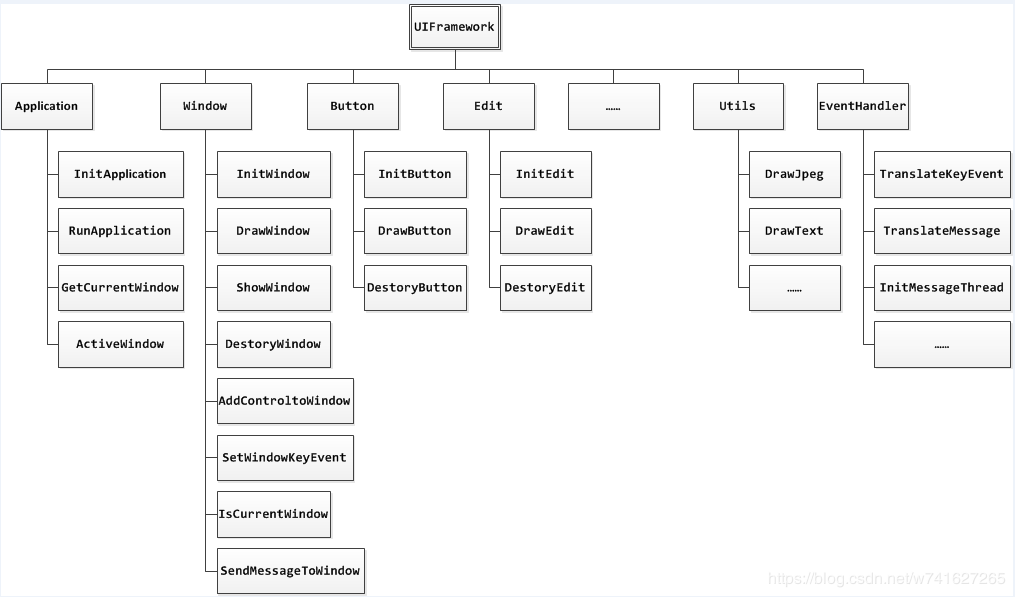
The calculation of a UI framework is related to the data structure. It is said that the algorithm + data structure is the soul of the program. We will take a thousand miles to start with the data structure. (There is a UI framework and data structure designed by Niuren on the network)
System framework, UI framework and data structure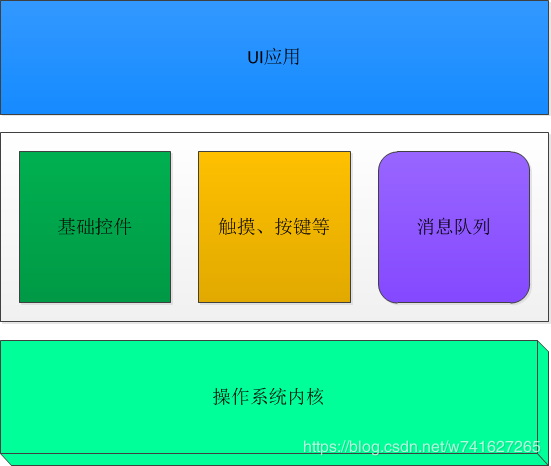
GuiLite design principles and code comments
- Fundamental
- Extension method
- Code directory structure
- Interface element management
- Graphics rendering
- File comments
- Function annotation
- Quick Roadmap
Fundamental
GuiLite only does two jobs: interface element management and graphic drawing.
Interface management includes:
Add/remove interface elements (such as buttons, labels, dialog boxes and other controls), set the corresponding text and location information
User input messaging: Find the affected interface elements based on user input and call back the processing function of the response processing
User-defined messaging: users can customize the message response function and generate messages independently; when a message is generated, the corresponding response function will be called
Graphic drawing includes:
Basic point and line drawing, such as: drawing points, rectangles, horizontal lines, vertical lines, etc.
Set the drawing layer. If multiple layers are needed, the index value of the layer needs to be given when drawing basic points and lines
Layer processing, when the layer interface changes (for example: open/close dialog), GuiLite will determine the pixels on each layer and which one will be displayed on the screen on
?Note: Graphic drawing does not depend on interface management, and can exist independently. For example, in a single-chip environment with limited resources, sometimes it does not require interface element management, but directly draws graphics and text.
extension method
GuiLite only gives the implementation methods of basic controls (for example: buttons, labels, keyboards, selection boxes), and aims to explain the implementation methods of controls. For extended controls, you can choose the following methods:
If the developer needs to adjust the details of the basic controls, they can modify them directly in the source code
If the developer needs to build a brand new control, you can refer to the implementation method of the basic control and re-implement
For extended drawing, for example: drawing a circle, drawing a curve, you can directly add the corresponding function interface in the surface.cpp file.
Code directory structure
core:
Realized the underlying drawing, layer management and message passing
The adapter implements packaging for various platforms (for example: Windows, Linux, Android, iOS, macOS, unknown OS or no OS).
widgets:
A variety of conventional controls (for example: buttons, labels, keyboards, waveforms) and containers (for example: windows, dialog boxes, sliding pages) are implemented, and developers can modify or redraw directly on the corresponding code according to their needs To develop an interface with its own style and characteristics
Realizes the user's gesture recognition (for example: finger sliding, mouse press/release) message transmission, the user input information is passed to the entire GUI system tree, and the corresponding response Callback function; developers can add/modify response callback function according to their needs.
Interface element management
Interface element management includes: management of all controls (button, spinbox, lable, keyboard), containers (dialog, view); the specific management method is that when the user calls the connect function, all interface elements will be connected to achieve the right Traverse/add/delete operations of all interface elements. These links look like a tree, and the traversal of interface elements is the traversal of this tree
For example: when you press a dialog button, the position information of the finger (x, y) will be transferred to the root of the tree (root), and then look for from the root, which dialog is clicked, which button of the dialog is clicked , And call the callback function in the buton point, which is used for corresponding processing (generally, the state of the button will be modified and redrawn)
How to create interface elements
All interface elements inherit from objects of class c_wnd. When the object is instantiated, the creation of interface elements is completed; however, the interface elements at this time are lonely and have no connection with other interface elements (no parents, no siblings) )
How interface elements are managed
The process of incorporating newly created interface elements into management is the process of adding parents, siblings to it. The function interface used is connect(); from now on, the interface element will be included in a tree like other interface elements, and will respond to possible user clicks.
When you need to delete the interface element, use disconnect(); from then on, the interface element will cut off all parent-child relationships, and will be removed from the tree, no longer responding to user touch operations; but the object itself will not be destroyed. Typical application scenario: creation/exit of soft keyboard.
Graphic drawing
Graphic drawing includes: drawing method and layer management.
Point drawing is the basis of line/area/bitmap drawing, and the drawing of several points forms the point surface and bitmap
Layer management is to manage the occlusion relationship of multiple interface elements. The system supports three layers of occlusion relationship by default. These three levels can be: view background layer, dialog layer, keyboard/ Spinbox control layer.
Drawing method
Please refer to the draw_xxx() function in the file bitmap.cpp and surface.cpp.
In order to take advantage of GPU acceleration, you can also rewrite the draw_xxx/fill_xxx function and use GPU features to improve drawing efficiency.
Layer management
All layers of GuiLite, as shown in the following figure: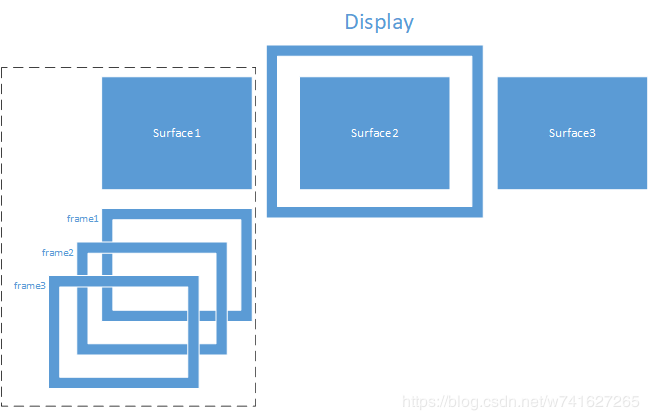
display layer:
This layer corresponds to physical display memory. The display layer determines the final display effect of a display terminal; usually there is at least one display layer in the system.
surface layer:
This layer belongs to a part of the display layer; it exists for sliding left and right, each sliding page corresponds to a surface layer; the surface layer determines the final display effect of a sliding page; Usually one display layer will correspond to multiple surface layers.
frame layer:
This layer belongs to a part of the surface layer; it actually superimposes interface elements and exists.
File comments
File comments
core importance/file name Introduction to the code Introduction recommended learning time
★★★ wnd.cpp The basic class of UI elements, defining all UI element information, drawing and management methods 1.5 hours
★ cmd_target.cpp mapping UI messages and user-defined messages 0.5 hours
★ display.cpp generates a display device, sets the number of surfaces, one surface corresponds to one sliding page 0.5 hours
★★ surface.cpp implements the drawing of pixels, and manages each layer (layer) for 0.5 hours
word.cpp display text <1 hour
bitmap.cpp bitmap drawing, support 16 bits and 32 bits <0.5 hours
rect.cpp Position information of UI elements <0.5 hours
api_linux.cpp Linux adaptation layer <0.5 hours
api_win.cpp Window adaptation layer <0.5 hours
api_unknow.cpp without OS or other OS adaptation layer <0.5 hours
audio_linux.cpp Linux audio adaptation layer <0.5 hours
audio_win.cpp Windows audio adaptation layer <0.5 hours
msg_linux.cpp The implementation of message pipeline on Linux <0.5 hours
msg_win.cpp The implementation of the message pipeline on Windows <0.5 hours
msg_unknow.cpp The implementation of the message pipeline on other OS (or no OS) <0.5 hours
widgets difficulty/file name Introduction to the code Recommended learning time
label.cpp The drawing of the label control <0.5 hours
button.cpp button drawing and user click response function <0.5 hours
table.cpp drawing of Table control <0.5 hours
dialog.cpp Dialog drawing and management method <0.5 hours
★ gesture.cpp gesture recognition method, including: mouse press, bounce and slide 0.5 hours
★ keyboard.cpp keyboard drawing and user click response function 0.5 hours
★ list_box.cpp list control drawing and user click response function 1.5 hours
★ ★ spinbox.cpp The Spinbox control drawing and user click response function 1.5 hours
★★ edit.cpp Editing control drawing and user click response function 1.5 hours
★★★ wave_buffer.cpp Buffer management of waveform data 1.5 hours
★★★ wave_ctrl.cpp Realize waveform control 1.5 hours
Function annotation
Function name display.cpp function interface comments
c_display _c_display constructor, initialize display parameters. Input: physical framebuffer pointer, physical display width, physical display height, surface width, surface height, color depth, number of surfaces/number of sliding pages
create_surface Create surface/slide page. Input: User ID, the number of layers
merge_surface The horizontally combined surface is mostly used for sliding surfaces. Input: surface source 1 to be combined, surface source 2 to be combined, start point x coordinate of surface source 1, start point x coordinate of surface source 2, start point y coordinate of surface source 1, start point y of surface source 2 Coordinates, offset distance of horizontal combination; output: may change the current display content
get_updated_fb Get the physical framebuffer pointer of the display
snap_shot Snapshot currently displayed and output to bmp file
Quick Roadmap
Intensively read the connect, on_touch, on_key functions in the source file wnd.cpp to understand the series connection method of interface elements; understand the basic principles of responding to touch operations; understand the basic principles of responding to hard keys
Quickly browse the draw_xxx function for drawing in surface.cpp, familiar with the basic drawing interface; conscientiously read the c_surface constructor, and understand the various member relationships of the c_surface class
Intensively read the button.cpp file to master the basic development methods of interface elements
Quickly browse the BuildLinux/main.cpp of the HelloStar example, and understand how to build general Linux applications
Quickly browse the BuildMFC/HelloStarDlg.cpp of the HelloStar instance, and understand how to build general Windows applications
Quickly browse the BuildSTM32F103-Keil/USER/main.c of the HelloStar example, and understand how to build a general single-chip system
————————————————
Copyright statement: This article is an original article by CSDN blogger "w741627265", which follows the CC 4.0 BY-SA copyright agreement. Please attach the original source link and this statement for reprint.
Original link: https://blog.csdn.net/w741627265/article/details/97113864
Intelligent Recommendation
UEFI Development to explore 47 - transplant GUILite on UEFI
(Keep -> Author: Luo Bing) On a blog, it has been built in the C ++ programming framework, although not all C ++ features are supported, such as new and delete, etc. as well as virtual destructor, ...
UEFI Development Exploration 45 – GuiLite Overview
(Keep -> Author: Luo Bing) When I started this exploration series, I planned to port a complete GUI library on UEFI. In front of the development of a variety of graphics programming, special effect...

Linux GUI Open Source Library Guilite
This article is reproduced from: author:tangtaoHangzhou University of Electronic Science and Technology www.promielee.cn/tao introduce This article will show youGuiLiteHow to work, what is the archite...
[STM32] Guilite based on HAL library transplantation
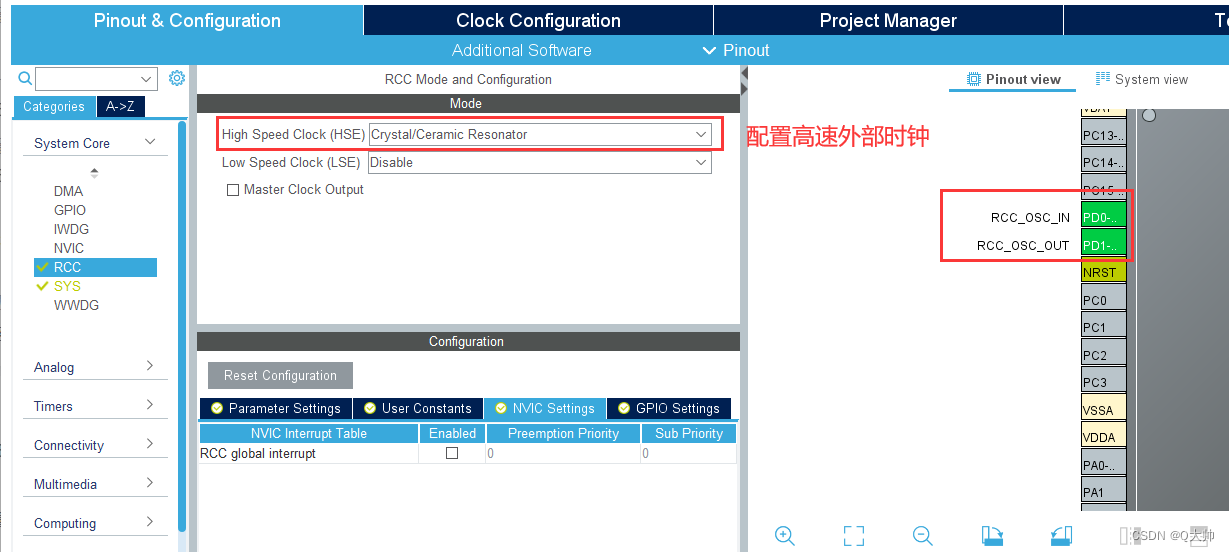
Table of contents 1. What is Guilite Second, STM32CUBEMX part 2.1 Configuration clock 2.2 Configure IIC 2.3 Project generation 3. MDK part 5 3.1 Transplant OLED file 3.2 Transplant Guilite file 3.3 Mo...
[Java learning] strong reference, weak reference, soft reference and ghost reference
Java expanded the concept of references after JDK1.2, introducing four different references. Strong citation As long as the strong reference exists, the garbage collector will never recycle the refere...
More Recommendation
Reference and learning JPA (1)
First, the definition of JPA and the overall thinking JPA stands for Java Persistence API.JPA describes the mapping of object-relational tables through JDK 5.0 annotations or XML, and persists runtime...
TIJ Learning: Object Reference
Author: Vamei Source: http: //www.cnblogs.com/vamei welcome to reprint, please keep this statement. Thank you! We have been using the concept of "objects" before, but we have not explored ho...
C++ learning reference
C++ references mainly have references to variables, references to pointers, references to structures, and references to function parameters. Reference to the variable: Pointer reference: Reference to ...
Element learning reference p1
Recently I am learning the element source code, as the leading vue library in China. There are a lot of places to learn, here are some things to learn from or to move directly to your own projects. No...

Shared reference to Python learning
Shared reference to Python learning Article directory Shared reference to Python learning What is a shared reference Shared References and In-Place Changes Shared reference and equal Reference materia...