[linux] permission settings
I. Permissions for files and directories
Umask value
When we create a new file or directory, what is its default value? The umask value is related to this. The umask is the default value of the current user when creating a new file or directory.
How do I view the umask value? Simply enter umask to view it.

On the properties of the default permissions, the directory is not the same as the file. Under linux, the creation of general files should not have execute permission. One way of saying this is because files are usually used for data logging and do not require executable permissions. Another way is that there is no anti-virus software under Linux. Generally, viruses are binary. Execution files exist in our system, so the default file attributes do not have executable permissions for security reasons. Therefore, the default permissions for files and directories are as follows:
- User new file
There is no executable permission x by default, only read and write permissions rw. That is, the default maximum permission of the file is 666. - User new directory
Since the executable permission x means that you can enter this directory, all permissions are open. That is, the default maximum permission of the directory is 777.
The value of umask refers to "the default value needs to be reduced." For example, when the umask value is 022, it is equivalent to the user not being removed any permissions, and the group and other are removed by 2, that is, there is no write permission. Then the newly created directory and file permissions are also different, as shown below:
You can see that the permissions of the directory are now 777-022=755, and the permissions of the file are now 666-022=644.
So what is the use of the umask value? For example, a file needs to be edited together with the users of the same group. If the umask value is 022 at this time, it means that the default permission of the newly created file is 644, that is, the users in the same group can only read and cannot write. At this point, you need to modify the umask value so that the group user of the file has read and write permissions, which is 664.
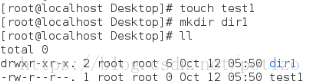
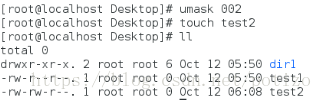
After modifying the umask, create a new file test2. You can see that the permissions of the test1 file are different. The group user of the test2 file has a write permission w. Of course, the umask value is only modified in this shell. Reopen a shell and check that the umask value is still 022.
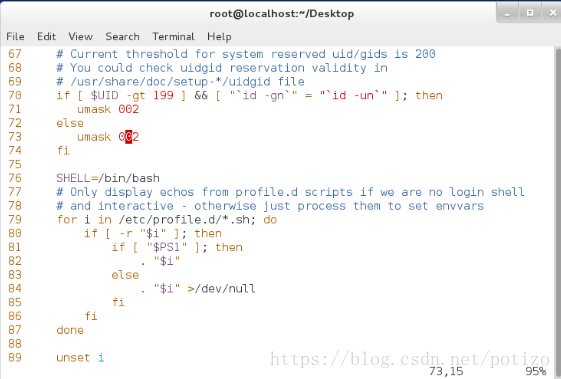
To permanently modify the umask value, you need the following:
vim /etc/profile Edit system files
vim /etc/bashrc Edit shell configuration file
Note: Both files are modified at the same time, the first screenshot is unmodified.
After the modification, let our changes take effect immediately. The following two commands are required:
At this point, whether you are viewing the umask in the current shell or reopening the shell environment, it has been modified:




2. Three special permissions
-
Sticky sticky bit
Function: Only valid for the directory. When there is sticky permission on a directory, the user creates a file or directory under the directory, and only has the root and the root to delete the file.
Briefly explain, assuming the /pub directory is a public storage directory, the user tom, harry has the directory w permission, which means that harry and tom create a new directory or file for anyone in the directory. Can be deleted, renamed, moved, etc. If you add the sticky permission to the /pub directory, then tom and harry can only delete, rename, and move the directory or file created by yourself. Tom can't delete the file of harry, and Harry can't move the file of tom.
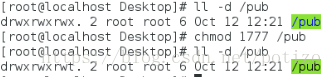
Setting method: chmod o+t chmod 1xxx
Check the permissions of the /pub directory with a t after it, indicating that the sticky permission was added successfully.
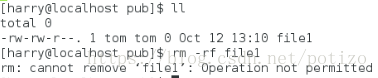
The user harry is viewed in the public storage directory /pub. There is only one file file1 in the directory. The main group is the tom. Harry tried to delete the file1 file of tom with limited permissions. This is the credit of the sticky. -
Sgid force bit
Function:
for files: only for binary executables
When there is sgid on the file, the process generated by anyone executing this file belongs to the user group of the file.
For directories: When there is sgid on the directory, any files created by anyone in this directory belong to all groups of the directory.
Setting method:
chmod g+s file|dir
chmod 2xxx file|dir
Set sgid permissions to the /pub directory
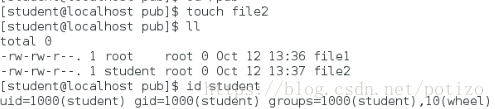
Create a file2 file in this directory with the student user. You can see that the owner of the file2 file is student, but the group is root.
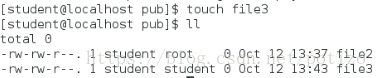
Remove the sgid permission for /pub and create file3 as the student user. It can be seen that, without the sgid permission, the file3 belonging to the student created by the student is the student group. -
Suid adventure
Role: only for binary executables
When there is a suid on the file, the process that anyone generates to execute this file belongs to the owner of the file.
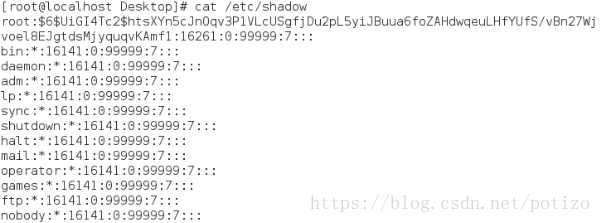
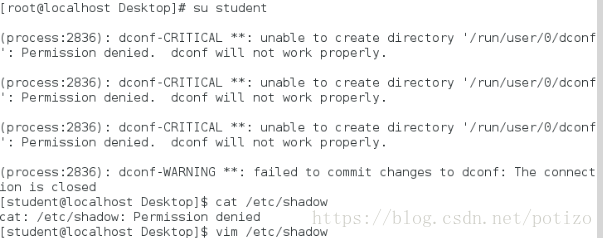
A brief explanation, in the Linux system, all account passwords are recorded in /etc/shadow. The permissions for this directory are as follows:
means that this file is only root readable and only root can force writes.
It can be seen that the root user can force the write to the file, and after switching to the student user, there is no read/write permission.
Since this file can only be modified by root, how can ordinary users use the passwd command to modify their own passwords? This is the benefit of suid.
You can see that the student user has x permission on the /usr/bin/passwd directory, indicating that the student can execute passwd; the passwd binary executable is root; there is s permission. Indicates that when the student executes passwd, the generated process belongs to the owner root of passwd; /etc/shadow can be modified by the passwd executed by the student, which is equivalent to modifying the shadow as root.
Compare the student user command in the above figure to execute the command cat /etc/shadow with limited permissions. The reason is simple because cat does not have s privilege.
So the student can execute cat; the owner of the binary executable file is root; there is no s permission, and the process generated by the student executing cat does not belong to the owner root of cat; therefore /etc/shadow cannot be viewed by the cat executed by the student.
Setting method:
chmod u+s file
chmod 4xxx file




Intelligent Recommendation

Linux user management and permission settings
User Management Form of existence: characters and files Store file /etc/passwd cat passwd cat group /etc/shadow /home/username /etc/skel 3. Create a new user useradd 4. Modify the user usermod 5. Mana...
Talk to the ACL permission settings in Linux
1. Set the ACL permissions, often use two major commands, which are setFacl and getfacl commands, the former is used to set ACL permissions to the specified file or directory, and the latter is used t...
Daily Linux - file permission settings
chmod command CHMOD is used to change access to Linux system files or directories, control files, or directory access. A text setting method containing letters and operator expressions or a digital se...
Linux advanced 4: Linux file permission settings;
This article blog content, continuationLinux advanced three: Linux users and user group management;】 In [Linux advanced three: Linux users and user group management;The three users of D1, D2, T1 have ...
Linux file basic properties and permission settings
Basic file attributes The first character in Linux means that the file is a directory, a file or a link file, and so on. When it is [d] it is the directory is a file when it is [ - ]; If it is [ l ], ...
More Recommendation
Linux special permission settings and ACL permissions
SUID, SGID, and sticky-bit File special permission Special permission Description SUID When a file with the SUID set is executed, the file will run as its owner, not the performer's. SGID When a file ...
Vim, user management and permission settings in Linux system
Vim and management input and output Three modes of 1.vim Command mode Press esc to enter command mode, shift+: insert mode exit mode 2. How vim works in command mode :set nu display line number...
Linux use: permission settings for files or directories
First, What. There are several access rights for files or directories in a Linux system? In a Linux system, each file or directory has four access rights: readable (r), writable (w), executable (x), a...
Ssh/sftp configuration and permission settings under linux
The ssh-based sftp service has better security than ftp (non-clear text account password transfer) and convenient rights management (restricting users' Active Directory). 1. Open the sftp account so t...
linux system links android device permission settings
problem When debugging, but to be adb remount the following error: Found to be a permissions problem. Because some time ago I would python2.7 on ubuntu unloading, resulting in previously normal enviro...