JObject staff = new JObject();
staff.Add(new JProperty("Name", "Jack"));
staff.Add(new JProperty("Age", 33));
staff.Add(new JProperty("Department", "Personnel Department"));
staff.Add(new JProperty("Leader", new JObject(new JProperty("Name", "Tom"), new JProperty("Age", 44), new JProperty("Department", "Personnel Department"))));
Console.WriteLine(staff.ToString());

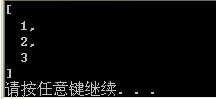
JArray arr = new JArray();
arr.Add(new JValue(1));
arr.Add(new JValue(2));
arr.Add(new JValue(3));
Console.WriteLine(arr.ToString());
string json = "{\"Name\" : \"Jack\", \"Age\" : 34, \"Colleagues\" : [{\"Name\" : \"Tom\" , \"Age\":44},{\"Name\" : \"Abel\",\"Age\":29}] }";
Get the name of the employee
/ / Convert json to JObject
JObject jObj = JObject.Parse(json);
/ / Access by property name or index, just their own property name, not all
JToken ageToken = jObj["Age"];
Console.WriteLine(ageToken.ToString());

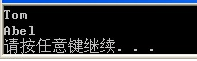
Get all the names of the employee colleagues
/ / Convert json to JObject
JObject jObj = JObject.Parse(json);
var names=from staff in jObj["Colleagues"].Children()
select (string)staff["Name"];
foreach (var name in names)
Console.WriteLine(name);
"Children()" can return objects in all arrays
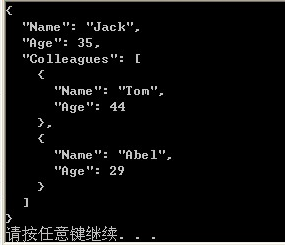
Now we find that the age of Jack in the json string obtained should be 35.
/ / Convert json to JObject
JObject jObj = JObject.Parse(json);
jObj["Age"] = 35;
Console.WriteLine(jObj.ToString());
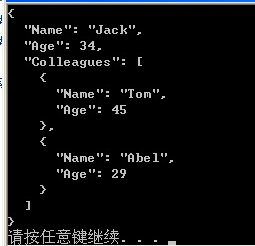
Now we find Jack's colleague Tom's age is wrong, it should be 45
/ / Convert json to JObject
JObject jObj = JObject.Parse(json);
JToken colleagues = jObj["Colleagues"];
colleagues[0]["Age"] = 45;
jObj["Colleagues"] = colleagues; / / modified, then assigned to the object
Console.WriteLine(jObj.ToString());
delete
1 Now we want to delete Jack's colleague
JObject jObj = JObject.Parse(json);
jObj.Remove("Colleagues");// is followed by the attribute name
Console.WriteLine(jObj.ToString());
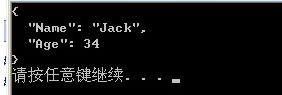
Now we find that Abel is not a colleague of Jack and asks to remove it from it.
JObject jObj = JObject.Parse(json);
jObj["Colleagues"][1].Remove();
Console.WriteLine(jObj.ToString());

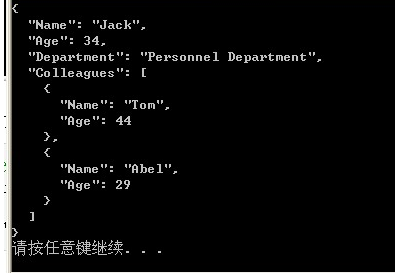
We found that there is less department information in Jack's information, asking us to add it to the back of Age.
/ / Convert json to JObject
JObject jObj = JObject.Parse(json);
jObj["Age"].Parent.AddAfterSelf(new JProperty("Department", "Personnel Department"));
Console.WriteLine(jObj.ToString());
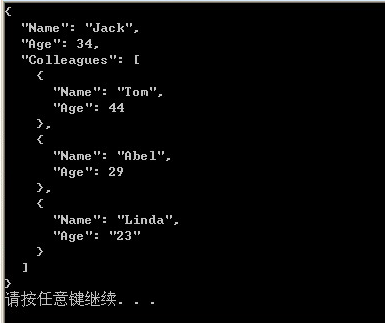
Now we find out that Jack has a new colleague, Linda.
/ / Convert json to JObject
JObject jObj = JObject.Parse(json);
JObject linda = new JObject(new JProperty("Name", "Linda"), new JProperty("Age", "23"));
jObj["Colleagues"].Last.AddAfterSelf(linda);
Console.WriteLine(jObj.ToString());
Use the function SelectToken to simplify the query, specifically:
1Use SelectToken to query the name
JObject jObj = JObject.Parse(json);
JToken name = jObj.SelectToken("Name");
Console.WriteLine(name.ToString());

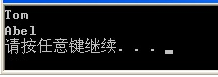
2 Use SelectToken to query the names of all colleagues
JObject jObj = JObject.Parse(json);
var names = jObj.SelectToken("Colleagues").Select(p => p["Name"]).ToList();
foreach (var name in names)
Console.WriteLine(name.ToString());
Query the age of the last colleague
/ / Convert json to JObject
JObject jObj = JObject.Parse(json);
var age = jObj.SelectToken("Colleagues[1].Age");
Console.WriteLine(age.ToString());

Define an error message:
JObject errors = new JObject();
if (productName.Length <= 0)
{
errors.Add("ProductName", new JValue("This entry is a mandatory entry"));
}
//Get the value in json
string jsonStr = "";//Json Str string
            JToken json = JToken.Parse(jsonStr);//Convert to JToken (JObject base class)
            string xx = json.Value<string>("xx");//Get the value of the xx key in Json
            JToken arr = json["arr"];//Get the array in Json {arr:[{yy:1,zz:2},{yy:3,zz:4}]}
            foreach (JToken baseJ in arr)//Traversing the array
            {
                int yy = baseJ.Value<int>("yy");
            }
            string yy1 = json["arr"][0].Value<string>("yy");//Can also be sauce purple, multi-layered
            string yy2 = json["arr"][0]["yy"] != null ? json["arr"][0]["yy"].ToString() : "";//This is equivalent to the above sentence, do not directly ToString, easy to report error
JToken.ToObject Method
Overload List Name Description
Public method ToObject<T>() Creates an instance of the specified .NET type from the JToken.
Public method ToObject(Type) Creates an instance of the specified .NET type from the JToken.
Public method ToObject<T>(JsonSerializer) Creates an instance of the specified .NET type from the JToken using the specified JsonSerializer.
Public method ToObject(Type, JsonSerializer) Creates an instance of the specified .NET type from the JToken using the specified JsonSerializer.
http://www.cnblogs.com/usharei/archive/2012/04/24/2467578.html


