Spring (four) Spring Bean life cycle complete process
The essence of the Spring IoC container is to manage beans. For a bean, there is a life cycle in the container. Its initialization and destruction also requires a process. In some processes that need to be customized, we can insert code to change some of their behaviors to meet specific needs. You need to use the life cycle of Spring Bean.
The life cycle is primarily to understand the Spring IoC container initialization and destruction process.

Spring IoC container management of beans is still relatively complicated. After the initialization and dependency injection, the Spring IoC container performs certain steps to complete the initialization. Through these steps, we can customize the initialization, and the Spring IoC container is closed normally. At the time, it will also perform certain steps to close the container and release the resources. In addition to the steps you need to understand throughout the lifecycle, you need to know what the interfaces for these lifecycles are for.
First introduce the steps of the life cycle:
- Instantiate bean object instantiation
- Populate properties
- If the bean implements the setBeanName method of the interface BeanNameAware , then it will call this method
- If the bean implements the setBeanName method of the interface BeanFactoryAware , then it will call this method
- If the bean implements the setApplicationContext method of the interface ApplicationContextAware, and the Spring IoC container must also be an implementation class of the ApplicationContext interface, then this method will be called, otherwise it will not be called.
- If the bean implements the postProcessBeforeInitialization method of the interface BeanPostProcessor , then it will call this method
- If the bean implements the afterPropertiesSet method of the interface BeanFactoryProcessor , then it will call this method
- If the bean customizes the initialization method<bean init-method=" " >, it will call the defined initialization method
- If the Bean implements the postProcessAfterInitialization method of the interface BeanPostProcessor and completes these calls, the initialization is completed at this time, then the Bean exists in the Spring IoC container, and the user can get the Bean service from it.
- If the bean implements the destory method of the interface DisposableBean, it will be called.
- If a custom destruction method is defined<bean destory-method=" ">, then it will be called
Test example:
Create class Man
package com.ioc.demo3;

import org.springframework.beans.BeansException;
import org.springframework.beans.factory.BeanNameAware;
import org.springframework.beans.factory.DisposableBean;
import org.springframework.beans.factory.InitializingBean;
import org.springframework.context.ApplicationContext;
import org.springframework.context.ApplicationContextAware;

public class Man implements BeanNameAware, ApplicationContextAware, InitializingBean, DisposableBean {

    private String name;

    public void setName(String name) {
                 System.out.println("Step 2: Set Properties");
        this.name = name;
    }

    public Man(){
                 System.out.println("Step 1: Initialize...");
    }

    public void setup(){
                 System.out.println ("Step 7: Man is initialized...");
    }

    public void teardown(){
                 System.out.println("Step 11: Man is destroyed...");
    }

    @Override
    public void setBeanName(String name) {
                 System.out.println ("Step 3: Set the name of the bean name");
    }

    @Override
    public void setApplicationContext(ApplicationContext applicationContext) throws BeansException {
                 System.out.println ("Step 4: Understanding Factory Information");
    }

    @Override
    public void afterPropertiesSet() throws Exception {
                 System.out.println ("Step 6: After property settings");
    }

    public void run(){
                 System.out.println ("Step 9: Executing Business Methods");
    }

    @Override
    public void destroy() throws Exception {
                 System.out.println ("Step 10: Execute Spring's Destruction Method");
    }
}
Create class MyBeanPostProcessor
package com.ioc.demo3;

import org.springframework.beans.BeansException;
import org.springframework.beans.factory.config.BeanPostProcessor;

public class MyBeanPostProcessor implements BeanPostProcessor {
    @Override
    public Object postProcessBeforeInitialization(Object bean, String beanName) throws BeansException {
                 System.out.println ("Step 5: Method before initialization..");
        return bean;
    }

    @Override
    public Object postProcessAfterInitialization(Object bean, String beanName) throws BeansException {
                 System.out.println ("Step 8: Method after initialization..");
        return bean;
    }
}
Set applicationContext.xml
<?xml version="1.0" encoding="UTF-8"?>
<beans xmlns="http://www.springframework.org/schema/beans"
       xmlns:xsi="http://www.w3.org/2001/XMLSchema-instance" xmlns:util="http://www.springframework.org/schema/util"
       xsi:schemaLocation="http://www.springframework.org/schema/beans http://www.springframework.org/schema/beans/spring-beans.xsd http://www.springframework.org/schema/util http://www.springframework.org/schema/util/spring-util.xsd">

 <bean id="man" class="com.ioc.demo3.Man" init-method="setup" destroy-method="teardown">
        <property name="name" value=" "></property>
    </bean>
    <bean class="com.ioc.demo3.MyBeanPostProcessor"/>


</beans>
Test class
package com.ioc.demo3;

import org.junit.Test;
import org.springframework.context.ApplicationContext;
import org.springframework.context.support.ClassPathXmlApplicationContext;


public class SpringDemo3 {

    @Test
    public void demo(){
        ApplicationContext applicationContext = new ClassPathXmlApplicationContext("applicationContext.xml");
        Man man1 = (Man)applicationContext.getBean("man");

        man1.run();


        ((ClassPathXmlApplicationContext) applicationContext).close();
    }

}
operation result:

Intelligent Recommendation
Spring study notes four, bean life cycle
1. Configuration 2. Test...
Spring bean life cycle four steps
First, clarify the concept of the interface; InitializingBean The interface is to make Beans to perform some custom operations after the construction is completed. BeanPostProcessor It is the lifecycl...
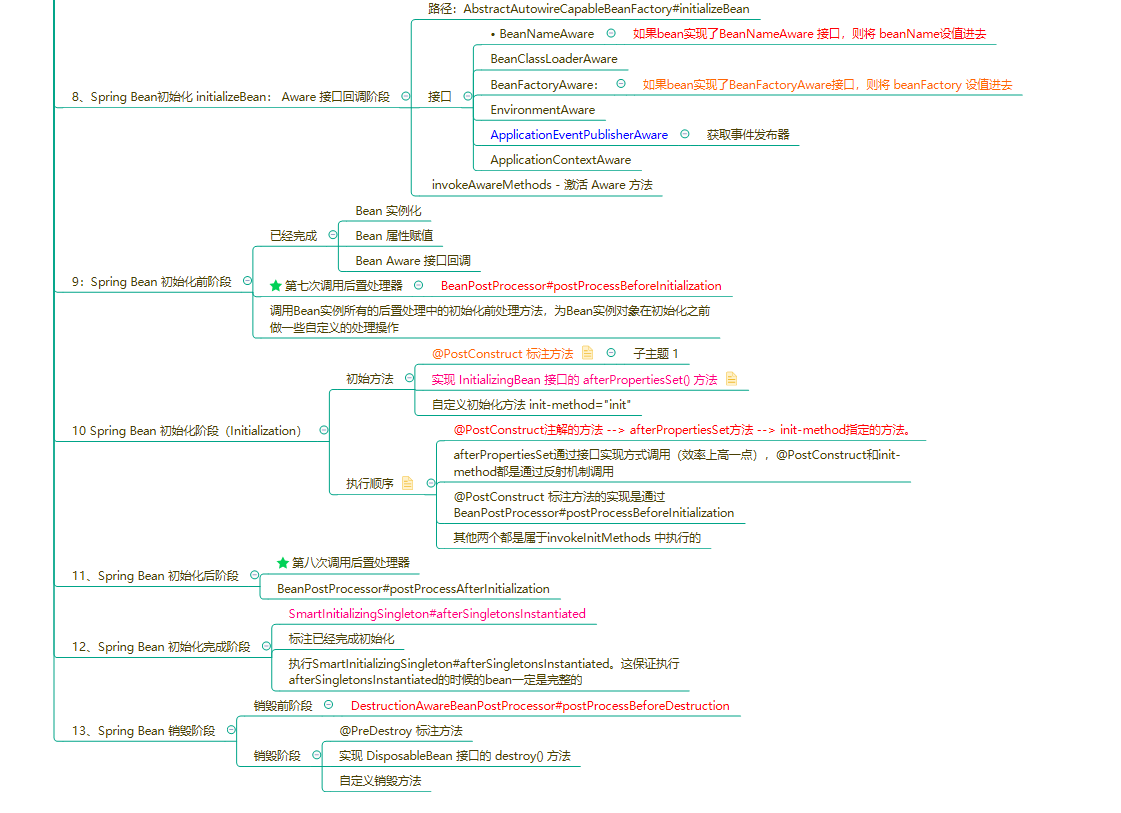
Spring bean life cycle four --- Spring bean initialization phase (Initialization)
table of Contents Overview INITIALIZEBEAN 2.1, InvokeaWareMethods - Activate aware Method 2.2, Spring Bean initialization Seventh call rear processor 2.3, InvokeinitMethods - Activate custom init meth...

Bean instantiation process and life cycle in Spring
1 Instantiation process and life cycle As shown below: The execution process of the Bean Instance (singleton bean) life cycle is as follows: Spring does the beanInstantiationThe default bean is a sing...
Spring bean life cycle and initialization process
1 ClassPathXmlApplicationContext class container configuration file bean.xml file through the construction method 2 AbstractApplicationContext initializes the refresh () method in this class 3 ...
More Recommendation
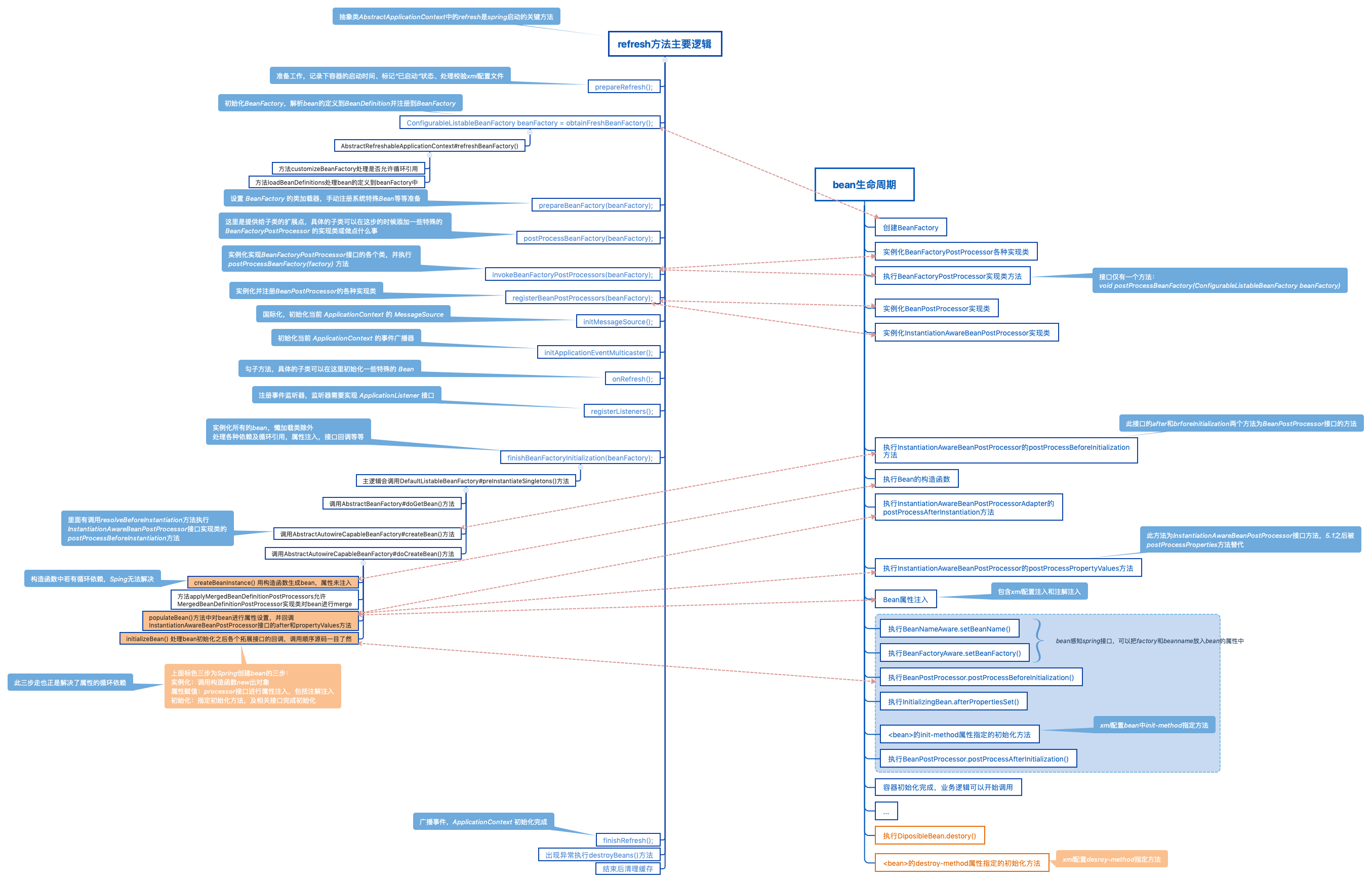
Spring startup process and Bean life cycle combing
The startup of Spring itself is accompanied by the beginning of the life cycle of Bean. In order to understand what each step of Spring startup does, and what operation is performed on the loading of ...
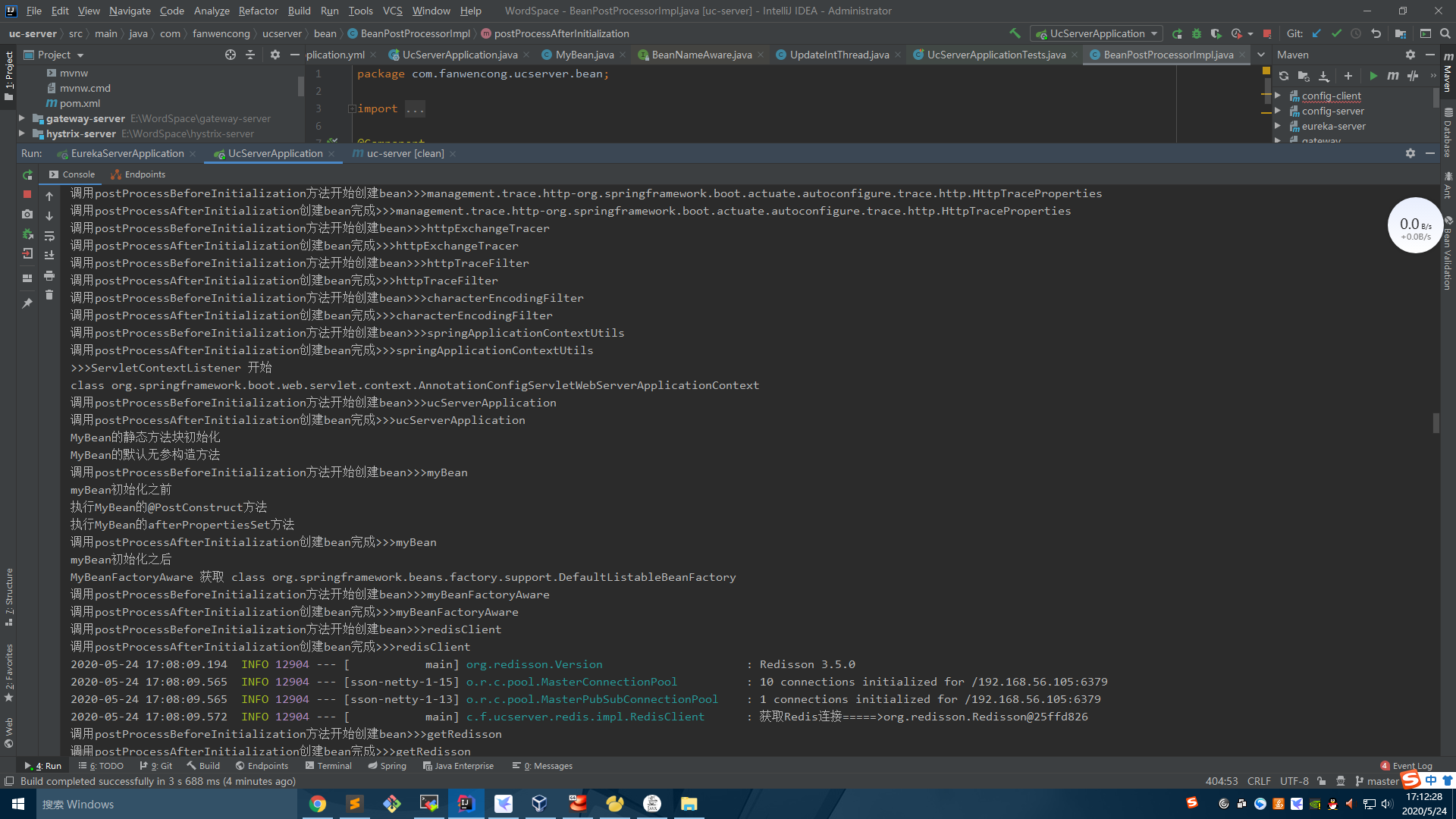
Spring bean initialization process (life cycle) summary
The bean initialization process is roughly as follows: The following pictures come from: I add one more point to the above process. After calling the postProcessBeforeInitialization method of the Bean...
The life cycle and initialization process of bean in spring
Spring is the life cycle and initialization process of our common bean bean Spring ioc (inversion of control) 1 ClassPathXmlApplicationContext class container load configuration file bean.xml file by ...
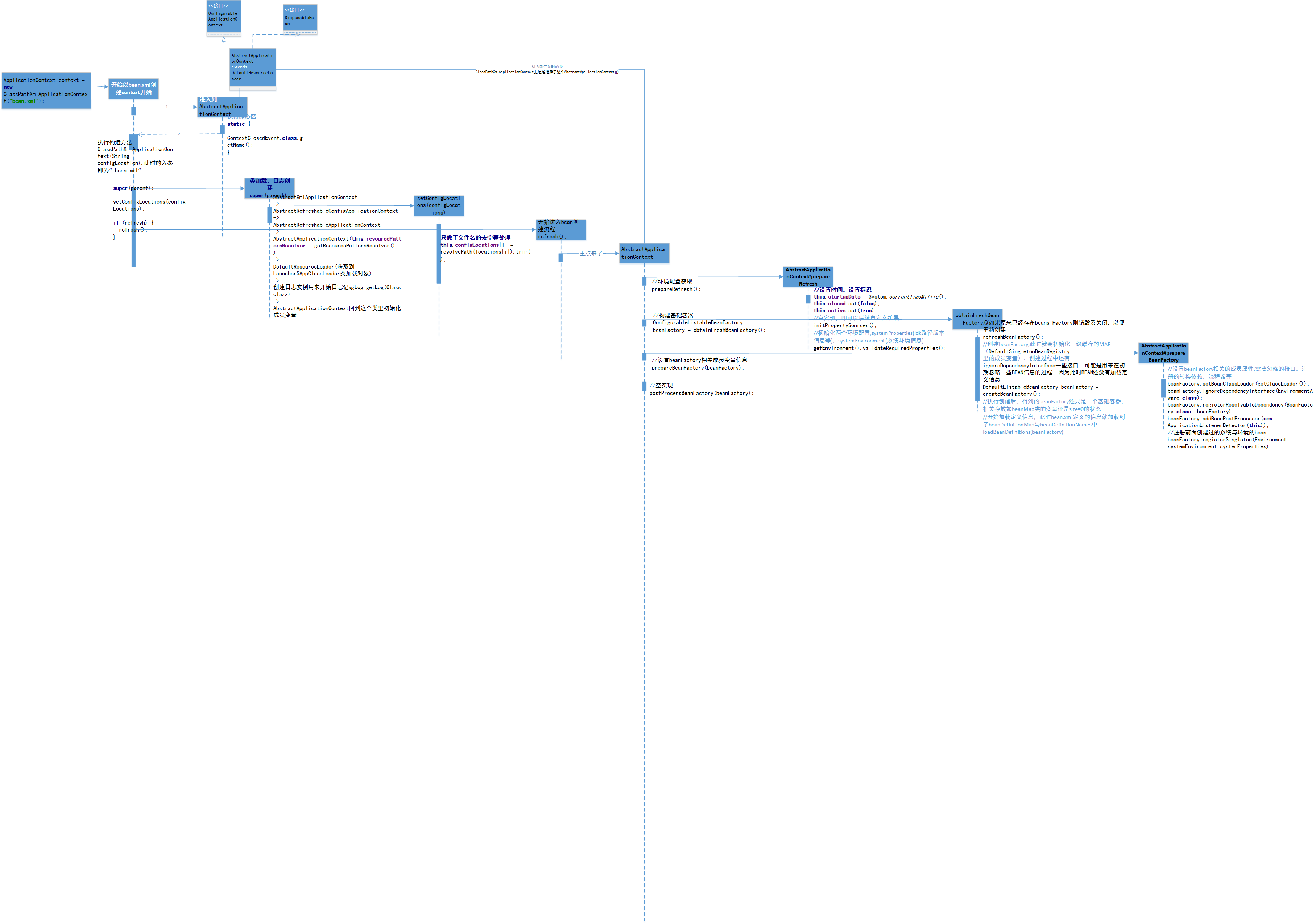
Spring process - BEAN life cycle - a graph analysis
Spring process - BEAN life cycle - a graph analysis Here is a story about the bean loading process. Story premise Create a project, leading to Spring related dependencies Profile preparation bean.xml ...
Spring startup process and bean life cycle
I. Overview Spring's IOC container has the following steps: The first step: Spring starts, generates a complete bean. Generate Bean Factory Analysis of XML to generate beandefinition Use BeanFactoryPo...