Parsing Fat32 file system
tags: File system FAT32
The Fat32 file system is the file system commonly used in windows os before, in this article we have to find:
1. Start sector of the first partition
2. The location of the first file file configuration table (FAT)
3. The location of the data area
4. The cluster where the file "file1.txt" is located
1 First, use HxD to open the FAT32 file to be analyzed

2 Select the file to be analyzed. After opening, in the initial sector0, that is, sector 0, we will see the master boot of the system. The 64-bit master partition table before the end mark of 55AA (Master Partition Table) ), which records the information of each partition.

offset1BE 00 means not bootable, 80 means bootable from this partition
offset1BF-1C1 means CHS (Cylinder-Head-Sector, first find cylinder, then track, then find sector addressing method) start address 000101 (window OSLITTLE-ENDIAN (smallEndianness3. Low byte order storage, that is, the low-order byte is arranged at the low address end of the memory, and the high-order byte is arranged at the high address of the memory.
offset1C2 indicates the partition flag
offset1C3-1C5 indicates the end address of CHS
offset1C6-1C9 takes up 32 bits and represents the starting sector 0000003F=63
offset1CA-1CD indicates the length of the sector
The remaining three sectors recorded as 0 means unused
3 After finding the starting sector of the first partition, we jump to the 63 sector where it is located and analyze the information in its boot record

offset7E0B occupies 16 bits and represents the number of bytes per sector in each sector. 0200 (h) = 512 byte
offset7E0D occupies 8 bits, which means sectors/cluster how many sectors each cluster has 02
offset7E0E takes up 16 bits, indicating how many sectors the content of the reserved area occupies 0022(h)=34
offset7E10 occupies 8 bits The partition has several FAT tables 2
offset7E16 occupies 16 bits represents sectors/FAT. If the number in this area is 0, jump to the 5th byte of the next line, ie offset7E24 occupies 32 bits 000002EB(h)=747 sectors
Therefore, the offset of FAT1 is [the starting position of the first partition (63 sectors where the boot record is located) + the number of sectors in the reserved area (34)]*[byte/sector (512)]=49664
The offset relative to the first partition is 49664-7E00(h)=49664-32256=17408
The location of the user data area is the next sector after the end of the FAT table, that is, the first sector of the first partition+reserved sector+FAT table sector=63+34+2*747=1591
3. Jump to sector 1591, we can see the record of the user's real files FAT Directory Entriy

The selected area is the file one information directory, and the position of offset6E88 is the attribute label of the file. When file 1 is set to 08, its bit volume label means that file1.txt is not visible when the file system is started.
offset6E9A occupies 16 bits, indicating the starting cluster of file1.txt 0011(h)=17

In FAT32, each cluster of information occupies 32 bits, 4 bytes. So starting from offsetC200, counting 17 4 bytes, found offsetC244, which is 18[00000012(h)]---19[13(h)].......34[22(h)- --FFFFFF0F (stop)
So the cluster occupied by file1.txt is 17-34
Intelligent Recommendation
Graphical fat32 file system design
Almost We passed by interesting it works Have an attitude Design file system ideas This article takes everyone to think about how the fatfs file system has evolved. If you are the designer of the file...

The structure of FAT32 file system (1)
FAT32 file system summary FAT32 can support partitions larger than 32M and smaller than 32G. Although a third-party formatting program can format a partition larger than 32G as FAT32, Microsoft’...

The structure of the FAT32 file system on the disk
The structure of the FAT32 file system on the disk Article Directory The structure of the FAT32 file system on the disk Volume structure Data area arrangement Physical address Physical sector number L...
SD card and FAT32 file system
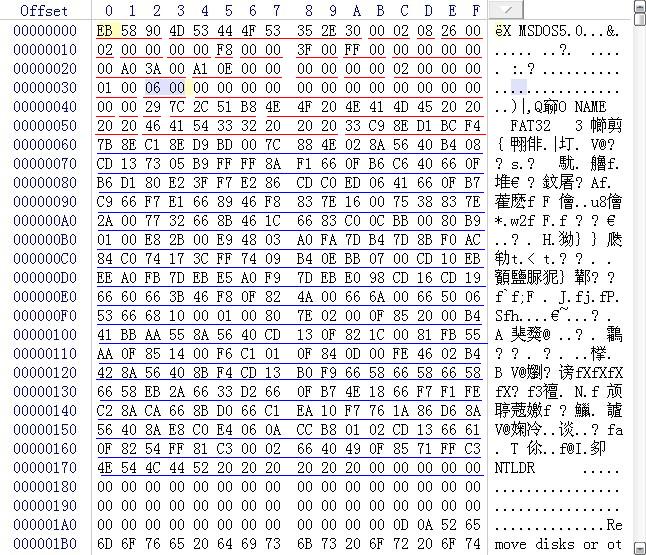
SD card and FAT32 file system First format the sd card, and then create a few new files and put them in it for analysis and storage of the files in the sd card. Use the tool winhex to open the ...
Introduction to FAT32 file system theory
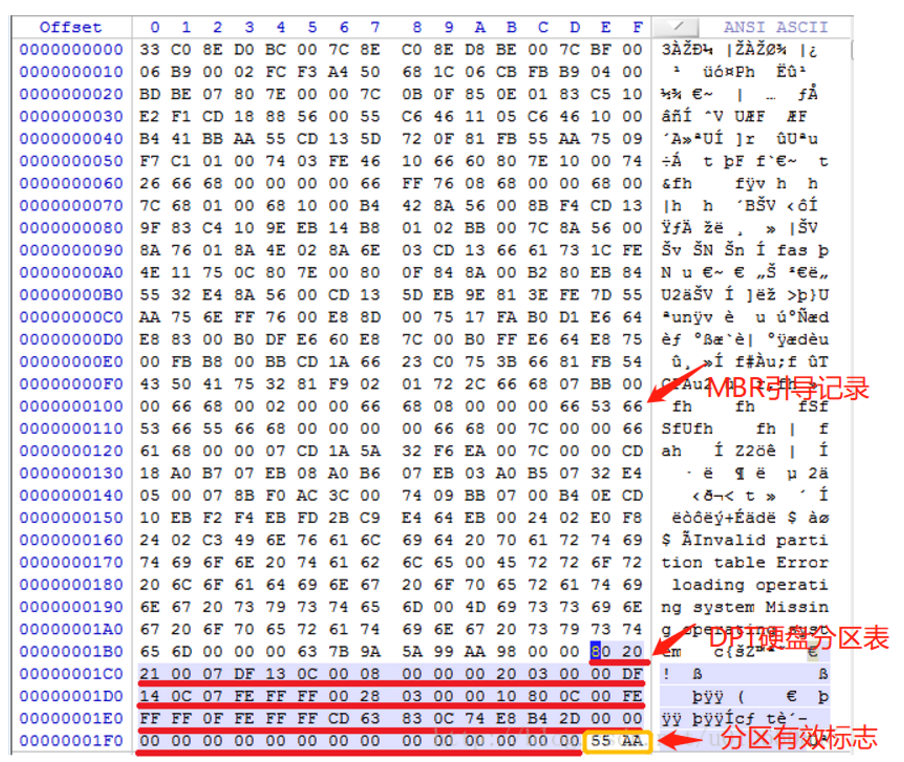
1.1 MBR(Main Boot Record) The main boot record, sometimes also called the main boot sector, is located in the 0 cylinder of the entire hard disk, head 1 sector (can be regarded as the first secto...
More Recommendation

First, the embedded FAT32 file system (1)
1 FAT32 file system introduction reference document The FAT32 file system has several basic concepts: MBR (Master Boot Record) DPT (Disk Partition Table) DBR (Dos boot record, Dos boot record) FAT (Fi...
File system format FAT16, FAT32, NTFS, exFAT of
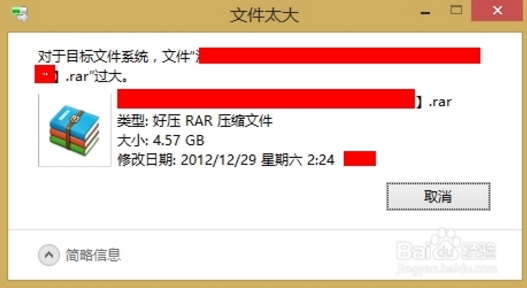
Foreword text problem Four file systems Compare summary Foreword We always encounter such a problem when using U disk to store large files, suggesting that file is too large, prompted U disk copy of t...
TXT format FAT32 file system creation
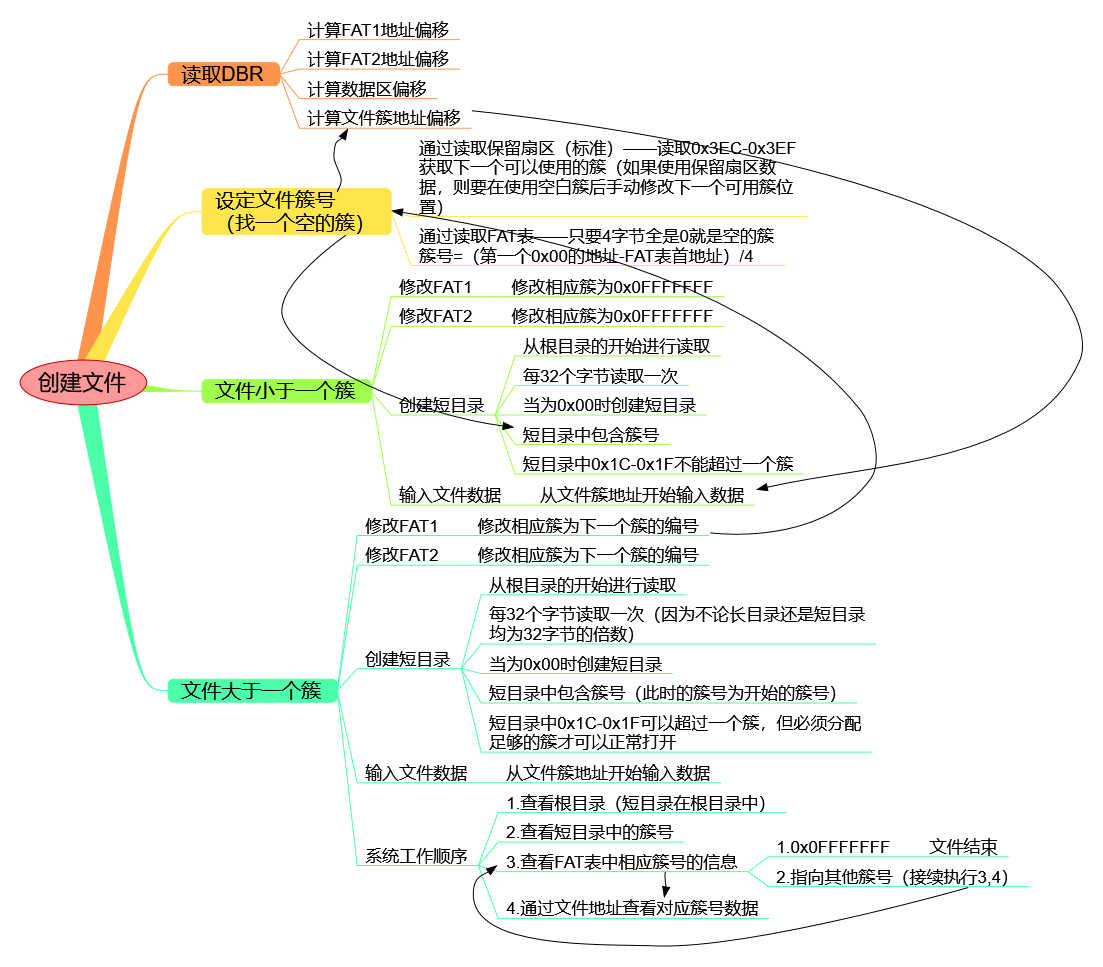
table of Contents What you need You at least want to know information Little-endian mode Hard drives DBR region Reserved sector FAT entries Data Area example FAT entries Meaning Example For example sh...

Storage organization structure of FAT32 file system (1)
Transfer from http://blog.chinaunix.net/uid-26913704-id-3213948.html After having a deeper understanding of the physical structure, logical structure and storage structure of the disk, let's take a cl...

Storage organization structure of FAT32 file system (2)
Transfer from http://blog.chinaunix.net/uid-26913704-id-3213951.html The FAT32 file system storage organization structure has been analyzed based on a formatted empty USB disk. Let’s analyze the...