A landing interface UI that beautifies PYQT5 using CSS
tags: Code problem analysis pyqt
A landing interface UI that beautifies PYQT5 using CSS
- Not perfect, there are some details I still don't know how to modify (time 2021-01-23 22:30)
The first is to see this article (@mahuatengmmp's article)
Then I watched the effect.
The CSS of QLineEdit and QPushbutton is a reference to TA.
Let's take a look at the final effect first
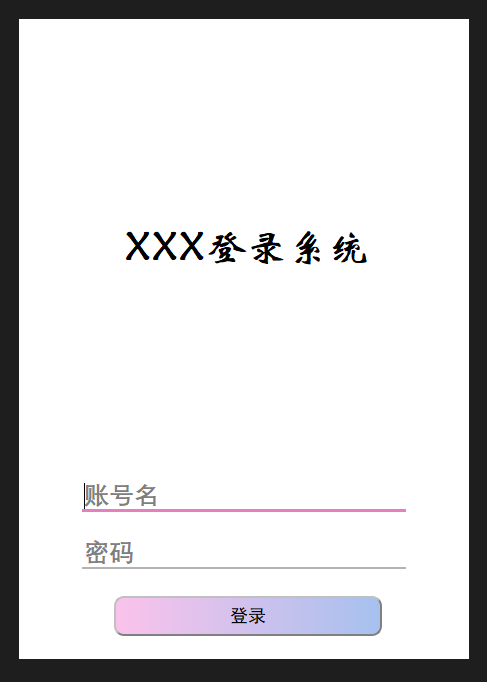
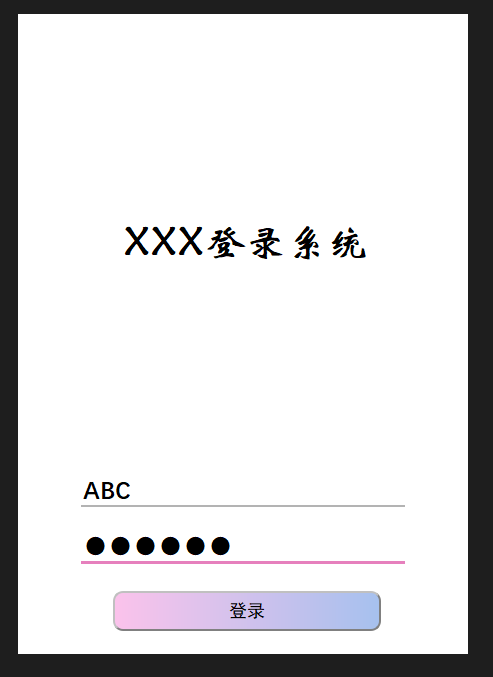
Next is a complete code
from PyQt5.QtWidgets import *
from PyQt5.QtCore import Qt
import sys


class widget(QWidget):
    def __init__(self, parent=None):
        super().__init__(parent)
        self.setFixedSize(450,640)  # Set fixed size

        self.setWindowFlags(Qt.CustomizeWindowHint)  # Hide the title bar
        self.setWindowFlags(Qt.FramelessWindowHint) # Hidden border
        # Set the total style, QWIDGET
        self.setStyleSheet('''
            QWidget
            {border:15px;
            margin:10px;
            margin-left:82px;
            margin-right:50px;
                         Font-Family: 'Huawen Xin Wei';
            font-size:40px;
            font-weight:bold;
            background-color:rgb(200,255,255);
            }
            QWidget#right_widget
            {border-radius:15;}
        ''')
        # Create a layout
        layout = QVBoxLayout()
        # Create a 4 control
        lb = QLabel('Xxx login system')
        lineEdit1 = QLineEdit('')
        lineEdit2 = QLineEdit('')
        # Set the account input form
        lineEdit1.setPlaceholderText('account name')
        # Set the password form
        lineEdit2.setPlaceholderText('password')
        lineEdit2.setEchoMode(QLineEdit.Password)
        # Set the LineEdit1 format
        lineEdit1.setStyleSheet('''
            QLineEdit
            {border:0px;
            border-radius:0;
            margin:10px;
            margin-left:50px;
            margin-right:50px;
            border-bottom: 2px solid #B3B3B3;
                         Font-Family: 'Isometrics;
            font-size:25px;
            font-weight:bold;}
            QLineEdit:hover{
                border-bottom:3px solid #66A3FF;
            }
            QLineEdit:focus{
                border-bottom:3px solid #E680BD
            }
        ''')
        # Set the LineEdit2 format
        lineEdit2.setStyleSheet('''
            QLineEdit
            {border:0px;
            border-radius:0;
            margin:10px;
            margin-left:50px;
            margin-right:50px;
            border-bottom: 2px solid #B3B3B3;
                         Font-Family: 'Isometrics;
            font-size:25px;
            font-weight:bold;}
            QLineEdit:hover{
                border-bottom:3px solid #66A3FF;
            }
            QLineEdit:focus{
                border-bottom:3px solid #E680BD;
            }
        ''')

        btn = QPushButton('log in')
        btn.setFixedSize(400,60)
        # Set button format
        btn.setStyleSheet('''
                            QPushButton
                            {text-align : center;
                            background-color:qlineargradient(spread:pad, x1:0, y1:0, x2:1, y2:0, stop:0 #fbc2eb, stop:1 #a6c1ee);
                            font: bold;
                            border-color: grey;
                            border-width: 2px;
                            border-radius: 10px;
                            padding: 6px;
                            height: 28px;
                            border-style: outset;
                                                         FONT-FAMILY: 'black body';
                            font : 18px;}

                            QPushButton:pressed
                            {text-align : center;
                            background-color : light gray;
                            background-color:qlineargradient(spread:pad, x1:0, y1:0, x2:1, y2:0, stop:0 #e1aad2, stop:1 #92adda);
                            font: bold;
                            color:lightblue;
                            border-color: gray;
                            border-width: 2px;
                            border-radius: 10px;
                            padding: 6px;
                            height : 28px;
                            border-style: outset;
                                                         FONT-FAMILY: 'black body';
                            font : 18px;}
                            QPushButton:hover:!pressed
                            {color:red;}
                            ''')

        layout.addWidget(lb)
        layout.addWidget(lineEdit1)
        layout.addWidget(lineEdit2)
        layout.addWidget(btn)
        self.setLayout(layout)
        print(type(self))

if __name__ == "__main__":
    app = QApplication(sys.argv)
    demo = widget()
    demo.show()
    sys.exit(app.exec_())
Need to be perfect
- Rounded
Intelligent Recommendation
[PYQT5] Pure Code Drawing UI Interface (Basics)
First, we design our UI interface: Interface design introduction This is a simplified version, simple introduction: Click the different buttons on the first-level menu, the second-level menu will appe...
[Pyqt5] teach you a trick, 's UI interface
Many small partners will see their interface when using PyQt5, they will feel giant ~ ugly ~ no ~ ratio ~, anyway, I started this, but when I suddenly learned a certain setting, I feel I feel Open! No...

A simple way to create UI using QtDesigner of pyqt5
1. Use QtDesigner to design UI Create a UI file based on the Main Window module, named textUI.ui 2. Using PyUIC willtextUI.ui is converted to textUI.py 3. Create a new file mainUItest.py Add the follo...

CSS beautifies Google Chrome scroll bar style
The following is the display effect Reprinted at: https://blog.51cto.com/liuzhenlife/1904061...

Android studio UI interface layout learning (1)-the layout of the landing page
Android studio UI interface layout learning (1)-the layout of the landing page First put a picture, the inner and outer margins must be understood, so I won't introduce too much. It is easy to make su...
More Recommendation
Applet UI-- style using -CSS
Attributes For more details, refer to page size background frame Margins text Other (list of contents, tables ...) Selector The basic selector Class selector (.name {}) ID selector (#name{}) Element s...
CSS landing
Knowledge point Several basic selectors (ID, CLSS) <IMG> Tag call background image (local calls -> src = "... / ... /") <a href = ""> tag Several types of <...

PyQt5 series tutorial (3) use QtDesigner to design UI interface
Original source:https://blog.xugaoxiang.com/python/pyqt5-designer.html Software and hardware environment windows 10 64bit Miniconda with Python 3.7.1 PyQt5 PyCharm 2018.3 Foreword To make a program UI...

UI interface construction-pyqt5 + eric 6 installation and configuration
The premise of this article: Python has been installed (the landlord uses version 3.7, windows 64-bit system) One, pyqt5 installation Method one: Enter the pip installation directory (C:\Users\Adminis...
PyQt5 series of tutorials (2) use QtDesigner to design UI interface
Software and hardware environment OS X EI Capitan Python 3.5.1 PyQt 5.5.1 PyCharm 5.0.1 Foreword In the first part of the PyQt5 series of tutorials, We have set up the development environment, today, ...