USB traffic analysis
1. Introduction to USB interface
By monitoring the USB interface traffic, you can obtain keyboard keystrokes, mouse movements and clicks, clear text transmission communication of storage devices, and network transmission content of USB wireless network cards.
2. Title
After wireshark opened the data packet, it was found to be the usb protocol

The USB protocol data part is in the Leftover Capture Data field, use the tshark command to extract it separately
tshark -r udn.pcapng -T fields -e usb.capdata > usbdata.txtcat command to view the separated usbdata.txt
cat usbdata.txt
Since USB traffic is divided into keyboard traffic and mouse traffic, the data length of keyboard data packets is eight bytes, and the data length of mouse data packets is four bytes.
The keystroke information of the keyboard data packet is concentrated in the third byte. Each key stroke will generate a keyboard event usb packet.
The first byte of the mouse data packet represents the button. When 0×00 is taken, it means no key is pressed; when 0×01 is taken, it means pressing the left button; when 0×02 is taken, it means the current The button is the right button. The second byte can be regarded as a signed byte type, and its highest bit is the sign bit. When the value is positive, it means the mouse moves the pixel to the right; when the value is negative, the mouse moves the pixel to the left. The third byte represents the offset of the vertical up and down movement.
This title is keyboard data package
Friendly link USB protocol, find the corresponding relationship between the value and the specific key position:
http://www.usb.org/developers/hidpage/Hut1_12v2.pdf
Write the script and decode the data packet according to the usb keyboard mapping table on page 53

Upload script
mappings = { 0x04:"A",  0x05:"B",  0x06:"C", 0x07:"D", 0x08:"E", 0x09:"F", 0x0A:"G",  0x0B:"H", 0x0C:"I",  0x0D:"J", 0x0E:"K", 0x0F:"L", 0x10:"M", 0x11:"N",0x12:"O",  0x13:"P", 0x14:"Q", 0x15:"R", 0x16:"S", 0x17:"T", 0x18:"U",0x19:"V", 0x1A:"W", 0x1B:"X", 0x1C:"Y", 0x1D:"Z", 0x1E:"1", 0x1F:"2", 0x20:"3", 0x21:"4", 0x22:"5",  0x23:"6", 0x24:"7", 0x25:"8", 0x26:"9", 0x27:"0", 0x28:"\n", 0x2a:"[DEL]",  0X2B:"    ", 0x2C:" ",  0x2D:"-", 0x2E:"=", 0x2F:"[",  0x30:"]",  0x31:"\\", 0x32:"~", 0x33:";",  0x34:"'", 0x36:",",  0x37:"." }
nums = []
keys = open('usbdata.txt')
for line in keys:
    if line[0]!='0' or line[1]!='0' or line[3]!='0' or line[4]!='0' or line[9]!='0' or line[10]!='0' or line[12]!='0' or line[13]!='0' or line[15]!='0' or line[16]!='0' or line[18]!='0' or line[19]!='0' or line[21]!='0' or line[22]!='0':
         continue
    nums.append(int(line[6:8],16))
keys.close()
output = ""
for n in nums:
    if n == 0 :
        continue
    if n in mappings:
        output += mappings[n]
print 'output :\n' + output
attached mouse script
nums = []
keys = open('data.txt','r')
posx = 0
posy = 0
for line in keys:
if len(line) != 12 :
     continue
x = int(line[3:5],16)
y = int(line[6:8],16)
if x > 127 :
    x -= 256
if y > 127 :
    y -= 256
posx += x
posy += y
btn_flag = int(line[0:2],16)  # 1 for left , 2 for right , 0 for nothing
if btn_flag == 1 :
    print posx , posy
keys.close()Intelligent Recommendation
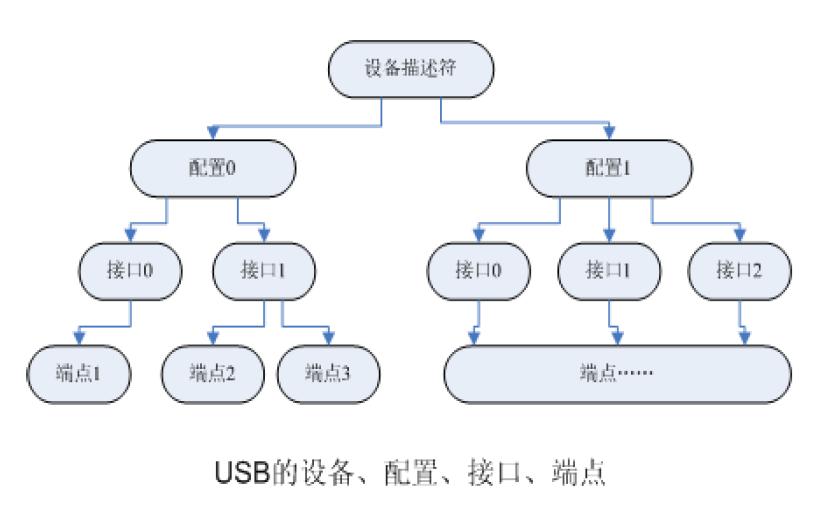
USB protocol analysis
Reprinted at: http://www.cnblogs.com/chd-zhangbo/p/5249955.html First, USB device description structure 1Logical organization In the logical organization of USB devices, there are four levels of devic...
Reprinted USB firmware analysis
http://1438431234.spaces.eepw.com.cn/articles/article/item/114022...

USB WIFI driven analysis
1. USB device enumeration process In the device into the USB port to the device successfully found its own drive this process as follows: When the USB device into the USB port, USB central controller ...
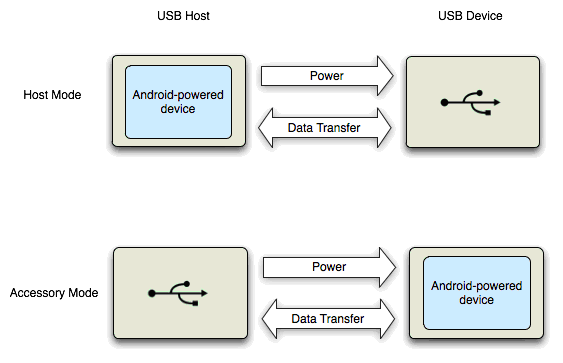
Android USB Accessory analysis
Android USB Accessory achieved under analysis Summary:This article describes some background knowledge USB Accessory and drives from Linux to Android Framework layer, describes the entire imple...
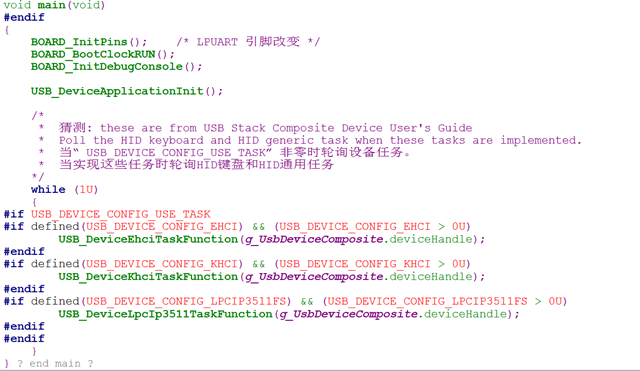
KSDK USB routine analysis
In the USB example file: lite is a simplified version, omitting a lot of functions on the USB stem, and retaining the main function of the USB communication part. I use the full-featured version. The ...
More Recommendation
Analysis of USB Technology
"Take You Through the USB World"In, we have initially introduced the overall structure of USB. This article will continue to introduce the content of USB from the following aspects. What are...

USB-OTG application analysis
If you want to know more about USB insertion check, enumeration process, and descriptor details, you can jump to this topic of mine: Brief explanation of USB protocol Let's get back to our USB-OTG: US...

USB camera driver analysis
The uvc driver is mainly located in the 3.42 kernel\drivers\media\video\uvc folder. Because it is very complicated, only a simple analysis is done here. This picture comes fromUVC specification. It ca...
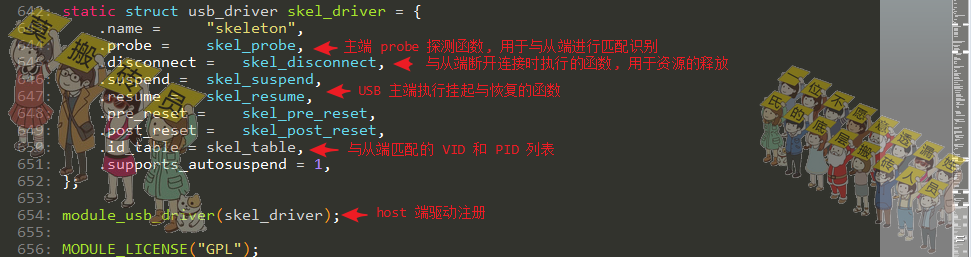
usb-skeleton code analysis
usb-skeleton code analysis Article Directory usb-skeleton code analysis Driver registration Master probe function probe Equipment operation set Turn on the device Turn off the device Write operation R...
STM32 USB enumeration analysis
STM32 USB enumeration analysis Chip: STM32F407VE Compiler: KEIL5 Author: SY Date: 2017-7-19 08:14:14 STM32 USBenumerate The more important registers are used:OTG_HS host port control and status regist...