Centos7 uses systemctl to start the docker container (container)
tags: docker
docker provides simple commands to manipulate containers. But his command to operate the container does not belong to the system.
Because it is too simple, there must be many shortcomings. For example, startup sequence, dependency check, failed service recovery, etc., all require a mature system service management software to complete.
This article uses redis as an example:
Step 1: Download the mirror
# docker pull docker.io/redisStep 2: Start the mirror
# docker run -d --name redis_server -p 6379:6379 redisStep 3: Enter the /etc/systemd/system/ directory and create the docker-container\@.service file
#cd /etc/systemd/system/
#vi /etc/systemd/system/docker-container\@.service
Note: Don't think that docker-container\@.service is missing something, his name is just this.
Copy the following content in
[Unit]
Description=Docker Container %I
Requires=docker.service
After=docker.service

[Service]
Restart=always
ExecStart=/usr/bin/docker start -a %i
ExecStop=/usr/bin/docker stop -t 2 %i

[Install]
WantedBy=default.target
Step 4: Set up boot (note: start docker first before booting the container)
# systemctl enable docker.service
# systemctl enable docker-container\@redis_server.service
Step 5: Check whether it can start normally
# systemctl start docker-container\@redis_server.service
# systemctl status docker-container\@redis_server.service- Step 5 docker-container\@ calledredis_server.service service is actually docker-container\@.service service. redis replaced %i in the third step
Finally try to restart.
-----------------------------------------------------------------------------------------------------
Self-use
systemctl enable docker-container\@dnmp_mysql.service
systemctl enable docker-container\@dnmp_phpfpm.service
systemctl enable docker-container\@dnmp_nginx.service
Intelligent Recommendation
[ ] can not start service with service in the docker container of centos7
You cannot start the service with the service in the docker container of centos7. Error content: Failed to get D-Bus connection: Operation not permitted. Check the information online and say that the ...
Docker uses Tomcat container to start the Java project
1. Install Tomcat image 2. Run the mirror to generate a container 3. View container 4. Enter the container 5. Upload project files in the webapps directory #Copy the host /les/lium/desktop/hello.war f...
The problem that the systemctl command is not executed in the centos7 container
Run the CentOS image in Docker, and display the problem that the command cannot be found when using the SystemCTL command Use when running a container The command -in -law container, focusing on -priv...

[Cloud Special -7]: container -Ubuntu/CentOS Linux platform installation and startup of Docker engine and environment: SystemCTL Start Docker
Author's homepage (Silicon -based workshop of Wenhuo Rock Sugar):Blog of Wenhuo Rock Sugar (Wang Wenbing) URL of this article: Table of contents Foreword: Chapter 1 Install the command of Ubuntu and C...
How to use SystemCTL boot service in the Docker container
Solution: Use --Privileged Parameter Initializer...
More Recommendation
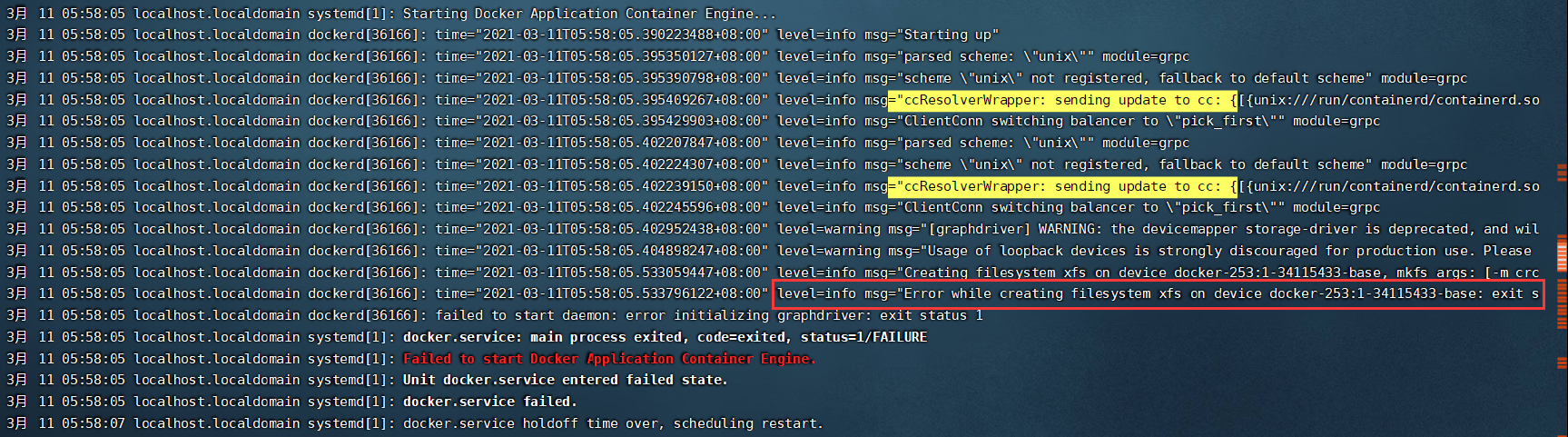
Installing the Docker Newspaper "Failed to Start Docker Application Container Engine" in CentOS7.
1. Open the Docker error, as follows 2. Tracking errors to this (many ways to check during the period) 3, see something in the red box box, Docker error when creating file system XFS, so you can know ...
Docker Container Centos7 systemctl prompts Failed to get D-Bus connection: Operation not permitted
Operating environment Problem Description To deploy mariadb in centos 7.4 container centos-cloudera-1, use systemctl to start mariadb and the prompts are as follows: Solution 1. Create a new container...
Docker container - new container, start container, pause container, and stop container
lab environment CentOS 7.5 container A container is a running instance of a mirror. The difference is that the image is a static read-only file, and the container has a writable file layer that is req...
CentOS7 Docker container failed to start Failed to start Docker Application Container Engine solution
This can be solved by: Check the file system /etc/docker/daemon.json to see if there is this file, it is not tested to create it including the secondary directory docker Enter the following in the dae...
Do not use the SystemCTL and other commands such as SystemCTL and other commands in the docker container
The solution to the commands such as SYSTEMCTL cannot be used in the docker container Solution Use service instead of SystemCTL Give privileges and start in init...