Simple use of EventBus event bus
1. Guide package
compile 'org.greenrobot:eventbus:3.0.0'
2. Add confusion
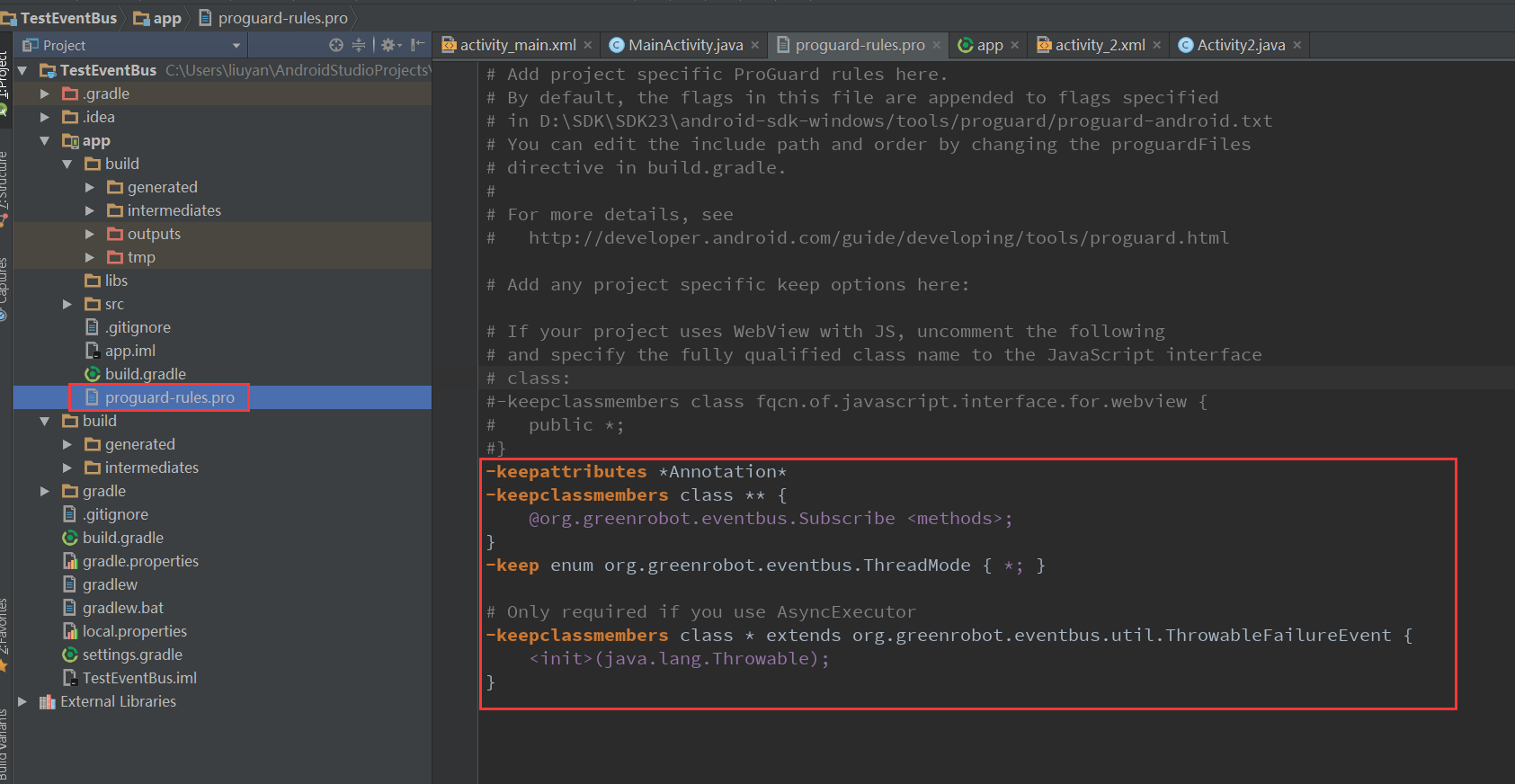
-keepattributes *Annotation*
-keepclassmembers class ** {
    @org.greenrobot.eventbus.Subscribe <methods>;
}
-keep enum org.greenrobot.eventbus.ThreadMode { *; }

# Only required if you use AsyncExecutor
-keepclassmembers class * extends org.greenrobot.eventbus.util.ThrowableFailureEvent {
    <init>(java.lang.Throwable);
}
3. The first activity
public class MainActivity extends AppCompatActivity {
    TextView textView;
    TextView kaiqi;
    Button sub;
    Button tiao;
    int tag = 0;

    @Override
    protected void onCreate(Bundle savedInstanceState) {
        super.onCreate(savedInstanceState);
        setContentView(R.layout.activity_main);
        textView = (TextView) findViewById(R.id.show);
        textView.setText("mainactivity");
        kaiqi = (TextView) findViewById(R.id.kaiqi);
        sub = (Button) findViewById(R.id.sub);
        tiao = (Button) findViewById(R.id.tiao);

        tiao.setOnClickListener(new View.OnClickListener() {
            @Override
            public void onClick(View v) {
                startActivity(new Intent(MainActivity.this , Activity2.class));
            }
        });

        sub.setOnClickListener(new View.OnClickListener() {
            @Override
            public void onClick(View v) {
                if (tag == 0) {
                    EventBus.getDefault().register(MainActivity.this);
                    kaiqi.setText("EventBus registered subscription");
                    tag = 1;
                } else if (tag == 1){
                    EventBus.getDefault().unregister(MainActivity.this);
                                         kaiqi.setText("EventBus cancel registration subscription");
                    tag = 0;
                }

            }
        });
    }

    @Subscribe(threadMode = ThreadMode.MAIN)
         public void onMoonEvent(Message msg) {//Receive the message published by the publisher
        if (msg.what == 1) {
            String lr = (String) msg.obj;
            textView.setText(lr);
        }

    }

         @Subscribe(threadMode = ThreadMode.POSTING, sticky = true) //sticky sticky event, you can subscribe later to view the news published by the publisher first
    public void onMoonStickyEvent(Message msg){
                 int waht = msg.what; //If there are more eventbus, you can use msg.what to judge and distinguish the eventbus you want to specify
        if (waht == 2) {
            textView.setText(msg.obj.toString());
        }
    }


    @Override
    protected void onDestroy() {
        super.onDestroy();
        EventBus.getDefault().unregister(MainActivity.this);
    }

}
4. The second activity
public class Activity2 extends AppCompatActivity {
    TextView show;
    Button fa;
    Button nian;
    int i = 0;

    @Override
    protected void onCreate(Bundle savedInstanceState) {
        super.onCreate(savedInstanceState);
        setContentView(R.layout.activity_2);

        show = (TextView) findViewById(R.id.show2);
        show.setText("activity2");
        fa = (Button) findViewById(R.id.famsg2);
        nian = (Button) findViewById(R.id.nianx);

        fa.setOnClickListener(new View.OnClickListener() {
            @Override
            public void onClick(View v) {
                Message msg = new Message();
                msg.what = 1;
                                 msg.obj = "Welcome to my blog";
                EventBus.getDefault().post(msg);
                finish();
            }
        });

        nian.setOnClickListener(new View.OnClickListener() {
            @Override
            public void onClick(View v) {
                Message msg = new Message();
                msg.what = 2;
                                 msg.obj = "This is a sticky event";
                EventBus.getDefault().postSticky(msg);
                finish();
            }
        });
    }
}
5. Simple functions are achieved
Intelligent Recommendation
Teach you to use the event bus EventBus
Teach you how to use EventBus EventBus: Also known as the event bus. In Vue, you can use EventBus as the concept of a communication bridge, just like all components share the same event center, you ca...
Basic Use of Android Event Bus Eventbus 3.0
I. Overview Android components, communication between threads, can be implemented with Handler, BroadcastReceiver, callback, etc., but the implementation of these methods is a cumbersome. Eventbus can...
[VUE] The use of global event bus (Eventbus)
Table of contents Registration event bus use take over Destruction event bus Notice Registration event bus main.js use take over Destruction event bus Notice After using it, it is best to destroy in B...
Detailed explanation and use of event bus (EventBus) in Vue
Plug -in method: No plug -in method:...
More Recommendation
VUE's EventBus-Event bus bus
In Vue, the data transmission between components is generally passed on the parent -child component, but in the actual application of the project, there is also no relationship of components that need...
Vue.js event bus (EventBus)
The core concept of many modern JavaScript frameworks and libraries is the ability to encapsulate data and UI in modular, reusable components. This allows developers to avoid writing a lot of duplicat...
Vue event bus (EventBus)
Reference article: The core concept of many modern JavaScript frameworks and libraries is the ability to encapsulate data and UI in modular, reusable components. This allows developers to avoid writin...
ionic4-EventBus (event bus)
ionic4-EventBus (event bus) surroundings Welcome to visit me:Ionic4 column Foreword: AngularJs, we can use b r o a d c a s t 、 broadcast、 broadcast、On to send out, listen to the broadcast, to achieve ...
VUE event bus eventbus
table of Contents First, introduction to eventbus Second, the problem needs to be solved Third, how to use (1) Create a js file of EventBus (two) global call (3) Sending an event (4) Receiving events ...