Qualcomm Audio HAL audio channel settings
Click to open the link
1. Overview of Audio Block Diagram
| Front End PCMs    |  SoC DSP  | Back End DAIs | Audio devices |

                    *************
PCM0 <------------> *           * <----DAI0-----> Codec Headset
                    *           *
PCM1 <------------> *           * <----DAI1-----> Codec Speakers/Earpiece
                    *   DSP     *
PCM2 <------------> *           * <----DAI2-----> MODEM
                    *           *
PCM3 <------------> *           * <----DAI3-----> BT
                    *           *
                    *           * <----DAI4-----> DMIC
                    *           *
                    *           * <----DAI5-----> FM
*************- 1
- 2
- 3
- 4
- 5
- 6
- 7
- 8
- 9
- 10
- 11
- 12
- 13
- 14
- 15
- Front End PCMs: Audio front end, one front end corresponds to one PCM device
- Back End DAIs: Audio backend, one backend corresponds to one DAI interface, one FE PCM can be connected to one or more BE DAI
- Audio Device: There are headset, speaker, earpiece, mic, bt, modem, etc.; different devices may be connected to different DAI interfaces, or may be connected to the same DAI interface (as shown above, both Speaker and Earpiece are connected to DAI1)
- Soc DSP: Implement routing function within the scope of this article: connect FE PCMs and BE DAIs, for example, connect PCM0 and DAI1:
                    *************
PCM0 <============> *<====++    * <----DAI0-----> Codec Headset
                    *     ||    *
PCM1 <------------> *     ++===>* <====DAI1=====> Codec Speakers/Earpiece
                    *           *
PCM2 <------------> *           * <----DAI2-----> MODEM
                    *    DSP    *
PCM3 <------------> *           * <----DAI3-----> BT
                    *           *
                    *           * <----DAI4-----> DMIC
                    *           *
                    *           * <----DAI5-----> FM
*************- 1
- 2
- 3
- 4
- 5
- 6
- 7
- 8
- 9
- 10
- 11
- 12
- 13
Qualcomm MSM8996 audio block diagram:

FE PCMs:
- deep_buffer
- low_latency
- mutil_channel
- compress_offload
- audio_record
- usb_audio
- a2dp_audio
- voice_call
BE DAIs:
- SLIM_BUS
- Aux_PCM
- Primary_MI2S
- Secondary_MI2S
- Tertiary_MI2S
- Quatermary_MI2S
2. Usecase and device in HAL
usecase is a popular expression of an audio scene, corresponding to the audio front end, such as:
- low_latency: low-latency playback scenes such as key tones, touch tones, and game background sounds
- deep_buffer: music, video, and other playback scenarios that do not require high latency
- compress_offload: mp3, flac, aac and other formats of audio source playback scene, this audio source does not require software decoding, directly send the data to the hardware decoder (aDSP), the hardware decoder (aDSP) for decoding
- record: ordinary recording scene
- record_low_latency: low-latency recording scene
- voice_call: voice call scenario
- voip_call: network call scenario
/* These are the supported use cases by the hardware.
 * Each usecase is mapped to a specific PCM device.
 * Refer to pcm_device_table[].
 */
enum {
    USECASE_INVALID = -1,
    /* Playback usecases */
    USECASE_AUDIO_PLAYBACK_DEEP_BUFFER = 0,
    USECASE_AUDIO_PLAYBACK_LOW_LATENCY,
    USECASE_AUDIO_PLAYBACK_MULTI_CH,
    USECASE_AUDIO_PLAYBACK_OFFLOAD,
    USECASE_AUDIO_PLAYBACK_ULL,

    /* FM usecase */
    USECASE_AUDIO_PLAYBACK_FM,

    /* HFP Use case*/
    USECASE_AUDIO_HFP_SCO,
    USECASE_AUDIO_HFP_SCO_WB,

    /* Capture usecases */
    USECASE_AUDIO_RECORD,
    USECASE_AUDIO_RECORD_COMPRESS,
    USECASE_AUDIO_RECORD_LOW_LATENCY,
    USECASE_AUDIO_RECORD_FM_VIRTUAL,

    /* Voice usecase */
    USECASE_VOICE_CALL,

    /* Voice extension usecases */
    USECASE_VOICE2_CALL,
    USECASE_VOLTE_CALL,
    USECASE_QCHAT_CALL,
    USECASE_VOWLAN_CALL,
    USECASE_VOICEMMODE1_CALL,
    USECASE_VOICEMMODE2_CALL,
    USECASE_COMPRESS_VOIP_CALL,

    USECASE_INCALL_REC_UPLINK,
    USECASE_INCALL_REC_DOWNLINK,
    USECASE_INCALL_REC_UPLINK_AND_DOWNLINK,

    USECASE_AUDIO_PLAYBACK_AFE_PROXY,
    USECASE_AUDIO_RECORD_AFE_PROXY,

    USECASE_AUDIO_PLAYBACK_EXT_DISP_SILENCE,

    AUDIO_USECASE_MAX
};- 1
- 2
- 3
- 4
- 5
- 6
- 7
- 8
- 9
- 10
- 11
- 12
- 13
- 14
- 15
- 16
- 17
- 18
- 19
- 20
- 21
- 22
- 23
- 24
- 25
- 26
- 27
- 28
- 29
- 30
- 31
- 32
- 33
- 34
- 35
- 36
- 37
- 38
- 39
- 40
- 41
- 42
- 43
- 44
- 45
- 46
- 47
- 48
- 49
device represents audio endpoint devices, including output endpoints (such as speaker, headset, earpiece) and input endpoints (such as headset-mic, builtin-mic). Qualcomm HAL expands the audio equipment, for example, speaker is divided into:
- SND_DEVICE_OUT_SPEAKER: Ordinary outdoor equipment
- SND_DEVICE_OUT_SPEAKER_PROTECTED: Protected external equipment
- SND_DEVICE_OUT_VOICE_SPEAKER: Ordinary call hands-free device
- SND_DEVICE_OUT_VOICE_SPEAKER_PROTECTED: hands-free device with protected call
There are many similars, see platform.h audio device definition for details, only a few are listed below:
/* Sound devices specific to the platform
 * The DEVICE_OUT_* and DEVICE_IN_* should be mapped to these sound
 * devices to enable corresponding mixer paths
 */
enum {
    SND_DEVICE_NONE = 0,

    /* Playback devices */
    SND_DEVICE_MIN,
    SND_DEVICE_OUT_BEGIN = SND_DEVICE_MIN,
    SND_DEVICE_OUT_HANDSET = SND_DEVICE_OUT_BEGIN,
    SND_DEVICE_OUT_SPEAKER,
    SND_DEVICE_OUT_HEADPHONES,
    SND_DEVICE_OUT_HEADPHONES_DSD,
    SND_DEVICE_OUT_SPEAKER_AND_HEADPHONES,
    SND_DEVICE_OUT_SPEAKER_AND_LINE,
    SND_DEVICE_OUT_VOICE_HANDSET,
    SND_DEVICE_OUT_VOICE_SPEAKER,
    SND_DEVICE_OUT_VOICE_HEADPHONES,
    SND_DEVICE_OUT_VOICE_LINE,
    SND_DEVICE_OUT_HDMI,
    SND_DEVICE_OUT_DISPLAY_PORT,
    SND_DEVICE_OUT_BT_SCO,
    SND_DEVICE_OUT_BT_A2DP,
    SND_DEVICE_OUT_SPEAKER_AND_BT_A2DP,
    SND_DEVICE_OUT_AFE_PROXY,
    SND_DEVICE_OUT_USB_HEADSET,
    SND_DEVICE_OUT_USB_HEADPHONES,
    SND_DEVICE_OUT_SPEAKER_AND_USB_HEADSET,
    SND_DEVICE_OUT_SPEAKER_PROTECTED,
    SND_DEVICE_OUT_VOICE_SPEAKER_PROTECTED,
    SND_DEVICE_OUT_END,

    /* Capture devices */
    SND_DEVICE_IN_BEGIN = SND_DEVICE_OUT_END,
    SND_DEVICE_IN_HANDSET_MIC  = SND_DEVICE_IN_BEGIN, // 58
    SND_DEVICE_IN_SPEAKER_MIC,
    SND_DEVICE_IN_HEADSET_MIC,
    SND_DEVICE_IN_VOICE_SPEAKER_MIC,
    SND_DEVICE_IN_VOICE_HEADSET_MIC,
    SND_DEVICE_IN_BT_SCO_MIC,
    SND_DEVICE_IN_CAMCORDER_MIC,
    SND_DEVICE_IN_END,

    SND_DEVICE_MAX = SND_DEVICE_IN_END,
};- 1
- 2
- 3
- 4
- 5
- 6
- 7
- 8
- 9
- 10
- 11
- 12
- 13
- 14
- 15
- 16
- 17
- 18
- 19
- 20
- 21
- 22
- 23
- 24
- 25
- 26
- 27
- 28
- 29
- 30
- 31
- 32
- 33
- 34
- 35
- 36
- 37
- 38
- 39
- 40
- 41
- 42
- 43
- 44
- 45
- 46
The expansion is so much that it is convenient to set the acdb id. For example, although the same speaker equipment is used for the speakerphone and hands-free, these two scenarios will use different algorithms. Therefore, you need to set different acdb id to aDSP to distinguish between SND_DEVICE_OUT_SPEAKER and SND_DEVICE_OUT_VOICE_SPEAKER is to match the respective acdb id.
Because the audio device defined by Qualcomm HAL is inconsistent with that defined by Android Framework, in Qualcomm HAL, the incoming audio device of the framework layer will be converted according to the audio scene. For details, see:
- platform_get_output_snd_device()
- platform_get_input_snd_device()
In Qualcomm HAL, we only see usecase (ie FE PCM) and device, so why wasn't BE DAI mentioned in the previous section mentioned? Very simple, device and BE DAI are "many to one" relationship, device is connected to the only BE DAI (the reverse is not true, BE DAI may be connected to multiple devices), so the device can also determine the connection BE DAI.
3. Audio path connection
Briefly describe the connection process of the audio path of the Qualcomm HAL layer. Such as Audio block diagram overviewAs shown, the audio channel is divided into three major blocks: FE PCMs, BE DAIs, and Devices. These three blocks need to be opened and connected in series to complete the setting of an audio channel.
FE_PCMs <=> BE_DAIs <=> Devices- 1
3.1. Turn on FE PCM
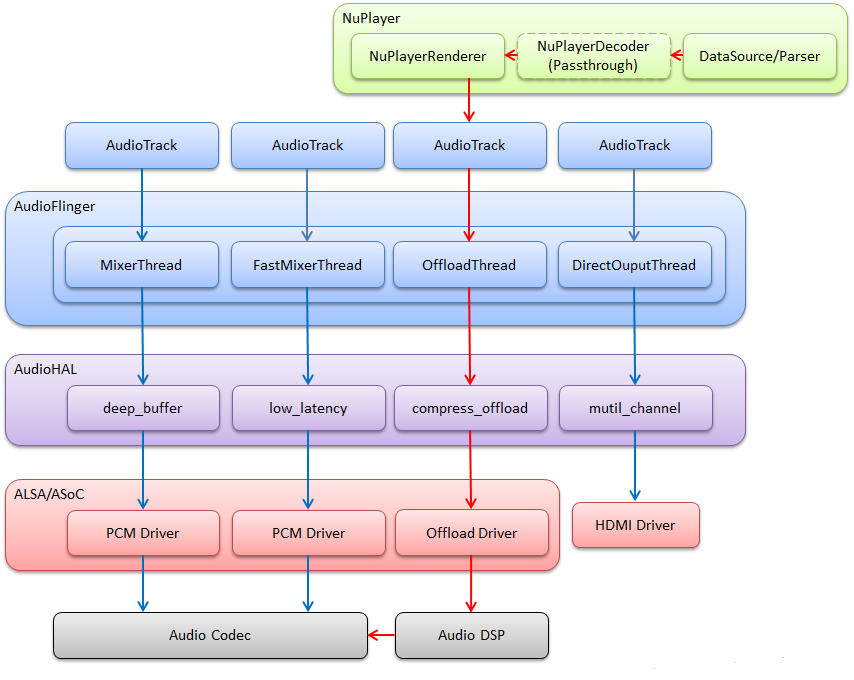
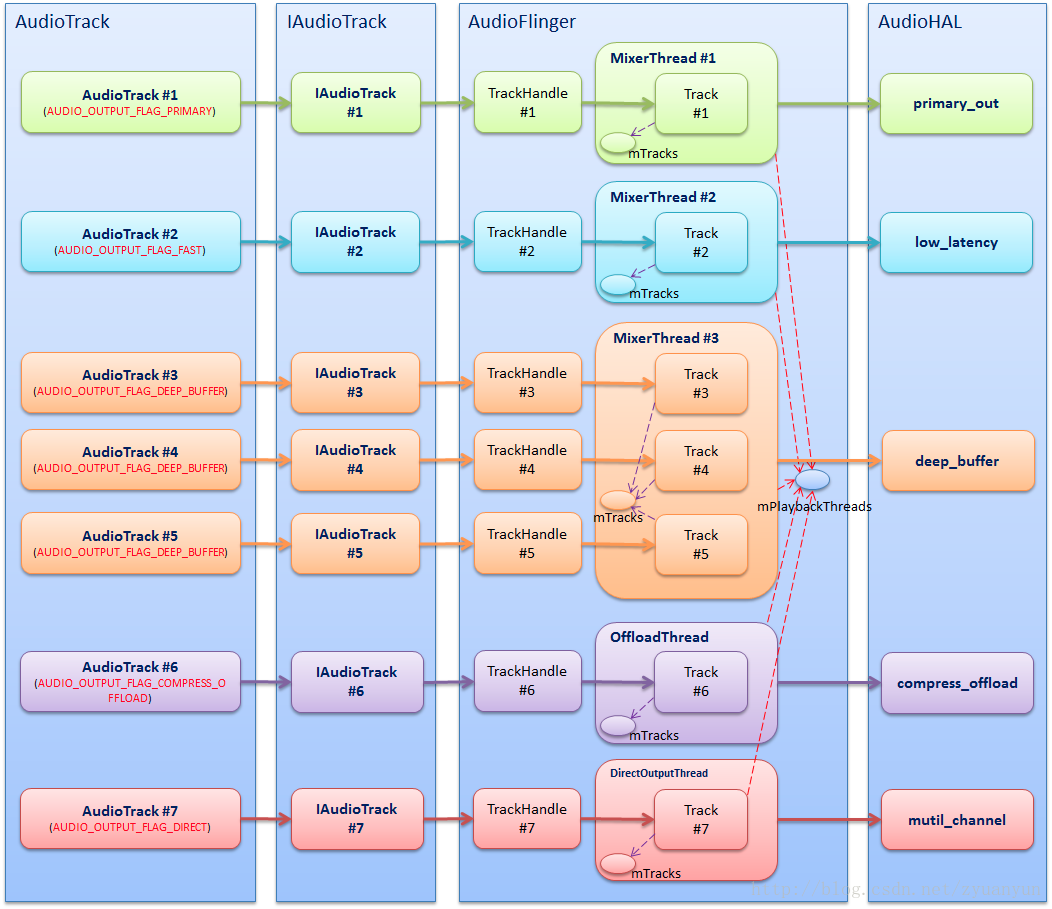
FE PCMs are set when the audio stream is turned on. We must first understand that an audio stream corresponds to a usecase. For details, please refer to:Android audio system: from AudioTrack to AudioFlinger
The relationship between AudioTrack, AudioFlinger Threads, AudioHAL Usecases, AudioDriver PCMs is shown in the following figure:
start_output_stream() code analysis:
// Find the corresponding FE PCM id according to usecase
int platform_get_pcm_device_id(audio_usecase_t usecase, int device_type)
{
    int device_id = -1;
    if (device_type == PCM_PLAYBACK)
        device_id = pcm_device_table[usecase][0];
    else
        device_id = pcm_device_table[usecase][1];
    return device_id;
}

int start_output_stream(struct stream_out *out)
{
    int ret = 0;
    struct audio_usecase *uc_info;
    struct audio_device *adev = out->dev;

    // Find the corresponding FE PCM id according to usecase
    out->pcm_device_id = platform_get_pcm_device_id(out->usecase, PCM_PLAYBACK);
    if (out->pcm_device_id < 0) {
        ALOGE("%s: Invalid PCM device id(%d) for the usecase(%d)",
              __func__, out->pcm_device_id, out->usecase);
        ret = -EINVAL;
        goto error_open;
    }

    // Create a new usecase instance for this audio stream
    uc_info = (struct audio_usecase *)calloc(1, sizeof(struct audio_usecase));

    if (!uc_info) {
        ret = -ENOMEM;
        goto error_config;
    }

    uc_info->id = out->usecase; // usecase corresponding to audio stream
    uc_info->type = PCM_PLAYBACK; // Flow direction of audio stream
    uc_info->stream.out = out;
    uc_info->devices = out->devices; // Initial device for audio streaming
    uc_info->in_snd_device = SND_DEVICE_NONE;
    uc_info->out_snd_device = SND_DEVICE_NONE;
    list_add_tail(&adev->usecase_list, &uc_info->list); // Add the newly created usecase instance to the linked list

    // According to usecase, out->devices, select the corresponding audio device for the audio stream
    select_devices(adev, out->usecase);

    ALOGV("%s: Opening PCM device card_id(%d) device_id(%d) format(%#x)",
          __func__, adev->snd_card, out->pcm_device_id, out->config.format);
    if (!is_offload_usecase(out->usecase)) {
        unsigned int flags = PCM_OUT;
        unsigned int pcm_open_retry_count = 0;
        if (out->usecase == USECASE_AUDIO_PLAYBACK_AFE_PROXY) {
            flags |= PCM_MMAP | PCM_NOIRQ;
            pcm_open_retry_count = PROXY_OPEN_RETRY_COUNT;
        } else if (out->realtime) {
            flags |= PCM_MMAP | PCM_NOIRQ;
        } else
            flags |= PCM_MONOTONIC;

        while (1) {
            // Open FE PCM
            out->pcm = pcm_open(adev->snd_card, out->pcm_device_id,
                               flags, &out->config);
            if (out->pcm == NULL || !pcm_is_ready(out->pcm)) {
                ALOGE("%s: %s", __func__, pcm_get_error(out->pcm));
                if (out->pcm != NULL) {
                    pcm_close(out->pcm);
                    out->pcm = NULL;
                }
                if (pcm_open_retry_count-- == 0) {
                    ret = -EIO;
                    goto error_open;
                }
                usleep(PROXY_OPEN_WAIT_TIME * 1000);
                continue;
            }
            break;
}- 1
- 2
- 3
- 4
- 5
- 6
- 7
- 8
- 9
- 10
- 11
- 12
- 13
- 14
- 15
- 16
- 17
- 18
- 19
- 20
- 21
- 22
- 23
- 24
- 25
- 26
- 27
- 28
- 29
- 30
- 31
- 32
- 33
- 34
- 35
- 36
- 37
- 38
- 39
- 40
- 41
- 42
- 43
- 44
- 45
- 46
- 47
- 48
- 49
- 50
- 51
- 52
- 53
- 54
- 55
- 56
- 57
- 58
- 59
- 60
- 61
- 62
- 63
- 64
- 65
- 66
- 67
- 68
- 69
- 70
- 71
- 72
- 73
- 74
- 75
- 76
- 77
The voice call situation is different, it is not a traditional audio stream, the process is probably like this:
- When entering a call, the upper layer will first set the audio mode to AUDIO_MODE_IN_CALL (HAL interface is adev_set_mode()), and then pass in the audio device routing=$device (HAL interface is out_set_parameters())
- In out_set_parameters(), check if the audio mode is AUDIO_MODE_IN_CALL, if yes, call voice_start_call() to open the FE_PCM of the voice call
3.2. Routing
We see the usecase-related channels in mixer_pahts.xml:
   <path name="deep-buffer-playback speaker">
        <ctl name="QUAT_MI2S_RX Audio Mixer MultiMedia1" value="1" />
    </path>

    <path name="deep-buffer-playback headphones">
        <ctl name="TERT_MI2S_RX Audio Mixer MultiMedia1" value="1" />
    </path>

    <path name="deep-buffer-playback earphones">
        <ctl name="QUAT_MI2S_RX Audio Mixer MultiMedia1" value="1" />
    </path>

    <path name="low-latency-playback speaker">
        <ctl name="QUAT_MI2S_RX Audio Mixer MultiMedia5" value="1" />
    </path>

    <path name="low-latency-playback headphones">
        <ctl name="TERT_MI2S_RX Audio Mixer MultiMedia5" value="1" />
    </path>

    <path name="low-latency-playback earphones">
        <ctl name="QUAT_MI2S_RX Audio Mixer MultiMedia5" value="1" />
</path>- 1
- 2
- 3
- 4
- 5
- 6
- 7
- 8
- 9
- 10
- 11
- 12
- 13
- 14
- 15
- 16
- 17
- 18
- 19
- 20
- 21
- 22
- 23
These paths are actually the routes connecting usecase and device. For example, "deep-buffer-playback speaker" is a route between deep-buffer-playback FE PCM and speaker Device. Turn on "deep-buffer-playback speaker" to connect deep-buffer-playback FE PCM and speaker Device ; Close "deep-buffer-playback speaker", then disconnect the connection between deep-buffer-playback FE PCM and speaker Device.
As mentioned earlier, "device is connected to the only BE DAI, and if you determine the device, you can determine the connected BE DAI", so these routing paths actually imply the connection of BE DAI: FE PCM is not directly to the device, but FE PCM is connected to BE DAI first, and then BE DAI is connected to device. This is helpful to understand the routing control. The routing control is oriented to the connection between FE PCM and BE DAI. The name of the playback type of routing control is generally:$BE_DAI Audio Mixer $FE_PCMThe name of the routing control of the recording type is generally:$FE_PCM Audio Mixer $BE_DAI, Which is easy to tell.
For example, the routing control in the "deep-buffer-playback speaker" channel:
<ctl name="QUAT_MI2S_RX Audio Mixer MultiMedia1" value="1" />- 1
- MultiMedia1: FE PCM corresponding to deep_buffer usacase
- QUAT_MI2S_RX: BE DAI to which the speaker device is connected
- Audio Mixer: indicates the DSP routing function
- value: 1 means connect, 0 means disconnect
The meaning of this control is to connect MultiMedia1 PCM and QUAT_MI2S_RX DAI. This control does not indicate the connection between QUAT_MI2S_RX DAI and speaker device, because there is no routing control between BE DAIs and Devices. As previously emphasized, “device is connected to the only BE DAI, and if the device is determined, the connection can also be determined. BE DAI".
The switch of the routing control not only affects the connection or disconnection of FE PCMs and BE DAIs, but also enables or disables the BE DAIs. To understand this in depth, you need to study the ALSA DPCM (Dynamic PCM) mechanism. .
The route operation function is enable_audio_route()/disable_audio_route(), the names of these two functions are very close, and control the connection or disconnection of FE PCMs and BE DAIs.
The code flow is very simple, the usecase and device are stitched together to form the path name of the route, and then call audio_route_apply_and_update_path() to set the routing path:
const char * const use_case_table[AUDIO_USECASE_MAX] = {
    [USECASE_AUDIO_PLAYBACK_DEEP_BUFFER] = "deep-buffer-playback",
    [USECASE_AUDIO_PLAYBACK_LOW_LATENCY] = "low-latency-playback",
    //...
};

const char * const backend_tag_table[SND_DEVICE_MAX] = {
    [SND_DEVICE_OUT_HANDSET] = "earphones";
    [SND_DEVICE_OUT_SPEAKER] = "speaker";
    [SND_DEVICE_OUT_SPEAKER] = "headphones";
    //...
};

void platform_add_backend_name(char *mixer_path, snd_device_t snd_device,
                               struct audio_usecase *usecase)
{
    if ((snd_device < SND_DEVICE_MIN) || (snd_device >= SND_DEVICE_MAX)) {
        ALOGE("%s: Invalid snd_device = %d", __func__, snd_device);
        return;
    }

    const char * suffix = backend_tag_table[snd_device];

    if (suffix != NULL) {
        strlcat(mixer_path, " ", MIXER_PATH_MAX_LENGTH);
        strlcat(mixer_path, suffix, MIXER_PATH_MAX_LENGTH);
    }
}

int enable_audio_route(struct audio_device *adev,
                       struct audio_usecase *usecase)
{
    snd_device_t snd_device;
    char mixer_path[MIXER_PATH_MAX_LENGTH];

    if (usecase == NULL)
        return -EINVAL;

    ALOGV("%s: enter: usecase(%d)", __func__, usecase->id);

    if (usecase->type == PCM_CAPTURE)
        snd_device = usecase->in_snd_device;
    else
        snd_device = usecase->out_snd_device;

    strlcpy(mixer_path, use_case_table[usecase->id], MIXER_PATH_MAX_LENGTH);
    platform_add_backend_name(mixer_path, snd_device, usecase);
    ALOGD("%s: apply mixer and update path: %s", __func__, mixer_path);
    audio_route_apply_and_update_path(adev->audio_route, mixer_path);
    ALOGV("%s: exit", __func__);
    return 0;
}- 1
- 2
- 3
- 4
- 5
- 6
- 7
- 8
- 9
- 10
- 11
- 12
- 13
- 14
- 15
- 16
- 17
- 18
- 19
- 20
- 21
- 22
- 23
- 24
- 25
- 26
- 27
- 28
- 29
- 30
- 31
- 32
- 33
- 34
- 35
- 36
- 37
- 38
- 39
- 40
- 41
- 42
- 43
- 44
- 45
- 46
- 47
- 48
- 49
- 50
- 51
- 52
3.3. Open Device
In the Android audio framework layer, the audio device only represents the input and output endpoints. It does not care which widgets are passed between the BE DAIs and the endpoints. But when we do the bottom layer, we must know clearly: from BE DAIs to the endpoints, what parts of the entire path have experienced. The release path as shown below:

In order to make the sound output from the speaker endpoint, we need to open the AIF1, DAC1, SPKOUT components, and connect them in series, so that the audio data can follow this path (AIF1>DAC1>SPKOUT>SPEAKER) all the way to the speaker.
In the audio hardware driver, define various controls for the switch or connection of components, for example, the control "SPKL DAC1 Switch" is used to control the connection or disconnection of SPKL and DAC1. For details, please refer to:Linux ALSA Audio System: Physical Link
We see the speaker channel in mixer_pahts.xml:
   <path name="speaker">
        <ctl name="SPKL DAC1 Switch" value="1" />
        <ctl name="DAC1L AIF1RX1 Switch" value="1" />
        <ctl name="DAC1R AIF1RX2 Switch" value="1" />
</path>- 1
- 2
- 3
- 4
- 5
These device paths are set by enable_snd_device()/disable_snd_device():
int enable_snd_device(struct audio_device *adev,
                      snd_device_t snd_device)
{
    int i, num_devices = 0;
    snd_device_t new_snd_devices[SND_DEVICE_OUT_END];
    char device_name[DEVICE_NAME_MAX_SIZE] = {0};

    if (snd_device < SND_DEVICE_MIN ||
        snd_device >= SND_DEVICE_MAX) {
        ALOGE("%s: Invalid sound device %d", __func__, snd_device);
        return -EINVAL;
    }

    // device reference count accumulation
    adev->snd_dev_ref_cnt[snd_device]++;

    // Find the corresponding device_name according to snd_device
    if(platform_get_snd_device_name_extn(adev->platform, snd_device, device_name) < 0 ) {
        ALOGE("%s: Invalid sound device returned", __func__);
        return -EINVAL;
    }
    // The device has been opened, go back directly, and the device will not be opened repeatedly
    if (adev->snd_dev_ref_cnt[snd_device] > 1) {
        ALOGV("%s: snd_device(%d: %s) is already active",
              __func__, snd_device, device_name);
        return 0;
    }


    // If it is a device with protection, then stop the calibration operation first
    if (audio_extn_spkr_prot_is_enabled())
         audio_extn_spkr_prot_calib_cancel(adev);

    if (platform_can_enable_spkr_prot_on_device(snd_device) &&
         audio_extn_spkr_prot_is_enabled()) {
       // Check whether the protected device has a legal acdb id, if there is no legal acdb id, the protection algorithm cannot be called
       if (platform_get_spkr_prot_acdb_id(snd_device) < 0) {
           adev->snd_dev_ref_cnt[snd_device]--;
           return -EINVAL;
       }
       audio_extn_dev_arbi_acquire(snd_device);
       // Turn on the device with protection, and the protection algorithm also starts to work
       if (audio_extn_spkr_prot_start_processing(snd_device)) {
            ALOGE("%s: spkr_start_processing failed", __func__);
            audio_extn_dev_arbi_release(snd_device);
            return -EINVAL;
        }
    } else if (platform_split_snd_device(adev->platform,
                                         snd_device,
                                         &num_devices,
                                         new_snd_devices) == 0) {
        // In ringtone mode, multiple devices are split: for example, SND_DEVICE_OUT_SPEAKER_AND_HEADPHONES is split into
        // SND_DEVICE_OUT_SPEAKER + SND_DEVICE_OUT_HEADPHONES, then turn on the speakers one by one
        // and headphones equipment
        for (i = 0; i < num_devices; i++) {
            enable_snd_device(adev, new_snd_devices[i]);
        }
    } else {
        ALOGD("%s: snd_device(%d: %s)", __func__, snd_device, device_name);

       // A2DP: turn on the Bluetooth device
       if ((SND_DEVICE_OUT_BT_A2DP == snd_device) &&
           (audio_extn_a2dp_start_playback() < 0)) {
           ALOGE(" fail to configure A2dp control path ");
           return -EINVAL;
       }

        audio_extn_dev_arbi_acquire(snd_device);
        // Set device path
        audio_route_apply_and_update_path(adev->audio_route, device_name);
    }
    return 0;
}- 1
- 2
- 3
- 4
- 5
- 6
- 7
- 8
- 9
- 10
- 11
- 12
- 13
- 14
- 15
- 16
- 17
- 18
- 19
- 20
- 21
- 22
- 23
- 24
- 25
- 26
- 27
- 28
- 29
- 30
- 31
- 32
- 33
- 34
- 35
- 36
- 37
- 38
- 39
- 40
- 41
- 42
- 43
- 44
- 45
- 46
- 47
- 48
- 49
- 50
- 51
- 52
- 53
- 54
- 55
- 56
- 57
- 58
- 59
- 60
- 61
- 62
- 63
- 64
- 65
- 66
- 67
- 68
- 69
- 70
- 71
- 72
- 73
Notable points are:
- Device reference count: Each device has its own reference count snd_dev_ref_cnt, the reference count is accumulated in enable_snd_device(), if it is greater than 1, it means that the device has been opened, then the device will not be opened repeatedly; the reference count is in disable_snd_device() Decrement, if it is 0, it means that no usecase needs the device, then turn off the device.
- Protected external equipment: The functions with the prefix of “audio_extn_spkr_prot” are related functions of the protected external devices. These protected external devices are different from other devices. Although they are output devices, they often need to open a PCM_IN as I/V Feedback Only with I/V Feedback protection algorithm can it work normally.
- Segmentation of multiple output devices: Multi-output device, generally refers to the situation where the external device and other devices output at the same time in the ringtone mode; platform_split_snd_device() splits the multi-output device, such as SND_DEVICE_OUT_SPEAKER_AND_HEADPHONES into SND_DEVICE_OUT_SPEAKER + SND_DEVICE_OUT_HEADPHONES, and then turn on speaker and headphones one by one. Why divide the multi-output device into the form of external device + other devices? At present, the external devices of smart phones are generally protected and need to run the speaker protection algorithm, while other devices such as Bluetooth headsets may also need to run the aptX algorithm. If there is no split, only an acdb id can be issued, and the speaker cannot be protected. Both the algorithm and the aptX algorithm are scheduled. When splitting multiple output devices, you also need to follow a rule: if these devices are connected to the same BE DAI, there is no need to split.
int platform_split_snd_device(void *platform,
                              snd_device_t snd_device,
                              int *num_devices,
                              snd_device_t *new_snd_devices)
{
    int ret = -EINVAL;
    struct platform_data *my_data = (struct platform_data *)platform;
    if (NULL == num_devices || NULL == new_snd_devices) {
        ALOGE("%s: NULL pointer ..", __func__);
        return -EINVAL;
    }

    /*
     * If wired headset/headphones/line devices share the same backend
     * with speaker/earpiece this routine returns -EINVAL.
     */
    if (snd_device == SND_DEVICE_OUT_SPEAKER_AND_HEADPHONES &&
        !platform_check_backends_match(SND_DEVICE_OUT_SPEAKER, SND_DEVICE_OUT_HEADPHONES)) {
        *num_devices = 2;

        new_snd_devices[0] = SND_DEVICE_OUT_SPEAKER;
        new_snd_devices[1] = SND_DEVICE_OUT_HEADPHONES;
ret = 0;- 1
- 2
- 3
- 4
- 5
- 6
- 7
- 8
- 9
- 10
- 11
- 12
- 13
- 14
- 15
- 16
- 17
- 18
- 19
- 20
- 21
- 22
- 23
4. Audio device switching
- To play back scenes, the framework layer calls back the HAL layer interface out_set_parameters(“routing=$device”) to switch the output device
- For recording scenes, the frame layer callback HAL layer interface in_set_parameters(“routing=$device”) to switch input devices
Both of these functions ultimately call select_device() to switch devices. The select_device() function is very complicated, and only the main process is described here.
select_devices
  disable_audio_route
  disable_snd_device
     check_usecases_codec_backend Check if other usecases also follow the switching device
      platform_check_backends_match
      disable_audio_route
      disable_snd_device
      enable_snd_device
      enable_audio_route
  enable_snd_device
enable_audio_route- 1
- 2
- 3
- 4
- 5
- 6
- 7
- 8
- 9
- 10
- 11
4.1. Device switching in single usecase scenario
4.2. Device switching in multiple usecase scenarios
–to be continued
Intelligent Recommendation
Qualcomm audio architecture (1)
I. Overview Audio is almost any machine, it is a must-have function, from an early purely sounded recorder, to the later MP3, and the current mobile phone, it has been accompanying our lives, the func...
Qualcomm Audio architecture (2)
1.2 HAL (hardware abstract layer) In the previous article, we discussed some code processes of the Audio on the Framework layer and write down to see the HAL layer. In most drivers, the HAL layer play...
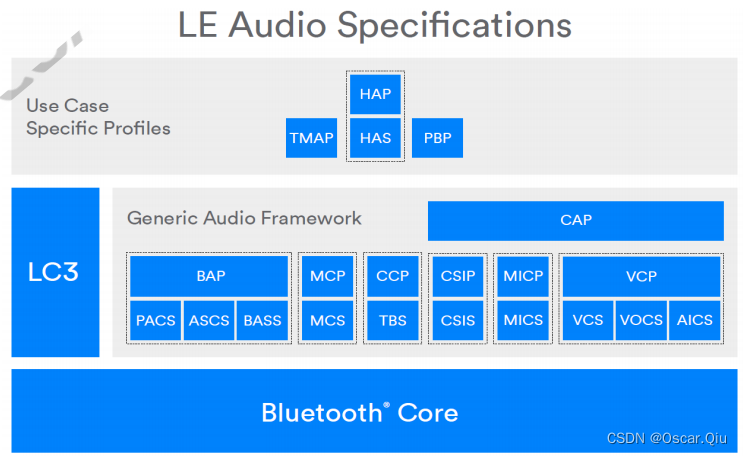
Qualcomm LE Audio Profiles
Development document box diagram: CAP: Common Audio Profile BAP: Basic Audio Profile - Define the supporting codec and Qos configuration TMAP: Telephony and Media Audio Profile - Define the minimum ab...
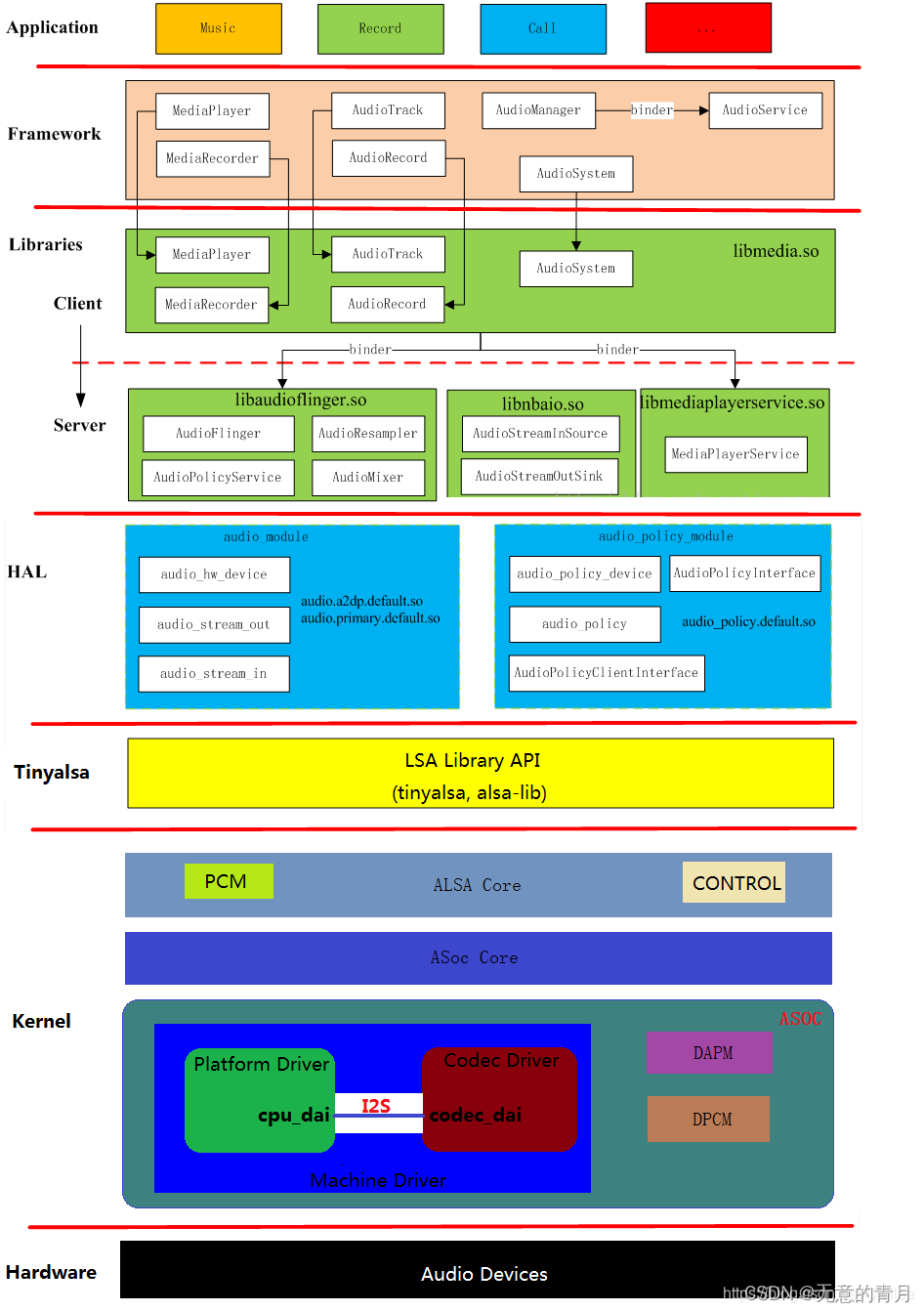
Qualcomm Audio architecture (3)
1. Kernel layer Due to its special work, audio has made its structure particularly complicated, and the ALSA architecture is introduced on the basis of its own structure. The streamlined version is al...
More Recommendation
Audio Hal call recording
Background needs Most of the APPs that make a speech recognition and the answering function need to separate the call-up on the row. Voice_DOWNLINK / VOICE_UPLINK separately separates real-time escape...
AUDIO loading HAL (LoadHWModule)
AUDIO loading HAL (LoadHWModule) Recently, in the process of organizing AUDIO problems, it will involve some process processing. There are no more processes to track in detail, and some of the content...
[Qualcomm Audio] How to encapsulate audio controls?
The audio code involves a wide range, this document describes how to encapsulate audio controls for use in the HAL layer. Here takes AW87519 chip debugging as an example to introduce the packaged audi...
Two-channel audio into a mono audio
Record your own writing cut into two-channel audio mono audio code Original audio format:Sampling rate 16KHZ Sampling point accuracy of 16 pairs of channel ...