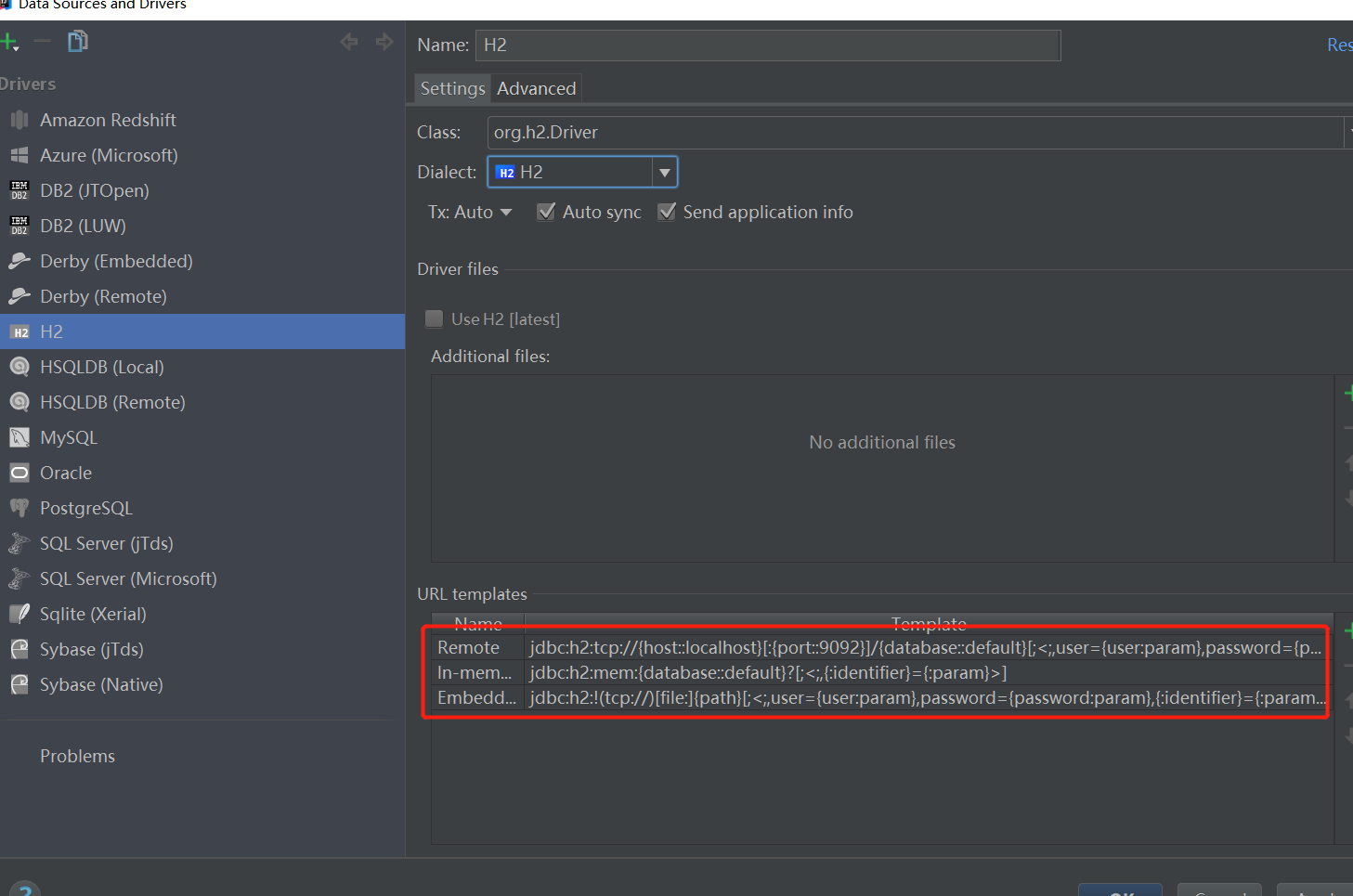
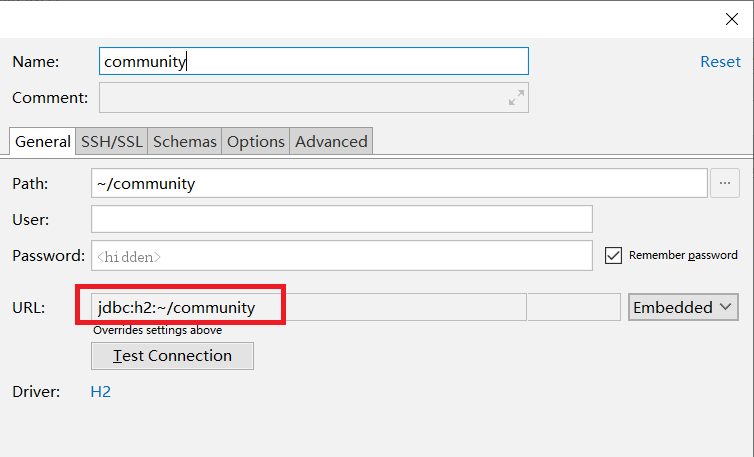
H2 as an embedded database, its biggest advantage is that you can embed into our Web applications, Web applications, and we are bound together, become part of our Web application. Let's show you how to embed H2 database to our Web application.
First, set up a test environment and project
1.1, set up a test project JavaWeb
Create an] [H2DBTest JavaWeb project, H2 database to find the jar file, as shown below:
H2 database is a jar file, this file contains a Jar manner using JDBC driver class used when connecting the database H2, be added to the [items] H2DBTest "h2-1.4.183.jar", as shown below:
Second, start the H2 database
Since it is you want to H2 database as part of our Web applications embedded into them, then we will start the service H2 database in Web applications, so that we can connect to the H2 database, so we can write a dedicated database service used to start the H2 listener (listener), listener following sample code:
 1 package me.gacl.web.listener;
 2
 3 import java.sql.SQLException;
 4 import javax.servlet.ServletContextEvent;
 5 import javax.servlet.ServletContextListener;
 6 import org.h2.tools.Server;
 7
 8 /**
 9 * @ClassName: H2DBServerStartListener
10 * @Description: H2 database used to start the service listener, in the application of the system to start the service initialized H2 Database
 11 * @author: Aloof Wolf
 12 * @date: 2014-12-20 11:43:39 PM
13 *
14 */
15 public class H2DBServerStartListener implements ServletContextListener {
16
 17 // H2 database server instance startup
18     private Server server;
19     /*
 20 * Web start H2 database application initialization
21      */
22     public void contextInitialized(ServletContextEvent sce) {
23         try {
 24 System.out.println ( "Starting h2 database ...");
 Org.h2.tools.Server use port 25 // This class creates a H2 database services and start the service, without specifying any parameters, then the default database occupancy during H2 8082 is started
26             server = Server.createTcpServer().start();
 27 System.out.println ( "h2 database started successfully ...");
28         } catch (SQLException e) {
 29 System.out.println ( "Start h2 database error:" + e.toString ());
30             e.printStackTrace();
31             throw new RuntimeException(e);
32         }
33     }
34
35     /*
 36 * Web database application to stop the destruction of H2
37      */
38     public void contextDestroyed(ServletContextEvent sce) {
39         if (this.server != null) {
 40 // stop H2 Database
41             this.server.stop();
42             this.server = null;
43         }
44     }
45 }
After the listener written, we register the listener in Web.xml file. In addition, because we want to H2 database embedded in our Web application which, in order to facilitate access to Console H2 provided by the database, we can Web.xml Servlet configuration file for database access H2 Console's.
Web.xml configuration file is as follows:
  1 <-! Listener to start and stop the use of the database ->
 2       <listener>
 3         <listener-class>me.gacl.web.listener.H2DBServerStartListener</listener-class>
 4     </listener>
 5
   6 <-! Use of Servlet H2 H2 Console Console is a standalone application, including its own Web server, but it can serve as a servlet ->
 7     <servlet>
 8         <servlet-name>H2Console</servlet-name>
 9         <servlet-class>org.h2.server.web.WebServlet</servlet-class>
10          <init-param>
11             <param-name>webAllowOthers</param-name>
12             <param-value></param-value>
13         </init-param>
14         <init-param>
15             <param-name>trace</param-name>
16             <param-value></param-value>
17         </init-param>
18         <load-on-startup>1</load-on-startup>
19     </servlet>
 20 <! - mapping H2 console access path ->
21     <servlet-mapping>
22         <servlet-name>H2Console</servlet-name>
23         <url-pattern>/console/*</url-pattern>
24     </servlet-mapping>
Once you've configured Listener and Servlet access Console, we can put H2 database as part of our Web application to use.
Web applications deployed to Tomcat server, when you start Tomcat server, in the console you can see the H2 database startup success message, as shown below:
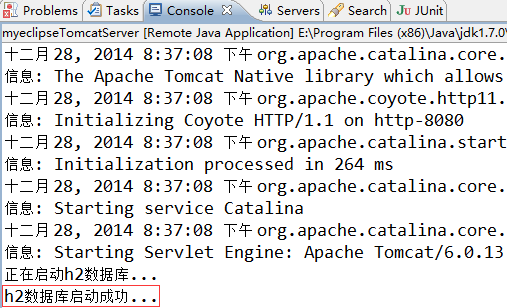
To further verify whether it is through H2 database listener to start a normal, we can access at Console H2 database, enter the access address: "http: // localhost: 8080 / H2DBTest / console /" access, as shown below :
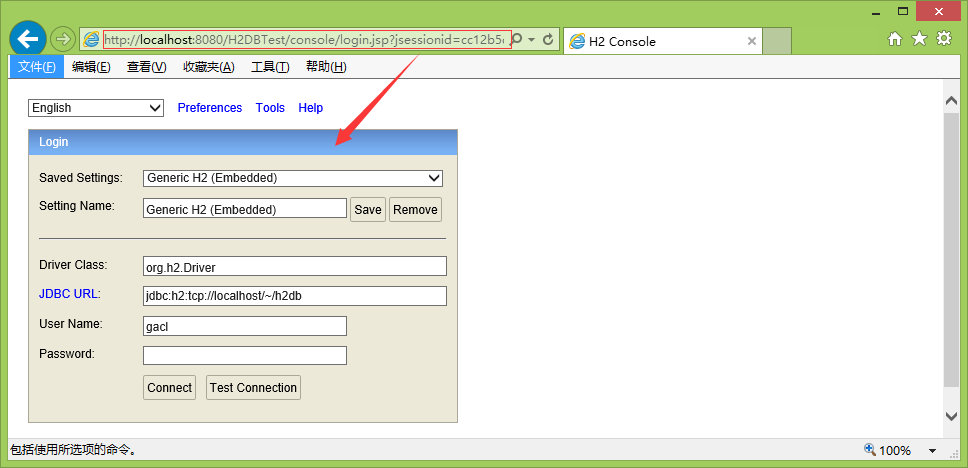
See H2 Database Console login page, indicating that the H2 database has been properly started.
Third, the registration database functions to customize the database to H2
H2 as a database, and other types of databases, will own some database functions for our use, but limited function H2 database provided by the database, can not meet the needs of our development, and fortunately, H2 database support custom database function, so we can write database functions to meet our needs based on the development of practical application scenarios.
Here is how to implement a custom database function H2
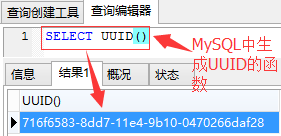
There in a MySQL database function is used to generate a UUID UUID executes "SELECT UUID ()" function can be seen UUID UUID generated, as shown below:
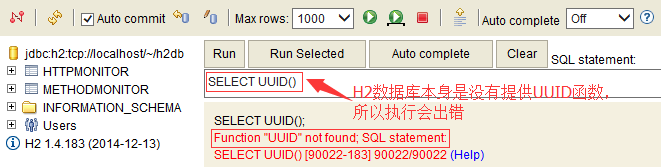
And by default, H2 database is not provided with the UUID function for us to use, as shown below:
So now we come to realize a UUID function, and then register the database to which H2, H2 database so that it supports the UUID function, which would be divided into two steps:
(1) is implemented in Java custom function method.
(2) the Java custom function registered in the H2 database.
First we UUID to achieve this function, in java, a UUID generation method is to use a class randomUUID java.util.UUID inside () method to generate, as a package uuid method, as follows:
 1 package h2db.function.ext;
 2
 3 import java.util.UUID;
 4
 5 /**
 6 * @ClassName: H2DBFunctionExt
   7 * @Description: Extended database functions for H2
   8 * @author: Aloof Wolf
   9 * @date: 2014-12-20 11:20:34 PM
10 *
11 */
12 public class H2DBFunctionExt {
13
14     /**
 15 * Usage: SELECT uuid ();
 16 * H2 registration database uuid function: CREATE ALIAS FOR "h2db.function.ext.H2DBFunctionExt.uuid" uuid;
17     * @Method: uuid
 18 * @Description: uuid function implemented MySQL database, for generating a UUID
 19 * @Anthor: Aloof Wolf
20     *
21     * @return
22     */
23     public static String uuid(){
24         return UUID.randomUUID().toString();
25     }
26 }
In this way, our uuid function even if it is written well, should be noted, classes and methods must be public (Public), and the method must be static (static), as used in the method of the Connection object needs to turn it off.
Next we want to H2 registered in the database shall be implemented "CREATE ALIAS" statement, SQL syntax is as follows:
1 CREATE ALIAS [IF NOT EXISTS] newFunctionAliasName [DETERMINISTIC] FOR classAndMethodName
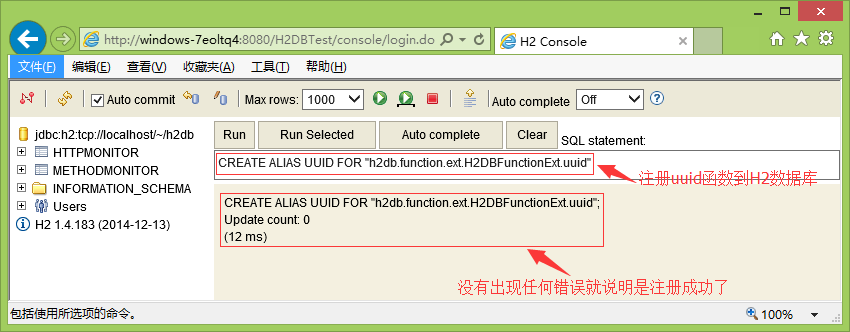
Wherein [] enclosed part is optional, the present embodiment is to be performed by the statement:CREATE ALIAS UUID FOR "h2db.function.ext.H2DBFunctionExt.uuid", an execution result as shown below:
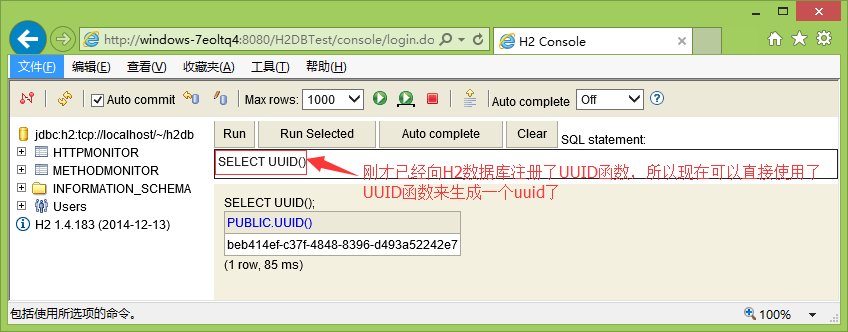
Such H2 database on more than a UUID function can be used, we execute "SELECT UUID ()" statement again can be resolved properly H2 database, the results as shown below:
The above is for an extension of H2 database function, we added a new function to the UUID H2 database used to generate a uuid. So when the function H2 database provided did not satisfy the actual needs of our development, we can use this method to extend the function of the H2 database. Then show you a one-time extension H2 database to more than one function, we write a H2DBFunctionExt class, write extension functions for H2 database in the class, the code is as follows:
 1 package h2db.function.ext;
 2
 3 import java.net.InetAddress;
 4 import java.net.UnknownHostException;
 5 import java.text.ParseException;
 6 import java.text.SimpleDateFormat;
 7 import java.util.Date;
 8 import java.util.UUID;
 9
10 /**
11 * @ClassName: H2DBFunctionExt
 12 * @Description: Extended database functions for H2
 13 * @author: Aloof Wolf
 14 * @date: 2014-12-20 11:20:34 PM
15 *
16 */
17 public class H2DBFunctionExt {
18
19     /**
 20 * Usage: SELECT uuid ();
 21 * H2 registration database uuid function: CREATE ALIAS IF NOT EXISTS FOR "h2db.function.ext.H2DBFunctionExt.uuid" uuid;
22     * @Method: uuid
 23 * @Description: uuid achieve MySQL database function for generating UUID
 24 * @Anthor: Aloof Wolf
25     *
26     * @return
27     */
28     public static String uuid(){
29         return UUID.randomUUID().toString();
30     }
31
32     /**
 33 * H2 Database Registration currentTime function: CREATE ALIAS IF NOT EXISTS FOR "h2db.function.ext.H2DBFunctionExt.now" currentTime;
34     * @Method: now
 35 * @Description: realized now () function MySQL database, for generating a current system time
 36 * @Anthor: Aloof Wolf
37     *
38     * @return
39     */
40     public static String now(){
41         return new Date().toLocaleString();
42     }
43
44     /**
 45 * H2 Database Registration IP function: CREATE ALIAS IF NOT EXISTS IP FOR "h2db.function.ext.H2DBFunctionExt.getIp";
46     * @Method: getIp
47     * @Description:
 48 * @Anthor: Aloof Wolf
49     *
50     * @return
51     */
52     public static String getIp(){
53         try {
54             InetAddress addr = InetAddress.getLocalHost();
 55 // Get the local IP
56             return addr.getHostAddress();
57         } catch (UnknownHostException e) {
58             e.printStackTrace();
 59 return "unknown IP address";
60         }
61     }
62
63     /**
 64 * H2 Database Registration date_format function: CREATE ALIAS IF NOT EXISTS FOR "h2db.function.ext.H2DBFunctionExt.date_format" date_format;
65     * @Method: date_format
 66 * @Description: achieve date_format MySQL database () function to format dates
 67 * @Anthor: Aloof Wolf
68     * @param date
69     * @param pattern
70     * @return
71     */
72     public static String date_format(String date,String pattern){
73         if (date != null) {
74             SimpleDateFormat sdf = new SimpleDateFormat(pattern);
75             try {
76                 Date temp = sdf.parse(date);
77                 return sdf.format(temp);
78             } catch (ParseException e) {
79                 e.printStackTrace();
80             }
81         }
82         return "";
83     }
84 }
In order to achieve the bulk registration extension functions H2 database, we can write a Servlet, dedicated to registering spread function code is as follows:
 1 package me.gacl.sys.init;
 2
 3
 4 import java.sql.Connection;
 5 import java.sql.Statement;
 6
 7 import javax.servlet.ServletException;
 8 import javax.servlet.http.HttpServlet;
 9
10 import me.gacl.util.JdbcUtil;
11
12 /**
13 * @ClassName: RegisterH2ExtFuncServlet
 Spread function H2 registration database: 14 * @Description
 15 * @author: Aloof Wolf
 16 * @date: 2014-12-20 11:47:03 PM
17 *
18 */
19 public class RegisterH2ExtFuncServlet extends HttpServlet {
20
21     /**
22     * @Field: serialVersionUID
23     */
24     private static final long serialVersionUID = 4379248469825545593L;
25
26     public void init() throws ServletException {
 27 // 1, registered uuid function of SQL statements
28         String sql1 = "CREATE ALIAS IF NOT EXISTS uuid FOR \"h2db.function.ext.H2DBFunctionExt.uuid\"";
 29 // 2, registered currentTime function of SQL statements
30         String sql2 = "CREATE ALIAS IF NOT EXISTS currentTime FOR \"h2db.function.ext.H2DBFunctionExt.now\"";
 31 // 3, registered IP function of SQL statements
32         String sql3 = "CREATE ALIAS IF NOT EXISTS IP FOR \"h2db.function.ext.H2DBFunctionExt.getIp\"";
33 // 4, registered date_format function of SQL statements
34         String sql4 = "CREATE ALIAS IF NOT EXISTS date_format FOR \"h2db.function.ext.H2DBFunctionExt.date_format\"";
35         Connection connection = null;
36         Statement stmt = null;
37         try {
 38 // Get a database connection
39             connection = JdbcUtil.getConnection();
 40 // Get the Statement object
41             stmt = connection.createStatement();
 42 // SQL Adding to be executed
43             stmt.addBatch(sql1);
44             stmt.addBatch(sql2);
45             stmt.addBatch(sql3);
46             stmt.addBatch(sql4);
 47 @ 4 above batch execution SQL
48             stmt.executeBatch();
 49 System.out.println ( "H2 database extension function successfully registered!");
50             stmt.clearBatch();
51         } catch (Exception e) {
 52 System.out.println ( "H2 database extension function registration failed!");
53             e.printStackTrace();
54         }finally{
55             try {
56                 stmt.close();
57                 connection.close();
58             } catch (Exception e2) {
59                 e2.printStackTrace();
60             }
61         }
62     }
63 }
Sign RegisterH2ExtFuncServlet in the Web.xml
1 <servlet> 2 <description> H2 spread function registration database </ description> 3 <servlet-name>RegisterH2DBExtFunction</servlet-name> 4 <servlet-class>me.gacl.sys.init.RegisterH2ExtFuncServlet</servlet-class> 5 <!-- 6 1, load-on-startup element labeled container is loaded at boot time on this the servlet (instantiate and call its init () method). 72, its value must be an integer, a sequence should be loaded servlet 83, when the value of 0 or greater than 0, represents the container when the application starts to load and initialize the servlet; 94, when the value is smaller than 0 or not specified, then the load will go to the container when the servlet is selected. 105, the value of a positive number, the higher the priority of the servlet, the more loaded first when the application starts. 116, when the values are the same, the container loading order of their choice. 12 Therefore, <load-on-startup> x </ load-on-startup>, 1,2,3,4,5 value of x is represented by priority, rather than the start delay time. 13 --> 14 <load-on-startup>1</load-on-startup> 15 </servlet>
RegisterH2ExtFuncServlet to batch execute SQL statements, and therefore need to connect the H2 database can execute, tools JdbcUtil provides a method for obtaining a database connection, JdbcUtil code is as follows:
 1 /**
 2  *
 3  */
 4 package me.gacl.util;
 5
 6 import java.io.InputStream;
 7 import java.sql.Connection;
 8 import java.util.Properties;
 9 import org.h2.jdbcx.JdbcConnectionPool;
10
11 public class JdbcUtil {
12
13     /**
 14 * H2 comes with a database connection pool
15      */
16     private static JdbcConnectionPool cp = null;
17
18     static{
19         try {
 20 // Load h2config.properties src directory
21             InputStream in = JdbcUtil.class.getClassLoader().getResourceAsStream("h2config.properties");
22             Properties prop = new Properties();
23             prop.load(in);
 24 // create a database connection pool
25             cp = JdbcConnectionPool.create(prop.getProperty("JDBC_URL"), prop.getProperty("USER"), prop.getProperty("PASSWORD"));
26         } catch (Exception e) {
 27 System.out.println ( "abnormal connection pool initialization");
28             e.printStackTrace();
29         }
30     }
31
32     /**
33     * @Method: getConnection
 34 * @Description: get a database connection
 35 * @Anthor: Aloof Wolf
36     * @return
37     * @throws Exception
38     */
39     public static Connection getConnection() throws Exception{
40         return cp.getConnection();
41     }
42
43     public static JdbcConnectionPool getCp() {
44         return cp;
45     }
46 }
h2config.properties configuration information as follows:
JDBC_URL=jdbc:h2:tcp://localhost/~/h2db
USER=gacl
PASSWORD=123
When the web application starts, it will execute the Servlet init method RegisterH2ExtFuncServlet in, inside the init process is to obtain a database connection H2 by JdbcUtil tools, then create a Statement object and then execute the SQL database to register with the H2 batch by the Statement object spread function.
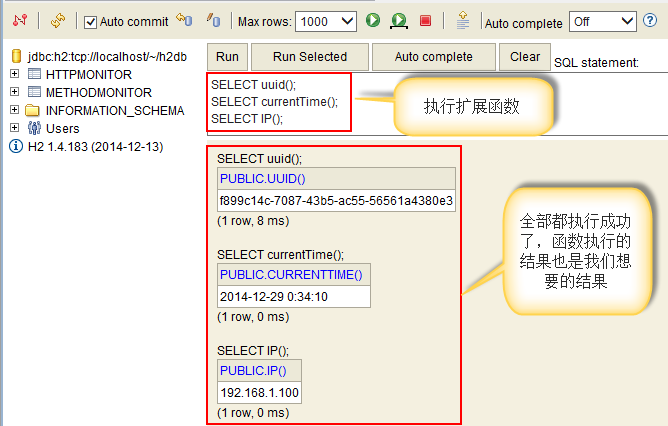
RegisterH2ExtFuncServlet execution process if there is no error, it shows all of the extended functions for H2 database have successfully registered, we can go to the H2 Console to verify the aforementioned four expansion function, as shown below:
About the use of embedded H2 database in Web applications, as well as for the content of H2 extend the database functions would explain so much.