The use of Vue event bus (EventBus)
Vue components are very common with parent-child component communication and brother component communication. The communication between parent and child components is very simple. The parent component will pass data down to the child component through props. When the child component has something to tell the parent component, it will tell the parent component through the $emit event.
But the two pages have no relationship between introduction and introduction, how should they communicate?
If our application does not need a library like Vuex to handle data communication between components, we can consider the event bus in Vue, namelyEventBusTo communicate.
Use of EventBus
1. Initialization(There are two ways), first you need to create an event bus and export it so that other modules can use or monitor it.
(1) Create a new .js file, such as event-bus.js
// event-bus.js
import Vue from 'vue'
export const EventBus = new Vue()
(2) EventBus can be initialized directly in main.js in the project
// main.js
Vue.prototype.$EventBus = new Vue()
Note that the EventBus initialized in this way is a global event bus.
2. Send event
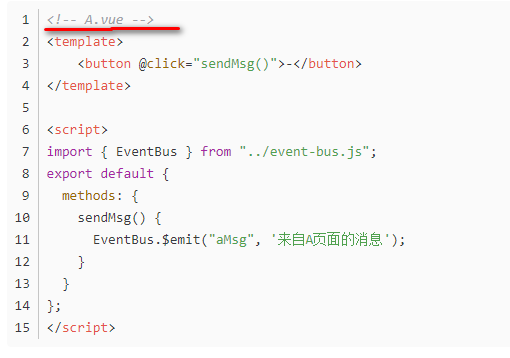
Suppose you have two Vue pages that need to communicate: A and B. The A page binds a click event to the button, and sends a message to notify the B page.
<template>
    <button @click="sendMsg()">-</button>
</template>

<script>
import { EventBus } from "../event-bus.js";
export default {
  methods: {
    sendMsg() {
      EventBus.$emit("message", 'Message from page A');
    }
  }
};
</script>
EventBus.$emit(‘message’,data) // This message is a custom event name, and data is the data you want to pass.
3. Receive events
Next, we need to receive this message in page B.
<template>
  <p>{{msg}}</p>
</template>

<script>
import {
  EventBus
} from "../event-bus.js";
export default {
  data(){
    return {
      msg: ''
    }
  },
  mounted() {
    EventBus.$on("message", (msg) => {
      // Message sent by A
      this.msg = msg;
    });
  }
};
</script>
EventBus.$on('message',msg=> {
  console.log(msg)
 })
Note: The name of the event sent and monitored must be the same, and msg is the acquired data. The first parameter is the event name, the second parameter is the method
In the same way, we can also send messages from page B to page A. Two methods are mainly used here:
// send messages
EventBus.$emit(channel: string, callback(payload1,…))

// listen to receive messages
EventBus.$on(channel: string, callback(payload1,…))
4. Remove event listener
If you want to remove the event listener, you can do as follows:
import {
  eventBus
} from './event-bus.js'
 beforeDestroy(){
     EventBus.$off('message')
 }
Use the $off method of the vue instance to clear eventBus in the vue life cycle beforeDestroy or destroyed
Global eventBus
// main.js
Vue.prototype.$EventBus = new Vue()
Two methods, $on and $emit, are used in this particular bus. One is used to create emitted events, which is $emit; the other is used to subscribe to $on:
Then we can use this.$ bus.$emit("sendMsg", ‘I am a web show’) on a Vue page, and use this on another Vue page
this.$EventBus .$on('sendMsg', function(value) {
  console.log(value); // I am a web show
})
You can also use this.$ EventBus .$off(‘sendMsg’) to remove event listeners.
Note: Use the $off method of the vue instance to clear eventBus in the vue life cycle beforeDestroy or destroyed
Intelligent Recommendation
Eventbus Vue Event Bus
Eventbus is the Vue Event Bus, all components can publish custom events to the event bus, then subscribe to him in the components we need. 1. First create an eventbus.js 2. Global introduction in main...
Vue event bus (EventBus) introduction
initialization Suppose you have two Vue pages that need to communicate: A and B. The A page binds a click event to the button, and sends a message to notify the B page. //Use emit to distribute in A U...
Vue Set Event Bus Eventbus
Some scenes use the Eventbus bus to make the code much simple. Step 1: Write an Eventbus class Step 2: Place the event bus in Vue, find the main.js file to join the following code The third step: is t...
What is Vue Event Bus (Eventbus)
1. Introduction of the event bus Vue components are very common with parent sub-component communication, brothers component communications. The parent subcomponent communication is very simple, and th...
More Recommendation
Vue Transfer Event Bus Eventbus
There is a simple method between components in Vue. Create Even.js (name your own) The following is the code created in the JS file. There are two components of A, B, and JS that needs to be created i...
Vue event bus (EventBus) with caution
Usually suitable for brothers component value It is best to plan the scope of function -Profin the range of instance control (different instances in different areas) -An the scope of control space con...
Vue event bus (EVENTBUS) learning
1. 1. Background We know that there are many ways to transfer data between Vue components, such as:Father -child component communication,Intergenerational component communication,Routing,vuexWait, but...
Vue.js use in the event of bus EventBus
Vuex to use 1. Introduction and Installation 2. Configure 3. Registration 4. In the assembly 1. Introduction and Installation EventBus: Also known as the event bus. EventBus can be used in the Vue as ...
Simple use of EventBus event bus
1. Guide package 2. Add confusion The obfuscation rules are as follows 3. The first activity 4. The second activity 5. Simple functions are achieved...