DASH.js uses demo (with ffmpeg and mp4box)
tags: Cloud computing-learning all the way, summing up all the way ffmpeg MP4Box Dash.js
reference:
https://github.com/sanlengjingvv/mpeg-dash-sample
ubuntu install ffmpeg, three-line command
Installation of GPAC (MP4Box) under Ubuntu | Build DASH video system based on MP4Box
Install the latest node on ubuntu
-------------------------------------------------------------------------------------------------------
Environment ubuntu 18.04
1. First install ffmpeg, MP4Box, node and npm according to the above link
ffmpeg: A set of open source computer programs that can be used to record, convert digital audio and video, and convert them into streams. Adopt LGPL or GPL license. It provides a complete solution for recording, converting, and streaming audio and video. It contains a very advanced audio/video codec library libavcodec. In order to ensure high portability and codec quality, many codes in libavcodec are developed from scratch.Use it here to get different quality video and separate audio。
MP4Box: Use mp4box to get the audio, video and .mpd files needed by MPEG-Dash.
Two, use ffmpeg, MP4Box
Video link:https://github.com/sanlengjingvv/mpeg-dash-sample/blob/master/input.mp4
# Use ffmpeg to transcode to get different quality videos
ffmpeg -i input.mp4 -s 160x90 -c:v libx264 -b:v 250k -g 90 -an input_video_160x90_250k.mp4
ffmpeg -i input.mp4 -s 320x180 -c:v libx264 -b:v 500k -g 90 -an input_video_320x180_500k.mp4
ffmpeg -i input.mp4 -s 640x360 -c:v libx264 -b:v 750k -g 90 -an input_video_640x360_750k.mp4
ffmpeg -i input.mp4 -s 640x360 -c:v libx264 -b:v 1000k -g 90 -an input_video_640x360_1000k.mp4
ffmpeg -i input.mp4 -s 1280x720 -c:v libx264 -b:v 1500k -g 90 -an input_video_1280x720_1500k.mp4
 # Use ffmpeg to get audio
ffmpeg -i input.mp4 -c:a aac -b:a 128k -vn input_audio_128k.mp4
# Use mp4box to get the audio, video and .mpd files needed by MPEG-Dash
MP4Box -dash 5000 -rap -frag-rap -profile dashavc264:onDemand -frag 5000 input_audio_128k.mp4 input_video_160x90_250k.mp4 input_video_320x180_500k.mp4 input_video_640x360_750k.mp4 input_video_640x360_1000k.mp4 input_video_1280x720_1500k.mp4 -out main.mpd The interface after running is as follows, including original video, audio, slice and mpd file
Three, use npm to install http-server
npm install http-server -g
npm install grunt-cli -g
Open the http-server server
# --cors means to accept cross-domain resource sharing of any domain name, -c-1 means not to enable caching
http-server -a 127.0.0.1 -p 9999 --cors -c-1
Open the browser and enterhttp://127.0.0.1:9999/, As shown below

Fourth, download dash.js and start
Find another directory dash.js folder to download and build dash.js, an open source player that supports MPEG-Dash protocolgit clone https://github.com/Dash-Industry-Forum/dash.js.git
cd dash.js
npm install //Download the required modules
grunt dev //startAfter the following interface appears, click "DASH IF Reference player”


5. Open the sliced video.
Right-click the mpd file on the http-server page, select copy link, and then copy it to the link on the player interface in the figure above, and click load to load the video. As shown in the figure, the video quality can be selected in the lower right corner of the video.

The cache, delay, bit rate and other information will also be displayed below

Intelligent Recommendation
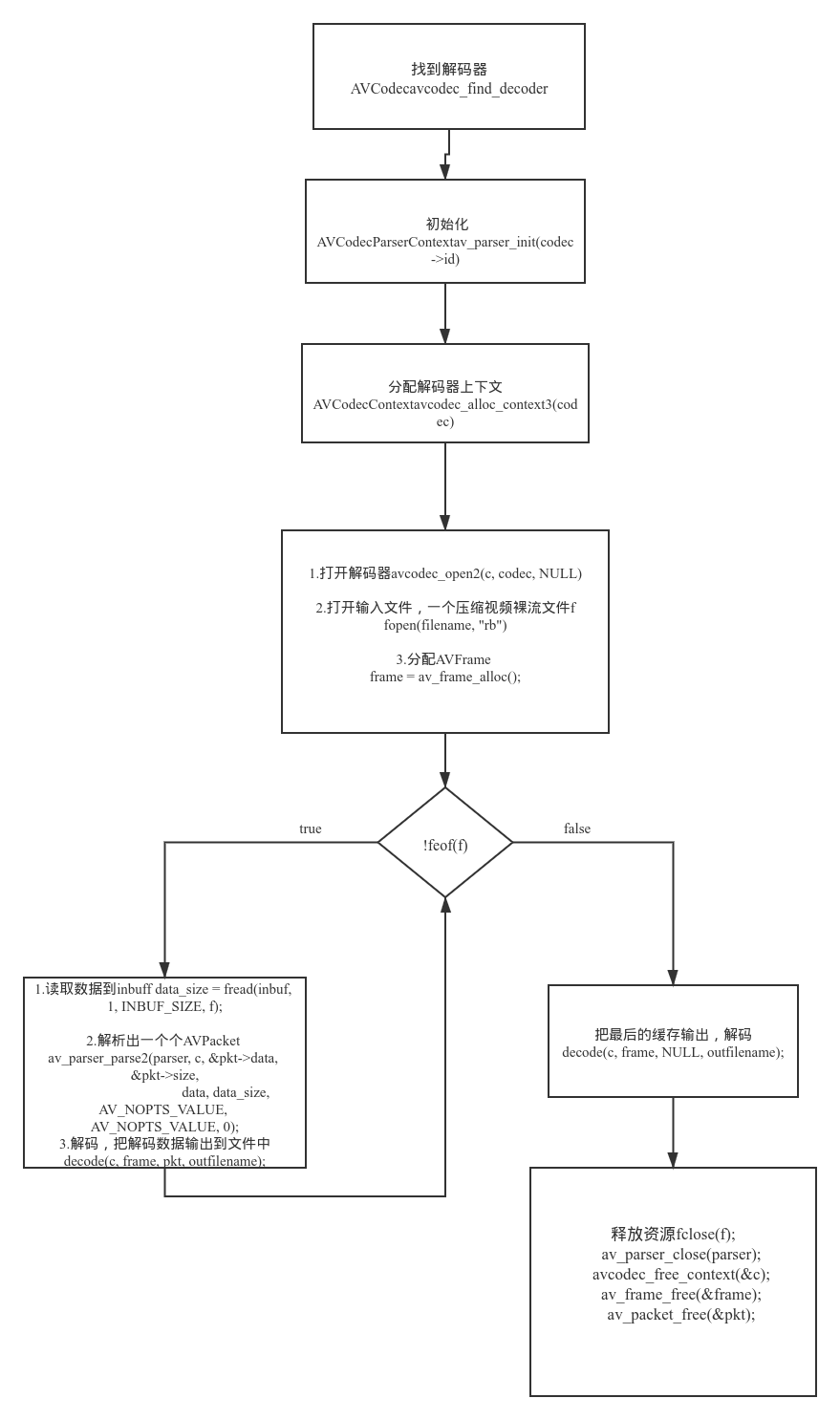
FFMPEG DEMO analysis decode_video.c
Foreword The previous two articles introduced the full process of audio and video from the coding package, unpacking decoding process: FFMPEG DEMO Analysis Muxing.c FFMPEG DEMO Demuxing_Decoding.c Tod...
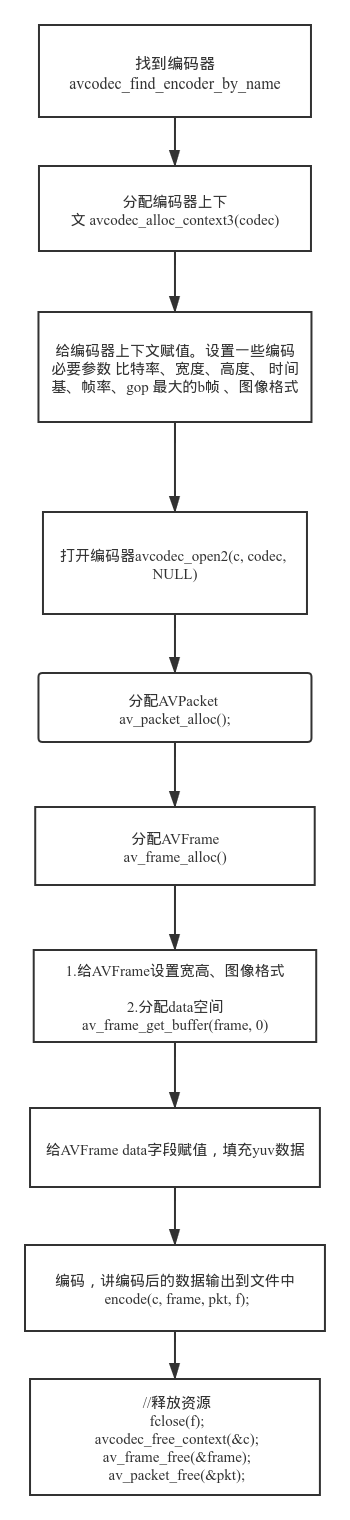
FFMPEG DEMO Analysis Encode_Video.c
Foreword This series of articles FFMPEG DEMO Analysis Muxing.c FFMPEG DEMO Demuxing_Decoding.c FFMPEG DEMO analysis decode_video.c This article will introduce to the encoding video file separately usi...
FFMPEG player Demo
The player's demonstration program here is used to play a local file, so there is no need to care about the network transmission problem when playing media data on the network. For players who play lo...
ffmpeg decode_video demo
Foreword The code of this article refers to the official DEMO provided by FFMPEG, combined with Decode_video and Demuxing_DECODING 2 examples to decod on a local video file into non -compressed video ...
More Recommendation
Qt uses FFMPEG to read local video stream files, network stream file Demo
Write a custom directory title here <1> Dispensed Qffmpeg Terminal File <1> Qffmpeg Class Source File The above completed frame acquisition, subsequent thread refresh Image constitute vide...
mp4box compilation and common commands
1 Introduction mp4box multimedia packer can be used to process multimedia files and perform many operations, such as AVI, MPG, TS, etc. Homepage: https://gpac.wp.imt.fr/mp4box/ 2. Download https://gpa...
MP4BOX Add version information
For example: MP4BOX synthesized MP4 adds freebox at the end of the file: For example: freeIsoMedia File Produced with GPAC 0.8.0-xx-HEAD The source code is as follows in isom_store.c: ...
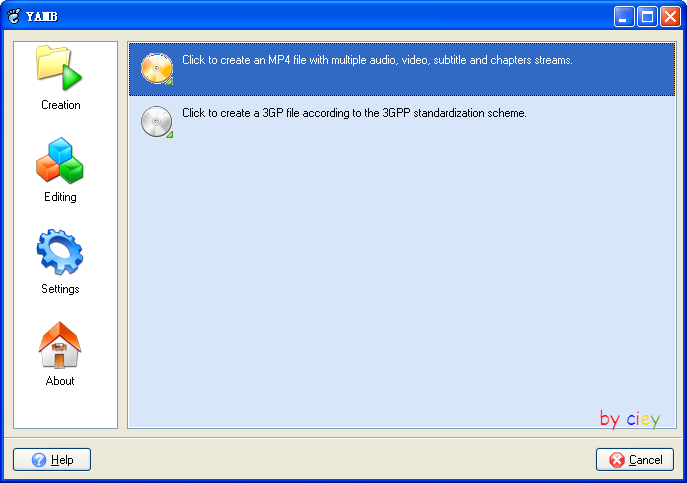
a MP4Box GUI-Yamb introduction
Yamb - Yet Another MP4Box User Interface for Windows Users Yamb is a front-end interface program of MP4BOX, eliminating the cumbersome MP4BOX command line operation, and the function of merging a...
Install MP4Box under ubuntu
The above is the installation method of mp4box. If it fails, it will prompt that the dependent lib is not installed. Provide the network disk address for everyone to download. Link:Click to open the l...