Electron starts quickly - set up from the environment to the program package
tags: Electron 1024 programmer festival
What is electron?
Electron is an open source framework developed by GitHub, which allows users to develop desktop-end applications using Web technology, and now the Electron framework is maintained by the OpenJS Foundation.
Electron = Chromium + Node.js + NativeAPI
Chrominu allows WEB technology to write UI
Node.js gives the ELECTRON to operate the underlying ability
NativeAPI enhances the ability of Electron's cross-platform to get more nativeilities.
Wikipedia introduction
Electro (formerly known as Atom Shell) is a open source framework for GitHub. It completes the development of cross-platform GUI applications by using node.js (as backend) and chromium rendering engine (as the front end). Electron has been used by multiple open source web applications for the development of front and backends, and the famous project includes Github's Atom and Microsoft's Visual Studio Code.
ELECTRON's history
In 2008, Chromium appeared in 2009, Node.js appeared in 2009, after the two developed mature, in 2016, ELECTRON, based on both. Since electron can multiplex the UI of the Web, the development efficiency is high, and it is suitable for quick test error.
If you need to develop web and desktop ends, you can consider using Electron.
Electron-based large applications are: Atom, Stack, Vscode, WordPress, WhatsApp
Minimum composition of Electron
A foundation ELECTRON contains three files:
Package.json (Body Description)
Main.js (main process)
Index.html (Graphical User Interface).
The frame is provided by the Electron executable (Electron.exe in Windows, Electron.app, Linux is ELECTRON). Developers can add a flag, custom icon, rename, or edit the Electron executable file.
Electron architecture
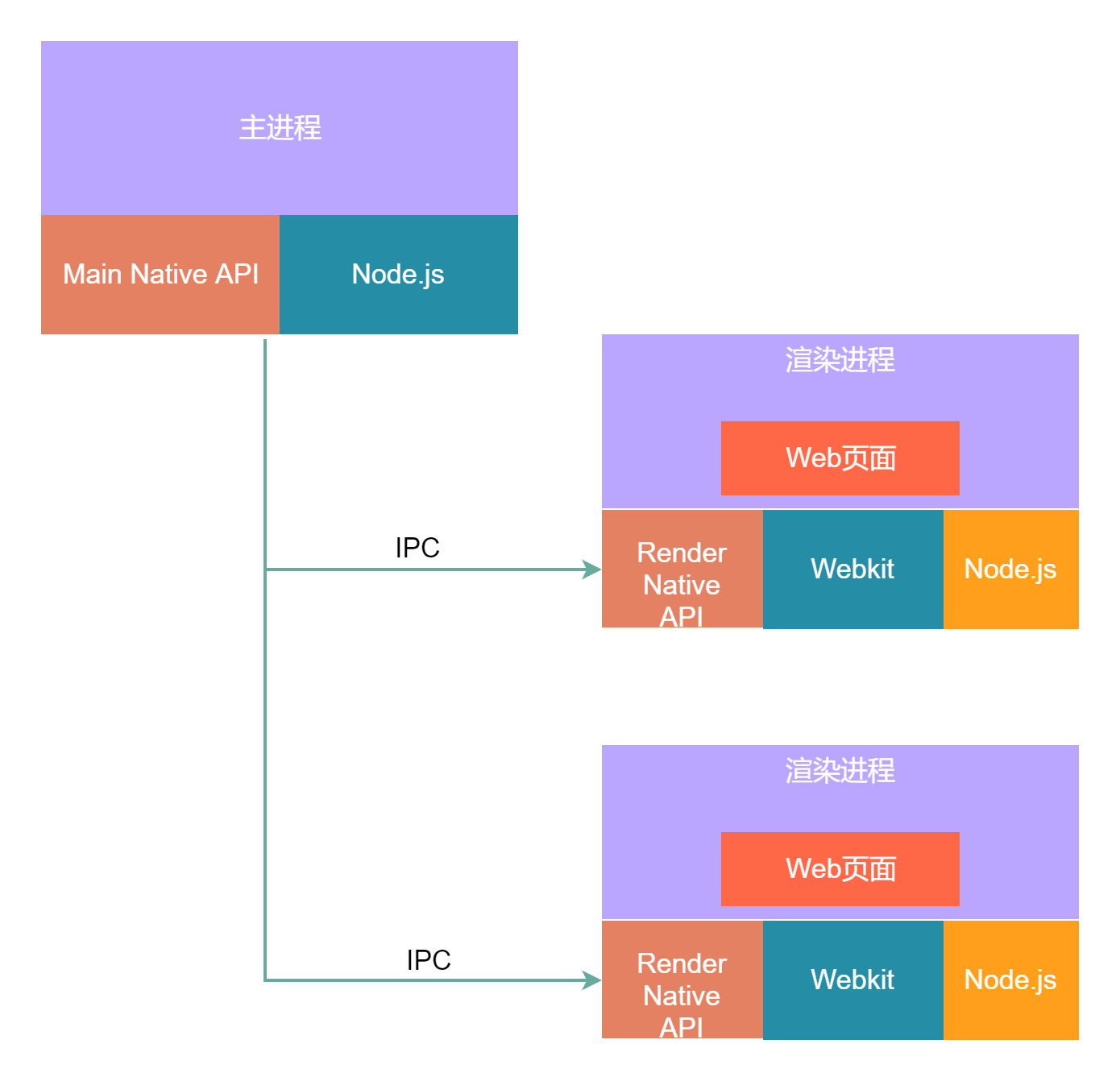
The Electron program is a multi-process program a Browser multiple render, and communication is communicated between the process. Node.js Event Cycle Based on libuv, Chromium's event loop based on Message Bump, integrated node.js and chromium to come together. When the libuv event of Node.js, the main thread of Electron will notify Electron, when the main thread receives the notification, it will forward the MessageLoop for chromium;
Various UI framework comparison
Native frame (MFC / GDI / C # / Objective-C)
Excellent performance, native experience, small package size, high development threshold, slow iterative speed
QT
Based on C ++ performance, cross-platform, package volume is high, high development threshold, iterative speed is general
Flutter
The main application scenario of Flutter is still on the mobile terminal, and the application in the PC is also relatively small, and the PC-side ecological construction is very small.
NW.js(Node-Webkit.js)
Based on web technology, performance, cross-platform (MAC, Windows, Linux), V0.14.7 support XP. The package volume is relatively large, the source code is encrypted, supports Chrome extension. Have a good ecological community. WeChat developer tools, staples are developed based on NW.JS.
Electron
Based on web technology, performance is general, cross-platform (MAC, Windows, Linux), does not support XP. The package volume is relatively large, and there is an active community. Applications such as Atom, Vscode, WordPress are based on Electron development.
Other small UI frames are:
Cef (also based on web technology)
WPF (Microsoft's User Interface Framework)
PWA (Google proposed by the frontier web technology provides a series of schemes for the Application experience of the App)
Building an Electron Development Environment
NVM installation
Mac/Linux:
curl -o- https://raw.githubusercontent.com/nvm.sh/nvm/v0.35.2/install.sh | bashWindows:
https://github.com/coreybutler/nvm-windows/releasesNode.js / npm installation
nvm install 12.14.0
npm -v \ node -v
 // If you download slow, you can also go to the official website to download the installation package installation.
Electron installation
Partial installation
npm install electron --save-dev
 // The following manner is installed by specifying the CPU and the platform.
npm install --arch=ia32 --platform=win32 electron
Install Electron globally
npm install -g electronVerify installation success
electron -vSet the corresponding sight to speed up the download and installation of Electron
npm config set electron_mirror “https://npm.taobao.org/mirrors/electron/”Write a simple electron program
The relationship between the ELECTON process is shown in the figure below, mainly with the main process and rendering process.
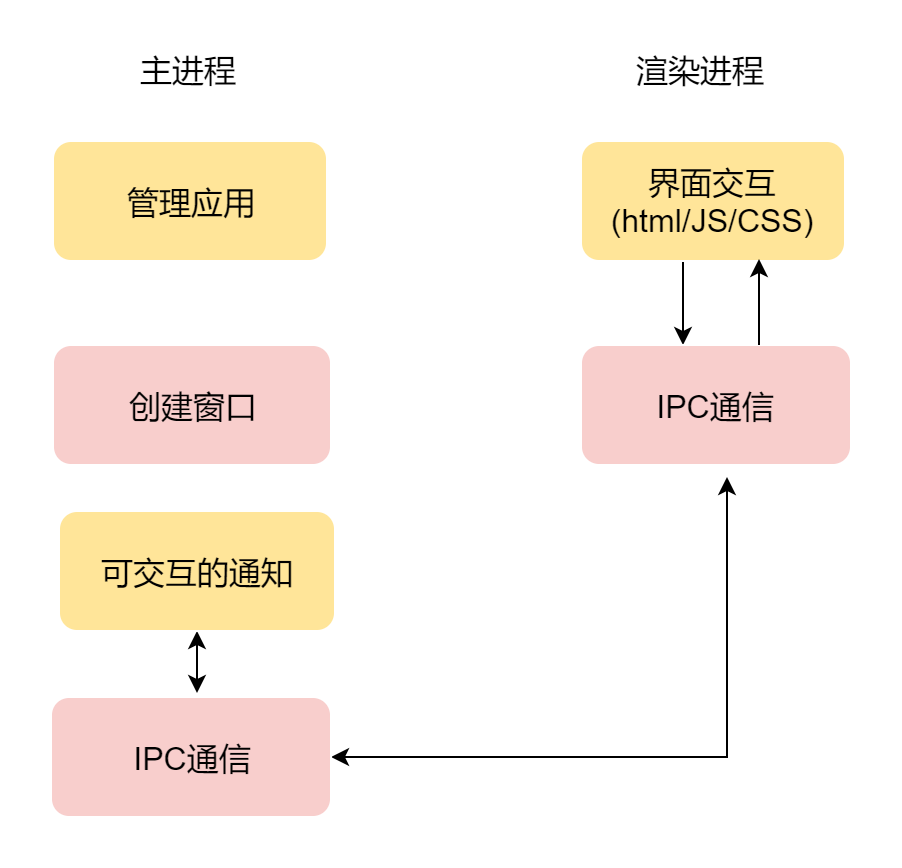
A minimal electron program unit consists of three files, an HTML file, a rendere.js file, a main.js file. The HTML file is used to define the interface of the Electron application, and the main.js file is used to define the entry of the starter, renderer.js is used to render the HTML interface, of course, if it is a static interface, renderer.js file can also Omit.
index.html
<html>
    <meta http-equiv="Content-Type" content="text/html; charset=utf-8" />
    <body>
        <H1> First Electron Application </ h1>
                 <Input Type = "Button" value = "Test button"> </ input>
    </body>
</html>
main.js
const {app, BrowserWindow, Notification, ipcMain} = require('electron')
 // Main process introduces App, BrowserWindow, Notification, IPCMAIN module
let win
 // Create a window
app.on('ready', () => {
    win = new BrowserWindow({
        width: 300,
        height: 300,
        webPreferences: {
            nodeIntegration: true
        }
    })
         // Load page
    win.loadFile('./index.html')
})
After writing the corresponding interface program, you can initialize the project. Execute the following command in the project to describe the project:
npm initEnter the corresponding description, the corresponding package configuration file is generated:
package.json
{
  "name": "test-electron",
  "version": "1.0.0",
     "Description": "Test Electron",
  "main": "main.js",
  "scripts": {
    "start": "electron .",
    "packager": "electron-packager . test-electron --platform=win32 --arch=x64 --icon=icon.ico --out=./out --asar --app-version=0.0.1"
  },
  "keywords": [
    "electron"
  ],
  "author": "yangfeifei",
  "license": "ISC",
  "devDependencies": {
    "electron": "^15.3.0"
  }
}
Electron runs and packaged
Start command
/ / Install local dependence in advance
npm install
Suppose there is no Lock file in your branch at this time, when you perform NPM Install, NPM will install these dependencies according to your definition of various dependencies in Package.json. After installation, it will generate two results:
- Node_Modules: All dependencies
- NPM-LOCK.JSON: LOCK file Accurately describe the physical tree of the directory listed in the Node_Modules directory, which is equivalent to a snapshot of the physical tree generated by Node_Module.
If you are configured with the START parameter in the package.json script, you can start using NPM START.
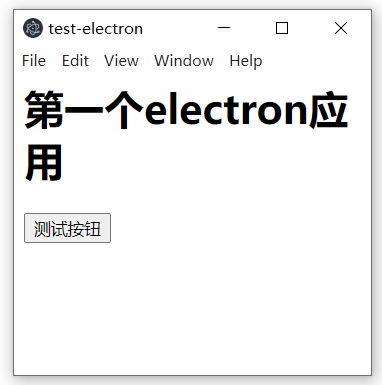
If the corresponding parameter is not configured, use electron. In the current directory, the startup results are shown below:
Install Electron-Packager packaging tool
npm install electron-packager -gPackage configuration package command via package.json
"scripts": {
  "start": "electron .",
  "packager": "electron-packager . test-electron --platform=win32 --arch=x64 --icon=icon.ico --out=./out --asar --app-version=0.0.1"
}
 // Configure the ELECTRON version required
"devDependencies": {
    "electron": "^15.3.0"
  }
Start packaging
NPM install // Install dependence
npm run packager
Package through the CMD command line
electron-packager . AppName --platform=win32 --arch=x64 --icon=computer.ico --out=./out --asar --app-version=0.0.1 --overwrite --ignore=node_modules --electron-version 5.0.0Parameter Description
Appname: The name of generating EXE
--PLATFROM = Win32 builds platform type, you can also take: Darwin, Linux, Mas, Win32
--arch = x64 Decided to use X86 or X64 or two architectures
- Icon = app.icon Custom Application icon
--out =. / OUT Specifies the location of the package file output
--ASAR: This parameter can not be added, if plus, the source code applied after packaging will exist in .asar format
--App-version = 0.0.1: Generate the version number of the application
--overwrite: Covered the original
--ignore = node_modules: If you add this parameter, the Node_Modules module in the project will not be packaged in.
--eCtron-Version 5.0.0: Specifies the current version of the current version to be consistent, and the corresponding package will be downloaded with the current version.
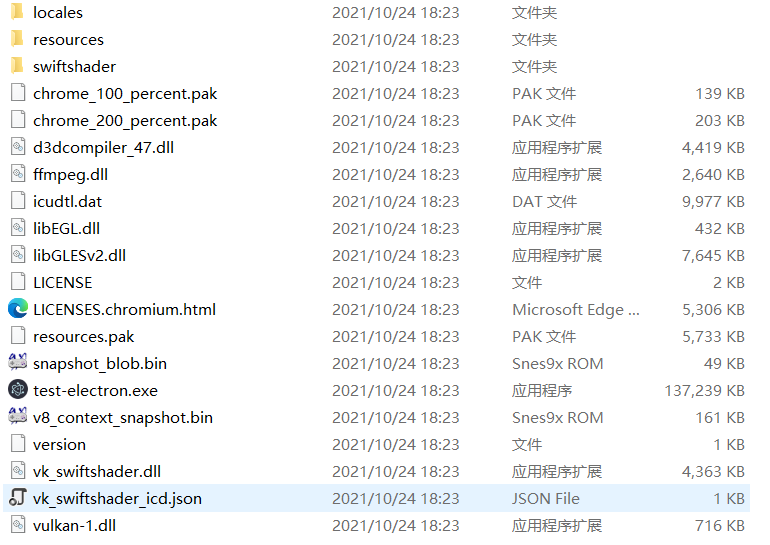
The corresponding files will be output to the OUT directory after packaging success:
The main program is still a lot of trillo
After completing a series of processes, you can develop the electron program. Of course, if you want to develop excellent Electron programs, the deep front-end technology cubb is required.
Intelligent Recommendation
4399AT Appium environment quickly set up
I received feedback that appium is slow to build, has many problems, and has a bad experience; Thank users for their feedback. Now the installation method of appium has been optimized. If the speed is...
bWAPP vulnerability platform environment quickly set up
Preface BWAPP (buggy web Application) is an open source web application that integrates a variety of common vulnerabilities and the latest vulnerabilities. The purpose is to help network security enth...
VAGRANT quickly set up a development test environment
Introduction to Vagrant Vagrant is a tool for building and managing virtual machine environments in a single workflow. It has a high degree of automation and easy-to-use workflow, which greatly reduce...
VAGRANT quickly set up Ubuntu18.04 server environment
After installing Vagrant, three commands can start a Ubuntu server, pay attention to domestic network speed issues, and use domestic mirror when downloading. Next, install the GCC compilation environm...
Electron program package notes
1. Linux (Ubuntu) platform package usedpkgCommand to package 2. Macos platform packaging Previously usedappdmgThis tool is packaged and usednpm install -g appdmgInstall it but packaged outdmgThe file ...
More Recommendation
electron configuration package program
In this paper, bound electron angular-electron desktop application development framework. electron development of cross-platform client, a set of code can be packaged into different operating systems ...
Electron package html program
1. Download the official demo of electron: 2. Run the demo Installation: npm i Running: npm start 3. Modify your address: 4. If the local address must be started with http, npm i http-server is requir...
NameNode set up by the Hadoop environment under Windows starts an error
Foreword: Because most of the normal work and daily contact are medium -sized projects, few personalized recommendations involve big data functions. However, in the later period, the information recom...
MATLAB starts to speed up the parallel environment, improve the running speed of the program
MATLAB starts to speed up the parallel environment, improve the running speed of the program Operating environment:matlab2020a,windows10 In order to speed up the running speed of the MATLAB code, it i...
The development environment is quickly set up under spark windows environment.
Spark local practice environment setup Practice environment construction In order to avoid setting up the environment to block the learning of spark itself (of course this part is also very important,...