CRC blasting width and height
tags: CTF miscellaneous
table of Contents
Foreword
Sometimes CTF Miscellaneous gives a png picture, which cannot be opened under Linux (white screen), and the picture can be viewed under Windows, and the width and height may be modified
Parse IHDR
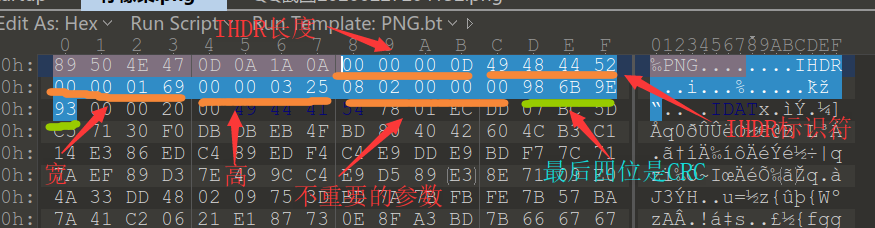
example
Selected from 2020 Anheng Monthly Race
Download the compressed package and extract a PNG image, which cannot be opened under linux, as shown in the figure
The guess is that the height or width has been changed, and CRC blasting is required to obtain the original width and height, and just modify it back.
script
import zlib
import struct

filename = 'test.png'
with open(filename, 'rb') as f:
    all_b = f.read()
    crc32key = int(all_b[29:33].hex(),16)
    data = bytearray(all_b[12:29])
    n = 4095            #Theoretically 0xffffffff, but considering the actual screen/cpu, 0x0fff is almost the same
    for w in range(n):          #High and wide blast together
        width = bytearray(struct.pack('>i', w))     #q is 8 bytes, i is 4 bytes, h is 2 bytes
        for h in range(n):
            height = bytearray(struct.pack('>i', h))
            for x in range(4):
                data[x+4] = width[x]
                data[x+8] = height[x]
            crc32result = zlib.crc32(data)
            if crc32result == crc32key:
                print("Wide is:",end="")
                print(width)
                print("High as:",end="")
                print(height)
                exit(0)
According to the results, Gao was changed

modify it back

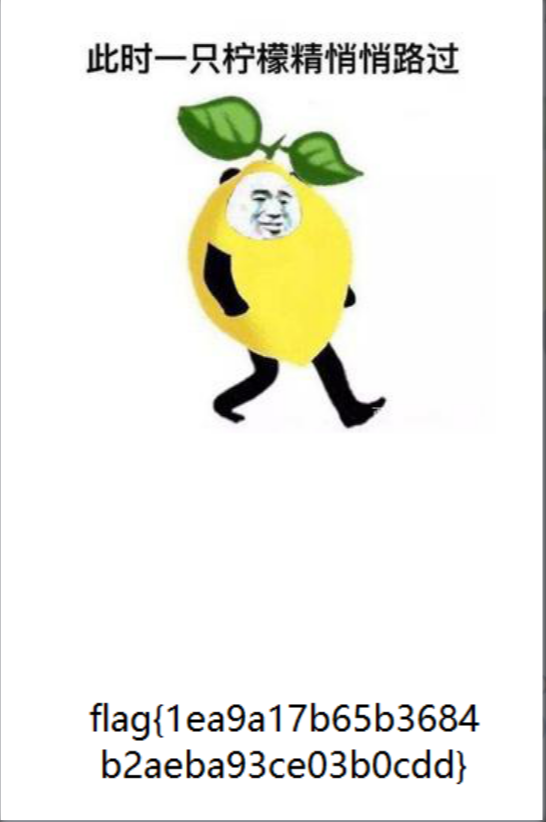
The picture is displayed normally and the flag is obtained
Intelligent Recommendation
Change the width and height of the picture
The lossless compression of the image that I want to achieve can't be realized (500W pixel image, I don't know why it is so big after compression), I suddenly see the function of changing the width an...
Js height width adaptive
1. According to browser size DIV adaptation, first we need to get the height and width of the browser. After we get the height and width, we can set the height and width to the div!...
Screen size (height, width)
Look at the relationship between the two ...
Get the height and width of the screen
The above method is to get the height and width of the entire screen, but sometimes the Activity is nested, so you need to get the height of the Activity, not the height and width of the entire screen...
More Recommendation
Android Activity height and width
Result - SONY mobile phone 10-17 22:43:29.194: INFO/smart_home(5028): metrics::density=1.5, densityDpi=240, heightPixels=569, widthPixels=320, scaledDensity=1.5, xdpi=239.0...
Get the width and height of the imageView
Get the width of the view ...