PCM and WAV data structures
tags: PCM WAV Sampling Rate Bit depth WAVE
PCM and WAV data structures
Sampling Rate
In my other postAudio coding The concept of sampling and quantization has been introduced, and the sampling rate is described here.
Sampling RateRepresents the number of digital snapshots per second of the audio signal. This rate determines the frequency range of the audio file. The higher the sample rate, the closer the shape of the digital waveform is to the original analog waveform. A low sample rate limits the range of frequencies that can be recorded, which can result in poor recording performance of the original sound.
According toNyquist sampling theoremIn order to reproduce a given frequency, the sampling rate must be at least twice that frequency. For example, the CD has a sampling rate of 44,100 samples per second, so it can reproduce a frequency of up to 22,050 Hz, which is just over the human hearing limit of 20,000 Hz.

ALow sampling rate that distort the original sound wave
BFully reproduce the high sampling rate of the original sound wave
Common sampling rate for digital audio
| Sampling Rate | Quality level | Frequency Range |
|---|---|---|
| 11,025 Hz | Poor AM radio (low-end multimedia) | 0–5,512 Hz |
| 22,050 Hz | Close to FM radio (high-end multimedia) | 0–11,025 Hz |
| 32,000 Hz | Better than FM radio (standard broadcast sampling rate) | 0–16,000 Hz |
| 44,100 Hz | CD | 0–22,050 Hz |
| 48,000 Hz | Standard DVD | 0–24,000 Hz |
| 96,000 Hz | Blu-ray DVD | 0–48,000 Hz |
Bit depth
The bit depth determines the dynamic range. When sampling sound waves, assign an amplitude value that is closest to the original sound wave amplitude for each sample. Higher bit depths provide more possible amplitude values, resulting in greater dynamic range, lower noise floor, and higher fidelity.
| Bit depth | Quality level | Amplitude value | Dynamic Range |
|---|---|---|---|
| 8 digits | phone | 256 | 48 dB |
| 16 bit | Audio CD | 65,536 | 96 dB |
| 24 bit | Audio DVD | 16,777,216 | 144 dB |
| 32 bit | optimal | 4,294,967,296 | 192 dB |
The higher the bit depth, the greater the dynamic range provided.
PCM audio data
PCM (Pulse Code Modulation) Also known as pulse code modulation. PCM audio data is a raw stream of uncompressed audio sample data, which is standard digital audio data that is sampled, quantized, and encoded by analog signals.

PCM audio data storage
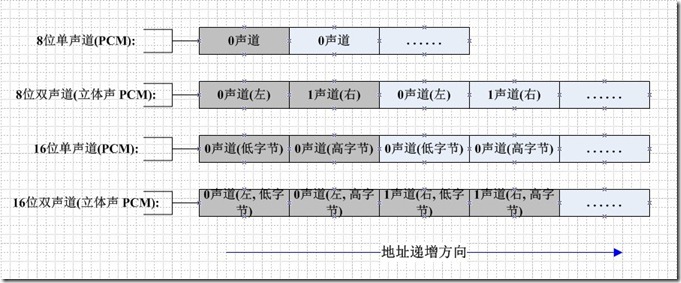
If it is a mono audio file, the sampled data is stored in chronological order (sometimes stored in LRLRLR mode, but the data of the other channel is 0). If it is two-channel, it is usually in LRLRLR. The way to store, when stored, is also related to the size of the machine. The big endian mode is shown below:

PCM audio data is uncompressed data, so it is usually large. The common MP3 format is compressed. The MP3 compression ratio of 128Kbps can reach 1:11.
PCM audio data parameters
Generally, when we describe the parameters of PCM audio data, we have the following description:
44100HZ 16bit stereo: 44100 samples per second, sampled data recorded in 16-bit (2 bytes), two-channel (stereo)
 22050HZ 8bit mono: 22050 samples per second, sampled data is recorded in 8 bits (1 byte), mono
 48000HZ 32bit 51ch: 48,000 samples per second, sampled data is recorded in 32-bit (4-byte floating point), 5.1 channel
44100Hz refers to the sampling rate, which means 44,100 samples per second. The larger the sample rate, the larger the space occupied by the stored digital audio.
16bit refers to the sampling accuracy, meaning that after the original analog signal is sampled, each sample point is represented by 16 bits (two bytes) in the computer. The higher the sampling accuracy, the finer the representation of the difference in the analog signal.
Stereo refers to the number of channels, that is, the number of microphones used during sampling. The more microphones, the more the real sampling environment can be restored (of course, the placement of the microphone is also specified).
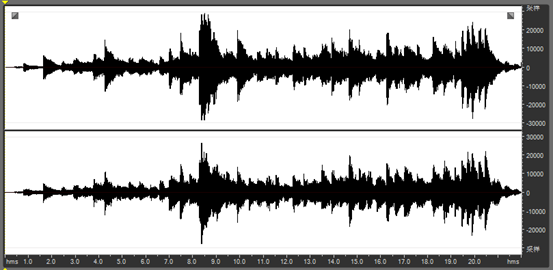
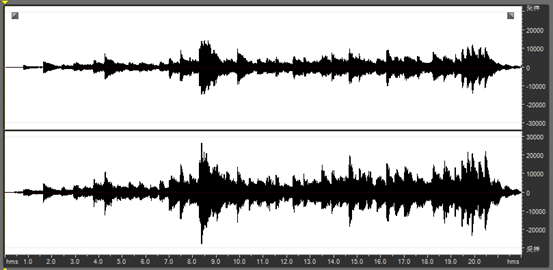
In general, the larger the amplitude of the waveform in the PCM data, the higher the volume.
Processing of PCM audio data
Decrease the volume of a channel1
Because for PCM audio data, its amplitude (that is, the size of the sampling point sample value) represents the volume of the volume, so we can reduce the volume of a channel by reducing the value of the data of a certain channel. .
int pcm16le_half_volume_left( char *url )
{
    FILE *fp_in = fopen( url, "rb+" );
    FILE *fp_out = fopen( "output_half_left.pcm", "wb+" );
    unsigned char *sample = ( unsigned char * )malloc(4); // Read one sample at a time, because it is 2 channels, so it is 4 bytes.
    while ( !feof( fp_in ) ){
        fread( sample, 1, 4, fp_in );
        short* sample_num = ( short* )sample; / / Turn into left and right channel two short data
        *sample_num = *sample_num / 2; // halve the left channel data
        fwrite( sample, 1, 2, fp_out ); // L
        fwrite( sample + 2, 1, 2, fp_out ); // R
    }
    free( sample );
    fclose( fp_in );
    fclose( fp_out );
    return 0;
}
As can be seen from the source code, after reading the 2 Byte sample value of the left channel, the program converts it into a short variable of type C. Dividing this value by 2 is written back to the PCM file. The figure below shows the waveform of the input PCM 2-channel audio sample data.
The following figure shows the processed waveform of the left channel of the output. It can be seen that the waveform amplitude of the left channel is reduced by half.
PCM → WAV
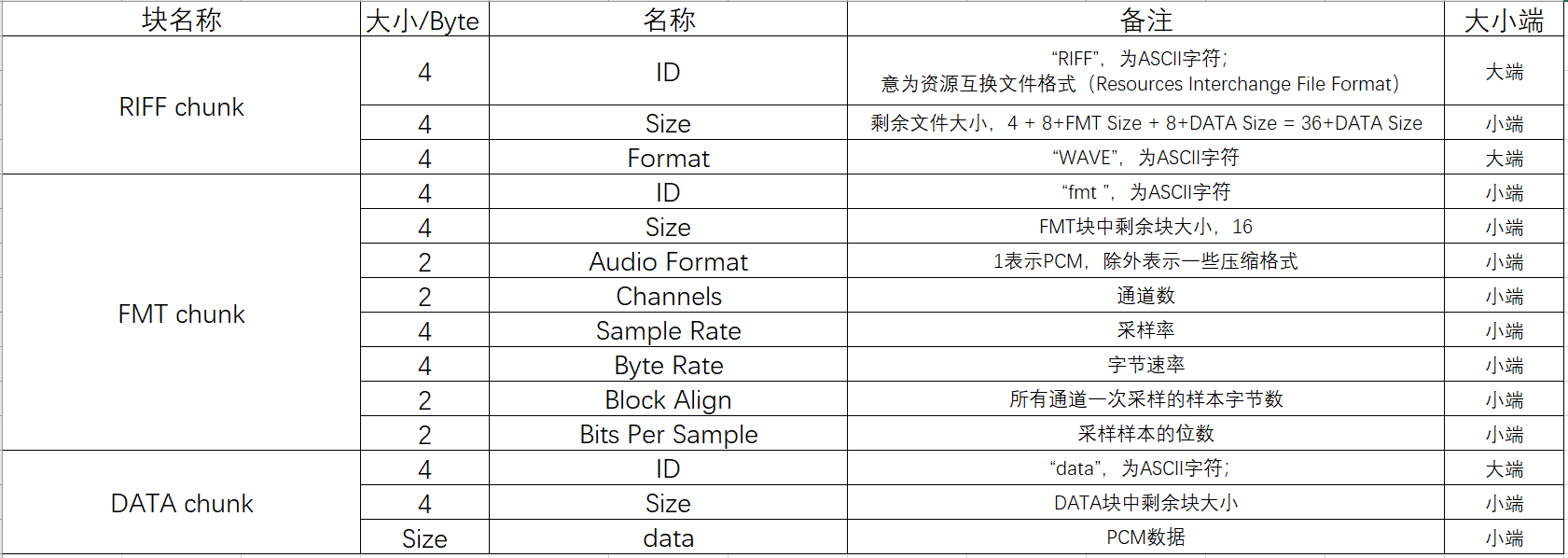
WAV is a sound file format developed by Microsoft and IBM for PC. It conforms to the RIFF (Resource Interchange File Format) file specification and is used to store audio information resources of the Windows platform. It is widely supported by the Windows platform and its applications. A WAVE file is usually just a RIFF file with a single "WAVE" block consisting of two sub-blocks ("fmt" sub-block and "data" sub-block), which have the following format:

WAV format definition
The essence of this format is to add a file header in front of the PCM file. The meaning of each field is as follows:
typedef struct {
    char          ChunkID[4]; //Content is "RIFF"
    unsigned long ChunkSize;  / / Bytes of the stored file (does not contain the 8 bytes of ChunkID and ChunkSize)
    char          Format[4];  //Content is "WAVE"
} WAVE_HEADER;

typedef struct {
   char           Subchunk1ID[4]; //Content is "fmt"
   unsigned long  Subchunk1Size;  / / Store the number of bytes of the sub-block (excluding the first 8 bytes of Subchunk1ID and Subchunk1Size)
   unsigned short AudioFormat;    / / Store the encoding format of the audio file, for example, if it is PCM, its storage value is 1.
   unsigned short NumChannels;    / / number of channels, mono (Mono) value of 1, two-channel (Stereo) value of 2, and so on
   unsigned long  SampleRate;     / / sampling rate, such as 8k, 44.1k, etc.
   unsigned long  ByteRate;       //Number of bits stored per second, value = SampleRate * NumChannels * BitsPerSample / 8
   unsigned short BlockAlign;     //block alignment size, its value = NumChannels * BitsPerSample / 8
   unsigned short BitsPerSample;  // The number of bits per sample point is generally 8, 16, 32, etc.
} WAVE_FMT;

typedef struct {
   char          Subchunk2ID[4]; //Content is "data"
   unsigned long Subchunk2Size;  //The number of bytes in the next official data section, its value = NumSamples * NumChannels * BitsPerSample / 8
} WAVE_DATA;
WAV file header parsing
Here is the beginning 72 bytes of a WAVE file, the bytes are displayed as hexadecimal digits:
52 49 46 46 | 24 08 00 00 | 57 41 56 45
66 6d 74 20 | 10 00 00 00 | 01 00 02 00
22 56 00 00 | 88 58 01 00 | 04 00 10 00
64 61 74 61 | 00 08 00 00 | 00 00 00 00
24 17 1E F3 | 3C 13 3C 14 | 16 F9 18 F9
34 E7 23 A6 | 3C F2 24 F2 | 11 CE 1A 0D
The field is parsed as shown below:

PCM → WAV code1
int simplest_pcm16le_to_wave( const char *pcmpath, int channels, int sample_rate, const char *wavepath )
{ // Save the wrong judgment
    short pcmData;
    FILE* fp = fopen( pcmpath, "rb" );
    FILE* fpout = fopen( wavepath, "wb+" );

    // padding WAVE_HEADER
    WAVE_HEADER pcmHEADER;
    memcpy( pcmHEADER.ChunkID, "RIFF", strlen( "RIFF" ) );
    memcpy( pcmHEADER.Format, "WAVE", strlen( "WAVE" ) );
    fseek( fpout, sizeof( WAVE_HEADER ), 1 );

    //fill WAVE_FMT
    WAVE_FMT pcmFMT;
    pcmFMT.SampleRate = sample_rate;
    pcmFMT.ByteRate = sample_rate * sizeof( pcmData );
    pcmFMT.BitsPerSample = 8 * sizeof( pcmData );
    memcpy( pcmFMT.Subchunk1ID, "fmt ", strlen( "fmt " ) );
    pcmFMT.Subchunk1Size = 16;
    pcmFMT.BlockAlign = channels * sizeof( pcmData );
    pcmFMT.NumChannels = channels;
    pcmFMT.AudioFormat = 1;
    fwrite( &pcmFMT, sizeof( WAVE_FMT ), 1, fpout );

    / / Fill WAVE_DATA;
    WAVE_DATA pcmDATA;
    memcpy( pcmDATA.Subchunk2ID, "data", strlen( "data" ) );
    pcmDATA.Subchunk2Size = 0;
    fseek( fpout, sizeof( WAVE_DATA ), SEEK_CUR );
    fread( &m_pcmData, sizeof( short ), 1, fp );
    while ( !feof( fp ) ) {
         pcmDATA.dwSize += 2;
         fwrite( &m_pcmData, sizeof( short ), 1, fpout );
         fread( &m_pcmData, sizeof( short ), 1, fp );
    }

    int headerSize = sizeof( pcmHEADER.Format ) + sizeof( WAVE_FMT ) + sizeof( WAVE_DATA ); // 36
    pcmHEADER.ChunkSize = headerSize + pcmDATA.Subchunk2Size;

    rewind( fpout );
    fwrite( &pcmHEADER, sizeof( WAVE_HEADER ), 1, fpout );
    fseek( fpout, sizeof( WAVE_FMT ), SEEK_CUR );
    fwrite( &pcmDATA, sizeof( WAVE_DATA ), 1, fpout );
    fclose( fp );
    fclose( fpout );
    return 0;
}

– EOF –
Intelligent Recommendation
Wave file (*.wav) format, PCM data format
http://www.cnblogs.com/cheney23reg/archive/2010/08/08/1795067.html 1. Audio Introduction We often see descriptions like this: 44100HZ 16bit stereo or 22050HZ 8bit mono, etc. 44100HZ 16bit stere...
PCM audio data package is WAV file
PCM (Pulse Code Modulation, Pulse Code), PCM audio data refers to sampling, quantization, encoding conversionUncompressedDigital audio data. One of the most common sound file formats in WAV is that Mi...
C ++ encapsulates the audio PCM data as a WAV file
Foreword The sound data collected using the sound device is usually PCM data. It cannot be played directly to the file. The usual method is to encapsulate it as a WAV format so that the player can be ...
C ++ reads PCM data in WAV files
Foreword The WAV file usually uses PCM format data to store audio. The data in this format can be played directly to play. To read the data in the WAV file, we must first get head information. Chunk, ...
C# simulate PCM data and create WAV files
Recently, due to the work of a radio receiving signal processing, the PCM data passed by the demodulation mode needs to be processed, drawing waveforms and playing sounds, which is hereby recorded. Si...
More Recommendation
PCM to WAV, WAV to MP3
Pit record Share it, use the implementation of Lame, the implementation process, all served. github addresshttps://github.com/suntiago/lame4androiddemo The first step is to save the original pcm strea...

C# WAV audio file conversion PCM data file PCM conversion WAV audio
The source file is linked below code show as below: Download:Click me to jump...
ffmpeg command: wav turn pcm, pcm to wav
1, ffmpeg command: wav turn pcm: 2, ffmpeg command: pcm turn wav:...
Generate audio and PCM data into WAV and MP3 files using FFMpeg
Article directory 1. Get the encoder and create the decoder context 2. Create an audio stream and output encapsulation context 3. Encode the original data into the file WAV audio package format can st...
Record WAV format audio files with ADC encoded PCM data
Because the PCM file directly stores the quantized value of the sample, it is sufficient to write the header and then write the audio data according to the specified format. Here is a 6V length WAV au...