Part 6 Message Bus (Spring Cloud Bus)
tags: # springcloud
1. Implementation principle
1. ConfigServer (Configuration Center Server) pulls the configuration file from remote git and a copy of it locally, ConfigClient (microservice) obtains its own corresponding configuration file from ConfigServer;
2. When the remote git warehouse configuration file changes, how does ConfigServer notify ConfigClient, that is, how does ConfigClient perceive the configuration update?
Spring Cloud Bus will provide an http interface, which is /bus/refresh in the figure. We configure this interface to the remote git webhook. When the file content on git changes, the /bus-refresh interface will be automatically called. Bus will notify config-server, config-server will publish update messages to the message queue of the message bus, and other services subscribe to the message will refresh the information, thereby realizing the automatic refresh of the entire microservice
Two: Implementation
Implementation method one: A microservice assumes the responsibility of configuration refresh

1. Submit the configuration to trigger the post to call the bus/refresh interface of client A
2. Client A receives the request to update the configuration from the Server side and sends it to the Spring Cloud Bus bus
3. The Spring Cloud bus receives the message and informs other clients connected to the bus, and all clients on the bus can receive the message
4. Other clients receive the notification and request the server to obtain the latest configuration
5. All clients get the latest configuration
There are problems:
1. Break the single responsibility of microservices. The microservice itself is a business module, and it shouldn't be responsible for configuration refresh. 2. The reciprocity of each node of the microservice is destroyed. 3. There are certain limitations. The configuration of WebHook changes with the microservice node that is responsible for refreshing the configuration.
The improvement is as follows: The second method: the configuration center server side assumes the responsibility of configuration refresh, the schematic diagram is as follows:
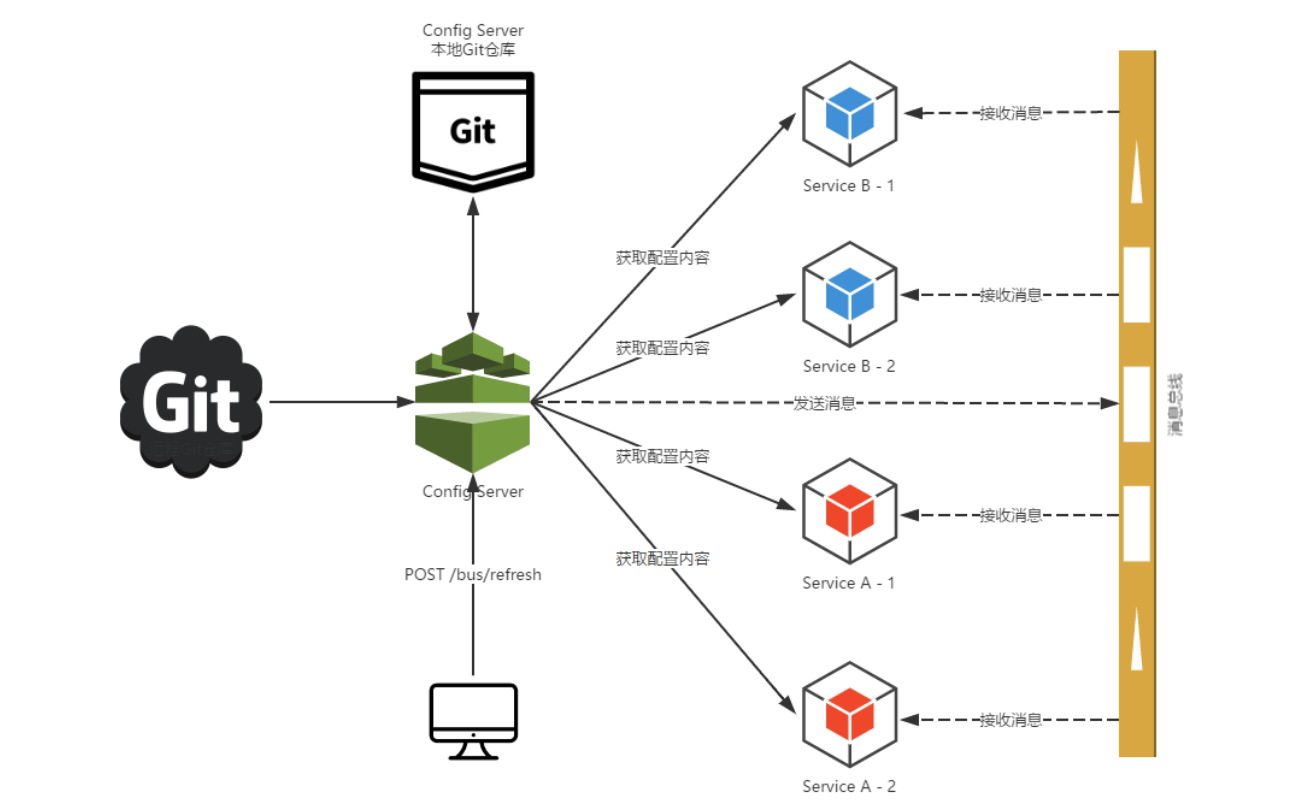
1. Submit the configuration to trigger the post request to the bus/refresh interface on the server side
2. The server receives the request and sends it to the Spring Cloud Bus bus
3. The Spring Cloud bus receives the message and informs other clients connected to the bus
4. Other clients receive the notification and request the server to obtain the latest configuration
5. All clients get the latest configuration
Three: Implementation steps
Remarks: The configuration method of mode two is given here. The difference of mode one is: because a microservice is responsible for configuration refresh, the server does not need to configure Rabbitmq and add bus-amqp dependencies.
< >Config Server side configuration (install rabbitmq in advance link:)
1. Add dependencies
<?xml version="1.0" encoding="UTF-8"?>
<project xmlns="http://maven.apache.org/POM/4.0.0"
         xmlns:xsi="http://www.w3.org/2001/XMLSchema-instance"
         xsi:schemaLocation="http://maven.apache.org/POM/4.0.0 http://maven.apache.org/xsd/maven-4.0.0.xsd">
    <parent>
        <artifactId>my-springcloud</artifactId>
        <groupId>org.example</groupId>
        <version>1.0-SNAPSHOT</version>
    </parent>
    <modelVersion>4.0.0</modelVersion>

    <artifactId>config-server</artifactId>

    <dependencies>
        <dependency>
            <groupId>org.springframework.cloud</groupId>
            <artifactId>spring-cloud-starter-netflix-eureka-client</artifactId>
        </dependency>

        <dependency>
            <groupId>org.springframework.cloud</groupId>
            <artifactId>spring-cloud-config-server</artifactId>
        </dependency>

                 <!-- springcloud-bus relies on automatic configuration updates, rabbitmq -->
        <dependency>
            <groupId>org.springframework.cloud</groupId>
            <artifactId>spring-cloud-starter-bus-amqp</artifactId>
        </dependency>
    </dependencies>
</project>
2. Modify the configuration file Bootstrap.yml file
server:
  port: 5000

#Specify where the service is registered
eureka:
  client:
    service-url:
      defaultZone: http://localhost:1111/eureka/
  instance:
    prefer-ip-address: true

spring:
  application:
    name: config-server
  cloud:
    config:
             label: master #Configure the branch of the warehouse
      server:
        git:
                     uri: https://gitee.com/xiaocheng12/my-springcloud.git/ #Configure git warehouse address
                     searchPaths: config #Configure warehouse path
                     username: #User name to access git warehouse
                     password: #User name password to access git warehouse
  rabbitmq:
             host: localhost #The local environment does not need to configure mq, but you need to start mq, Springboot will automatically connect to local mq
      port: 5672
      username: guest
      password: guest

 #All endpoints open
management:
  endpoints:
    web:
      exposure:
        include: "*"
3. Startup annotations
@SpringBootApplication
@EnableConfigServer
@EnableDiscoveryClient
public class ConfigServerApplication {

    public static void main(String[] args) {
        SpringApplication.run(ConfigServerApplication.class, args);
    }

}
<2>Config Client configuration
1. Add dependencies
<?xml version="1.0" encoding="UTF-8"?>
<project xmlns="http://maven.apache.org/POM/4.0.0"
         xmlns:xsi="http://www.w3.org/2001/XMLSchema-instance"
         xsi:schemaLocation="http://maven.apache.org/POM/4.0.0 http://maven.apache.org/xsd/maven-4.0.0.xsd">
    <parent>
        <artifactId>my-springcloud</artifactId>
        <groupId>org.example</groupId>
        <version>1.0-SNAPSHOT</version>
    </parent>
    <modelVersion>4.0.0</modelVersion>

    <artifactId>config-client</artifactId>

    <dependencies>
        <dependency>
            <groupId>org.springframework.boot</groupId>
            <artifactId>spring-boot-starter-web</artifactId>
        </dependency>

        <dependency>
            <groupId>org.springframework.cloud</groupId>
            <artifactId>spring-cloud-starter-netflix-eureka-client</artifactId>
        </dependency>

        <dependency>
            <groupId>org.springframework.cloud</groupId>
            <artifactId>spring-cloud-starter-config</artifactId>
        </dependency>

     <!-- springcloud-bus relies on automatic configuration updates, rabbitmq -->
        <dependency>
            <groupId>org.springframework.cloud</groupId>
            <artifactId>spring-cloud-starter-bus-amqp</artifactId>
        </dependency>
    </dependencies>
</project>
2. Modify the configuration file Bootstrap.yml file
server:
  port: 5001

 #Specify where the service is registered
eureka:
  client:
    service-url:
      defaultZone: http://localhost:1111/eureka/
  instance:
    prefer-ip-address: true

spring:
  application:
         name: myconfig #corresponding to the {application} part of the configuration file rules
  cloud:
    config:
             label: test #Specify the branch of the remote warehouse, corresponding to the {label} part of the configuration file rules
             profile: dev #Specify the environment under the branch of the remote warehouse, corresponding to the (profile) part of the configuration file rules
      discovery:
                 enabled: true #is to read the file from the configuration center
                 serviceId: config-server #The serviceId of the configuration center, which is the service name, is the same as the previous access via url
3. Add a comment: @RefreshScope is added to the configuration file that needs to be refreshed
Note: Automatic refresh can only refresh the configuration under the @RefreshScope annotation. For some special configurations, such as databases, you need to set the database link ConfigServer class first, and then add @RefreshScope annotations
@RestController
@RefreshScope
public class TestController {


    @Value("${from}")
    private String from;


    @Autowired
    private Environment environment;

    /**
           * Get properties from the configuration file
     * @return
     */
    @RequestMapping("/from")
    public String from()
    {
        return this.from;
    }

    /**
           * Get properties from environment variables
     * @return
     */
    @RequestMapping("/from/environment")
    public String fromEnvironment()
    {
        String from = environment.getProperty("from");
        return from;
    }
}
At this point, the Config-Server and Client have been configured, and the Server and Client have been started successively. The post request method is tested: http://localhost:5000//actuator/bus-refresh The configuration file of the client is found, and it is successfully implemented Dynamic refresh
Intelligent Recommendation
Spring Cloud builds an enterprise-level bus-part 8 message bus
PrefaceLet me recap first. In the previous introduction of spring Cloud Config, we still left a suspense: how to achieve real-time update of configuration information. Although we have been able to pa...

Spring Cloud study notes 6-message bus
The message bus and configuration center are two important components of the microservice architecture Spring Cloud Bus currently supports only two middleware products: RabbitMQ and Kafka For the inst...
Spring cloud spring cloud bus message bus
Introduced: As mentioned earlier, spring cloud config is the service configuration center (When the remote git submits the code, the client needs to use RefreshScope to refresh to get the latest confi...

Spring Cloud-Message Bus (Spring Cloud Bus)
Spring Cloud Bus connects distributed nodes with a lightweight message broker. It can be used to broadcast configuration file changes or communication between services, and can also be used for monito...
Spring Cloud message bus
Spring Cloud Bus scenes to be used Used to broadcast application state changes to each associated 1 node in a distributed system. The application nodes do not directly communicate with each other, but...
More Recommendation

Spring Cloud (6) message bus Spring Cloud Bus + Spring Cloud Config realizes automatic refresh of cluster configuration
Article Directory Preface 1. Integrate springcloud bus message bus Configure the server Configure the client 2. Testing 3. Automatic refresh For the catalog of the springcloud series of study notes, p...
Spring Cloud Quick Start (6) Distributed Configuration Management Spring Cloud Config and Message Bus Spring Cloud Bus
The configuration file of each host in the cluster is the same. Updating and maintaining the configuration file has become a thorny issue. Spring Cloud Config is the configuration center responsible f...

Spring Cloud Bus message bus (learning summary)
First, the introduction Earlier we showed how to manually refresh the contents of the configuration file through the /refresh interface. However, when there are more and more services in our system, m...
Microservice architecture spring cloud - message bus Bus
Microservice architecture spring cloud - message bus Bus 1. What is a message bus? The message bus is required due to changes in configuration information or other management operations. The message b...
Message Bus Bus - Spring Cloud Series (8)
This article is based on spring-boot-starter-parent 2.0.6RELEASE, spring-cloud-dependencies Finchley.SR2. What is Spring Cloud Bus? Spring Cloud Bus is used to provide message bus functionality for mi...