TAB controls in the Win32 dialog
Windows programming is a long way. A Tab control is tossing for a long time, and there is a lot of problems. The record will be implemented for the time being.
First of all, begin a beginner Windows programming, even if you know all the information about a control, there is no example, and it is very confused. There is a module called using ... in the MSDN official website document, it is very helpful.

Just as shown above, refer to the sample code in the use of Tab Controls, it can make the beginners save a lot when using the control.
The TAB control is different in Dialog and Window. In normal operation, in Window, create or bind a sub-Window for each page of Tab, and a sub-dialog is bound to each page of the dialog box.
The author is written based on the dialog, so you need to bind a sub-dialog for each page.
According to the practice given by the official document, first define a structure to store TAB information.
#define C_PAGES 3

typedef struct tag_dlghdr {
    HWND hwndTab;       // tab control
    HWND hwndDisplay;   // current child dialog box
    RECT rcDisplay;     // display rectangle for the tab control
    DLGTEMPLATEEX *apRes[C_PAGES];
} DLGHDR;
The comments behind the all-in-one definitions in the STRUCT have been given, quite clear, and details are not described here.
But the author has a problem when using it. It is not the header file that can't find DLGTemplateEx, I don't know what kind of header file can be used. Search online is no fruit. Finally, I still see the statement given by the documentation. Here is a very important thing to read the official documentation, many things are very clear, don't look carefully, but go to the Internet, and waste time.
The DLGTemplateEx structure is used to describe the extension dialog and specify the number of controls. There is such a sentence in the official document: theDLGTEMPLATEEX structure is not defined in any standard header file.
That is, it is not defined in the standard library. As for where it is defined, online seems to have some clues, but I have not searched it. The author's approach is to define the structure.
typedef struct {
  WORD      dlgVer;
  WORD      signature;
  DWORD     helpID;
  DWORD     exStyle;
  DWORD     style;
  WORD      cDlgItems;
  short     x;
  short     y;
  short     cx;
  short     cy;
  sz_Or_Ord menu;
  sz_Or_Ord windowClass;
  WCHAR     title[titleLen];
  WORD      pointsize;
  WORD      weight;
  BYTE      italic;
  BYTE      charset;
  WCHAR     typeface[stringLen];
} DLGTEMPLATEEX;
Such structures are not missing. I thought I would be happy to be happy, but I found that SZ_OR_ORD is not a type in a standard document. Where is the type definition, or it is meaningful, and I don't know. Looking on the official website, only the array of variable lengths consisting of 16-bit elements. One-through search, found that there is a benevolent brother so definition:
#define sz_Or_Ord WORD
Very effective, you can use it. And in other variables defined in the structural body, this method is also applicable. Therefore, the perfect unlenected structure is defined as follows:
#define C_PAGES 4
#define sz_Or_Ord WORD
#define titleLen 30
#define stringLen 30
typedef struct {
	WORD      dlgVer;
	WORD      signature;
	DWORD     helpID;
	DWORD     exStyle;
	DWORD     style;
	WORD      cDlgItems;
	short     x;
	short     y;
	short     cx;
	short     cy;
	sz_Or_Ord menu;
	sz_Or_Ord windowClass;
	WCHAR     title[titleLen];
	WORD      pointsize;
	WORD      weight;
	BYTE      italic;
	BYTE      charset;
	WCHAR     typeface[stringLen];
} DLGTEMPLATEEX;
To this step, we can use the structural DLGHDR of Tab and its sub-page relationships.
When initializing the Parent Class dialog, it is also a WM_INITDIALOG message to perform the operation of the TAB.
Generally, when we use the dialog program, it has been drawn by the dialog boxes you have to use in the resource view, so when you initialize Tab, you don't need to create it, you can use GetDlgitem to get the handle of the TAB control directly.
// Handles the WM_INITDIALOG message for a dialog box that contains
//   a tab control used to select among three child dialog boxes.
// Returns a result code.
// hwndDlg - handle of the dialog box.
//
HRESULT OnTabbedDialogInit(HWND hwndDlg)
{
    INITCOMMONCONTROLSEX iccex;
    // Official documentation, but if you draw Tab in the dialog, the following code does not need.
   // DWORD dwDlgBase = GetDialogBaseUnits();
   // int cxMargin = LOWORD(dwDlgBase) / 4;
   // int cyMargin = HIWORD(dwDlgBase) / 8;

    TCITEM tie;
    RECT rcTab;
    HWND hwndButton;
    RECT rcButton;
    int i;

    // Initialize common controls.
    iccex.dwSize = sizeof(INITCOMMONCONTROLSEX);
    iccex.dwICC = ICC_TAB_CLASSES;
    InitCommonControlsEx(&iccex);

    // Allocate memory for the DLGHDR structure. Remember to
    // free this memory before the dialog box is destroyed.
    DLGHDR *pHdr = (DLGHDR *) LocalAlloc(LPTR, sizeof(DLGHDR));

    // Save a pointer to the DLGHDR structure in the window
    // data of the dialog box.
    SetWindowLong(hwndDlg, GWL_USERDATA, (LONG) pHdr);

   // Official documentation, but if you draw Tab in the dialog, the following code does not need.
    // Create the tab control. Note that g_hInst is a global
    // instance handle.
    /*pHdr->hwndTab = CreateWindow(
        WC_TABCONTROL, L"",
        WS_CHILD | WS_CLIPSIBLINGS | WS_VISIBLE,
        0, 0, 100, 100,
        hwndDlg, NULL, g_hInst, NULL
        ); */
    if (pHdr->hwndTab == NULL)
    {
        return HRESULT_FROM_WIN32(GetLastError());
    }

    // Add a tab for each of the three child dialog boxes.
    tie.mask = TCIF_TEXT | TCIF_IMAGE;
    tie.iImage = -1;
    tie.pszText = L"First";
    TabCtrl_InsertItem(pHdr->hwndTab, 0, &tie);
    tie.pszText = L"Second";
    TabCtrl_InsertItem(pHdr->hwndTab, 1, &tie);
    tie.pszText = L"Third";
    TabCtrl_InsertItem(pHdr->hwndTab, 2, &tie);

    // Lock the resources for the three child dialog boxes.
    pHdr->apRes[0] = DoLockDlgRes(MAKEINTRESOURCE(IDD_FIRSTDLG));
    pHdr->apRes[1] = DoLockDlgRes(MAKEINTRESOURCE(IDD_SECONDDLG));
    pHdr->apRes[2] = DoLockDlgRes(MAKEINTRESOURCE(IDD_THIRDDLG));

    // Determine a bounding rectangle that is large enough to
    // contain the largest child dialog box.
   // Official documentation, but if you draw Tab in the dialog, the following code does not need.
/*
    SetRectEmpty(&rcTab);
    for (i = 0; i < C_PAGES; i++)
    {
        if (pHdr->apRes[i]->cx > rcTab.right)
            rcTab.right = pHdr->apRes[i]->cx;
        if (pHdr->apRes[i]->cy > rcTab.bottom)
            rcTab.bottom = pHdr->apRes[i]->cy;
    }

    // Map the rectangle from dialog box units to pixels.
    MapDialogRect(hwndDlg, &rcTab);
    */
 / / The official document is not, but the code is incorrect, although it can run and have expected results, but not the best solution, there is a bug, I believe you show me the code, I know where BUG is
    GetWindowRect(pHdr->hwndTab,&rcTab);
    rcTab.top=rcTab.top+50;

    // Calculate how large to make the tab control, so
    // the display area can accommodate all the child dialog boxes.
    TabCtrl_AdjustRect(pHdr->hwndTab, TRUE, &rcTab);
   // Official documentation, but if you draw Tab in the dialog, the following code does not need.
 //   OffsetRect(&rcTab, cxMargin - rcTab.left, cyMargin - rcTab.top);

    // Calculate the display rectangle.
    CopyRect(&pHdr->rcDisplay, &rcTab);
    TabCtrl_AdjustRect(pHdr->hwndTab, FALSE, &pHdr->rcDisplay);

    // Set the size and position of the tab control, buttons,
    // and dialog box.
   // Official documentation, but if you draw Tab in the dialog, the following code does not need.
  /*  SetWindowPos(pHdr->hwndTab, NULL, rcTab.left, rcTab.top,
            rcTab.right - rcTab.left, rcTab.bottom - rcTab.top,
            SWP_NOZORDER); */
   // This is casual, the program except Tab, there are two Button controls, so you have to change their location. There is no in the author, so it's not added, you will comment here.
/*
    // Move the first button below the tab control.
    hwndButton = GetDlgItem(hwndDlg, IDB_CLOSE);
    SetWindowPos(hwndButton, NULL,
            rcTab.left, rcTab.bottom + cyMargin, 0, 0,
            SWP_NOSIZE | SWP_NOZORDER);

    // Determine the size of the button.
    GetWindowRect(hwndButton, &rcButton);
    rcButton.right -= rcButton.left;
    rcButton.bottom -= rcButton.top;

    // Move the second button to the right of the first.
    hwndButton = GetDlgItem(hwndDlg, IDB_TEST);
    SetWindowPos(hwndButton, NULL,
        rcTab.left + rcButton.right + cxMargin,
        rcTab.bottom + cyMargin, 0, 0,
        SWP_NOSIZE | SWP_NOZORDER);

    // Size the dialog box.
    SetWindowPos(hwndDlg, NULL, 0, 0,
        rcTab.right + cyMargin + (2 * GetSystemMetrics(SM_CXDLGFRAME)),
        rcTab.bottom + rcButton.bottom + (2 * cyMargin)
        + (2 * GetSystemMetrics(SM_CYDLGFRAME))
        + GetSystemMetrics(SM_CYCAPTION),
        SWP_NOMOVE | SWP_NOZORDER);
 */
    // Simulate selection of the first item.
    OnSelChanged(hwndDlg);

    return S_OK;
}

// Loads and locks a dialog box template resource.
// Returns the address of the locked dialog box template resource.
// lpszResName - name of the resource.
//
DLGTEMPLATEEX* DoLockDlgRes(LPCTSTR lpszResName)
{
    HRSRC hrsrc = FindResource(NULL, lpszResName, RT_DIALOG);

    // Note that g_hInst is the global instance handle
    HGLOBAL hglb = LoadResource(g_hInst, hrsrc);
    return (DLGTEMPLATEEX *) LockResource(hglb);
}
The above is to get the TAB control, and the code that is bound to the sub-dialog box, the sub-dialog is drawn in advance, give an ID.
The Tab control has, and also binds the sub-dialog. So how to implement the corresponding content when you click on a Tab Button. .
code show as below.
// Processes the TCN_SELCHANGE notification.
// hwndDlg - handle to the parent dialog box.
//
VOID OnSelChanged(HWND hwndDlg)
{
    // Get the dialog header data.
    DLGHDR *pHdr = (DLGHDR *) GetWindowLong(
        hwndDlg, GWL_USERDATA);

    // Get the index of the selected tab.
    int iSel = TabCtrl_GetCurSel(pHdr->hwndTab);

    // Destroy the current child dialog box, if any.
    if (pHdr->hwndDisplay != NULL)
        DestroyWindow(pHdr->hwndDisplay);

    // Create the new child dialog box. Note that g_hInst is the
    // global instance handle.
    pHdr->hwndDisplay = CreateDialogIndirect(g_hInst,
        (DLGTEMPLATE *)pHdr->apRes[iSel], hwndDlg, ChildDialogProc);

    return;
}
The above functions can be used when TCN_SELCHANGE NOTIFY can implement click the corresponding Tab Button switching page. Where "ChildDialogProc" is the DialogProc function of the sub-dialog, there is no example definition, and you can define one for the corresponding sub-dialog.
But how do I guarantee that the sub-dialog is lying on the TAB page? Need to adjust the sub-dialog location, the following code needs to be called when the child dialog is initialized.
// Positions the child dialog box to occupy the display area of the
//   tab control.
// hwndDlg - handle of the dialog box.
//
VOID WINAPI OnChildDialogInit(HWND hwndDlg)
{
    HWND hwndParent = GetParent(hwndDlg);
    DLGHDR *pHdr = (DLGHDR *) GetWindowLong(
        hwndParent, GWL_USERDATA);
    SetWindowPos(hwndDlg, NULL, pHdr->rcDisplay.left,
        pHdr->rcDisplay.top,//-2,
        (pHdr->rcDisplay.right - pHdr->rcDisplay.left),
        (pHdr->rcDisplay.bottom - pHdr->rcDisplay.top),
        SWP_SHOWWINDOW);

    return;
}
This is perfect.
However, it should be noted that this program has a BUG to be resolved. The author is too stupid, not finding the method of obtaining the position of the child control in the parent control, and does not find how to make the sub-dialog with the relative position of the parent dialog. After the program is running, if the parent dialog is moved, the sub-dialog in the TAB page will not move, and stay in place, because the original given the location information relative to the screen, and no pair is in the Parent dialog When moving, the action of the sub-dialog is handled.
Not so particularly perfect, if there is improved, it will be updated. If this article is fortunate to be seen by you, you know how to solve it, especially specially informally, you are willing to tell, not grateful!
Intelligent Recommendation
Win32 non-modular dialog
table of Contents A non-modular dialog as the main window 1.1 successful but did not show 1.2 Here you can display the window, but it flashes 1.3 full code Di-non-modular dialog box as a child window ...
Win32 Modal dialog
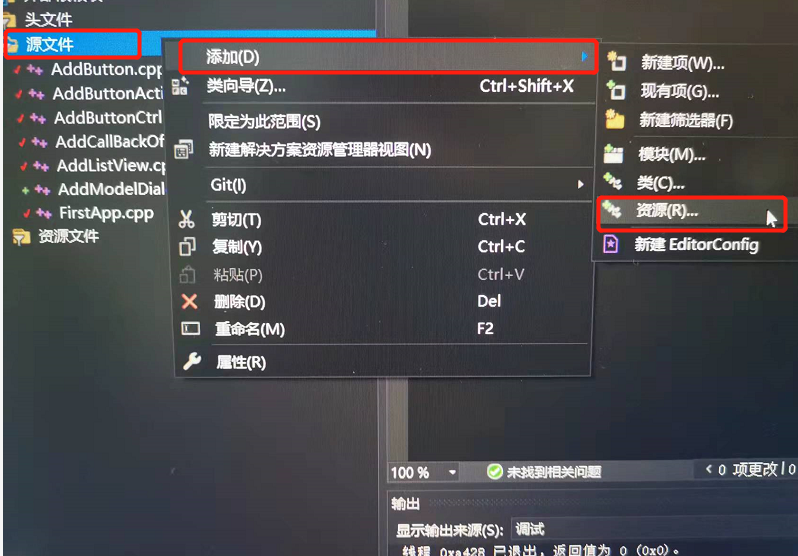
Click to jump to the video tutorial Gitee code link(There are more than 100 MB) New constructionAddModelDialog.cpp Create an API of the Modal dialog:DialogBox Run the results and the layout of our dra...
[Win32] is what controls
[Win32] is what controls statement: Since this topic is very large, finished, a little regret. After all, I just wrote a Win32 program less than two months, their understanding is not very comprehensi...

Win32 basic controls
One. Control concept Controls: a special type of "sub" window, the system has defined the window type. The creation method is similar to that of creating a window, call createWindows, and ea...
The use of WIN32 basic controls
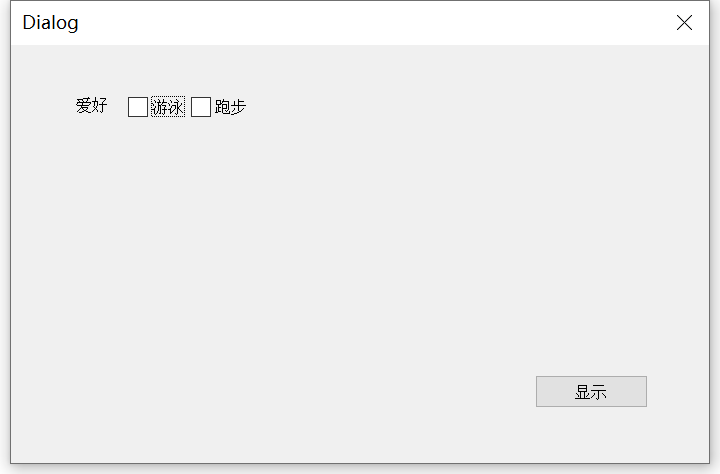
Code template Checkbox Code meaning: After we click the display, it will pop up whether the check box is selected Process function: BM_GETCHECK message document Single box The radio buttons need to be...
More Recommendation
Win32 SDK standard "About" dialog
Walking set Official software, generally designed an "About" dialog box to display software version, copyright, author or developer, contact information and other information. D...
Win32 5.4 dialog resource definition
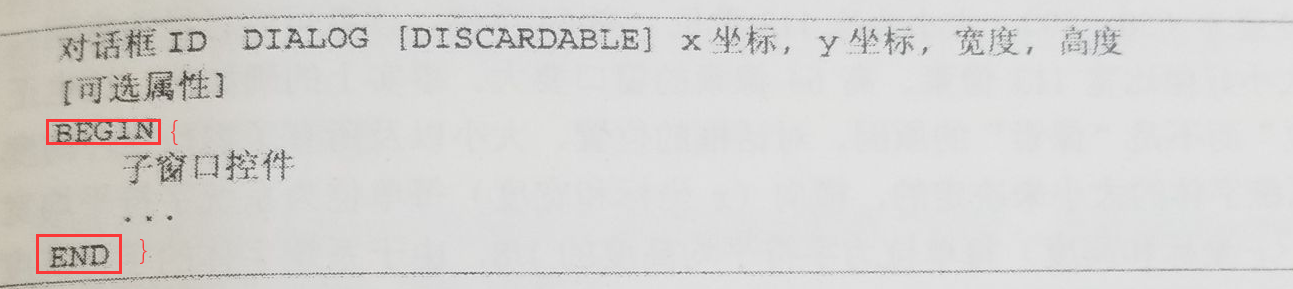
The format of the dialog box is: (where BEGIN END can be replaced with curly braces {}) The optional attributes are (just understand it roughly): Code interpretation: It can be seen that four groups o...
win32 8.2 using common dialog
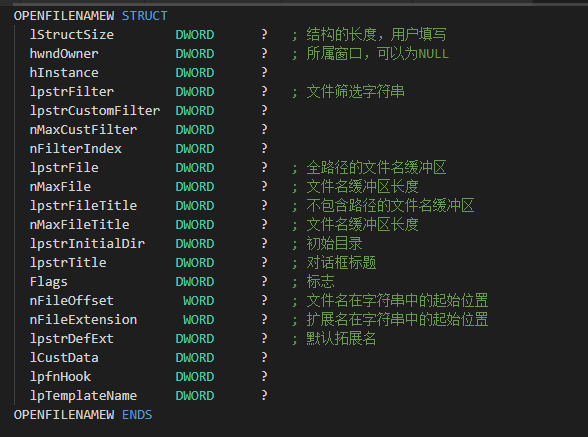
"Open" file and "Save" file dialog The function to display the "Open" dialog box is GetOpenFileName, and the function to display the "Save" file dialog is GetSa...
Introduction to win32 8.1 common dialog
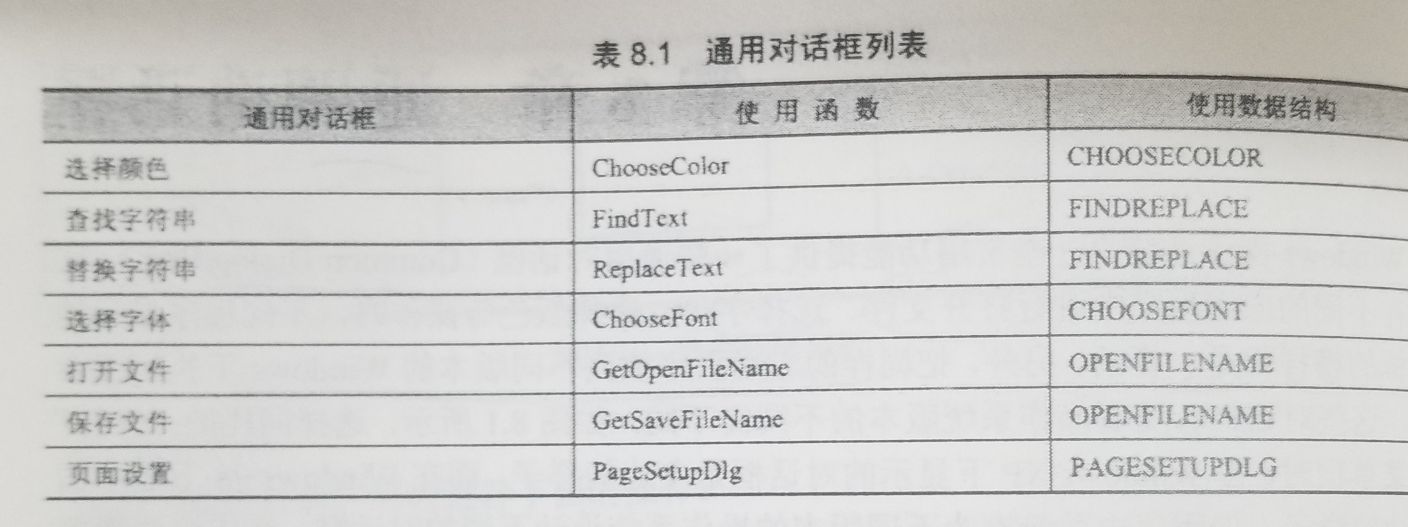
The common dialog box function is provided by Comdlg32.dll, please add the header file before using: List of common dialog boxes: In these dialogs, the dialogs created by finding strings and replacing...
How to create a visual dialog in win32
How to create a visual dialog in win32 One, plan 1 Resource view, create dialog resource 2 DialogBox interface, create dialog box instance 3 Message processing interface 2. Realization 1 Resource view...