SecureCRT uses script command to automatically record logs
tags: SecureCRT javascript
1. SecureCRT script engine
The SecureCRT script engine supports VBSCRIPT, JScript, and Python script. You can choose any script language you are familiar with and interact with the SecureCRT object.
Second, use the automatic log function of SecureCRT
The following is an example of using JScript script language
# $language = "JScript"

/*Global Variables during the Runicad of Scooter*/
var gLog_time       = "";
var gScript_name    = "";
var gRemoteHostip   = "";


var timer_sleep_sec = 1000;
var timer_sleep_min = 60 * 1000;
var timer_sleep_hour= 60 * 60 * 1000;

function process_log_open()
{
    /*************************************************************************************************/

    crt.session.Log(false); // Close the log record first
    crt.Screen.Send("\n");
    crt.Sleep(300);
    crt.Screen.Clear();

    // Get the current time
    crt.Screen.Send("sleep 1; echo `date +%Y-%m-%d_%H-%M-%S` | awk '{printf(\"%s\", $0)} END{print \"INFO_END\"}' \n");
    crt.Sleep(300);
    crt.Screen.Clear();

    gLog_time = crt.Screen.ReadString("INFO_END", 3);
    crt.Sleep(timer_sleep_sec);
    crt.Screen.Send("\n");

    //var ip = crt.Session.LocalAddress;
    //crt.Screen.Send("# ip: "+ip+" \n");

    gRemoteHostip = crt.Session.RemoteAddress;
    crt.Screen.Send("# remoteip: "+gRemoteHostip+" \n");

    // Get the current script file name
    var name = script_name = crt.ScriptFullName.split("\\");
    gScript_name = name.pop();
    crt.Screen.Send("# ScriptName: "+gScript_name+" \n");

    crt.session.Log(false);                                                        // Close the log record first
    crt.session.LogFileName = gRemoteHostip+"_"+gScript_name+"_"+gLog_time+".log"; // Log record name
    crt.session.Log(true);                                                         // Open the log record
    crt.Screen.Synchronous = true;                                                 // screen display synchronization
    crt.Screen.Send("# LogName: "+crt.session.LogFileName+" \n");

    return 0;
}

function main()
{
    process_log_open();

    return 0;
}
Intelligent Recommendation
SecureCRT command line to view error logs
First, ls lists files and directories (equivalent to dir, dir can also be used) -A: List all files, including hidden files. -l: List form, which contains most of the attributes of the file. -R: Recurs...
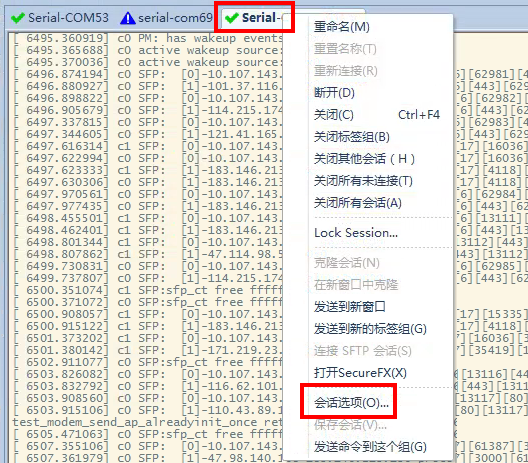
SecureCRT automatically saves window data to file and automatically saves logs
First select the window to be saved, such as saving the content of Serial-COM5(1) Right-click "Session Options" The save file attribute settings are modified according to your needs, mainly ...
SecureCRT VBS script to automatically log server
As shown in the script as follows crt.GetScriptTab (). Caption session is to get the title, such as "127.0.1.1 service A" Wait for a particular character screen appears, enter the IP ...
The script automatically logs in to the Linux server
1. [#!/usr/bin/expect] This line tells the code in the operating system script to use that shell to execute Note: This line needs to be in the first line of the script. 2. [set timeout 30] Set a 30 se...
Shell script to automatically delete logs
auto-del-7-days-ago-log.sh file content, pay attention to the file encoding, the newline must be in Unix format when saving Be sure to follow the next steps 1、chmod 777 auto-del-7-days-ago-log.sh &nbs...
More Recommendation
OpenWRT automatically logs in Portal script
The school campus network has recently replaced Portal login mode. Because I really feel troublesome, I want to use scripts to automatically log in on the router, and the router acts as terminals. bas...
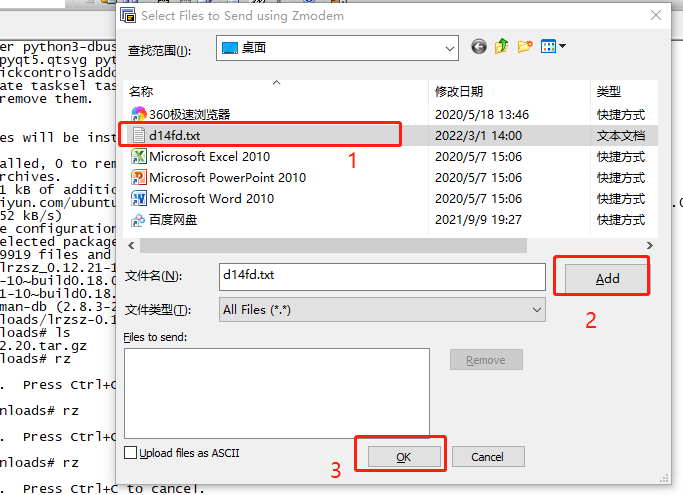
SecureCRT uses the RZ command to transfer files to the machine
SecureCRT uses LRZSZ tool transmission file to machine RZ command Enter the RZ command, CRT will automatically pop up the following interface, select the file you want to pass Then the terminal will p...
NetCore uses Log4Net to record logs
Required packages log4net version 2.0.8 Microsoft.Extensions.Logging.Log4Net.AspNetCore version 2.2.6 Add configuration in Program Log4Net configuration file, convert itCopy to output directoryPropert...
springboot uses logback to record logs
By default, Spring Boot will use Logback to record logs and output to the console with INFO level. In other words, you can print logs without configuring anything. However, if you want to customize th...

C# uses Log4 to record logs
Log4 record log Step 1: Download Log4Net download link:http://logging.apache.org/log4net/download_log4net.cgi After decompressing the downloaded log4net-1.2.11-bin-newkey, double-click the bin folder,...