How to use JAVA-JSP-JDBC-Tomcat to connect to SQL Server database
first step
Switch to SSMS, open the properties of the login object, and change the server authentication to SQL Server and Windows authentication mode
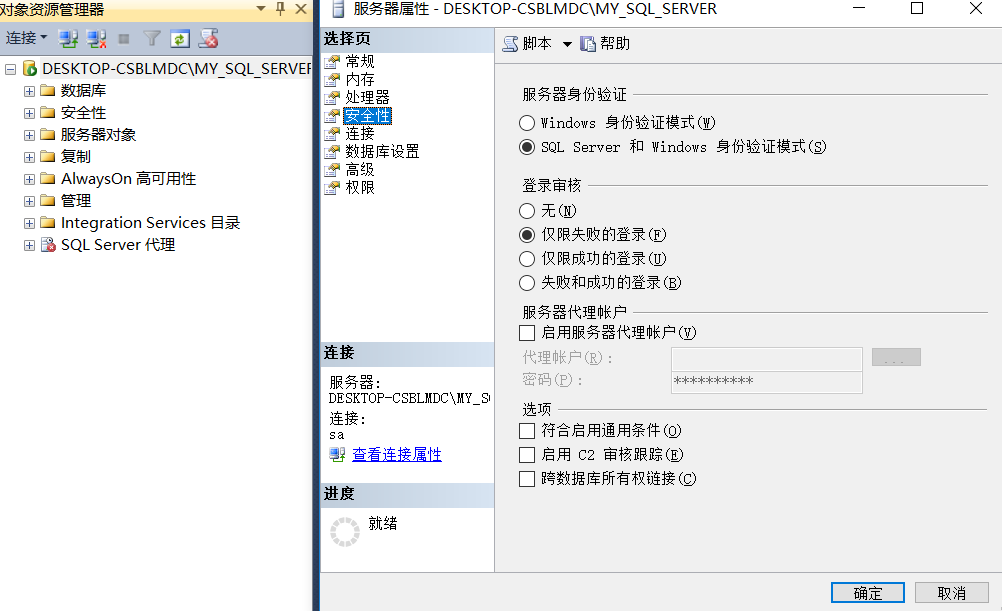 Open the server properties, click on security, and switch.
Second step
Specify a new password for the login name sa and change the status to login enabled
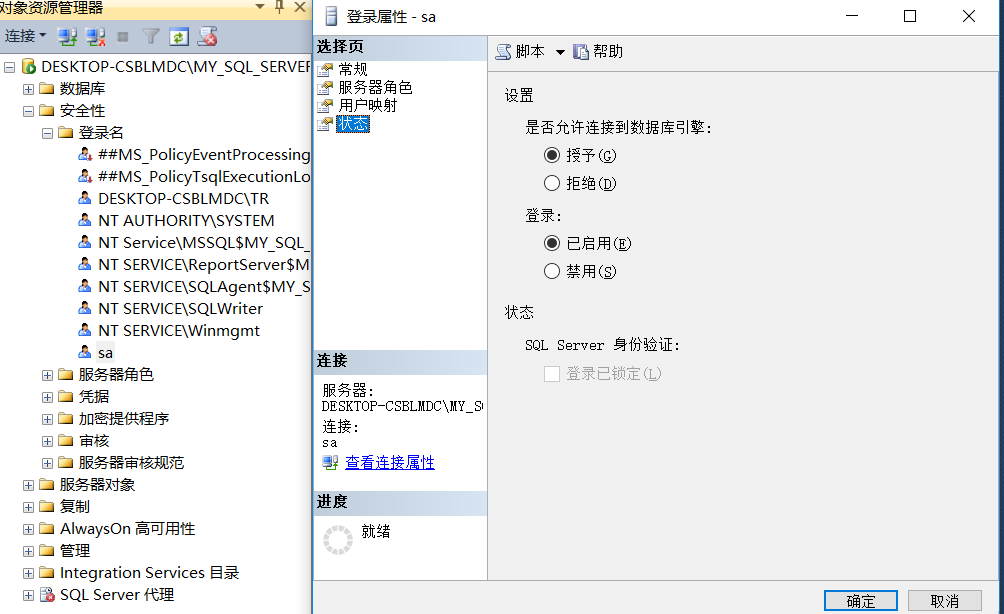 It is best to restart SSMS after switching
third step
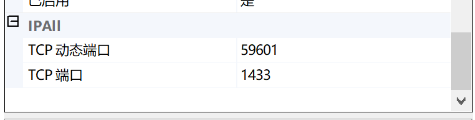
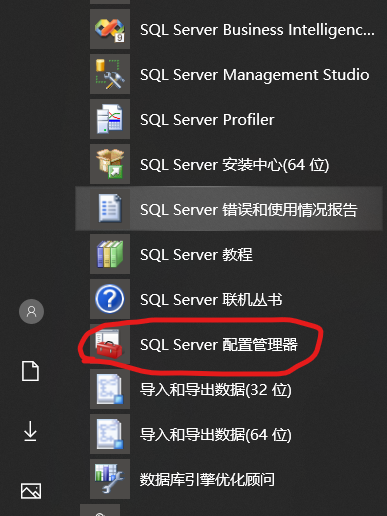
Open the SQL Server configuration manager and switch all the protocols in the network configuration to the enabled state
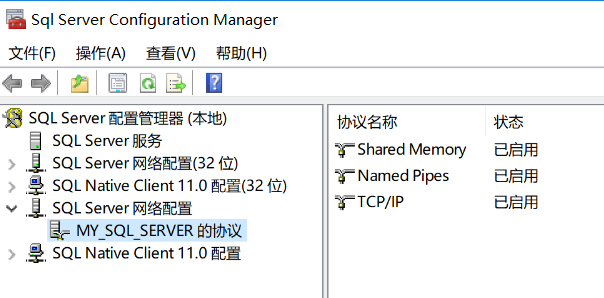
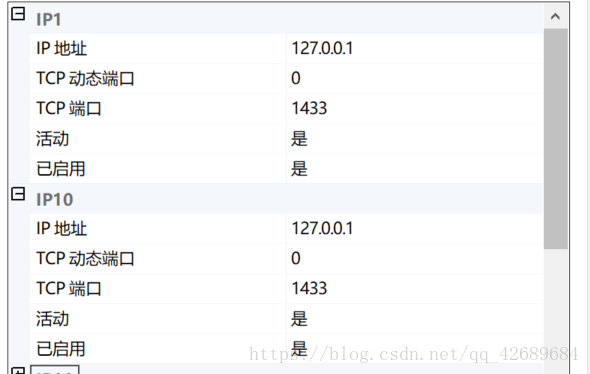
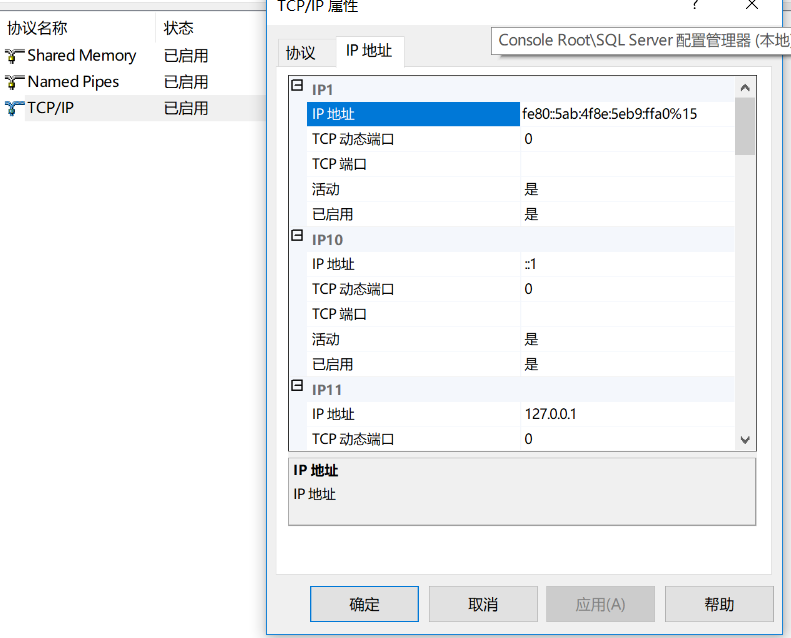 Change the TCP port of IPALL to 1433 to facilitate connection to jdbc
Next, you need to download a jdbc
Link: https://pan.baidu.com/s/1Aei3A0fa6XSc6e78fGywIQ
Extraction code: vohc
This is the file of jdbc and tomcat
After that is the operation on eclipse
import java.sql.*;
public class jdbctest {

	public static void main(String[] args)
	{
		try
		{
			Class.forName("com.microsoft.sqlserver.jdbc.SQLServerDriver");
			System.out.println("Driver loaded successfully");
			Connection conn = DriverManager.getConnection("jdbc:sqlserver://127.0.0.1:1433;DataBaseName=XSCJ", "sa", "123456");
			System.out.println("Link to the database successfully");

			String sql = "select * from XS_KC";
			System.out.println("search successful");
			Statement st = conn.createStatement();
			ResultSet rs=st.executeQuery(sql)
			while(rs.next())
			{
				String s1 = rs.getString(1);
				String s2 = rs.getString(2);
				int s3 = rs.getInt(3);
				System.out.print(s1+":"+s2+":"+s3+"\n");
			}
			rs.close();
			st.close();
			conn.close();
		}
		catch(Exception e)
		{
			System.out.println("Driver loading failed");
		}

	}

}
 Load the driver
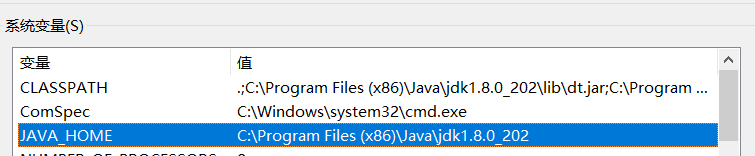
Then unzip Tomcat and add the location of the jdk file to JAVA_HOME
the fourth step
Use eclipse's Dynamic Web Project to create jsp

If there is no Dynamic Web Project, the specific download steps are as follows
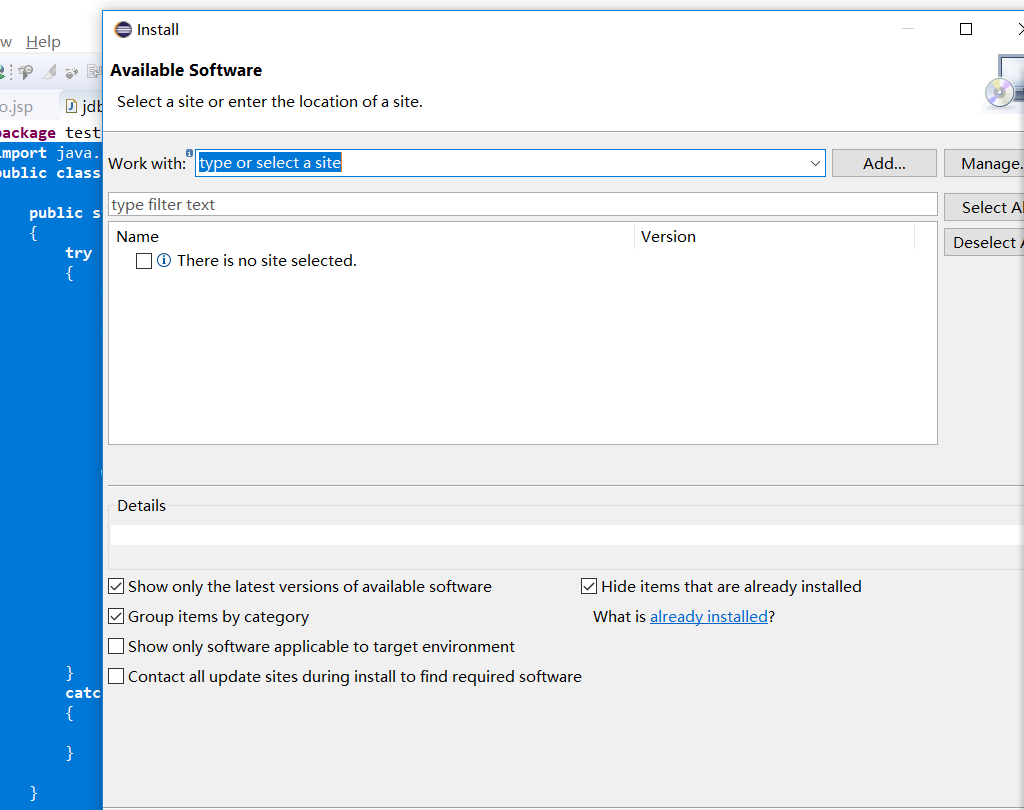 Open install new software in help
choose your own eclip version number
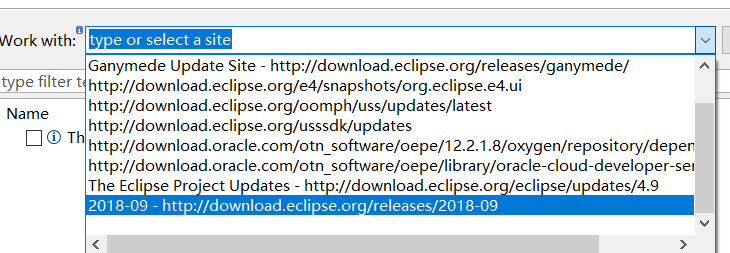
After loading is complete
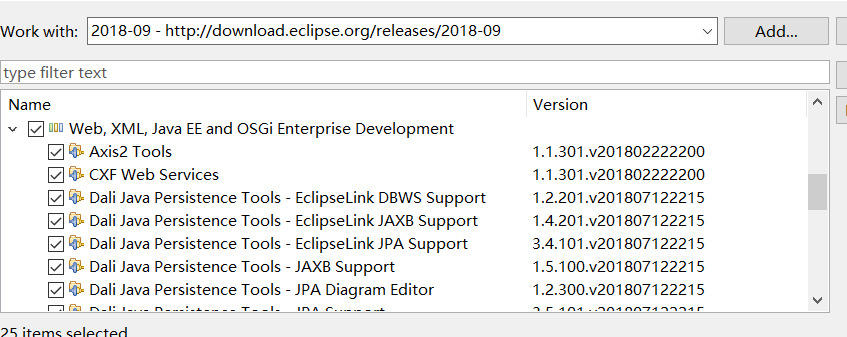
drop down selection
- Eclipse Java EE Developer Tools
- Eclipse Java Web Developer Tools
- Eclipse Web Developer Tools
- Eclipse XML Editors and Tools
After the progress bar reaches 100%, the Dynamic Web Project file can be created
Then you can use jsp to connect to sqlserver
The following is the operation of adding, deleting, modifying and checking
<%@ page language="java" contentType="text/html; charset=UTF-8"
    pageEncoding="UTF-8"%>
<%@ page import="java.sql.*"%>
<%@ page import="java.util.Scanner"%>
<!DOCTYPE html>
<html>
<head>
<meta charset="UTF-8">
<title>Database experiment</title>
</head>
<body>
<%
try
{
	Class.forName("com.microsoft.sqlserver.jdbc.SQLServerDriver");
	out.println("Drive loaded successfully");
	Connection conn = DriverManager.getConnection("jdbc:sqlserver://127.0.0.1:1433;DataBaseName=XSCJ", "sa", "123456");
	out.println("Database connection is successful");

	String sql_q = "select * from student";
	Statement st = conn.createStatement();

	ResultSet rs=st.executeQuery(sql_q);
	out.println("<table border='2'>");
	out.println("<tr>");
	out.println("<td>Student ID</td><td>Name</td>");
	out.println("</tr>");
	while(rs.next())
	{
		String s1 = rs.getString(1);
		String s2 = rs.getString(2);
		out.print("<tr><td>"+s1+"</td><td>"+s2+"</td></tr>");
	}
	out.println("</table>");
	rs.close();
	st.close();


	String sql_d = "delete from student where name='Fang Lulu'";
	PreparedStatement st_d = conn.prepareStatement(sql_d);
	int rs_d = st_d.executeUpdate();
	out.println("successfully deleted");
	st_d.close();

	String sql_u = "update XS_KC set score = 100 where student number = '020101' and course number = '101'";
	PreparedStatement st_u = conn.prepareStatement(sql_u);
	int rs_u = st_u.executeUpdate();
	out.println("Successfully modified");
	st_u.close();

	String sql_in = "insert into KC (course number, course name, credits) values('120','Advanced Mathematics', 4)";
	PreparedStatement st_in = conn.prepareStatement(sql_in);
	int rs_in = st_in.executeUpdate();
	out.println("Increase Success");
	st_in.close();

	conn.close();
}
catch(Exception e)
{
	out.println("succ failed");
}
%>
</body>
</html>
Intelligent Recommendation
java JDBC connect to SQL Server
JDBC java (eclipse) connect to SQL Server 1. Set up SQL Server Manager 2. Open SQL Server 2008 3. Download the SQL Server JDCB library 4. Open the eclipse tool and connect Reference Bolg: 1. Set up SQ...

Java web database connection (using JDBC to connect to sql server 2017)
First, install the JDBC driver Second, load the driver and establish a connection object 1. Connection code of sql server: 2. About the username and password here 3. Solve the problems that may occur ...
JAVA JDBC connect to SQL Server database advanced (1) ---ConnectionFactory
Every time you perform an operation in the previous stage, you need to establish a connection, and then close the connection. This produces a lot of redundant code, which is contrary to the reusabilit...
JAVA JDBC connect to SQL Server database advanced (2) --- batch processing
In the previous study, every SQL statement executed is sent to the database once. Although PreparedStatement will store the SQL statement on the database side, its parameters are also sent to the data...
JDBC preliminary--java to connect to SQL Server database (1)
JDBC preliminary--java to connect to SQL Server database (1) (1)test01Databasestudenttable (2)JDBCThe four core objects of operation: 1)DriverManager: Create connection 2)Connection: A connection 3)St...
More Recommendation
Java JDBC Connect SQL Server, MySQL, Oracle, Access Database
First, connect SQLServer 1, SQL Server Verification (username / password connection) 2, Windows authentication (no username and password) Second, connect MYSQL Third, connect Oracle Fourth, connect Ac...

JSP JDBC operation Sql Server database
Sql Server database is a commonly used database software, it is a Microsoft product, but also provides support for JDBC operations. operating: <1> First, download the JDBC driver jar package fil...
Conditional query of JDBC database of Sql Server in JSP
1. Experimental requirements Write three JSP pages: inputCondition.jsp, byNumber.jsp and byName.jsp pages. Write two Tag files: NumberCondtion.tag and NameConditon.tag. 1. Specific requirements of inp...
How to use JDBC to connect to the database
Let’s learn less in the next, let’s learn together: JDBC key code Remarks: The database I use is SQL Server 2012 Part of the code analysis url=”jdbc:sqlserver://LAPTOP8FMIL6M7:1433;&...
JSP JDBC connect to the database
1. Create a database in MySql, create a table, The format of driver and url can also refer to the jar package, driver class name and URL format corresponding to various databases. Add database tables ...