CMD and PowerShell setting proxy in Windows
tags: Windows tips windows Agent mode
This article uses the SOCKS5 protocol to set the agent, users can replace the HTTP and HTTPS protocols to set up SOCKS5 according to their own needs.
This article is tested to open the agent software, open, no need to turn on the agent on the software.
windows
cmd
set uptemporaryAgent (turn off the agent set by CMD disappears)
set all_proxy=socks5://127.0.0.1:10808 (Port number for your proxy software SOCKS5 protocol port)
Delete temporary agent
set all_proxy=
View current environment variables
set
View the current public network IP judgment agent is successful
curl cip.cc
powershell
set uptemporaryAgent (turn off the power of PowerShell disappeared)
$env:all_proxy="socks5://127.0.0.1:10808" (Port number for your proxy software SOCKS5 protocol port)
Delete the current temporary agent
$env:all_proxy=""
View current environment variables
ls env:*
I don't know if the detection agent is successful on the CURL and PING level, set up the interpretation agent, and successfully downloaded the download depending on the command line interface.
CMD and PowerShell setting permanent agent
Click My Computer Properties = "Select Advanced System Settings =" Select Environment Variable = "Select System Variable =" Select New
New all_proxy, value set to socks5: //127.0.0.1: 10808
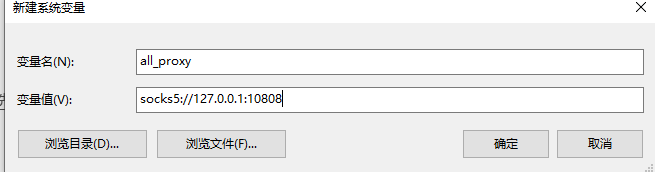
Save to save as a permanent agent
Express code setting temporary command line agent
cmd
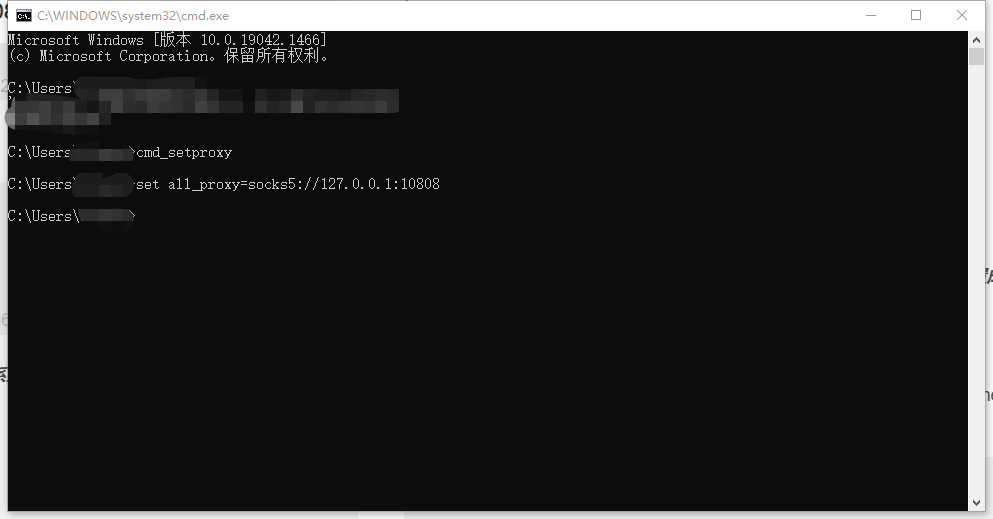
Can settemporaryThe agent is saved as cmd_setproxy.bat as follows:

deletetemporaryThe agent is as follows
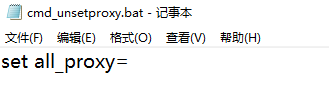
Setting two BATs as the same path to place the path into the path of the system variable.
Enter CMD_SETPROXY to set success
powershell
Open PowerShell with administrator mode
code $profile(Code means opening $ profile file with vscode, $ profile represents the configuration file of PowerShell)
function setproxy{
    $env:all_proxy="socks5://127.0.0.1:10808"
}

function unsetproxy{
    $env:unsetproxy=""
}
After saving, you will open PowerShell if you appear.
The system cannot use the script error
Use the administrator to open PowerShell
Set-ExecutionPolicy -ExecutionPolicy RemoteSigned
Choose Agree to change the policy, if you need to change the relevant policy options, you can view the official website document
You can use the Power Shell to use the setProxy shortcut to use the Power Shell.

Intelligent Recommendation

Say goodbye to CMD, welcome Windows PowerShell
Now the latest version of Win10, direct search can download good-looking and easy terminal interface. Simple shortcuts WIN + R, run the input WT, enter the return to enter Left and right split screen:...
Differences between PowerShell and CMD under Windows
First answer the title question: Simply put, PowerShell is a super-collection of CMD, in other words, CMD can do things, PowerShell can do, but PowerShell can also make many CMD can't do. I can unders...
Windows log in to different users CMD or PowerShell
When you use two users, such as root or tom, due to permissions. Traditional methods often need to switch users with frequent login pages, but if you know the command line, you can make you don't need...
Windows comes with PowerShell or CMD login remote server
Windows comes with SSH remote login command The command is as follows: Of course, the port number above can also be written, generally not changed, the default is 22, if you change it, fill in yoursel...
Windows command line statistical line PowerShell cmd
Articles directory method one: Method Two: Note: About $ ENV: PATH About Find command The first point Second point appendix For example: how many items are there in the statistical environment variabl...
More Recommendation
How to connect to linux server for cmd\powershell in Windows
Preface Sometimes we don’t have a tool like xshell to connect to a Linux server. It’s very simple. You don’t need to install xshell at all. The cmd window can also connect to a remot...
Windows: CMD setting environment variables
2018.11.01 Article directory Foreword method Foreword Installing JDK under Windows or deploying Tomcat, the process of installing environment variables always makes me feel very painful, and every cli...
Set up a proxy for windows cmd
If you want to set the proxy for cmd, you need to execute it before executing other commands. The role of the above command is to set the environment variable, do not worry, this environment va...
Windows git and cmd proxy settings
Linux is relatively simple, you can directly modify the configuration file, so I will not repeat them here. Set up a Git proxy Http proxy: Temporary agent: export http_proxy=http://127.0.0.1:7777 expo...
Set up proxy for windows cmd
This article is reproduced fromSet up proxy for windows cmd Execute certain commands through the cmd command line. If these commands go to a foreign site to download any files but cannot download them...