Vue event bus (EventBus)
Reference article:
The core concept of many modern JavaScript frameworks and libraries is the ability to encapsulate data and UI in modular, reusable components. This allows developers to avoid writing a lot of duplicate code when developing an entire application. While this is very useful, it also involves data communication between components. There is also such a concept in Vue. Through the previous period of learning, Vue component data communication often has data communication between the parent and child components and the sibling components. That is to say, there are certain principles for component communication in Vue.
Parent and child component communication principles
In order to improve the independence and reusability of the component, the parent component will pass the data down to the child component through props. When the child component has something to tell the parent component, it will tell the parent through the $emit event. Component. This ensures that each component operates independently in a relatively isolated environment, which can significantly improve the maintainability of the component.
This section is described in detail in the article "Vue Component Newsletter". But this set of communication principles has a certain criticism of data communication between sibling components. Of course, there are other ways to handle data communication between sibling components in Vue, such as libraries like Vuex. But in many cases, our application does not require a library like Vuex to handle data communication between components, but consider the event bus in Vue, ie **EventBus **.
The next step is to learn about the EventBus related knowledge in Vue.
Introduction to EventBus
EventBus is also known as the event bus. In Bue, you can use EventBus as a communication bridge concept, just as all components share the same event center, you can register to send events or receive events to the center, so components can notify other components in parallel, but also too Convenience, if used carelessly, it will cause a disaster that is difficult to maintain, so a more complete Vuex is needed as a state management center to raise the concept of notification to the shared state level.
How to use EventBus
How do I use EventBus in Vue projects to communicate data between components? This can be done in the following steps.
initialization
The first thing you need to do is create an event bus and export it so that other modules can use it or listen to it. We can handle it in two ways. First look at the first one, create a new .js file, such as event-bus.js :
// event-bus.js
import Vue from ‘vue’
export const EventBus = new Vue()
All you need to do is introduce Vue and export an instance of it (in this case, I call it EventBus ). Essentially it's a component that doesn't have a DOM, it's just a sample method, so it's very lightweight.
Another way to initialize EventBus directly in main.js in your project:
// main.js
Vue.prototype.$EventBus = new Vue()
Note that the EventBus initialized this way is a global event bus. Later we will take a moment to talk about the global event bus.
Now that we have created EventBus, all you need to do is load it in your component and call the same method, just as you pass messages to each other in the parent and child components. .
Send event
Suppose you have two subcomponents: DecreaseCount and IncrementCount , which are bound to the decrease() and increment() methods in the button. The two methods do very simple things, that is, the value is decremented (increased) by 1, and the angle value is decremented (increase) by 180. In both methods, the decreased (and incremented) channel is listened to by EventBus.$emit(channel: string, callback(payload1,...)).
In the example above, the decreased and incremented channels were sent in DecreaseCount and IncrementCount respectively. Next, we need to receive these two events in another component, keeping the data in communication between the components.
Receive events
Now we can use the EventBus.$on(channel: string, callback(payload1,...)) listener DecreaseCount and IncrementCount in the component App.vue to send the decreased and incremented channels respectively.
        <div class="back">
            <div class="increment">
                <IncrementCount />
            </div>
            <div class="show-back"> {{backCount}} </div>
            <div class="decrement">
                <DecreaseCount />
            </div>
        </div>
    </div>
</div>
The final result is as follows:
Finally, a diagram is used to describe the relationship between the EventBus used in the example:
If you only want to listen for an event, you can use EventBus. off(‘decreased’, {})
You can also use EventBus.
Off() to remove all event channels, note that no parameters need to be added.
The above is how the EventBus is used. Is it very simple? As we saw in the example above, event-bus.js needs to be introduced into each component each time EventBus is used. In fact, we can make things simpler by other means. That is to create a global EventBus. The next example shows you how to create a global EventBus in a Vue project.
global EventBus
The global EventBus, although not recommended for use in some examples, is a very nice and simple way to share data across components.
It works as a publish/subscribe method, usually called Pub/Sub.
This whole method can be seen as a design pattern, because if you look at things around it, you will find it more like an architectural solution. We'll use plain JavaScript and create two components and demonstrate how EventBus works.
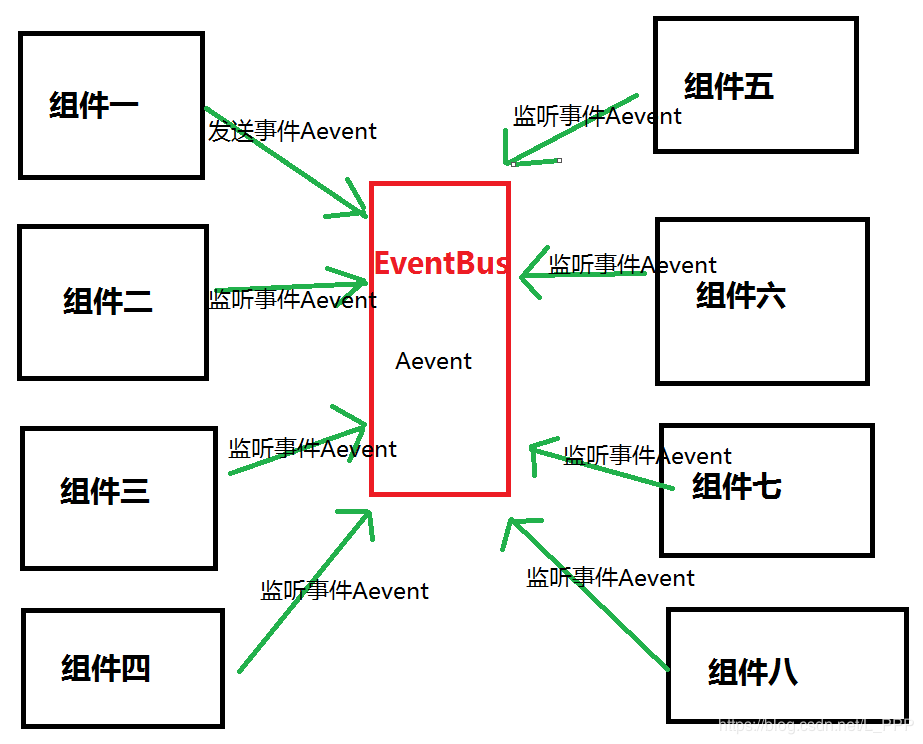
Let's take a look at the image below and try to understand what happened in this situation.
We can get the following points from the above picture:
Have a global EventBus
subscribes to all events
All components are also posted to it, and the subscription component gets updated
Summarize. All components are able to publish events to the bus, then the bus is subscribed by another component, and then the components that subscribe to it are updated
In the code, we will keep it very small and concise. We split it into two parts that will show two components and the code that generates the event bus.
Create a global EventBus
The global event bus is nothing more than a simple vue component. code show as below:
var EventBus = new Vue();
Object.defineProperties(Vue.prototype, {
$bus: {
get: function () {
return EventBus
}
}
})
Now this particular bus uses two methods $on and
Emit ; another for subscribing $on :
var EventBus = new Vue();
this. emit(‘nameOfEvent’,{ … pass some event data …});
this.
on(‘nameOfEvent’,($event) => {
// …
})
Now we create two simple components to get the final conclusion.
In the next example, we created a component of ShowMessage to display the information, and a component of UpdateMessage to update the information.
Triggers the required events in the UpdateMessage component. In this example, an updateMessage event is fired, which sends the channel for updateMessage :
Also listen for this event in the ShowMessage component:
<The final result is as follows:
From the above code, we can see that the ShowMessage component listens for a specific event called updateMessage that is fired when the component is instantiated, or you can fire when the component is created. . On the other hand, we have another component, UpdateMessage , which has a button that emits an event when someone clicks on it. This causes the subscription component to listen for events that are emitted. This produces a Pub/Sub model that persists between siblings and is very easy to implement.
Summary
This article mainly learns about the related knowledge of EventBus in Vue through two examples. It mainly involves how to instantiate EventBus, how to send channel signals through $emit, and how to receive channel signals via $on. Finally, I briefly introduced how to create a global EventBus. From the example we can understand that EventBus can better realize the data communication between the sibling components.
Students interested in front-end technology are welcome to join the Q group: 866109386. I welcome you whether you are a white or a big cow, and a set of efficient learning routes organized by Daniel. The tutorial is shared with you for free, and the video files are updated daily.
Finally, I wish you all a good start, get a satisfactory offer, get a quick promotion and raise your salary, and embark on the peak of your life.
Author: Yi Dian people to the moon frost
link:
Source: Short book
The copyright of the book is owned by the author. Any form of reprint should be contacted by the author for authorization and the source.
Intelligent Recommendation
Vue Transfer Event Bus Eventbus
There is a simple method between components in Vue. Create Even.js (name your own) The following is the code created in the JS file. There are two components of A, B, and JS that needs to be created i...
Vue event bus (EventBus) with caution
Usually suitable for brothers component value It is best to plan the scope of function -Profin the range of instance control (different instances in different areas) -An the scope of control space con...
Vue event bus (EVENTBUS) learning
1. 1. Background We know that there are many ways to transfer data between Vue components, such as:Father -child component communication,Intergenerational component communication,Routing,vuexWait, but...
The concept, use and attention of vue event bus EventBus
vue event bus Preface text Introduction to EventBus Use of EventBus One, initialization Two, send events to EventBus Three, receive events Fourth, remove the monitoring event Concluding remarks Prefac...
More Recommendation
Use the central event bus eventBus in vue
Use the central event bus eventBus in vue Prepare to create files: router/index.js : App.vue : src/utils/eventBus.js : src/components/sky.vue : src/components/news.vue : src/views/About.vue Click on t...
Talk about the event bus mechanism in vue-EventBus
Vue event bus mechanism-EventBus The background of the event bus The core part in vue is the component, and the communication between components is the top priority. Communication is divided into pare...
Vue Development Central Event Bus Eventbus
Use background: In Vue development, a large number of components are encountered, and VUE has a corresponding solution for different situations. For example, the parent component can use the ...
Vue implementation global Eventbus (global event bus)
Basic knowledge: There are three events on VUE prototypes: $ N (), $ EMIT (), $ OFF () The prototype object of the component object is a VM object: the component object can directly access the method ...
Vue in the event bus (Eventbus) detailed and used
Portal: Vue ion assembly to the parent components and .sync modifier Portal: Vue State Manager (Vuex) Detailed and Application Scene Portal: Vue $ Attrs, $ Listeners More 1 Introduction Frequently ava...