Some distance understanding margin scrolltop
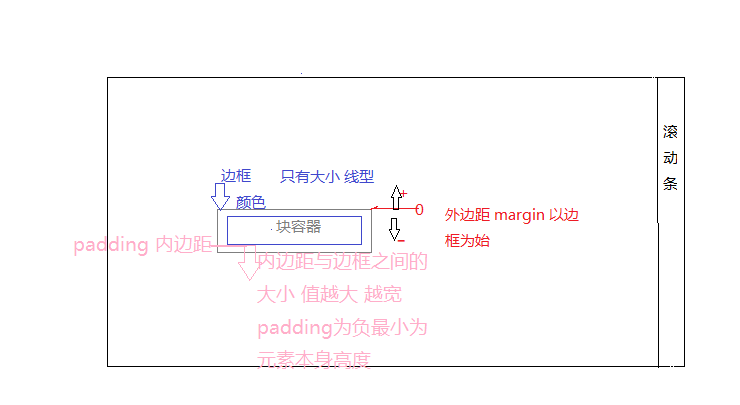 Single block container
If you want a negative distance between elements, you can use text-indent to indent the first line. Positive values shrink right, negative values shrink left (really eat the text)
The distance between multiple containers is determined by setting their respective margins
Elements in multiple containers want to change the position of each other without changing the size of the inner margin The position of the border is not right The inner layer is widened
The height of the visible area of the webpage: document.body.clientHeight
The full text height of the page body: document.body.scrollHeight
The height of the visible area of the webpage (including the height of the sideline): document.body.offsetHeight
The height of the page being scrolled: document.body.scrollTop
High screen resolution: window.screen.height
Each HTML element has clientHeight offsetHeight scrollHeight offsetTop scrollTop these five attributes related to element height, scrolling, and position. It is difficult to figure out the difference between what they mean by words alone. By reading their documents, the rules are as follows:
clientHeight and offsetHeight attributes have nothing to do with the scrolling and position of the element. They represent the height of the element, where:
clientHeight: The height of the element including padding but not border, horizontal scroll bar, and margin. For inline elements, this attribute is always 0, unit px, read-only element.
offsetHeight: Including padding, border, horizontal scroll bar, but not including the height of margin elements. For inline elements, this attribute is always 0, unit px, read-only element.
Next, discuss the situation when there is a scroll bar:
When the child element of this element is higher than this element and overflow=scroll, this element will scroll, then:
scrollHeight: Because the child element is higher than the parent element, the parent element does not want to be supported by the child element as high as the scroll bar is displayed. During the scrolling process, this element is partially hidden, scrollHeight Represents the height of the element including the currently invisible part. The height of the visible part is actually clientHeight, that is, scrollHeight>=clientHeight is always established. It makes sense to discuss scrollHeight when there is a scroll bar, and scrollHeight==clientHeight is always established when there is no scroll bar. Unit px, read-only element.
scrollTop: Represents the distance the scroll bar scrolls down when there is a scroll barThat is, the height of the covered part at the top of the element. When there is no scroll bar, scrollTop==0 is always established. The unit is px, which can be read and set.It can be set to initialize the container first. scrollTop=0; self-setting is to scroll from top to bottom
offsetTop: The distance between the top of the current element and the top of the nearest parent element, regardless of whether there is a scroll bar. Unit px, read-only element.offsetTop: The distance between the top of the current element and the top of the nearest parent element, regardless of whether there is a scroll bar. Unit px, read-only element.
Intelligent Recommendation
My understanding of scrolling news scrollTop
As a front-end beginner, I learned how to use scrollTop in JavaScript to achieve message scrolling effects. The scrolling up of the message can actually be seen as we drag the photos in the frame upwa...
Gets the scroll bar scrollTop distance is always 0
Js event monitor when the scroll bar when the monitor can succeed, but since the acquisition scrollTop is always 0, still has not found himself 0 after breakpoint debugging console can get into, that ...
Get the scrollbar scrollTop distance is always 0
Get the scrollbar scrollTop distance is always 0 When monitoring the scroll bar event, it can monitor successfully. However, it is always 0 when acquiring scrollTop. After debugging on the console bre...
Get the page scroll distance PageYoffset, Scrolly, Scrolltop
When obtaining the height of the page scrolling distance, there is often different ways, and different attribute browser supports a slight difference: pageYOffset: Both Window objects, IE9 +, Firefox,...
Padding inner margin, margin outside distance
padding: 1px 1px 1px 1px; For inline elements:up and downThe inner margin will fail; For block-level elements: the internal margins of the upper and lower left and left will take effect; Outside dista...
More Recommendation
Percentage of internal margin and outer distance
The percentage value of the inner margin and the outer distance is calculated relative to the Width of its parent element. Code: Show results:...
Outer distance, inner margin, and floating
First, margin is an external distance, you can set the gap outside the container 1, shortty margin:20px; up down left right margin:20px 30px; up down left right margin:20px 30px 40px; Under the left a...
Box model -outer distance Margin
1. What is outer distance Margin The box model consists of four parts, that is, content, padding, border, and margin. The Margin attribute is to set the outer border, that is, the distance between the...

The outer distance of the box model -Margin
Articles directory The outer distance of the box model -Margin Margin's basic attribute Margin's composite attribute Typical application of outer distance Outer distance merger Adjustable element vert...
Flutter Margin negative side distance
Flutter Container will report negative values to the border range and report an error: I/flutter ( 3173): ‘package:flutter/src/widgets/container.dart’: Failed assertion: line 251: &lsquo...