Building a LevelDB environment and principle analysis
1. Build a LevelDB environment
1. Download levelDB (or download the installation package and unzip it yourself)
git clone https://github.com/google/leveldb.git2. Use cmake to compile (cmake artifact, simple and fast)
cd leveldb/
mkdir -p build && cd build
cmake -DCMAKE_BUILD_TYPE=Release .. && cmake --build .
3. Configure the library directory and header file directory
cp build/libleveldb.a /usr/local/lib/
cp -r include/leveldb/ /usr/local/include/
4. Test basic functions
#include <cassert>
#include <iostream>
#include <string>
#include <leveldb/db.h>

int main() {
  leveldb::DB* db;
  leveldb::Options options;
  options.create_if_missing = true;
  leveldb::Status status = leveldb::DB::Open(options, "/tmp/testdb", &db);
  assert(status.ok());

  std::string key = "apple";
  std::string value = "A";
  std::string get;

  leveldb::Status s = db->Put(leveldb::WriteOptions(), key, value);

  if (s.ok()) s = db->Get(leveldb::ReadOptions(), key, &get);
     if (s.ok()) std::cout << "Read (value=" << get << ")" corresponding to (key=" << key << ")" << std:: endl;
     else std::cout << "Failed to read!" << std::endl;

  delete db;

  return 0;
}
Compile and link (Note: the lack of -pthread option will report undefined reference to `pthread_create’):
g++ -o demo demo.cc -pthread -lleveldb -std=c++11$ ./demo
(Value=A) corresponding to (key=apple) readTwo, LevelDB principle analysis
1、LevelDBgetting Started
LevelDBYesGoogleOpen source persistenceKVStand-alone database,Has a high random write, sequential read/Write performance, but random read performance is very general, That is,LevelDBIt is very suitable for scenarios where there are few queries and a lot of writing.LevelDBAppliedLSM (Log Structured Merge) Strategy,lsm_treeDelay and batch process index changes, and efficiently migrate updates to disk in a manner similar to merge sort, reducing index insertion overhead.
Features:
1、keywithvalueBoth are byte arrays of arbitrary length;
2、entry(Ie oneK-VRecord) The default is to followkeyStored in lexicographical order, of course, developers can also overload this sorting function;
3, Basic operation interface provided:Put()、Delete()、Get()、Batch();
4, Support batch operation in atomic operation;
5, Can create data panoramasnapshot(Snapshot), And allow to find data in the snapshot;
6, You can traverse the data through the forward (or backward) iterator (the iterator will implicitly create asnapshot);
7, Automatic useSnappyCompressed data
8,portability;
limit:
1, Non-relational data model (NoSQL),not supportsqlStatement, index is not supported;
2, Allow only one process to access a specific database at a time;
3, No built-inC/SArchitecture, but developers can useLevelDBThe library encapsulates oneserver;
2、LevelDBStorage model
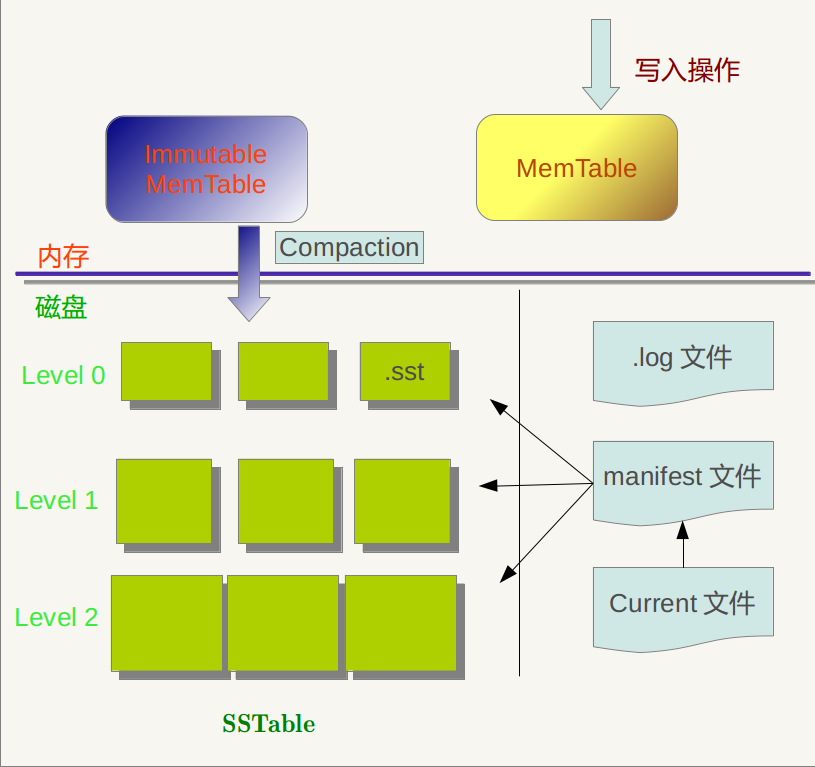
Fig. 2-1 LevelDB storage model
2.1 LevelDBStorage method:
RAM:MemTablewithImmutable MemTable
Disk:Currentfile,Manifestfile,logFiles andSSTablefile
among them,logfile,MemTable、SSTableFiles are used to storek-vrecorded
SSTableA file in belongs to a specific level, And its stored records arekeyOrderly, then there must be the smallest in the filekeyAnd maxkey, This is very important information.
Manifest RecordedSSTableManagement information of each file, Such as whichLevel, What is the name of the file, the smallestkeyAnd maxkeyWhat is each. The picture below isManifestSchematic representation of stored content:
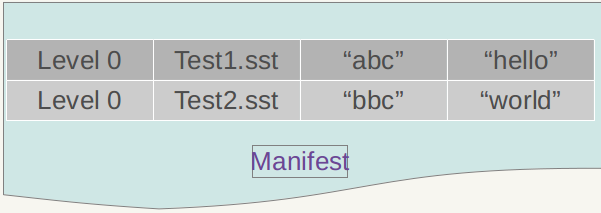
Fig. 2-2 Manifest storage layout
In addition, inLevleDbDuring the operation ofCompactionThe progress,SSTableFiles will change, new files will be generated, old files will be discarded,ManifestWill also reflect this change, and at this time will often be newly generatedManifestDocuments to document this change, andCurrentIs used to indicate whichManifestThe file is the one we care aboutManifestfile。
3、LevelDBRead and write data

Schematic diagram of reading and writing of LevelDB in Figure 3-2
Write operation flow:
1, Sequential write to disklogfile;
2, Write to memorymemtable(useskiplistStructure realization);
3, Write to diskSSTfile(sorted string table files), This step is the process of data archiving (Permanent storage);
note:(Writing process)
- logThe function of the file is to recover from a system crash without losing data. If there is noLogFile, because the written record is stored in the memory at the beginning, if the system crashes at this time, the data in the memory has not had timeDumpTo disk, so data will be lost;
- WritingmemtableTime, if it reachescheck point(Full staff), change it toimmutable memtable(Read only), then waitdumpTo diskSSTFile, a newmemtableFor writing new data;
- memtablewithsstIn the filekeyAre all in order,logFilekeyIs disorderly
- LevelDBDelete operation is also insert, just markKeyIn order to delete the state, the real deletion must beCompactionDo the real operation only when
- LevelDBNo interface update, if you need to update aKeyYou only need to insert a new record; or delete the old record first and then insert it.
The process of inserting a new record is also very simple, that is, first find the appropriate insertion position, and then modify the corresponding link pointer to insert the new record. After this step is completed, the write record is complete, so an insert record operation involvesDisk file append write oncewithRAMSkipListInsert operation, Why is thislevelDbThe root cause of such efficient writing speed.
Read operation flow:
1, Search sequentially in memorymemtable、immutable memtable;
2, If configuredcache, Findcache;
3,according tomainfestIndex file, search on diskSSTfile;

Figure 3-3 LevelDB Reading and Writing Flowchart
For example, let’s insert a piece of data into levelDb {key="www.samecity.com" value="we"}. After a few days, the samecity website was renamed: 69 samecity. At this time, we insert data {key= "www.samecity.com" value="69 "}, same key, different value; logically it seems that there is only one storage record in levelDb, that is, the second record, but there are probably two records in levelDb , That is, the two records above are stored in levelDb. At this time, if the user queries key="www.samecity.com", we of course hope to find the latest update record, which is the second record returned. Therefore, the search The order should be based on the freshness of the data update. For the SSTable file, if the same key is found at both level L and Level L+1, the information of level L must be newer than that of level L+1.
4、Logfile
For a log file, LevelDb will cut it into physical blocks with a unit of 32K. Each reading unit uses one block as the basic reading unit. The log file shown in the figure below is composed of 3 blocks, so from the physical layout In terms ofOnelogThe file is made up of consecutive32KsizeBlockConstituted.
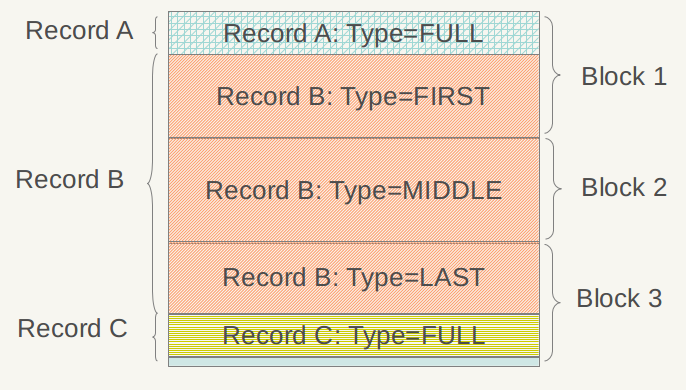
Layout of the log file Figure 4-1 Log file layout

Figure 4-2 Log data record structure
The record header contains three fields,ChechSumYesFor the check codes of the "Type" and "Data" fields, in order to avoid processing incomplete or corrupted data, the data will be checked when LevelDb reads the recorded data. If it is found to be the same as the stored CheckSum, the data is indicated Complete and undamaged, you can continue the follow-up process. "Record length"Records the size of the data,"data"Is the Key:Value value pair mentioned above,"Types ofThe "field points out the relationship between the logical structure of each record and the physical block structure of the log file. Specifically, there are four main types: FULL/FIRST/MIDDLE/LAST.
If the record type isFULL, Which represents the current record content is completely stored in a physicalBlockThere is no different physicalBlockCut open; If the record is split by adjacent physical blocks, the type will be one of the other three types. Let's take the example shown in Figure 3.1 to illustrate.
5、MemTablefile
LevelDb's MemTable provides an interface for writing, deleting and reading KV data, but in factMemtableThere is no real delete operation, Deleting the Value of a Key is implemented as inserting a record in Memtable, but it willHit oneKeyMark for deletion, The real deletion operation is Lazy, and this KV will be removed in the subsequent Compaction process.
It should be noted that the KV pairs in LevelDb's Memtable are stored in an orderly manner according to the key size. When a new KV is inserted into the system, LevelDb must insert the KV in a suitable position to maintain this key order. In fact, the Memtable class of LevelDb is just an interface class.The real operation is throughSkipListCome to do, Including insert operations and read operations, etc., so MemtableThe core data structure is aSkipList。
SkipList is an alternative data structure of the balanced tree, but unlike the red-black tree, the realization of the balance of the tree by SkipList is based on a randomized algorithm, which means that the insertion and deletion of SkipList is Relatively simple.
SkipList reference blog,
SkipList is not only a simple implementation of maintaining ordered data, but alsoCompared with a balanced tree, frequent tree node adjustment operations can be avoided when inserting data, so the writing efficiency is very high, LevelDb is a high-write system as a whole, and SkipList should also play an important role in it.RedisIn order to speed up the insert operation, also usedSkipListAs internal data structure。
6. SSTable file
There are many SSTable files at different levels of LevelDb (featured with the suffix .sst), and the internal layout of all .sst files is the same. In the previous section, the Log file is physically divided into blocks.SSTableThe same will divide the file into fixed-size physical storage blocks, But the logical layout of the two is quite different. The root cause is that the records in the Log file are Key out of order, that is, there is no clear size relationship between the key size of the successive records, and the inside of the .sst file is based on the recorded Key from small to small. Large arrangement, from the layout of the SSTable introduced below, you can understand why the Key order is the key to the structure of the .sst file.
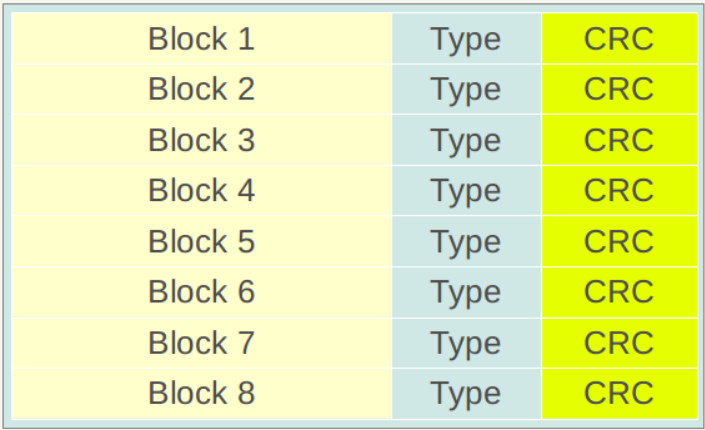
Figure 6-1 The block structure of the .sst file
Figure 6-1 shows the physical partition structure of a .sst file. Like the Log file, it is also divided into fixed-size storage blocks. Each block is divided into three parts.Red sectionIs the data storage area,blueTypeAreaUsed to identify whether the data storage area uses a data compression algorithm (Snappy compression or no compression),CRCsectionIt is the data check code, which is used to judge whether the data is generated and transmitted in error.
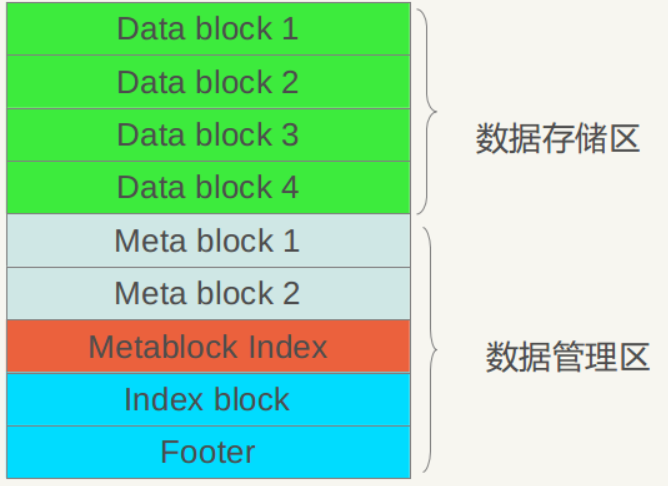
Figure 6-2. sst logical layout Figure 6-2.sst logical layout
It can be seen from Figure 6-2 that from a large aspect, the .sst file can be divided into a data storage area and a data management area.Data storage areaStore the actual Key:Value data,Data management areaSome management data such as index pointers are provided for the purpose of finding the corresponding records more quickly and conveniently. Both areas are based on the above-mentioned block, that is, the first several blocks of the file actually store KV data, and the latter data management area stores management data. Management data is divided into four different types: purple Meta Block, red MetaBlock index and blue data index block, and a file tail block.
LevelDb version 1.2 has no actual use for Meta Block yet, but retains an interface. It is estimated that content will be added in subsequent versions. Let's look at the internal structure of the data index area and the footer at the end of the file.
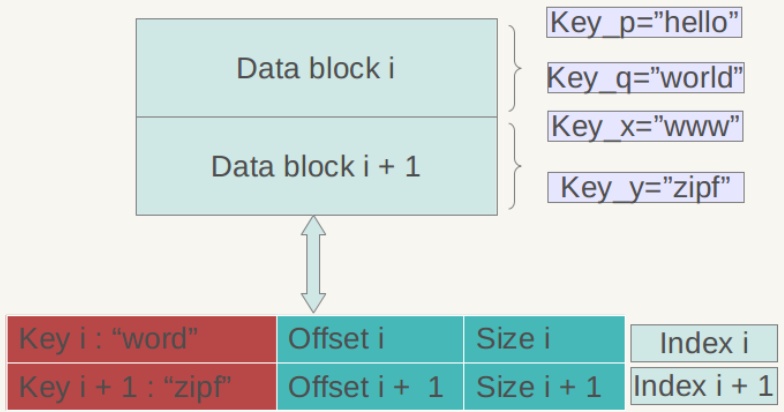
Figure 6-3 Data Index Figure 6-3 Data Index
Figure 6-3 is a schematic diagram of the internal structure of the data index. Again, the KV records in the Data Block are arranged in descending order of Key. Each record in the data index area is index information established for a certain Data Block. Each index information contains three contents, as shown in Figure 4.3 For the index Index i of the data block i shown: the first field in the red part records the Key that is greater than or equal to the largest Key value in the data block i, and the second field indicates the start of the data block i in the .sst file Starting position, the third field indicates the size of Data Block i (sometimes it is data compressed).
The latter two fields are easy to understand and are used to locate the position of the data block in the file. The first field needs to be explained in detail. The Key value stored in the index may not necessarily be the Key of a certain record, as shown in Figure 4.3 For example, suppose the minimum Key of data block i = "samecity" and the maximum Key = "the best"; the minimum Key of data block i+1 = "the fox" and the maximum Key = "zoo", then for data block i For index i, the first field records the maximum Key ("the best") greater than or equal to data block i and is less than the minimum Key ("the fox") of data block i+1, soIn the exampleIndex iThe first field is:“the best”, This is satisfactory; andIndex i+1The first field is "zoo”, Which is the largest Key of data block i+1.
The internal structure of the Footer block at the end of the file is shown in Figure 6-4. Metaindex_handle indicates the starting position and size of the metaindex block; inex_handle indicates the starting address and size of the index block; these two fields can be understood as the index of the index, for Set up by reading the index value correctly, followed by a padding area and magic number.
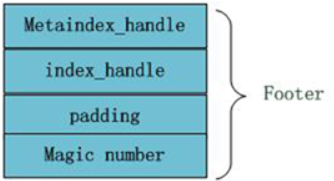
Image 6-4 Footer structure diagram
The above mainly introduces the internal structure of the data management area. Let's take a look at how the data part of a block in the data area is laid out (the red part in Figure 4.1). Figure 6-5 is a schematic diagram of its internal layout.
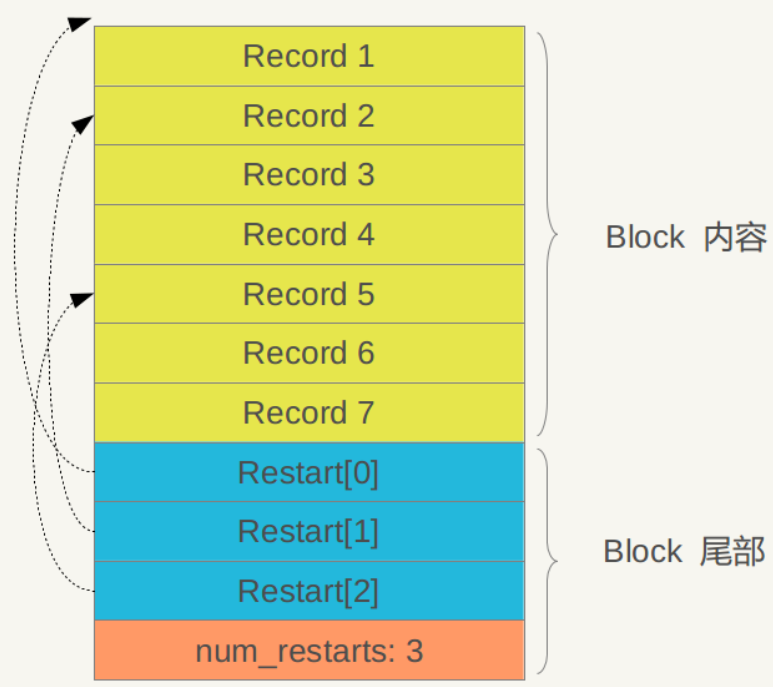
Figure 6-5 Internal structure of the data block Figure 6-5 Data Block internal structure
As can be seen in Figure 6-5, its interior is also divided into two parts. The front is a KV record. The order is arranged according to the Key value from small to large. At the end of the block, there are some "restart points" (Restart). Point), is actually some pointers that point out some record positions in the block content.
What is the "restart point" for? We have repeatedly emphasized that the KV records in the Block content are ordered according to the Key size. In this case, two adjacent records are likely to overlap in the Key part, such as key i=“the Car”, Key i+1=“the color", then there is an overlapping part "the c" between the two. In order to reduce the storage of Key, Key i+1 can only store the part "olor" that is different from the previous Key, and the common part of the two can be obtained from Key i . This is how the recorded Key is stored in the block content, and the main purpose is to reduce storage overhead. "Restart point" means: at the beginning of this record, instead of recording only the different Key parts, all Key values are re-recorded. Assuming that Key i+1 is a restart point, then the Key will be completely stored in the key. the color" instead of the simple "olor" approach. The end of the block is to point out which records are these restart points.

Figure 6-6 Record format
In the Block content area, what is the internal structure of each KV record? Figure 4.6 shows its detailed structure. Each record contains 5 fields: key shared length, such as the "olor" record above, the length of the key part shared by its key and the previous record is the length of "the c", which is 5 ;Key non-shared length, for "olor", it is 4; value length indicates the length of Value in Key:Value, the actual Value value is stored in the following Value content field; and key non-shared content actually stores "olor "This Key string.
SSTFile implementation details:
1. The size of each SST fileThe upper limit is2MBTherefore, LevelDB usually stores a large number of SST files;
2. SST file originSeveral4KThe size ofblocksComposition, block is also the smallest unit of read/write operations;
3. SST filethe last oneblockIs anindex, Point to the starting position of each data block, and the key value of the first entry of each block (keys in the block are stored in order);
4. Use Bloom filter to speed up search. As long as you scan the index, you can quickly find all the blocks that may contain the specified entry.
5. The keys in the same block can share the prefix (stored only once), so that each key only needs to store its own unique suffix. If only some keys in the block need to share a prefix, insert the "reset" mark between this part of the key and other keys.
The entry directly read by the log will be written to the SST of Level 0 (up to 4 files);
Level0 Precautions:
When the 4 files of Level 0 are full, one of the files will be selected to Compact into the SST of Level 1;
note:The SSTable file of Level 0 is unique compared with the files of other levels: the .sst file in this level,Two files may existkeyoverlappingFor example, there are two level 0 sst files, file A and file B. The key range of file A is {bar, car}, and the key range of file B is {blue,samecity}, so it is likely that both files exist key=”blood” record. For SSTable files of other levels, there will be no overlap of the keys of the .sst files in the same level, that is to say, any two .sst files in Level L, then it can be guaranteed that their key values will not overlap.
Level level:
Log:maximum4MB (Configurable), Level 0 will be written;
Level 0:most4ASSTfile,;
Level 1: The total size does not exceed 10MB;
Level 2: The total size does not exceed 100MB;
Level 3+: The total size does not exceed the size of the previous Level × 10.
For example: 0 ↠ 4 SST, 1 ↠ 10M, 2 ↠ 100M, 3 ↠ 1G, 4 ↠ 10G, 5 ↠ 100G, 6 ↠ 1T, 7 ↠ 10T
Read and write operation process:
In the read operation, to find an entry, first search the log, if not found, then search in Level 0, if still not found, then search in the order of the lower level; if you find an entry that does not exist, then Traverse all Levels to return the result of "Not Found".
In the write operation, new data is always inserted into the first few Levels first, and the storage amount of the first few Levels is also relatively small. Therefore, the performance impact of modifying or deleting an entry is more controllable .
It can be seen that SST adopts a layered structure to minimize the overhead when inserting new entries;
7, Compaction operation
forLevelDbIn other words, the operation of writing a record is very simple, and deleting a record just writes a delete mark to complete the work, but reading the record is more complicated, and it needs to be searched in the memory and each level of the file according to the freshness, which is very expensive. In order to speed up the reading speed, levelDb adopts the compaction method to organize and compress the existing records. In this way, some KV data that is no longer valid are deleted, the data size is reduced, and the number of files is reduced.
The compaction mechanism and process of LevelDb are basically the same as those described by Bigtable. There are three types of compaction mentioned in Bigtable:minor 、majorwithfull:
- Minor Compaction is to export the data in the memtable to the SSTable file;
- Major compaction is to merge SSTable files of different levels;
- Full compaction is to merge all SSTables;
LevelDb contains two of them, minor and major.
The purpose of Minor compaction is to save the content to a disk file when the size of the memtable in the memory reaches a certain value, as shown below:
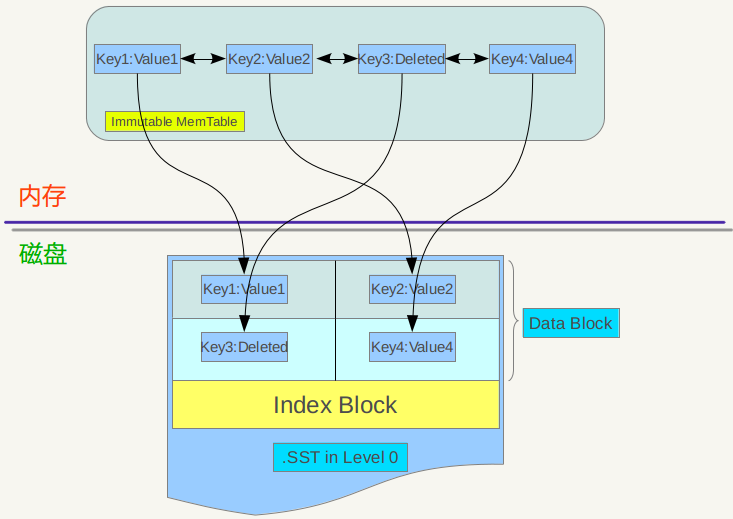
Figure 7-1 compaction mode
The immutable memtable is actually a SkipList, in which the records are arranged in an orderly manner according to the key. The keys are traversed and written into a new SSTable file of level 0 in turn. After writing, the index data of the file is created, thus completing a minor compaction. It can also be seen from the figure that for the deleted record, the record is not really deleted during the minor compaction process. The reason is also very simple. Here I only know that the key record needs to be deleted, but where is the KV data? That requires a complicated search, so it is not deleted during minor compaction, but the key is written into the file as a record. As for the actual delete operation, it will be done in higher-level compaction in the future.
When the number of SSTable files under a certain level exceeds a certain set value, levelDb will select a file from the SSTable of this level (level>0) and merge it with the SSTable file of the higher level+1, which is major compaction.
Because in the level greater than 0, the keys in each SSTable file are stored in order from small to large, and the key range between different files (between the smallest key and the largest key in the file) will not overlap. The level 0 SSTable file is a bit special. Although each file is arranged according to the key from small to large, because the level 0 file is directly generated through minor compaction,So any twolevel 0Two undersstableFile may thenkeyOverlap in scope. So when doing major compaction, for a level greater than level 0, just select one of the files, but for level 0, after specifying a file, this level is likely to have the key range of other SSTable files and this file. Overlapping, in this case, find all overlapping files and level 1 files to merge,which islevel 0When selecting files, there may be multiple files involvedmajor compaction。
After LevelDb selects a certain level for compaction, it also chooses which file is to be compacted. For example, this time it is file A for compaction, then next time it is compacted on file B next to file A on the key range. In this way, each file will have the opportunity to merge with higher level files in turn.
If the level L file A and the level L+1 file are selected for merging, then the question arises again, which file should be selected for merging level L+1? levelDb selects all files that overlap with file A in the key range in layer L+1 to merge with file A. In other words, the file A of level L is selected, and then all the files B, C, D... etc. that need to be merged are found in level L+1. The remaining question is how to merge the major? That is to say, given a series of files, each file has keys in order, how to merge these files so that the newly generated files still have keys in order, and at the same time throw away the KV data that is no longer valuable.
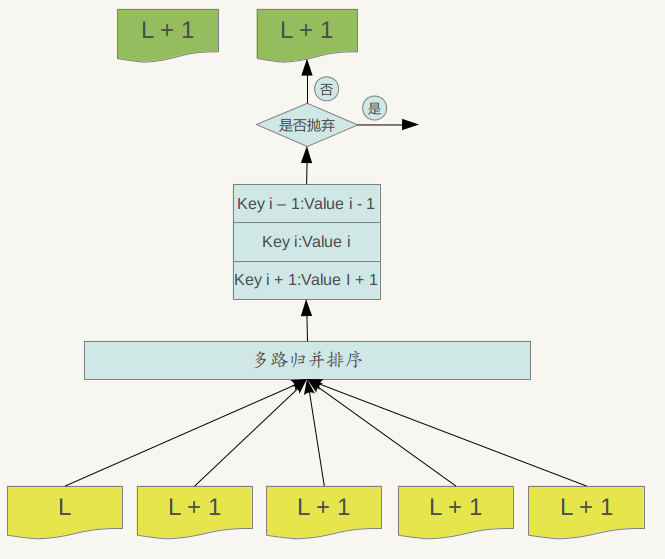
Figure 7-2 level of the merger process
Major compactionprocess: Use multi-path merge sorting for multiple files, and find the smallest Key record in turn, that is, re-sort all records in multiple files. After that, certain criteria are adopted to determine whether the Key needs to be saved. If it is judged that there is no value to save, then throw it away. If you feel that it needs to be saved, then write it into a newly generated SSTable file in the level L+1 layer. . In this way, the KV data is processed one by one, and a series of new L+1 layer data files are formed. The previous L layer files and the file data of L+1 layer participating in compaction are no longer meaningful at this time, so they are all deleted. This completes the merging process of the L layer and L+1 layer file records.
So in the process of major compaction, what is the criterion for judging whether a KV record is discarded? One of the criteria is: for a key,If it is less thanLExists in the layerKey, Then thisKVinmajor compactionCan be thrown away in the process.Because we have analyzed before, if there is a record of the same Key in a file with a level lower than L, it means that there is a fresher Value for the Key, then the past Value is meaningless, so it can be deleted.
8、Version、VersionEdit、VersionSetanalysis
Version Save the current disk and all file information in the memory, generally there is only one Version called "current" version (current version). Leveldb also saves a series of historical versions. What are the functions of these historical versions?
When an Iterator is created, the Iterator references the current version (current version). As long as the Iterator is not deleted, the version referenced by the Iterator will always survive. This means that when you use up an Iterator, you need to delete it in time.
When a compaction is over (new files will be generated, and the files before the merge need to be deleted), Leveldb will create a new version as the current version, and the original current version will become a historical version.
VersionSet It is a collection of all Versions and manages all surviving Versions.
VersionEdit Indicates the change between Versions, which is equivalent to delta increment, indicating how many files have been added and deleted. The following figure shows the relationship between them.
Version0 +VersionEdit-->Version1
VersionEdit will be saved to the MANIFEST file, and when data is restored, it will be read from the MANIFEST file to reconstruct the data.
This version of leveldb control reminds me of dual-buffer switching. Dual-buffer switching comes from graphics. It is used to solve the splash screen problem when drawing on the screen. It is also useful in server programming.
For example, there is a dictionary library on our server. We need to update the dictionary library every day. We can open a new buffer and load the new dictionary library into this new buffer. When the loading is completed, the pointer of the dictionary points to the new dictionary library. .
The version management of leveldb is similar to dual-buffer switching, but if the original version is referenced by an iterator, then this version will be kept until it is not referenced by any iterator, then this version can be deleted.
8、Cache
I mentioned earlier thatlevelDbIn other words, if the read operation is not in memorymemtableTo find the record in the file, the disk access operation must be performed multiple times.Assuming the optimal situation, that is, the first timelevel 0Found this in the latest file inkey, Then also need to read2Secondary disk, Once willSSTableIn the fileindexPartially read into memory, so according to thisindexCan be determinedkeyWhere is itblockStore in; the second time is to read thisblockAnd then look up in memorykeycorrespondingvalue。
LevelDbIntroduced two differentCache:Table CachewithBlock Cache. among themBlock CacheThe configuration is optional, that is, whether to enable this function is specified in the configuration file.
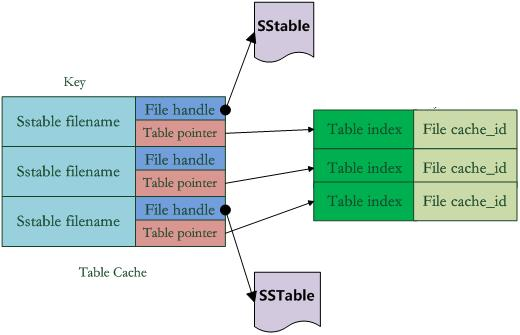
Figure 8-1 Cache structure diagram
As shown in Figure 8-1, in Table Cache, the key value is the file name of the SSTable, and the Value part contains two parts. One is the file pointer to the SSTable file opened on the disk. This is for the convenience of reading the content; the other is the memory The Table structure pointer corresponding to the SSTable file in the SSTable file. The table structure is stored in the memory. It stores the index content of the SSTable and the cache_id used to indicate the block cache. Of course, there are other content besides.
For example, in the get(key) reading operation, if levelDb determines that the key is within the key range of a certain file A under a certain level, then it is necessary to determine whether file A really contains this KV. At this point, levelDb will first look up the Table Cache to see if the file is in the cache. If it is found, you can find which block contains the key according to the index part. If the file is not found in the cache, open the SSTable file, read its index part into the memory, and insert it into the Cache to locate which block contains the key in the index. If it is determined which block of the file contains this key, then the content of the block needs to be read. This is the second reading.
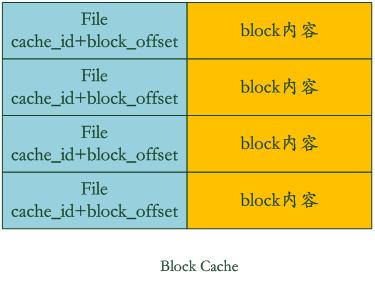
Figure 8-2 Block Cache structure diagram
Block Cache is to speed up this process, where the key is the cache_id of the file plus block_offset, the starting position of the block in the file. The value is the content of this block.
If levelDb finds that the block is in the block cache, then you can avoid reading the data, and just look up the value of the key in the block content in the cache. What if you don't find it? Then read the block content and insert it into the block cache. This is how levelDb speeds up the reading speed through two caches. It can be seen from this that if the locality of the data read is better, that is to say, most of the data to be read can be read in the cache, then the read efficiency should still be very high, and if the key is sequenced The reading efficiency should also be good, because it can be reused multiple times after one reading. But if it is random reading, you can infer how efficient it is.
Intelligent Recommendation
Leveldb BloomFliter analysis
BloomFilter principle Bloom filter was proposed by Barton Bloom in 1970 and consists of a very long bit array and a series of hash functions. Bloomfilter can be used to retrieve whether an element app...
Leveldb LRU Cache analysis
LRU principle LRU is a classic cache elimination strategy, its principle and implementation can be viewed in my previous blogLRU Cache analysis and implementation. This article mainly analyzes Leveldb...
leveldb Arena analysis
leveldb Arena analysis Copyright statement: This article is an original article by cheng-zhi, which can be reproduced at will, but the source must be clearly indicated! Arena Arena Yes leveldb Lightwe...
Leveldb: Version Analysis
Version::AddIterators() This function is finally called in the DB :: NewItem () interface, and the call level is: DBImpl::NewIterator()->DBImpl::NewInternalIterator()->Version::AddIterators()。 F...
PUT process analysis of LevelDB
LevelDB file type LEVELDB in FW: kLogFile keep = number >= versions_->LogNumber() || number == versions_->PreLogNumber file is represe...
More Recommendation
LevelDB Nodestructor class analysis
LevelDB provides a BYTE level comparator, see Utte / Comparator.cc, the BytewiseComparator class object provided in this file is provided by a single case of the free system, the code is as follows: H...
Leveldb: ARNA shallow analysis
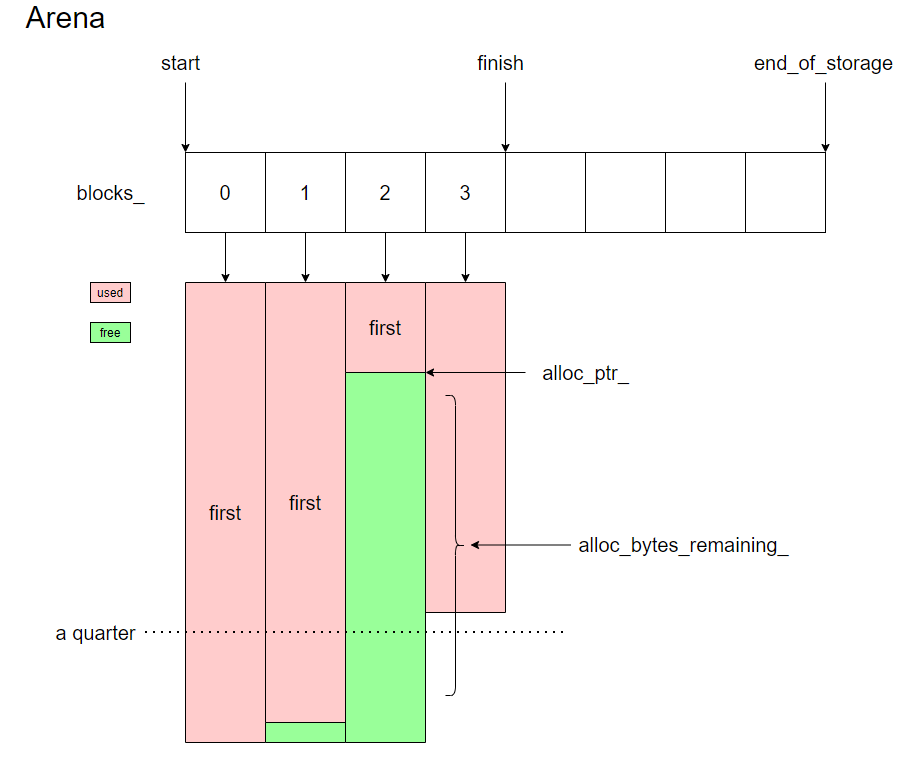
Table of contents introduction Member variables MemoryUsage ~Arena Allocate AllocateFallback AllocateNewBlock AllocateAligned Talking about byte alignment (align & (align - 1)) == 0 (alloc_ptr_) &...
"Virtualization Technology-Actual Combat and Principle Analysis" Chapter 3 Building KVM Environment
First of all, the processor must support VT technology (Virtualization Technology) on the hardware, and its function must be turned on in the BIOS before KVM can be used. In addition to the necessary ...
Environment building with Python for data analysis
system Mac os 10.12.6 Install edm Download edm installer:https://www.enthought.com/products/edm/installers Installation module Then you can also play Perl 6: After entering the edm shell: p6-jupyter-k...
Data analysis with Python - environment building
main content: Python Development Environment Construction: (EPD + PANDAS, IPYTHON Notebook, NotePad ++) First, configure EPD + PANDAS Software name download address epd_free-7.3-2-win-x86.msi http://e...