Windows environment configuration Apache+Mysql+PHP
I haven't written a blog for a long time, and I am learning php recently, so I will share the environment configuration with you.
Software preparation:
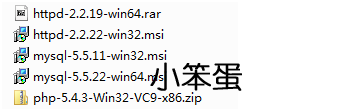
The prepared software is shown below.
Apache found a 64-bit drop in the official wood, given an address, has been tested and can run normally.
Other 32 and 64-bit can be found in the official.
http://www.blackdot.be/?inc=apache/binariesapache 64 bit
Apacheinstallation:
Note: In this example, only the screenshots that need attention are taken. Other defaults are not displayed.
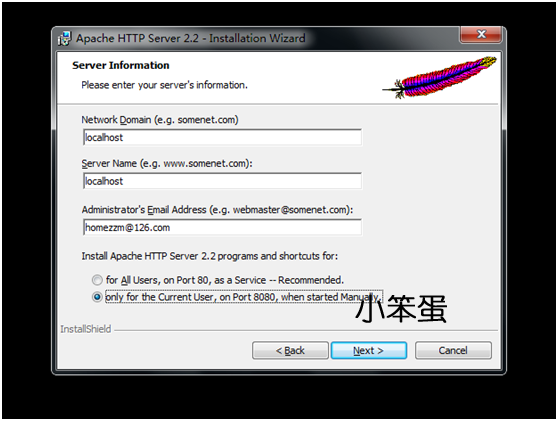
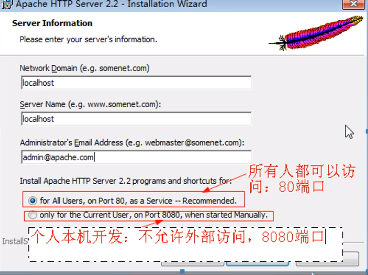
1. Server information can be configured by default if port 80 of the server is not occupied by other server programs. Optional "for All Users, on Port 80, as a Service—Recommended." If it is only for the current user, use port 8080 and start it manually. Select "only for the Current User, on Port 8080, when started Manually." The port number can be modified through the configuration file.
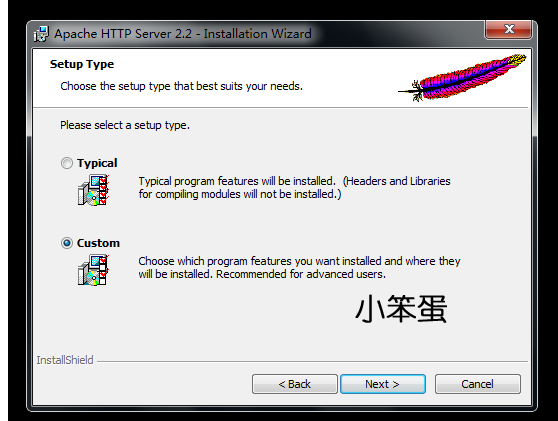
2.“Typical"For the default installation,"Custom"Customize the installation for the user.
3. Click on "Build Headers and libraries" and select "This feature will be installed on local dirive."
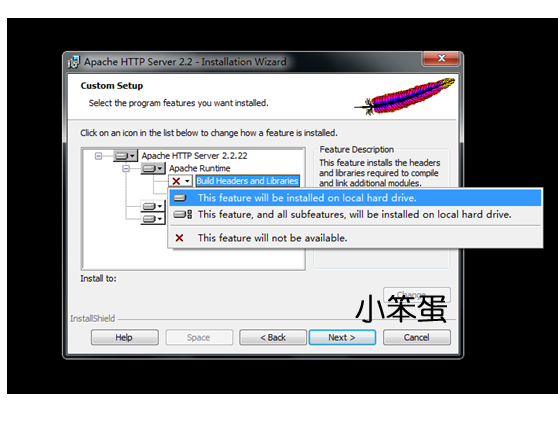
4. You can select "Change" to change the default installation path. This example is installed by default.
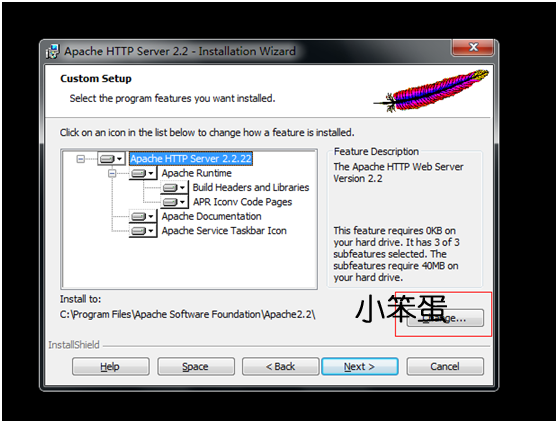
5. The apache service manager will appear after the installation is complete.

There are service items that can be started now in the service management list.

Note: If you do not appear in the service management list after installationapacheThe service item indicates that an error occurred during the installation process, and you can install it manually.
usecmdenterC:\Program Files\Apache Software Foundation\Apache2.2\binThis is the directory I installed locally.And executehttpd -k installCommand, after the prompt is successful, you can see it in the service management list.apacheservice.
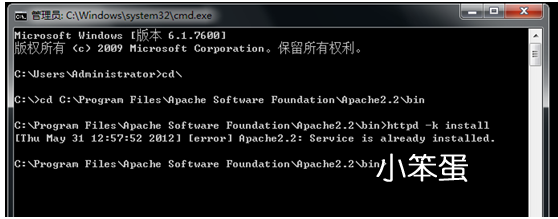
Since my machine has installed this service normally, I am prompted to install the service error when executing this command.httpdThe relevant execution commands can be searched by themselves.
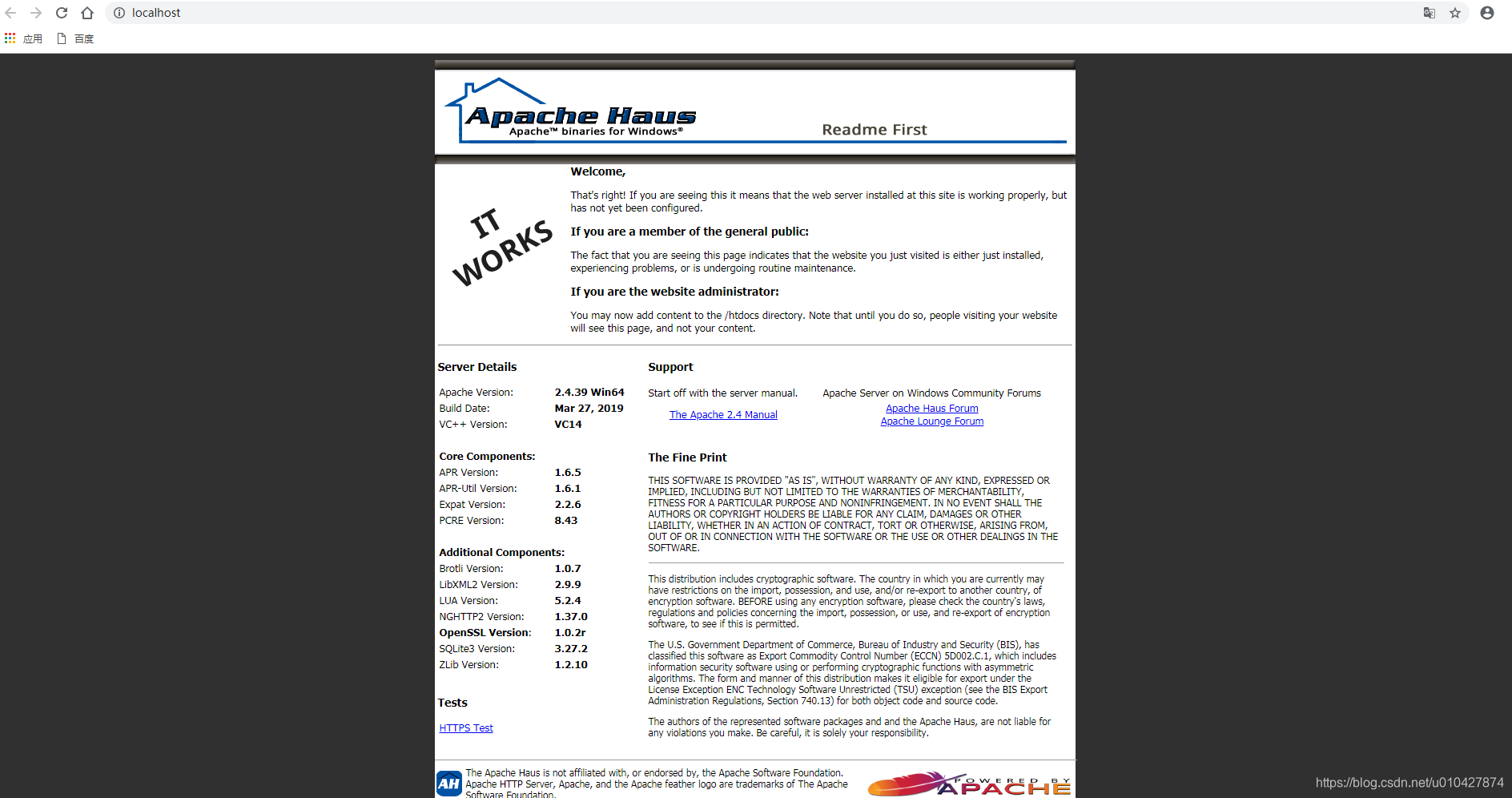
6. Now you can test if apache is installed successfully. Enter localhost or 127.0.0.1 in the browser. If you choose not to use port 80 during installation, you need to access the port number when accessing here.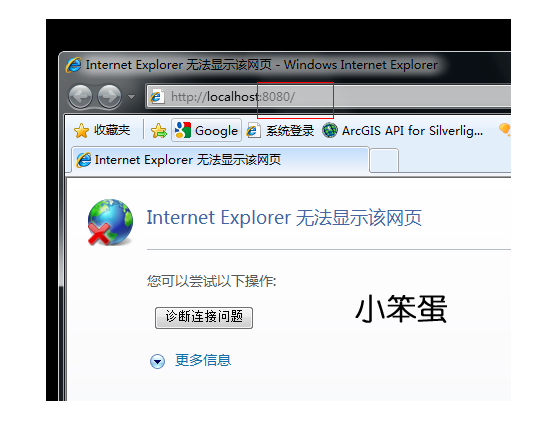
7.Ok, I have to admit that this is a magical website. The reason is that we have installedapacheThis service was not started after.
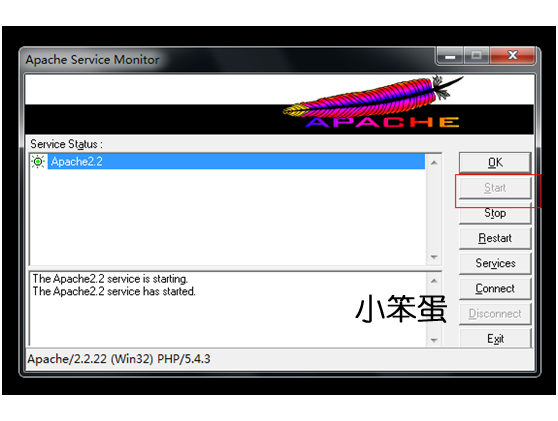
8. As you can see, he is working.

Apache is now installed.
------------------------------------------------------------------------------------------------------------------------------------------
Mysqlinstallation:
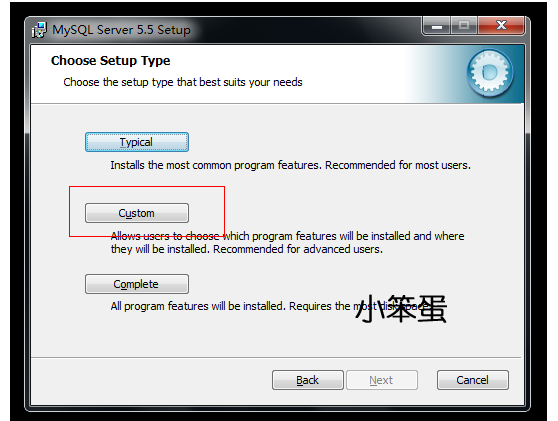
1. Select user-defined configuration here
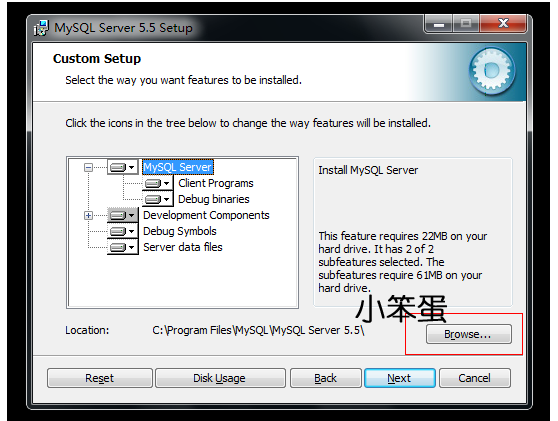
2. You can change the location of the mysql installation directory. This example keeps the default.
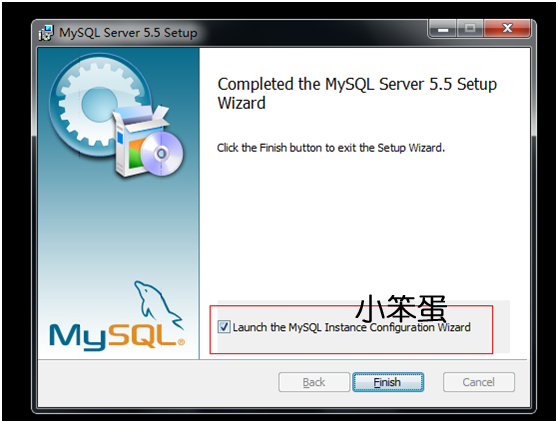
3. After finishing, check the "Launch the MySql instance Configuration Wizard" to configure MySql.
4. Select the configuration method: "Detailed Configuration", "Standard Configuration", select "Detailed Configuration",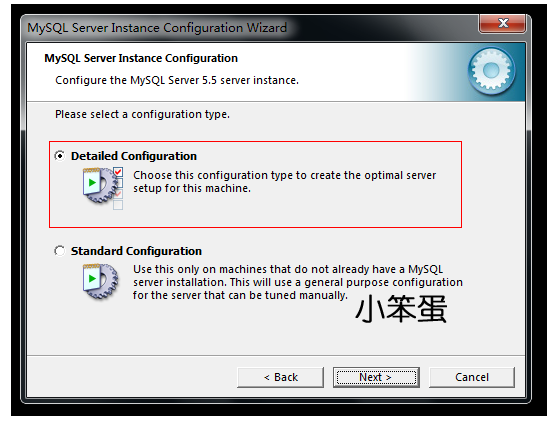
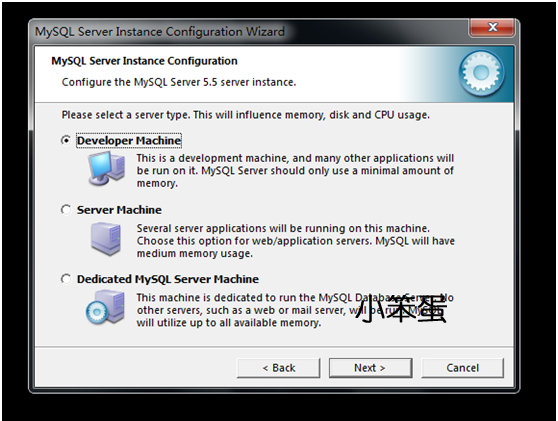
5. Select the server type, "Developer Machine (development test class, mysql takes up very little resources)", "Server Machine (server type, mysql takes up more resources)", "Dedicated MySQL Server Machine (special database server, mysql occupied) "All available resources)", generally select "Server Machine". It can be selected according to the actual situation. This example uses a development test type drop.
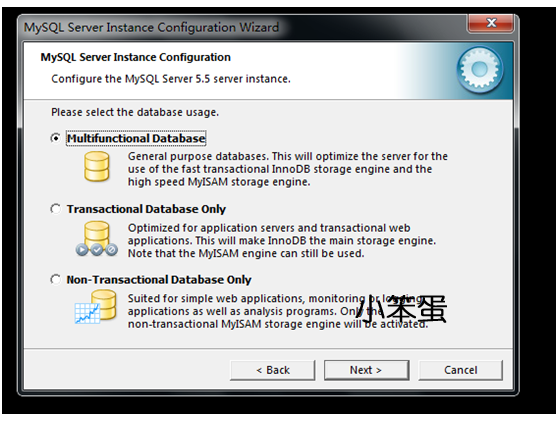
6. Select the general purpose of the mysql database, "Multifunctional Database", "Transactional Database Only", "Non-Transactional Database Only", "Non-Transactional Database Only" It is simpler, mainly to do some monitoring, counting, support for MySAM data type is limited to non-transactional), select "Transactional Database Only", this example selects the universal multi-function type.
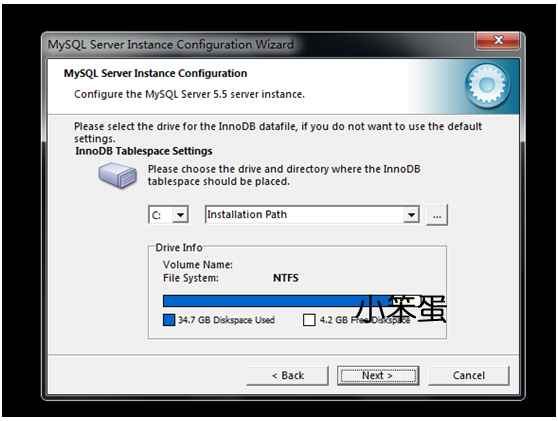
7. Configure the InnoDB Tablespace, which is to select a storage space for the InnoDB database file. If you modify it, remember the location and choose the same place when reinstalling. Otherwise, the database may be damaged. Of course, make a database. Backup is fine. Use the default location.
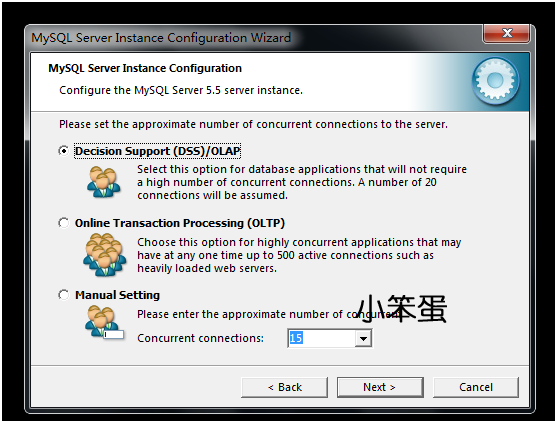
8. Select half of the mysql traffic on the website, and the number of connections at the same time, "Decision Support (DSS) / OLAP (about 20)", "Online Transaction Processing (OLT) (500 or so)", "Manual Setting" , by yourself, enter a number)", select "Online Transaction Processing (OLTP)". This example selects the first item, because it only does development testing work on this machine.
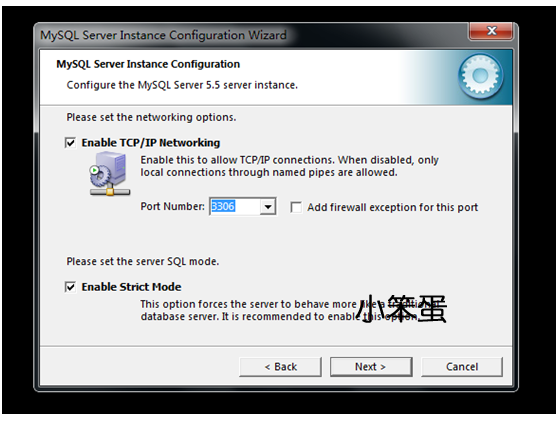
9. Whether to enable TCP/IP connection, set the port, if not enabled, you can only access the mysql database on your own machine, select "Enable TCP/IP Networking" to enable TCP/IP connection, set the port, if not When enabled, you can only access the mysql database on your own machine and select "Enable TCP/IP Networking".
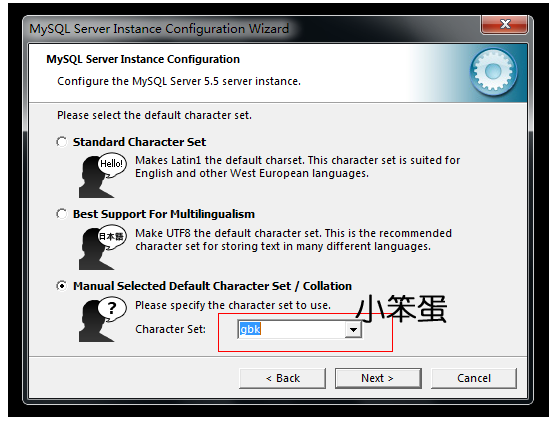
10. Set the database language code, "Standard Character Set" for Western code, "Best Support For Multilingualism" for RTF-8 code, "Manual Selected Default Character Set/Collation" for manual setting code, gbk, gb2312 for Chinese code, Select "Best Support For Multilingualism".
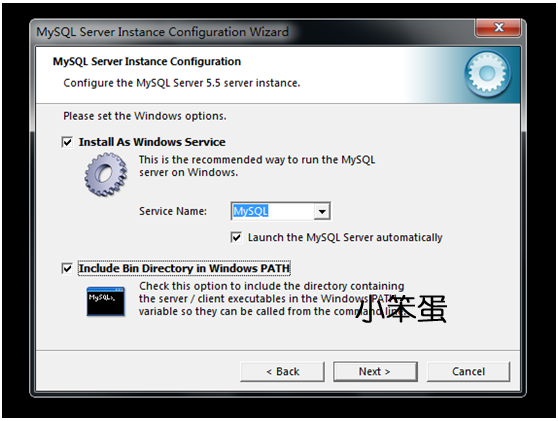
11. "Install As Windows Service" choose to install the MySql service, you can customize the name of the service.
"Include Bin Directory in Windows PATH" is an environment variable that adds MySql to the machine.
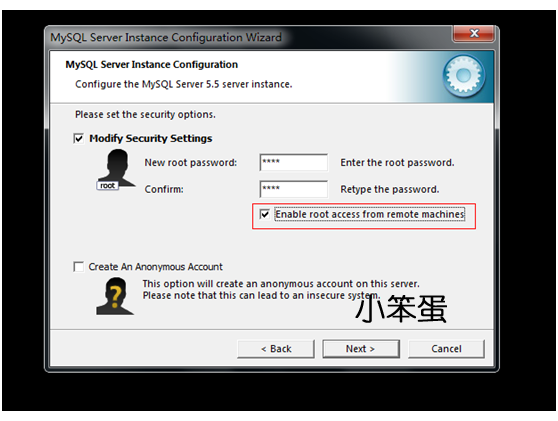
12.select"Modify Security Settings", can be checked according to the actual requirements."Enable root access from remote machines"To be able to access from other machines.
13. After completing the configuration, click “Execute” to execute the configuration.
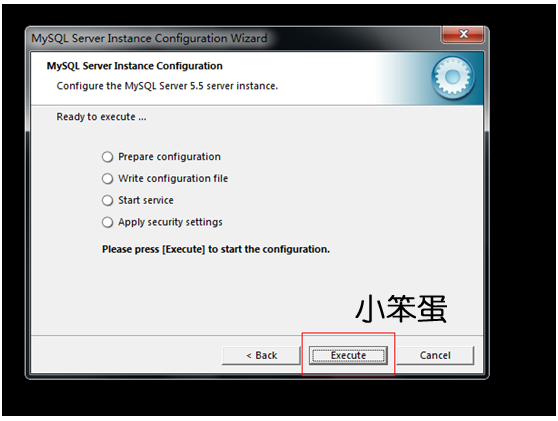
The MySql installation operation has been completed.
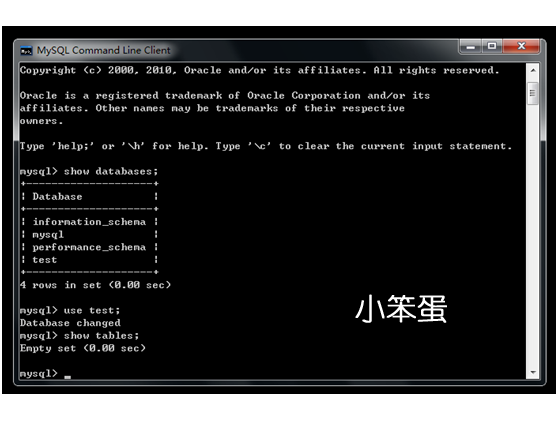
Test MySql
------------------------------------------------------------------------------------------------------------------------------------------
Phpinstallation:
Unzip the php-compressed package to the appropriate directory. In this case I placed it in the E:\Program Files\PHP folder.
PhpConfiguration:
1. Copy php.ini-dist from E:\Program Files\PHP to php.ini.
If you don't have a php.ini-dist file, you can use the php.ini-development file and change the name to php.ini (leave a backup, good habits)
php.ini-development Development
php.ini-producitonProduction machine
2. Open E:\Program Files\PHP\php.ini and modify the following line:
3、extension_dir = "E:\Program Files\PHP\ext"

4、default_charset ="utf-8"
 5、
5、
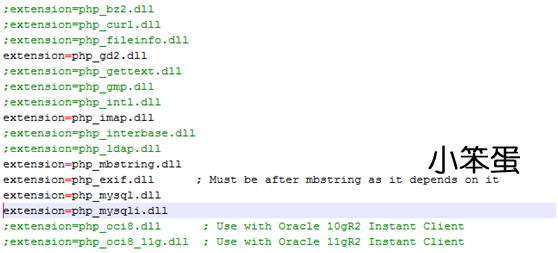
5. Remove the semicolon ";" in front of extension=php_exif.dll, php_gd2.dll, php_imap.dll, php_mbstring.dll, php_mcrypt.dll, php_mime_magic.dll, php_mysql.dll, php_mysqli.dll, php_pdf.dll.
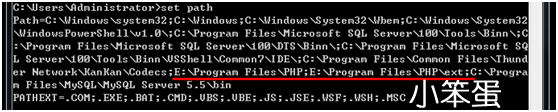
6. In the [Path] of [Environment Variable], add:; E:\Program Files\PHP; E:\Program Files\PHP\ext.
7, other configurations
1. Sometimes there is a warning in the php program: PHP Warning: date(): It is not safe to rely on the system's timezone settings. You are *required* to use the date.timezone setting or the date_default_timezone_set() In case you used any of those methods and you are still getting this warning, you most likely misspelled the timezone identifier. We selected 'UTC' for '8.0/no DST' instead in D:\xxx\xxx\xxx.php On line 10. This is because the time taken by PHP is Greenwich Mean Time, so there will be about 8 hours difference between Greenwich Mean Time and Beijing time in your local time. We can solve the following methods: 1. The page header uses date_default_timezone_set() to set my default time zone to Beijing time, which is <?phpdate_default_timezone_set("PRC");?>. 2, in the php.ini set date.timezone value of PRC, set the following: date.timezone=PRC, and cancel the comment of this line of code, that is, remove the previous semicolon.

httpd.confConfiguration:
The location of the httpd.conf file: C:\Program Files\Apache Software Foundation\Apache2.2\conf.
This is the directory I installed locally.Note: There are many tutorials on the Internet that need to be putphpSomewhere under the directorydllCopy the file tosystem32In fact, this is actually unnecessary, only need to behttpd.confLoadingphpThe module is OK.
Add and modify the following statement line: LoadModule php5_module "E:/PHP/php5apache2_2.dll" (need to add "", otherwise apache can not be started)

【ps:
in casephpNo in the installation directoryphp5apache2_2.dllIt must be that the downloaded version is wrong.
There are several paragraphs on the left side of the official website:
Which version do I choose?
If you are using PHP with Apache 1 or Apache2 from apache.org you need to use the VC6 versions of PHP。。。。
So you downloadV6C versions of PHP
VC6 x86 Non Thread Safe
VC6 x86 Thread Safe
one isThread Safe,one isNon Thread Safe,
result,Non Thread SafeVersionphpDuring the installation process, there is noApacheOptions:
select the web server you wish to setup
IIS FastCGI
Other CGI
Do not setup a web server
andThread SafeDuring the installation processApache 2.2.x ModuleOptions:
select the web server you wish to setup
Apache 2.2.x Module
Apaceh CGI
IIS FastCGI
IIS CGI
NSAPI
Xitami
NetServe Web Server
Other CGI
Do not setup a web server】
------------------------------------------------------------------------------------------------------
PHPThere are several different versions to choose from when downloading. That isVC6 X86withVC9 X86。
First of all, let me answer:
VC6What is it?
VC6Islegacy Visual Studio 6 compilerIs compiled with this compiler.
VC9What is it?
VC9Isthe Visual Studio 2008 compilerIs using Microsoft'sVSThe editor is compiled.
So how do we choose which version to download?PHPWhat?
If you are atwindowsUse underApache+PHPPlease chooseVC6version;
If you are atwindowsUse underIIS+PHPPlease chooseVC9version;
thatNon Thread SafeWhat is it?
Non Thread SafeIs not thread safe;
Thread SafeWhat is it??
Non Thread SafeIs thread safe;
The official does not recommend that youNon Thread SafeApplied to the production environment, so we chooseThread SafeVersionPHPTo use.
PHPIniDir "E:/Program Files/PHP"
[
If you appear when linking MySql database
Fatal error: Call to undefined function mysql_connect() in C:\xxxxx.php
That's because you didn't add this property.
]

DocumentRoot "C:/Program Files/Apache Software Foundation/Apache2.2/htdocs"The default storage path of the project can be modified according to the actual situation.Note: So the node modification is correspondingDirectoryThe directory of the node also needs to be modified.
<Directory " C:/Program Files/Apache Software Foundation/Apache2.2/htdocs ">
AddType application/x-httpd-php .php

DirectoryIndex index.php index.html
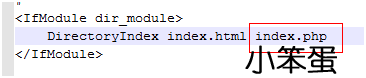
note:Apache WindowsConfiguration filehttpd.confThe directory separator required in it is a slash”/”,andPHP WindowsConfiguration filephp.iniWhat is required when writing a directory is a backslash”\”Don't get confused.
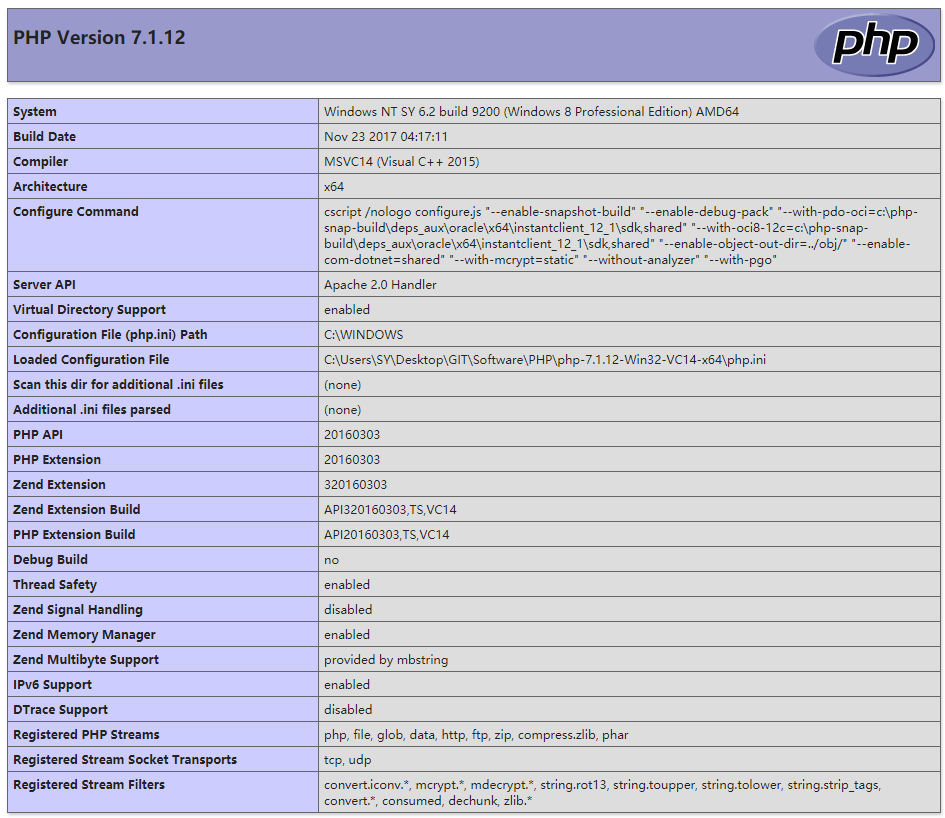
To configure the test, create index.php to print the php configuration information in the directory specified by the DocumentRoot node.
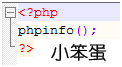
You know.
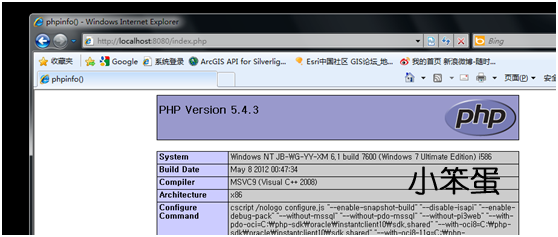
------------------------------------------------------------------------------------------------------------------------------------------
First, download
First download on the InternetphpMyAdminCan also gophpMyAdminDownload the official website at:http://www.phpmyadmin.net/home_page/downloads.phpExtract it againwebUnder the directory that can be accessed, if it is a virtual space, it can be decompressed and passed.ftpTool uploaded towebUnder the directory, you can also modify the name of the file after unzipping.
Second, the configuration
turn onlibrariesUnder the catalogconfig.default.phpFile, find the following items in turn, follow the instructions to configure.
1、Access URL

2、MySQLHost information
fill inlocalhostorMySQLOn the serveripAddress ifMySQLAnd thephpMyAdminOn the same server, press the defaultlocalhost
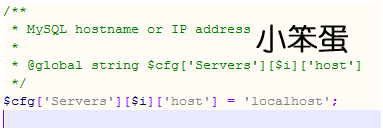
MySQLPort, default is3306, leave it blank if you installMySQLOther ports are used and need to be filled in here.

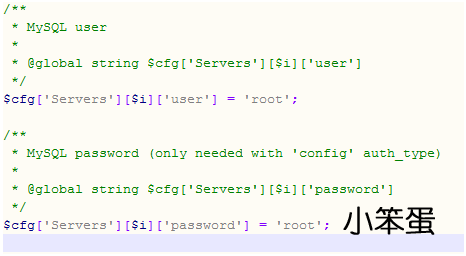
3、MySQLuser name and password
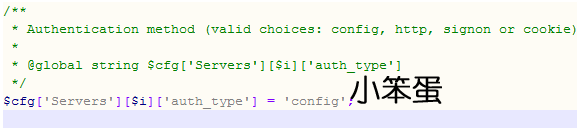
4、Authentication method
There are four modes to choose from here.cookie,http,HTTP,config;
configMethod is inputphpMyAdminThe access URL can be accessed directly, without entering a username and password, it is not safe and is not recommended.
When the item is set tocookie,httporHTTPWhen logging inphpMyAdminThe data username and password are required for verification, as follows:
PHPInstallation mode isApache,can usehttpwithcookie;
PHPInstallation mode isCGI,can usecookie。
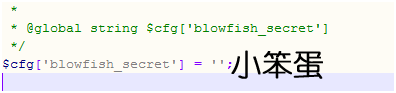
5、Phrase passwordblowfish_secret)setting
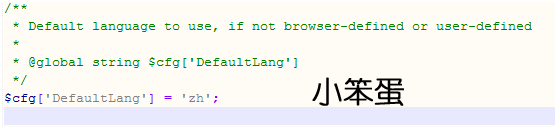
6、Modify interface language
Modify this property tozh[Simplified Chinese]
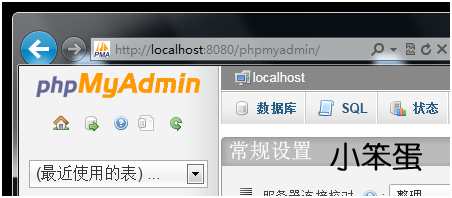
7、testPhpMyAdmin
Intelligent Recommendation
PHP notes (Apache + PHP + MySQL environment configuration)
Install Apache Install PHP PHP.exe application Configure Apache loading PHP module mysql PHP connection mysql Virtual host 1. What is a virtual host? 2. Classification of virtual hosts...
Php apache configuration environment under windows
Install jpgreap to produce graphs or pie charts (1) Extract all the files under the compressed package into a folder, such as F:AppServwwwjpgraph. (2) Open the PHP installation directory, edit the php...
Build Apache+MySql+Php environment under windows
First, the environment WindowsXP Apache http://httpd.apache.org/download MySql http://dev.mysql.com/downloads/mysql/ Php http://www.php.net/downloads.php The relevant versions I downloaded are: apache...
Apache + PHP + mySQL + phpMyAdmin environment under Windows
1, this article mainly explains how to configure Apache + PHP + mySQL + phpMyAdmin 2, the configuration process is slightly longer, I hope to follow the article step by step operation, and finally I c...

Install Apache + php + mysql tutorial windows environment
Some time ago wind up the computer, what are not, need to download some software, this article is about the process of installing php, turned a lot of information to help large is that these two links...
More Recommendation

Install Apache+PHP+MySql environment on Windows Server
I rented a host on Alibaba Cloud, and its operating system is Windows Server Standard 2008. I hope to run a Laravel service on it. At the beginning, I installed the WAMPServer package, but it ran into...

PHP+Apache+mysql environment setup under Windows
PHP+Apache+mysql environment setup under Windows We first download and install amp: Here we choose the latest version of the software download (because my computer is a 64-bit operating system,...
Build a Windows platform PHP, MySQL, Apache environment
Apache software download EnterOfficial website , ClickDownload – a number of third party vendors – ApacheHaus , The version I choose to download: Apache 2.4.29 x64 , The file name is:httpd...
Apache PHP MySQL environment building on Windows
Tool download address: Apache2.4 Download Address:http://httpd.apache.org/ Apache installation package requires a VC14 environment, so you need to VC ++ 2015 Runar | Visual C ++ Redistributable for Vi...

Apache+PHP+MySQL+phpMyAdmin configuration under Windows
Mainly backup yourself and everyone who is already familiar with mysql MySQL 5.5 Download address:http://www.mysql.com/downloads/mysql/ Apache 2.2.4 Download address:http://...