js mouse events clientX, clientY, offsetX, offsetY, layerX, layerY, pageX, pageY, screenX, screenY
tags: javascript
The categories of MouseEvent are as follows:
- mousedown mousedown
- mouseup mouseup
- click left click
- dblclick left click
- mousemove
- mouseover
- mouseout
- mouseenter
- mouseleave
- contextmenu right-click menu
note:
- Execution sequence: mousedown —> mouseup —> click
- Difference: mouseover and mouseout child elements will also trigger, you can trigger bubbling
- Difference: mouseenter and mouseleave are triggered for the listening object, preventing bubbling
Prevent mouse default events
- e.preventDefault()
- e.returnValue=false;//Compatible with IE8 and below
- return false;//IE compatible writing, only used as on event to prevent default event
Remove the right-click menu
document.body.addEventListener("contextmenu",clickHandler);
function clickHandler(e){
    e.preventDefault();//Block event default behavior
    console.log(e.type);
}
Prevent images from dragging by default
var img=document.querySelector("img");
img.addEventListener("mousedown",mouseHandler);
function mouseHandler(e){
    e.preventDefault();
}
Prevent text dragging and selection
document.body.addEventListener("mousedown",mouseHandler);
function mouseHandler(e){
    e.preventDefault();
}
Prevent form submission and reset
var bn=document.querySelector("[type=submit]");
bn.addEventListener("click",clickHandler);
function clickHandler(e){
    e.preventDefault();
}

//Or write to form
var form=document.querySelector("form");
form.addEventListener("submit",submitHandler);
function submitHandler(e){
    e.preventDefault();
    //e.returnValue=false;//Compatible with IE8 and below
}
MouseEvent object
Print out the contents of the MouseEvent object:
document.body.addEventListener("mousedown",clickHandler);
function clickHandler(e){
    console.log(e);
}
The print result is as follows (only part of the content is intercepted):
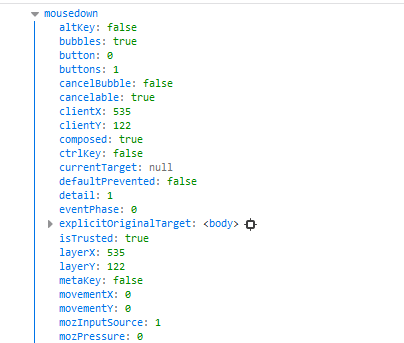
- altKey ctrlKey shiftKey metaKey Whether the key is clicked
- button buttons which is used to determine which mouse button is operated
The values corresponding to the left button are 0, 1, 1
The value corresponding to the middle key is 1, 4, 2
The value corresponding to the right key is 2, 2, 3 - timeStamp The time from when the page opens to when the event is triggered
The following is the description of coordinate values:
clientX and clientY and x, y
- clientX and clientY are the same as x and y, they are the coordinates of the client area, which refers to the coordinates of the mouse, starting with the upper left corner of the browser display area, x, y are supported by the new browser
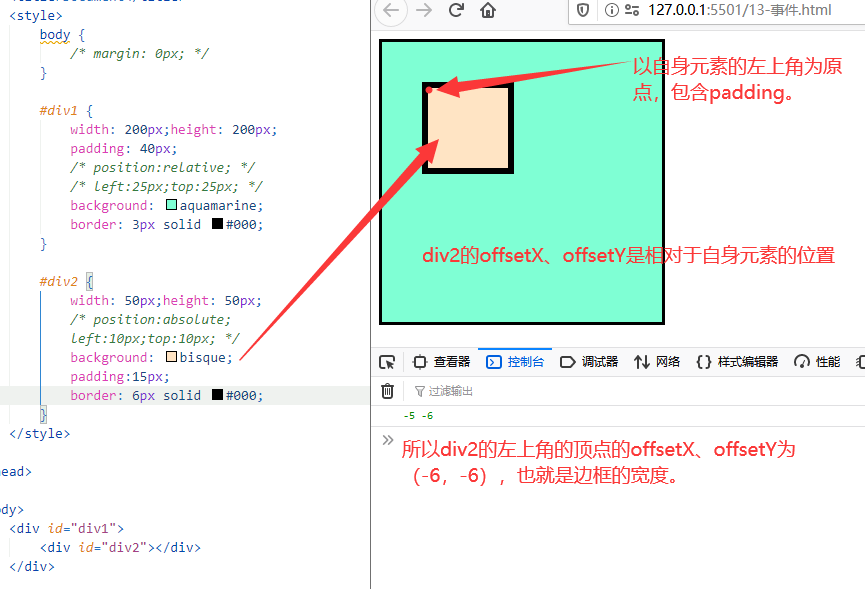
The results printed in the following screenshots are the position coordinates of the upper left vertex of the div2 element.

offsetX,offsetY
- offsetX, offsetY aim at the coordinates of the upper left corner of the target element (e.target), the mouse click in the screenshot below has an error, does not affect the result.
layerX,layerY
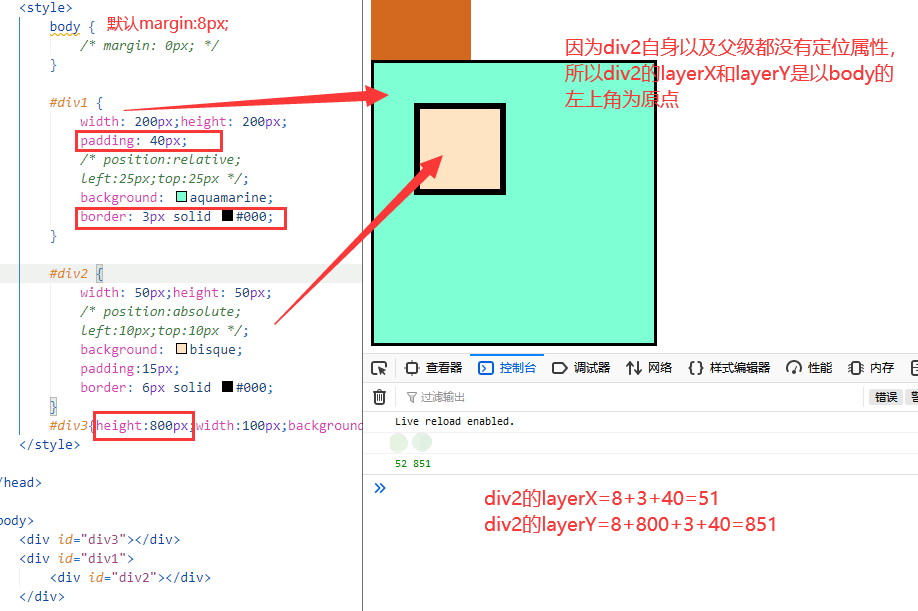
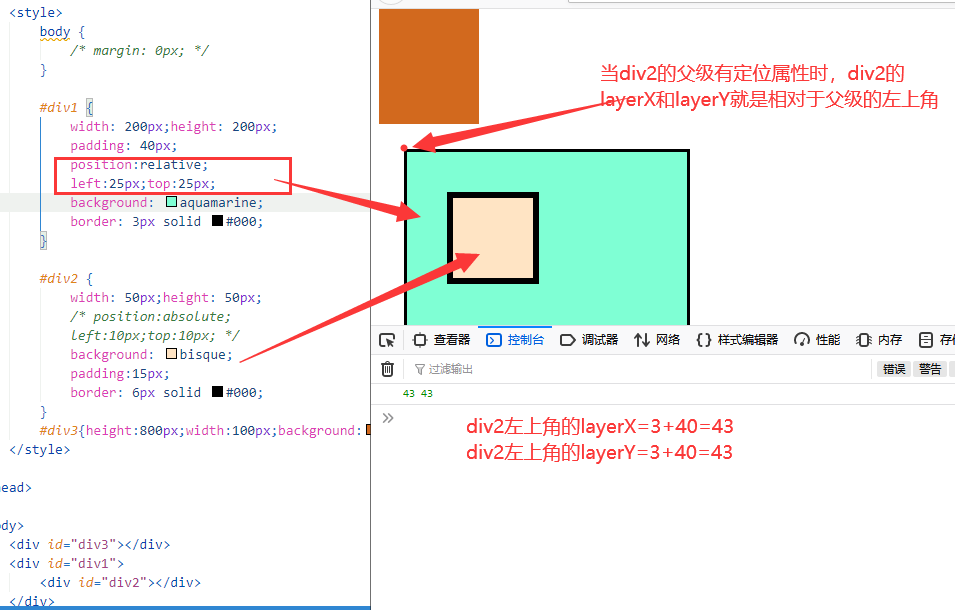
- layerX, layerY go to the upper left corner of the parent element with positioning attributes (if it has positioning attributes, it is relative to itself), if there is none, it is relative to the upper left corner of the body
When the element and its parent have no positioning attributes, the upper left corner of the body is used as the origin:
When the parent of the element has positioning attributes, use the upper left corner of the parent as the origin:
When the element itself has positioning attributes, the upper left corner of the element is used as the origin:
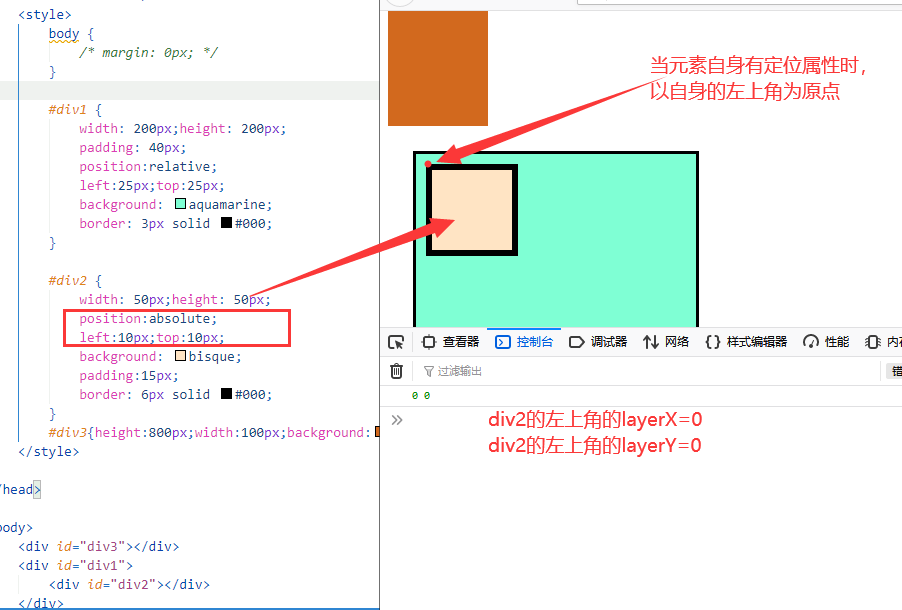
pageX, pageY
- pageX, pageY relative to the upper left corner of the page
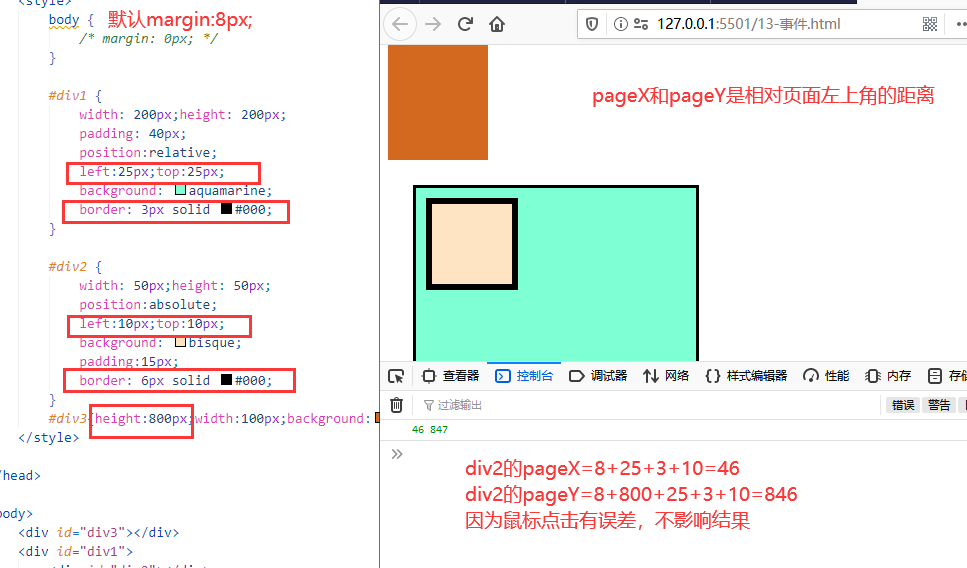
screenX screenY
- screenX screenY relative to the upper left corner of the screen
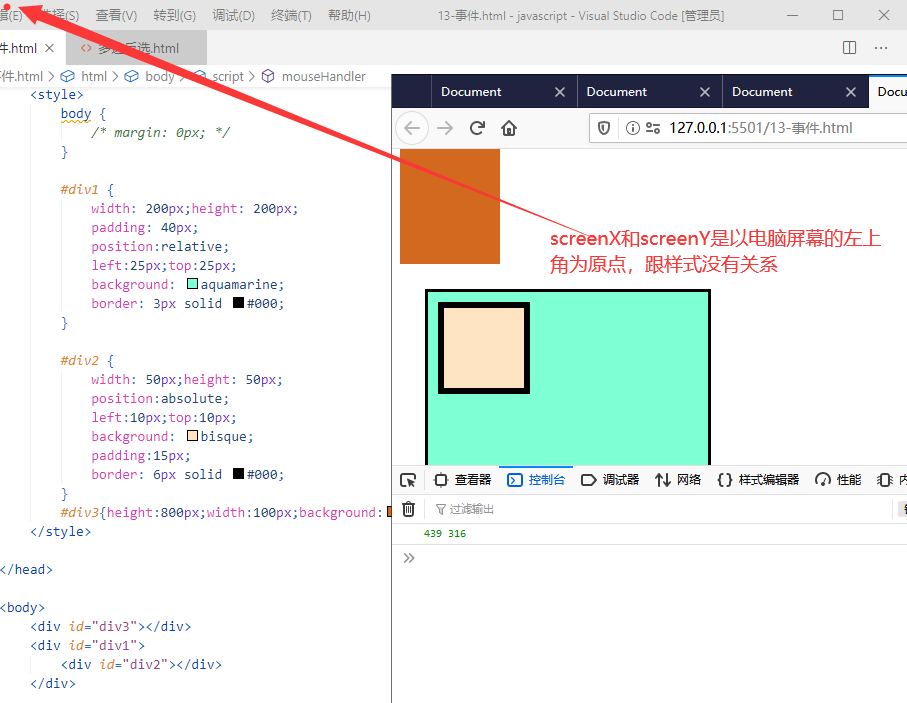
to sum up:
- clientX and clientY are the same as x and y, starting with the upper left corner of the browser display area, referring to the coordinates of the mouse. x,y is new browser support
- offsetX, offsetY, the coordinates of the upper left corner of the target element, starting from padding.
- layerX, layerY, look up the upper left corner of the parent element with positioning attributes (if it has positioning attributes, it is relative to itself), if it is not, it is relative to the upper left corner of the body
- pageX, pageY relative to the upper left corner of the page
- screenX screenY relative to the upper left corner of the screen
Intelligent Recommendation

The difference between pageX/pageY, clientX/clientY, screenX/screenY
When a mouse event is triggered, an event parameter will be passed. In this parameter, we can get pageX/pageY, clientX/clientY, screenX/screenY, but what is the difference between these attributes? lo...

js positioning, jq positioning, jquery positioning, clientX, clientY, offsetX, offsetY, screenX, screenY
clientX set or get the mouse pointer positionRelative towindowThe x coordinates of the client area, where the client area does not include the controls and scroll bars of the window itself. clientY se...
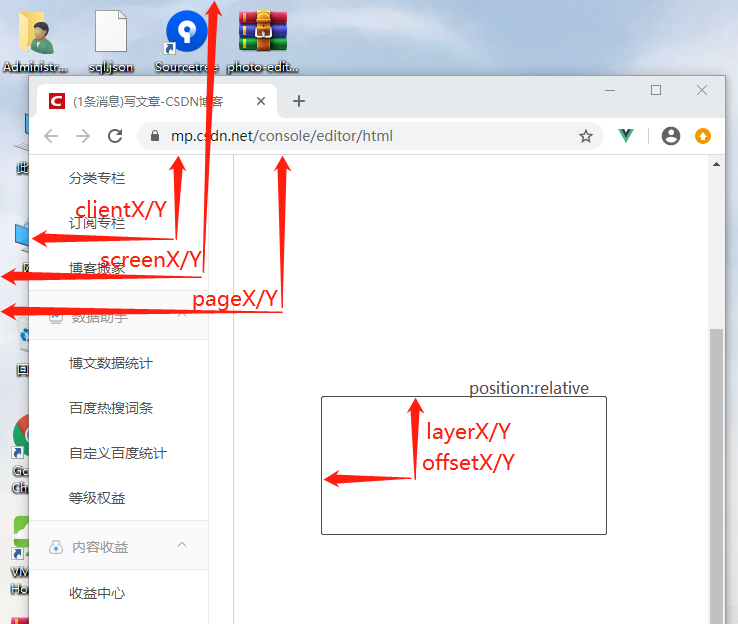
Distinguish screenY clientY pageY layerY offsetY
screenX / Y from the mouse to the upper left corner of the monitor screen clientX / Y mouse to the visual browser page from the upper left corner (in the case where the value of the page no scroll bar...

The difference between clientY pageY screenY layerY offsetY
clientY refers to the distance from the upper left corner of the visual page pageY refers to the distance from the upper left corner of the visual page (not affected by page scrolling) screenY refers ...
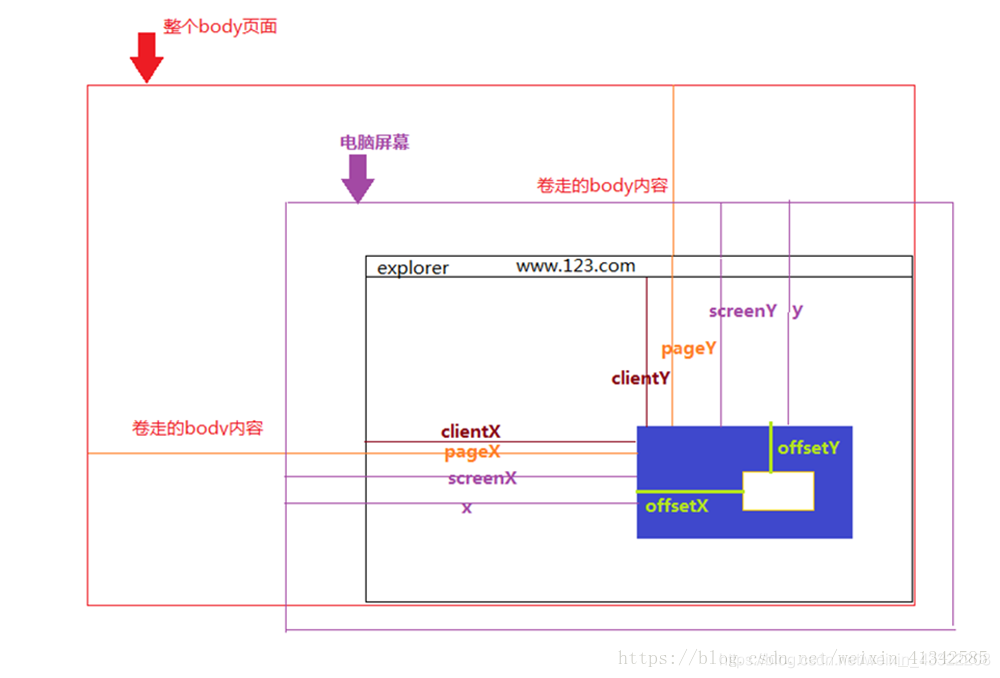
clientX,offsetX,layerX,pageX,screenX
First, clientX, clientY Click position to the x, y coordinate of the current body visible area Second, pageX, pageY for the entire page, including the length of the body part that was rolled up Third,...
More Recommendation
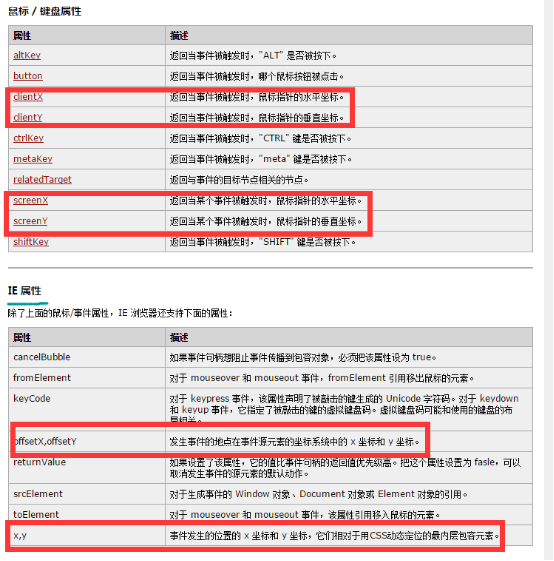
clientX, offsetX, layerX, pageX, screenX, X mouse position solution
The following is the explanation of w3c about each attribute: PageX/Y is divided into jq: No official documentation for layerX/Y was found. to sum up: Recommended Use: Scree...

offsetX , clientX ,pageX ,screenX ,layerX , x ,screen
Event attribute layerX - compared to the position of the current coordinate system, that is, if the trigger element is not set to absolute positioning or relative positioning, the page is used as the ...
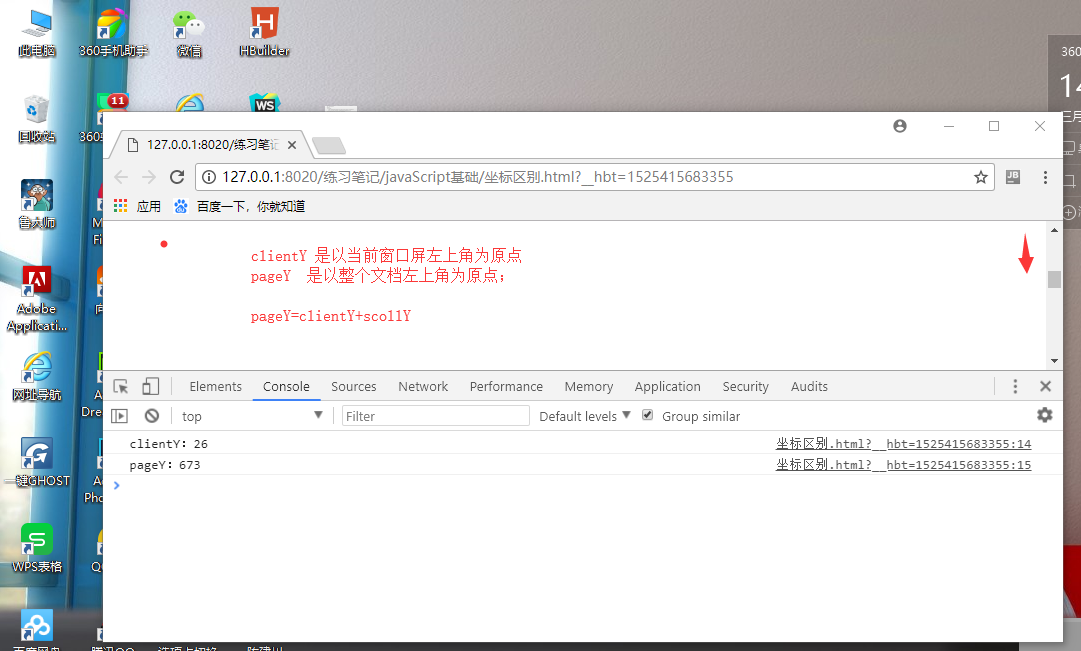
Difference clientX, pageX, screenX, offsetX, layerX of
screenX, screenY: mouse relative to the user Display ScreenThe coordinates of the upper left corner; pageX, pageY: mouse relative FileThe coordinates of the upper left corner, pageY=clientY+scrollY cl...
About offsetX, layerX, clientX, screenX and pageX
【Please indicate the source】: We all know that several methods in the title are used to get the location of an event, but what is the difference between them? Just use a picture to illustrate offsetX:...

clientX, pageX, screenX, offsetX, layerX, x
clientX, pageX, screenX, offsetX, layerX, x Native js: The console prints event object: chrome browser clientX/clientY: The coordinates of the relative viewable area (the viewable area, as ...