python-docx-template package-setting table (2)
Overview:
When using the python-docx-template package, you may need to perform various operations on the table. The following summarizes the various operations and implementations.
demand:
1. Insert content into the table (cell background can be specified dynamically)
2. Dynamically merge table cells horizontally
3. Dynamically merge table cells vertically
4. Automatically add table header to form feed
5. Fixed form length and width
6. If the content is empty, remove the table including the header
Implementation 1: Insert content into the table
Template
{% cellbg a.bg %} When you want to change the background color of a cell, you need to add the label cellbg before var

2. Code:
from docxtpl import DocxTemplate, RichText

tpl=DocxTemplate('test_files/cellbg_tpl.docx')

context = {
    'alerts' : [
        {'date' : '2015-03-10', 'desc' : RichText('Very critical alert',color='FF0000', bold=True), 'type' : 'CRITICAL', 'bg': 'FF0000' },
        {'date' : '2015-03-11', 'desc' : RichText('Just a warning'), 'type' : 'WARNING', 'bg': 'FFDD00' },
        {'date' : '2015-03-12', 'desc' : RichText('Information'), 'type' : 'INFO', 'bg': '8888FF' },
        {'date' : '2015-03-13', 'desc' : RichText('Debug trace'), 'type' : 'DEBUG', 'bg': 'FF00FF' },
    ],
}

tpl.render(context)
tpl.save('test_files/cellbg.docx')
3. Results

Implementation 2: Dynamically merge table cells
Template
{% colspan <var> %} Dynamically span table cells on multiple columns, <var> must contain an integer number of columns to span
{% colspan col_label|count %} Take the number of col_labels as the number of spanned cells

2, code
from docxtpl import DocxTemplate

tpl=DocxTemplate('test_files/dynamic_table_tpl.docx')

context = {
    'col_labels' : ['fruit', 'vegetable', 'stone', 'thing'],
    'tbl_contents': [
        {'label': 'yellow', 'cols': ['banana', 'capsicum', 'pyrite', 'taxi']},
        {'label': 'red', 'cols': ['apple', 'tomato', 'cinnabar', 'doubledecker']},
        {'label': 'green', 'cols': ['guava', 'cucumber', 'aventurine', 'card']},
        ]
}

tpl.render(context)
tpl.save('test_files/dynamic_table.docx')
3. Results

Realize three: Dynamically merge table cells vertically
Template
{% vm %} Merge cells vertically

2. Code
from docxtpl import DocxTemplate

tpl=DocxTemplate('test_files/vertical_merge_tpl.docx')

context = {
    'items' : [
        {'desc' : 'Python interpreters', 'qty' : 2, 'price' : 'FREE' },
        {'desc' : 'Django projects', 'qty' : 5403, 'price' : 'FREE' },
        {'desc' : 'Guido', 'qty' : 1, 'price' : '100,000,000.00' },
    ],
    'total_price' : '100,000,000.00',
    'category' : 'Book'
}

tpl.render(context)
tpl.save('test_files/vertical_merge.docx')
3. Results

Realize four: automatically add the header of the page-changing table
1. Method
Just modify it directly on the template
Select the table, right-click, click the table properties --> select Repeatedly appear in the form of titles at the top of each page

Fifth implementation: fixed form length and width
method:
Just modify the template directly
Right click to select the table --- automatic adjustment --- fixed column width
Implementation Six: If the content is empty, remove the table including the header
Template

2, the code
When generating Word, the incoming context adds a variable: have_content = False
Intelligent Recommendation
Partial record of python-docx package
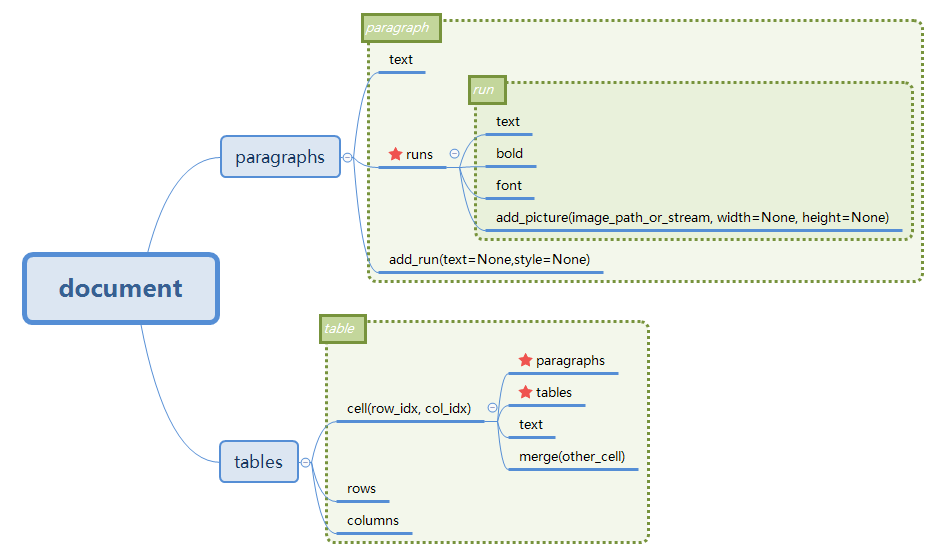
Official document python-docx Structure record This time I mainly used paragraph and table, and only recorded the more familiar parts. document: This is the object of the entire document paragraph: A ...
python-docx Table Style list
python-docx table style as follows: Instructions: Table Style: Normal Table Column 1 The first two The first three Table style: Table Grid Column 1 The first ...
Python-Docx adds pictures in the table
Python-Docx adds pictures in the table...
[Basic] Python-Docx ---- Section chapter setting
Overview Python-Docx can make some settings for Word, such as layout, etc., all settings are too cumbersome, before Python DocxTPL can be set directly through Word setting, but if it has to use code s...
Python -library docx (2) 12.21
The assignment and data batch entry of cells:...
More Recommendation

Python reads word documents (python-docx package)
Recently, I want to count some information in the word document, if I do manual statistics. . . Three days and three nights python is indeed a universal language. I found that there is a package calle...
Docx template in python merges multiple word documents
Reprint link:https://stackoverflow.com/questions/24872527/combine-word-document-using-python-docx increase...
python-docx template word document operation
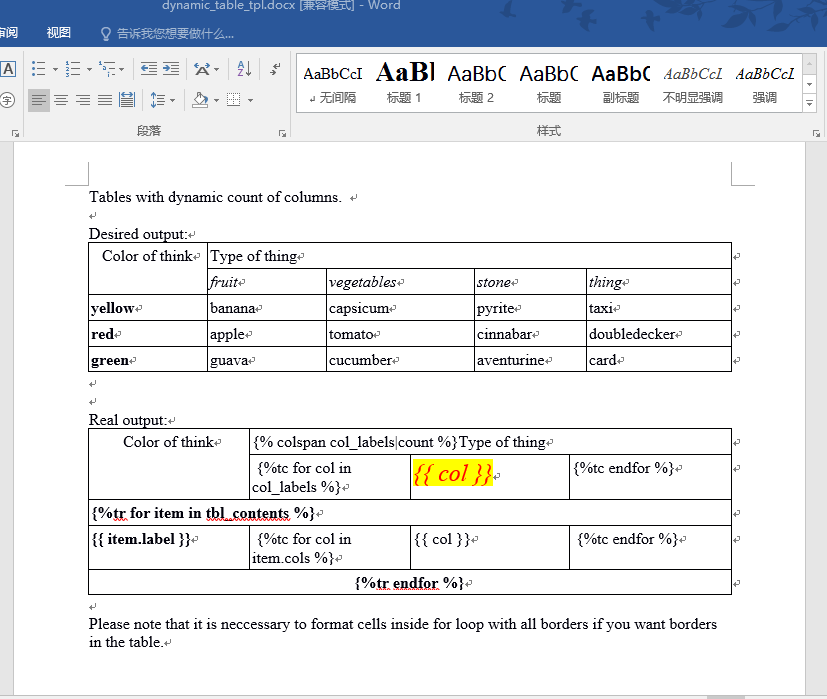
Operation Python word document. You can use python docx document to a new, automatic typesetting. You can also use python-docx template to modify the template. This article speaks python-docx template...
Use Python-Docx-Template to modify Word documentation
Use Python-Docx-Template to modify Word documentation 1. The library file required for installation 2. Create WORD documents and use template language in the documentation 3.python control generating ...
Pyinstaller + python docx package exe problem solving
Reference link: https://stackoverflow.com/questions/35642322/pyinstaller-and-python-docx-module-do-not-work-together When I wrote PyQt5+python docx+Python3.7 package exe, I found that there was a flas...