Python code one-click to flow chart
tags: 1024 Programmer's Day python Visualization
Python code to flowchart
When designing a program, class diagrams and flowcharts are very useful tools. We have many tools to draw these drawings, and even use them to generate the most basic framework code. Sometimes we need to reverse the code that has been written into class diagrams and flowcharts, such asHomeworkWhen sharing designs with others.
There are also many tools for converting code to class diagrams. Commonly used IDEs such as VS Code and IntelliJ IDEA can be installed with plug-ins to complete this task. And if you do Microsoft’s development, Visual Studio’s optional "Class Designer" is too strong to be able to easily hit any other similar tools I have seen. In this regard, VS is worthy of the "universe" The title of "First IDE".
However, the code transfer flowchart is relatively less demanding and the tools are not so rich. Recently, I suddenly needed to turn some Python code into a flowchart. Google turned two pages, GitHub searched a few projects, and found that the existing implementations are not good: either the technology used is too weird (those using "regular expressions" positive It shocked me all afternoon), either can’t run (dependency is harsh, for example, some projects use PyGame which is not friendly to macOS), or it ran out too ugly (messy lines, strange colors, not new Ugly wind is ugly to convulsions). When I see a high praise projectVatsha/code_to_flowchart Even when the above three "advantages" were assembled, I chose to DIY a python to flowchart tool.
Of course, I am not sprayingVatsha/code_to_flowchart, But some of its details are really not good, there is a lot of room for improvement. But I have to say that his design is simple and effective, and visualization with PyGame is also very innovative. In fact, I also made a lot of reference to this project when doing my own implementation.
My solutionPyFlowchart Based on the famous flowchart.js.
(Originally, I named it PyFlow. When I uploaded PyPi, I found the same name ♂️. So I changed it to PyFlowchart)
flowchart.js
If you use Typora, you may know that using ```flow in Typora can use a simple text language to write flowcharts, according toTypora's documentation, This feature comes from open sourceflowchart.js。
My plan is to convert Python code into this flowchart language, and then you can useflowchart.js.org、Typora、 francoislaberge/diagrams Wait for the tool to generate the flowchart.
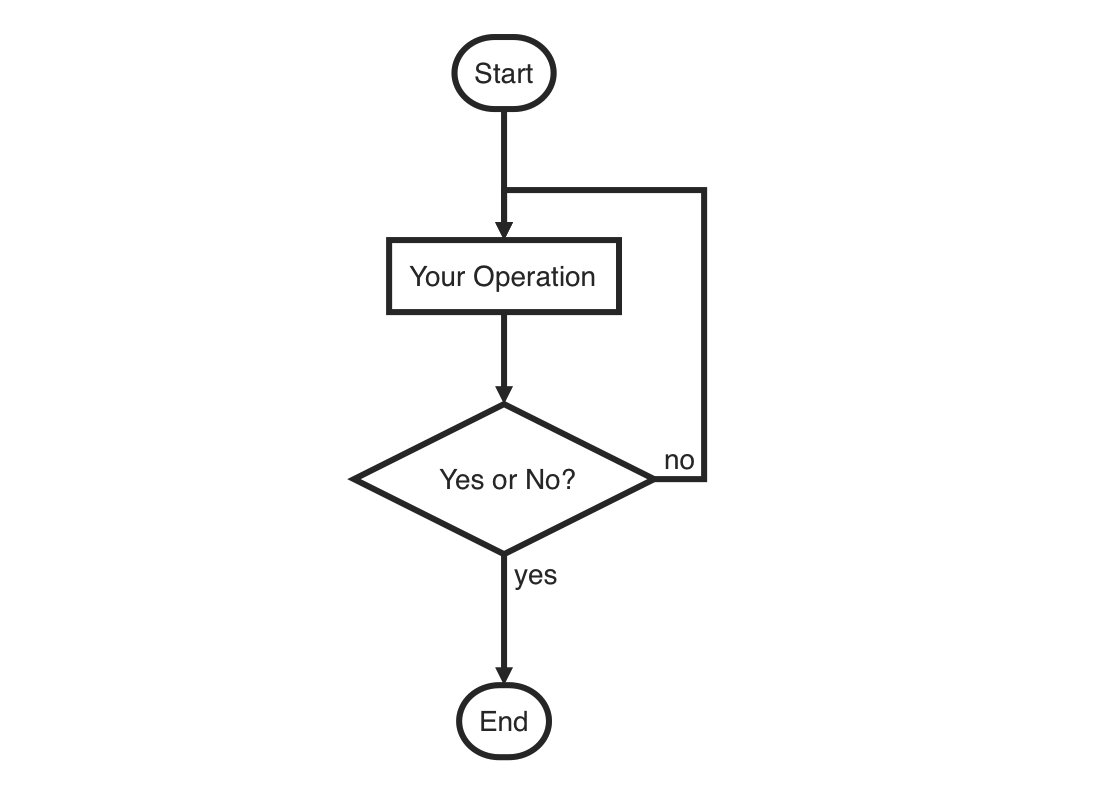
st=>start: Start
op=>operation: Your Operation
cond=>condition: Yes or No?
e=>end

st->op->cond
cond(yes)->e
cond(no)->op
PyFlowchart
The following briefly introduces how to use the PyFlowchart I implemented. For more detailed instructions, please see the projectREADME。
Install PyFlowchart:
$ pip3 install pyflowchart
Write onesimple.py file:
def foo(a, b):
    if a:
        print("a")
    else:
        for i in range(3):
            print("b")
    return a + b
Run PyFlowchart:
$ python3 -m pyflowchart simple.py
It will output flowchart code:
st4439920016=>start: start foo
io4439920208=>inputoutput: input: a, b
cond4439920592=>condition: if a
sub4439974736=>subroutine: print('a')
io4439974672=>inputoutput: output:  (a + b)
e4439974352=>end: end function return
cond4439974224=>operation: print('b') while  i in range(3)

st4439920016->io4439920208
io4439920208->cond4439920592
cond4439920592(yes)->sub4439974736
sub4439974736->io4439974672
io4439974672->e4439974352
cond4439920592(no)->cond4439974224
cond4439974224->io4439974672
Visitflowchart.js.org, Paste the code generated above into the text box, and the flowchart will be automatically generated on the right:
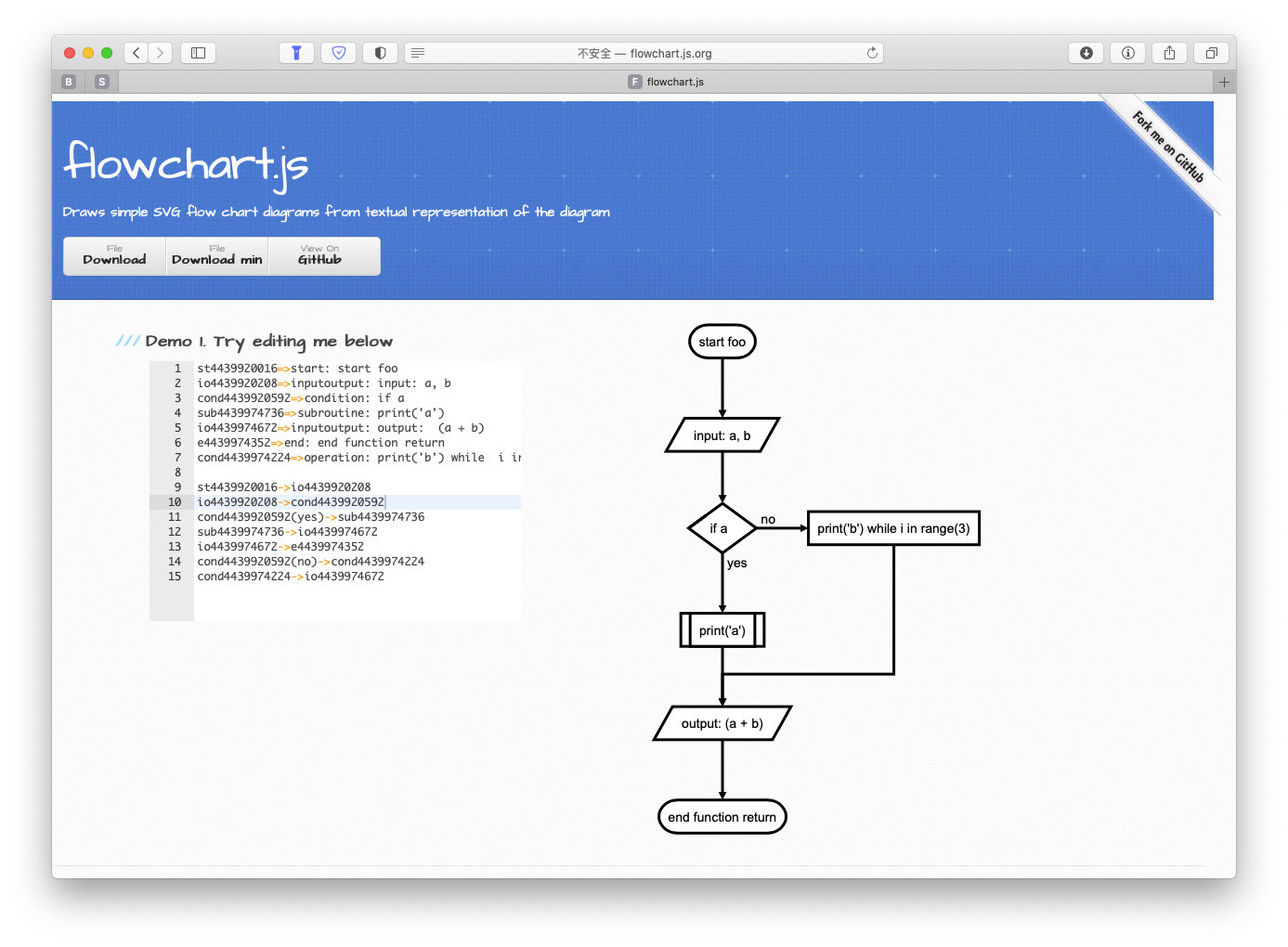
Of course, you can also put these codes directly into Typora's flow code block, and the flowchart will be automatically generated. If you prefer to use the command line, you can also usefrancoislaberge/diagrams To generate a flowchart.
If the generated flowchart has unsatisfactory parts (for example, overlapping lines) or you like to specify the style, refer toflowchart.js.orgJust manually modify the generated flowchart, which is very convenient.
Realization principle
PyFlowchart uses Python's built-inast Package, convert the code into an AST (Abstract Syntax Tree), and then convert the AST into a graph composed of Nodes defined by yourself. Each Node corresponds to a node in the flowchart. You can get the flowchart by traversing this diagram.
For the ast package, you can read this article:AST module: Modify Python code with Python, Although very old, but very simple and easy to understand. All in all, using the ast package, we can convert a piece of Python code into a data structure:
>>> import ast
>>> expr = """
... def add(a, b):
...     return a + b
... """
>>> expr_ast = ast.parse(expr)
>>> expr_ast
<_ast.Module object at 0x10c773e10>
>>> ast.dump(expr_ast)
# p.s. Manual formatting is done here
Module(body=[FunctionDef(name='add',
  args=arguments(
    args=[
      arg(arg='a', annotation=None),
      arg(arg='b', annotation=None)],
    vararg=None, kwonlyargs=[], kw_defaults=[], kwarg=None, defaults=[]),
  body=[Return(value=BinOp(
    left=Name(id='a', ctx=Load()),
    op=Add(),
    right=Name(id='b', ctx=Load())))],
  decorator_list=[],
  returns=None)])
After learning this thing, the next job is to translate this expr_ast (_ast.Module object) into a flowchart. We use the object-oriented approach to achieve:
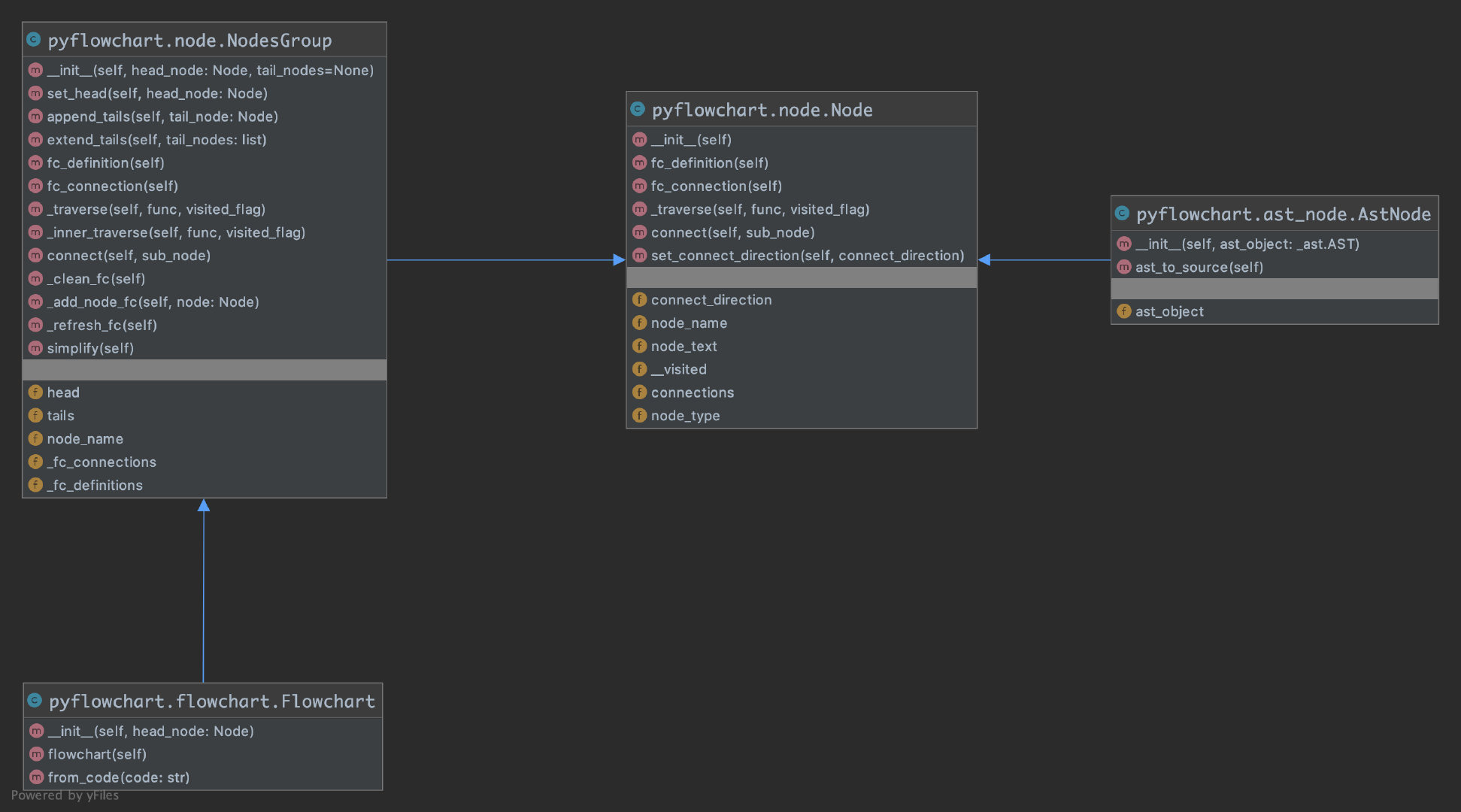
Node It is the most basic class, representing a node in the flowchart, and everything else inherits from it. Node has attributes such as node type, name, content, etc. It providesfc_definition()、fc_connection() The method can convert itself into a flowchart language string. additional __visited with _traverse() It is used to traverse the graph. Corresponding to the node types in flowchart, we have implemented various Node subclasses: StartNode, EndNode, OperationNode...
NodesGroup It is a special Node. It will not appear in the generated flowchart by itself, but it can contain some other Nodes. This design is inspired by Android's View and ViewGroup. With this NodesGroup, nested bodies such as if statements and for / while loops are easy to handle.
AstNode Represents a Node obtained from an AST object. To construct AstNode is to translate an AST object into a Node (or NodesGroup). Its subclasses correspond to various ast objects (which correspond to various statements in Python): If, Loop, Return...
Flowchart Represents a flowchart. A flow chart is just a bunch of nodes connected together, so Flowchart is a subclass of NodesGroup. In itsfrom_code()In the method, the work of parsing Python code with the ast package to obtain the ast object is realized. Inflowchart() In the method, traverse the graph, get the flowchart representation of all nodes, and summarize them into a complete flowchart.
In fact, this thing is very simple, and the more specific implementation is easy to understand by looking at the source code, so I won’t go into details here. in conclusion:
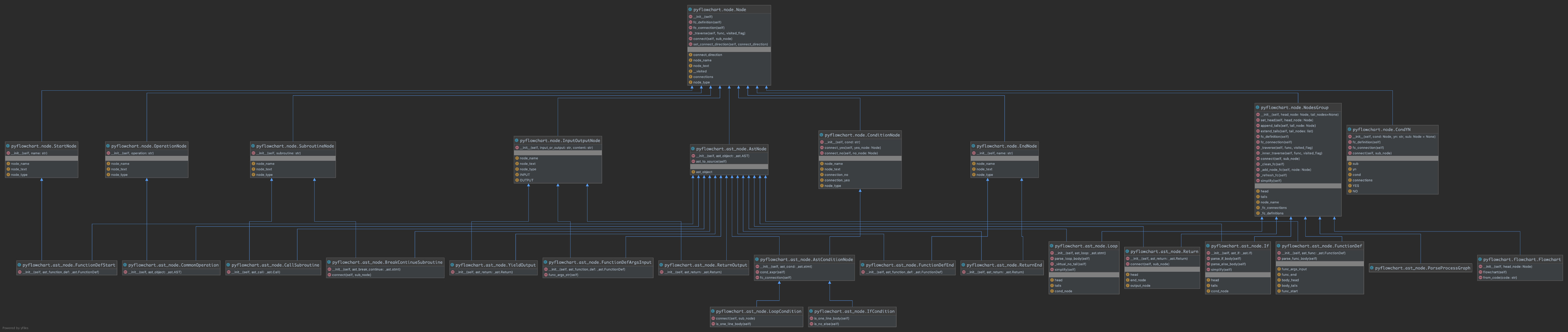
- The ast package is used in Flowchart to implement code to ast;
- AstNode and its subclasses implement ast to node graph;
- Node and its subclasses implement node graph to flowchart.
Attach the project address and the complete implementation class diagram:
- https://github.com/cdfmlr/pyflowchart/
by('CDFMLR', '2020.10.24')
#
Intelligent Recommendation
Python draws flow chart with Graphviz
Usually we use Graphviz this package to assist draw flowcharts or decision trees visualization, free graphviz-2.38.msi download address: Once the download is complete, the package is added in the foll...
Flow chart and thinking map of Python
Flow chart and thinking map of Python 1 flow chart 2 thinking map 1) Flying little turtle 2) a good-looking landing interface 3) Take a plane 1 flow chart The flowchart is a block diagram combination ...
Python generates word cloud chart (only one line of code)
Install pip install -i https://pypi.tuna.tsinghua.edu.cn/simple python-office -U...
[Matlab] One -click MATLAB code to Python code detailed tutorial
Motivation A paper that bloggers have recently read to do Biomedical Image SR. Its pre -processing of data is made of MATLAB ... if you want to run on the cluster, you must re -equip the environment t...
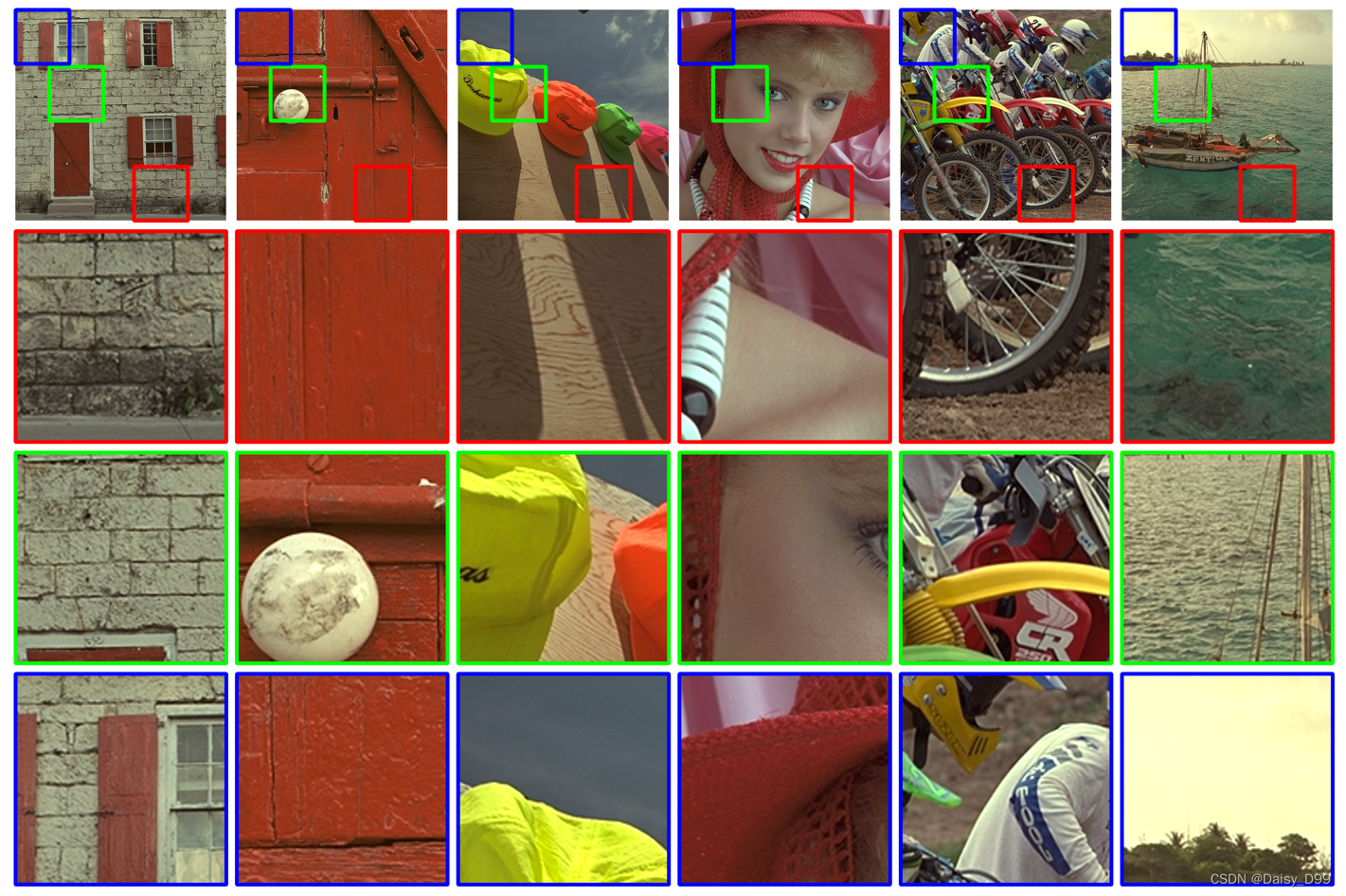
Python one -click generating paper comparison chart (including the magnification of the selection box)
Articles directory Python one -click generating paper comparison chart (including the magnification of the selection box) Code transfer Effect Python one -click generating paper comparison chart (incl...
More Recommendation
Helm Chart One-click deployment of Jenkins
Jenkins Jenkins is an open source CI&CD software used to automate various tasks, including building, testing, and deploying software. Currently more than 1,000 plug-ins are provided to support con...
One-click code generation
Source address:https://github.com/nongzihong/automatic MyBatis-PlusOfficial website:https://mp.baomidou.com/ origin: dao, entity, service, and controller must be written by yourself. This part of the ...
One-click code to chm
No nonsense code to chm file...
In Windows, use one-click python to download android q code
In order to facilitate the viewing of the code in the window, so download the google native android q code, write a python script to facilitate 1. Install GIT git official website download:https://git...