git study notes-management, undo modification
tags: GIT Manage changes Undo modification
GIT study notes
Modify management, cancel
Manage changes
- Why Git is better than other versions of the control system design, because Git tracks and manages changes, not files. In other words, all modifications, such as adding a line, deleting a line, or even creating a new file are considered modifications.
- Why does Git manage changes rather than files? We can do an experiment, the first step, right
readme.txtMake a modification, such as adding a line and adding:
$ git add readme.txt
$ git status
Located on branch master
 Changes to be submitted:
     (Use "git reset HEAD <file> ..."  To cancel temporary storage)
- Then, modify
readme.txtAnd submit:
$ git commit -m "git tracks changes"
[master 376d9c0] git tracks changes
 1 file changed, 1 insertion(+)
- After submission, look at the status:
$ git status
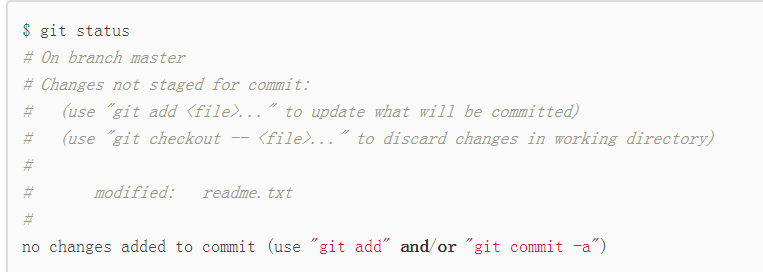
 Located on branch master
 Changes that have not been temporarily stored for submission:
     (Use "git add <file> ..."  Update the content to be submitted)
     (Use "git checkout-<file> ..."  Discard work area changes)

	 Modify: readme.txt

 Modifications have not been added for submission (use "git add"  and / or  "git commit -a")
- we discover,The second modification was not submitted. Review the operation process:
First modification->git add-> Second modification->git commit - As mentioned earlier, git manages modification, when used
git addAfter the order, the first modification in the work area is put into the temporary storage area for preparation. However, the second modification in the work area was not put into the temporary storage area, so,git commitIt is only responsible for submitting the changes in the temporary storage area, that is, the first modification is submitted, and the second modification will not be submitted. - After submission, use
git diff HEAD -- readme.txtThe command can check the difference between the latest version in the workspace and the version library:
$ git diff HEAD -- readme.txt
diff --git a/readme.txt b/readme.txt
index 76d770f..a9c5755 100644
--- a/readme.txt
+++ b/readme.txt
@@ -1,4 +1,4 @@
 Git is a distributed version control system.
 Git is free software distributed under the GPL.
 Git has a mutable index called stage.
-Git tracks changes.
+Git tracks changes of files.
- It can be seen that the second modification was indeed not submitted.
- How can we submit the second amendment? Can continue
git addagaingit commit, Or do n’t worry about submitting the first revision, firstgit addThe second modification, and thengit commit, Which is equivalent to submitting the two amendments together.
Undo modification one
- If in
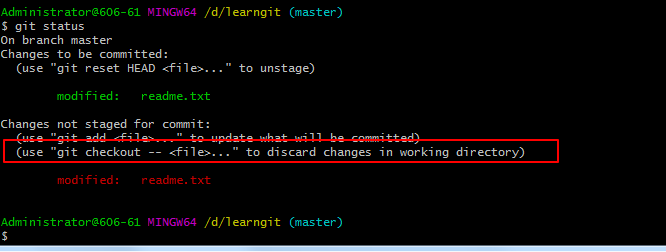
readme.txtAn extra line is added to the file, after submission, usegit statusView, Git will prompt to usegit checkout -- <file>...You can discard changes to the workspace.
$ git checkout -- readme.txt
- command
git checkout -- readme.txtMeaning, putreadme.txtAll changes to the file in the workspace are cancelled. There are two cases:- One is
readme.txtIt has not been put into the temporary storage area since the modification. Now, the small modification will return to the same state as the version library; - One is
readme.txtAfter it has been added to the temporary storage area, changes have been made. Now, the undo changes will return to the state after being added to the temporary storage area.
- One is
- In short, it is to return this file to the most recent
git commitorgit addState at the time. - After revocation, let's take a look
readme.txtdocument content:
$ cat readme.txt
Git is a distributed version control system.
Git is free software distributed under the GPL.
Git has a mutable index called stage.
Git tracks changes of files.
- File content restored
- note:
git checkout -- fileIn the order--Very important, no--, It becomesSwitch to another branch, We will encounter again in the branch managementgit checkoutcommand.
Undo modification 2
- If the content to be revoked is not only written to the file, but also
git addAdded to staging area, incommitFound this problem before, usegit statusView, the modification is just added to the temporary storage area, has not been submitted:
$ git status
 Located on branch master
 Changes to be submitted:
     (Use "git reset HEAD <file> ..."  To cancel temporary storage)

	 Modify: readme.txt
- Git also tells us that with the command
git reset HEAD <file>You can unstage the changes in the temporary storage area and put them back in the work area.
$ git reset HEAD readme.txt
 Cancel temporary changes after reset:
M	readme.txt
- Reuse
git statusCheck to make sure that the temporary storage area is clean and the work area is modified
$ git status
 Located on branch master
 Changes that have not been temporarily stored for submission:
     (Use "git add <file> ..."  Update the content to be submitted)
     (Use "git checkout-<file> ..."  Discard work area changes)

	 Modify: readme.txt

 Modifications have not been added for submission (use "git add"  and / or  "git commit -a")
- So that we can reuse
checkoutTo discard changes to the workspace.
Undo modification 3
- If the file to be modified is submitted to the repository, we will use the previous learningVersion rollback . However, this is conditional, that is, the version is rolled back before being pushed to the remote repository.
Delete Files
- In Git, deleting files is also a modification operation, let ’s add one first
test.txtFile to Git and submit:
$ git add text.txt
$ git commit -m "add text.txt"
[master 89274d2] add text.txt
 1 file changed, 2 insertions(+)
 create mode 100644 text.txt
- Then if we want to delete those useless files, we can delete them directly in the file manager, or use
rmCommand delete:
$ rm text.txt
- At this time, Git knows that you deleted the file, so the workspace and the repository are inconsistent,
git statusThe command will tell you immediately which files were deleted:
$ git status
 Located on branch master
 Changes that have not been temporarily stored for submission:
     (Use "git add / rm <file> ..."  Update the content to be submitted)
     (Use "git checkout-<file> ..."  Discard work area changes)

	 Delete: text.txt

 Modifications have not been added for submission (use "git add"  and / or  "git commit -a")
- There are two options now, one is to actually delete the file from the repository, use the command
git rmDelete, andgit commit:
$ git rm text.txt
rm 'text.txt'

$ git commit -m "delete text.txt"
[master acc1af6] delete text.txt
 1 file changed, 2 deletions(-)
 delete mode 100644 text.txt
- This deletes the file from the repository.
Delete files manually before using
git rm <file>withgit add <file>The effect is the same.
- The other case is the deletion, because there is still in the repository, so you can easily restore the accidentally deleted files to the latest version:
$ git checkout -- test.txt
git checkoutIn fact, the version in the workspace is replaced with the version in the repository, so whether the workspace is modified or deleted, you can "one-click restore".
note: Files that have been deleted before being added to the repository cannot be recovered.
Intelligent Recommendation
Undo modification of git
Here's a look at git undo changes related commands 1. Undo the changes that have not been submitted. 1) Cancel 1 or 2 files 2) Cancel all txt files 3) Cancel all documents Second, cancel the changes a...
Git Tutorial - Undo Modification
Git Tutorial - Undo Modification Undo the modification (discard the changes in the workspace, no add to the staging area) Undo the modification (the modification has been added to the staging area) Un...
Git-Undo Modification
Making mistakes is inevitable, for example, accidentally adding a line of irrelevant content in the readme.txt file: Git is a distributed version control system. Git is free software distributed under...
Git undo modification
Naturally, you will not make mistakes. But it's two o'clock in the morning, you are rushing a job report, you added a line to readme.txt Before you were ready to submit, a cup of coffee worked, and yo...
---Git---04---Undo the modification---
Undo changes in workspace If we add a line in readme.txt We found the last sentence and we want to correct it. We can delete the last line and manually restore the file to the state of the previous ve...
More Recommendation
git undo the modification of a file
git undoes the modification of a file, divided into two situations: 1.Modified in the work area, but not submitted to the staging area (that is, there is no add)。 For the undo modification of a single...
Git Supplement-Undo the modification
git checkout -- fileThe modification of the workspace can be discarded: commandgit checkout -- readme.txtMeans, putreadme.txtAll modifications of files in the workspace are undone. There are two situa...
Six, Git-undo modification
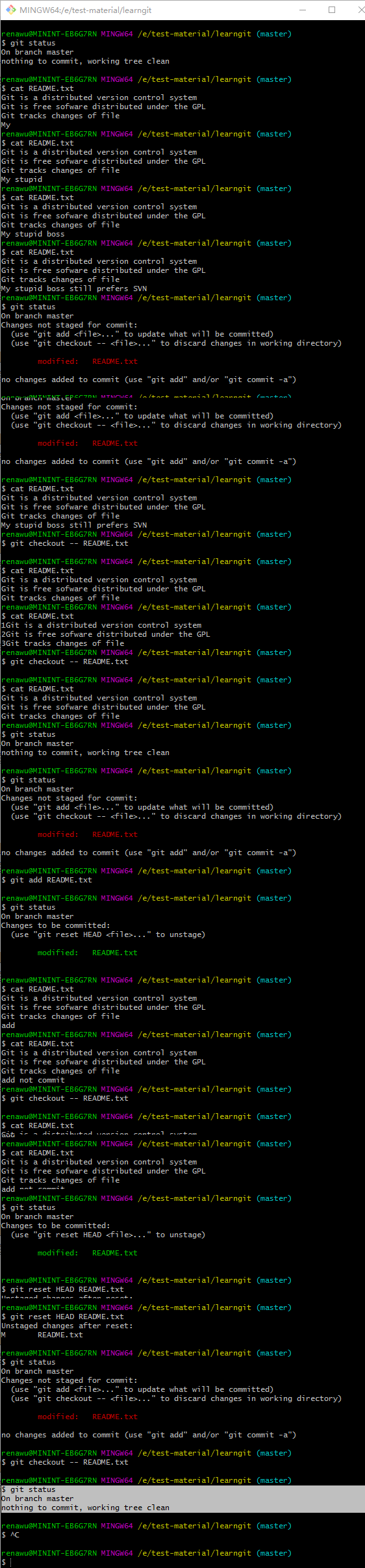
references: 1. You have modified and saved the content of the workspace many times. What if you want to go back to before the modification? Example 1: Modify the README.txt file of the workspace 4 tim...
Pro Git study notes (three, undo, draft)
This command will commit the files in the staging area. If you haven't made any changes since the last commit (for example, if you executed this command immediately after the last commit), the snapsho...
git basis: "undo action" study notes
At any stage, you are likely to want to undo some operations. Here, we will learn the basic tools you have done a few changes to undo. Note that some undo action is not reversible. This is one of the ...