SecureCRT uses BackSpace and python shell arrow keys garbled
tags: SecureCRT Linux BackSpace Arrow key Garbled
1. Solve the garbled characters of backspace and delete:
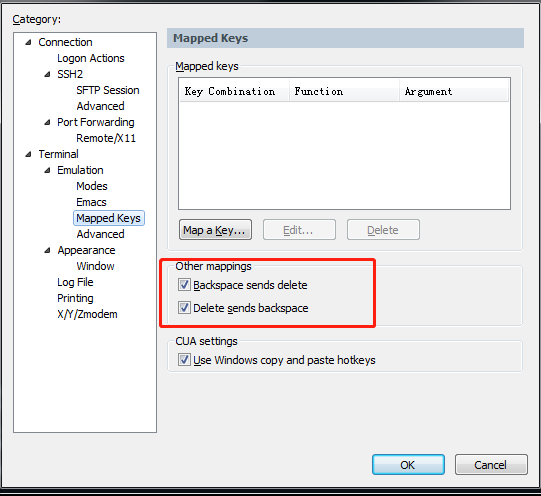
On the toolbar of securecrt–>options–>session–>terminal–>emulation–>mapped keys, check the two options of “other mappings”, as shown below:
2. The garbled arrow keys of the python shell
[root@bigdata003 ~]# python
Python 2.7.15 (default, Jan 24 2019, 15:36:44)
[GCC 4.4.7 20120313 (Red Hat 4.4.7-23)] on linux2
Type "help", "copyright", "credits" or "license" for more information.
>>> ^[[A^[[A
If the above situation occurs, then you need to install the package and recompile python:
yum install readline-devel
./configure –prefix=/usr/local/python2.7
make all
make install
make clean
make distclean
Intelligent Recommendation
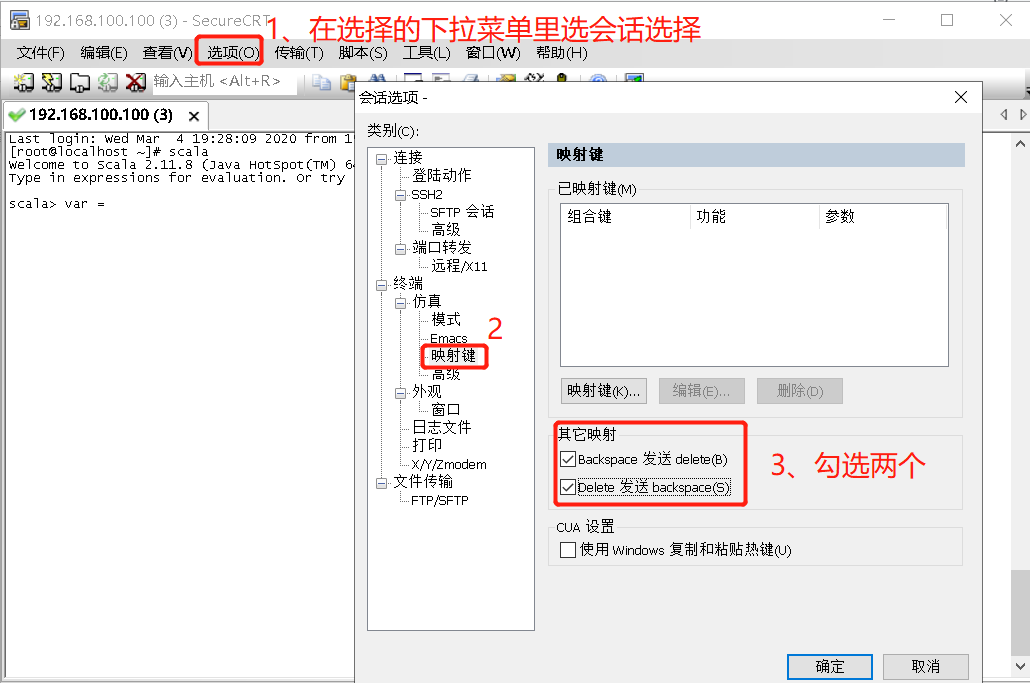
SecureCRT can not backspace and delete, Chinese garbled solution
1, can not backspace and delete Select -----> Session Options ----> map key ----> Check the two hook simulation ----> terminal selects linux 2, Chinese garbled solution Finished modifying ...

Vi arrow keys and backspace key solutions
Ubuntu's default editors are vi and gedit, but when using vi, editing the arrow keys does not move the cursor, but the four letters A, B, C, and D appear on the command line, and edit An error occurre...
Use the arrow keys and backspace under vi
Use ubuntu's own vi, in the insert mode, press the keyboard up and down and left and right will not move the cursor, only ABCD and line breaks, knock back delete is not enough, this problem occurs bec...
The arrow keys and backspace key cannot be used in SQLPLUS
Reference: http://blog.51cto.com/linuxguest/405374 Use rlwrap to call back the command executed in sqlplus under linux Use yum to install rlwrap: Configure the environment variables of the oracle user...

Using SecureCRT to write Spark-shell cannot backspace
When I was using Spark today, I suddenly found that I couldn't backspace, and I couldn't modify it if I wrote it incorrectly. Baidu found the answer for a long time, just modify the relevant configura...
More Recommendation
Solve the garbled problem of the Delete/Backspace key in the Python shell (version 3.5.2)
Problem Description In linux, when using the python3.5.2 interpreter, you can't delete it, roll back, etc. One press is ^H, which makes people very helpless. problem analysis When I use it here: I fou...
Solve the problem of garbled Delete/Backspace key in Python shell
Brief description Enter Python shell, press Delete/Backspace key, it will appear^HCharacters. After the command is entered incorrectly, it can only be started from the beginning and cannot be deleted,...
Solve the problem of Delete/Backspace key garbled and automatic completion in Python shell
Garbled problem Enter the Python shell, press the Delete/Backspace key, the ^H character will appear. After a command is entered incorrectly, it can only be started from the beginning and cannot be de...
Cannot press backspace and arrow keys under the python command line in the virtual machine Linux system to solve the problem
First yum installreadline-devel Then find the place where you originally compiled python and recompile it again How do I find the location where I compiled python? View the current version number of p...

Solve the invalidation of the arrow keys and backspace keys in vi insert mode
My ubuntu 8.04 vi (using the vi command, not vim) in the insert mode, you can not use the arrow keys, use the arrow keys to display some garbled, the backspace key is not good. Solution: Modify...