Graphics in createjs
Graphics in createjs is basically similar to Graphics in flash ActionScript. Today we will analyze it.
Let's first look at the definition of Graphics:
The Graphics class contains a set of methods that can be used to create vector shapes. The display object Shape object that supports drawing. The Shape class includes the graphics property, which is a Graphics object. The following are some auxiliary functions provided for ease of use: drawRect(), drawRoundRect(), drawCircle() and drawEllipse().
1.arc
arc(x,y,radius,startAngle,endAngle,anticlockwise):Graphics
arc() method to create arc/curve (used to create circle or partial circle)
parameter
| x |
The center x coordinate of the arc |
| y |
The y coordinate of the center of the arc |
| radius |
Radius of arc |
| startAngle |
The starting angle is in radians. (The three o'clock position of the circle of the arc is 0 degrees) |
| endAngle |
End angle in radians |
| anticlockwise |
Is it counterclockwise or clockwise false: clockwise (default), true: counterclockwise |
Please understand with the following figure

The following code creates a semicircle:
var shap = new createjs.Shape();
shap.graphics.beginFill("#ff0000");
shap.graphics.arc(100, 100, 20, 0, Math.PI);
shap.graphics.endFill();
stage.addChild(shap);
tip:usearc() to create a circle, please set startAngle to 0 and endAngle to Math.PI * 2;
2.arcTo
| x1 |
The x coordinate of the starting point of the arc |
| y1 |
The y coordinate of the starting point of the arc |
| x2 |
The x coordinate of the end of the arc |
| y2 |
The y coordinate of the end of the arc |
| radius |
Radius of arc |
    var shap = new createjs.Shape();
    shap.graphics.beginStroke("#ff0000");
         shap.graphics.moveTo(20,20); // Create a starting point
         shap.graphics.lineTo(100,20); // Create a horizontal line
         shap.graphics.arcTo(150,20,150,70,30); // create arc
    shap.graphics.lineTo(150,100);
    shap.graphics.endStroke();
stage.addChild(shap);Note:I don't know why it is used 23333
3.beginFill
| English words |
"red" |
| Hexadecimal |
"#ff0000" |
| rgb |
"rgb(255,0,0)" |
| rgba |
"rgba(255,0,0,0.1)" |
tip:This method appears as a pair with endFill()
tip: Basically, the color value settings encountered in createjs are all like this
4.beginStroke
beginStroke(color):Graphics;
beginStroke() specifies the style (color) of the drawn line
parameter:
color Line color The settable type is the same as the parameter color of beginFill
5.moveTo
moveTo(x,y):Graphics;
moveTo() adjust the drawing position to the point (x, y)
parameter
| x |
Draw point x coordinate |
| y |
Draw point y coordinate |
6.lineTo
lineTo(x,y):Graphics;lineTo() draw a straight line from the current point to the point (x, y)
| x |
Draw point x coordinate |
| y |
Draw point y coordinate |
7.endFill
beginFill()The line and curve added after the method should be filled. If the drawn line is not closed, it will be automatically closed and then filled.
8.endStroke
9.rect
| x |
The x coordinate of the upper left corner of the rectangle |
| y |
The y coordinate of the upper left corner of the rectangle |
| w |
Rectangle width |
| h |
Rectangle height |
    var shap = new createjs.Shape();
         shap.graphics.beginStroke("#ff0000"); //The border line color is #ff0000 red
         shap.graphics.drawRect(100,100,40,80); //Draw a rectangle with a width of 40 and a height of 80 at the point 100,100
    shap.graphics.endStroke();
    stage.addChild(shap);
10.drawRect
| x |
The x coordinate of the upper left corner of the rectangle |
| y |
The y coordinate of the upper left corner of the rectangle |
| w |
Rectangle width |
| h |
Rectangle height |
11.drawRoundRect
| x |
The x coordinate of the upper left corner of the rounded rectangle |
| y |
The y coordinate of the upper left corner of the rounded rectangle |
| w |
Width of rounded rectangle |
| h |
Rounded rectangle height |
| radius |
The corner radius of the rounded rectangle |
    var shap = new createjs.Shape();
         shap.graphics.beginStroke("#ff0000"); //Line color is #ff0000 red
         shap.graphics.drawRoundRect(100,100,40,80,10); //Draw a rounded rectangle with a width of 40 and a height of 80 and a radius of 10 at the point 100,100
    shap.graphics.endStroke();
    stage.addChild(shap);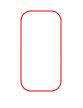
12.drawRoundRectComplex
| x |
The x coordinate of the upper left corner of the rounded rectangle |
| y |
The y coordinate of the upper left corner of the rounded rectangle |
| w |
Width of rounded rectangle |
| h |
Rounded rectangle height |
| radiusTL |
The radius of the upper left corner of the rounded rectangle |
| radiusTR |
The radius of the upper right corner of the rounded rectangle |
| radiusBL |
The radius of the lower left corner of the rounded rectangle |
| radiusBR |
The radius of the lower right corner of the rounded rectangle |
    var shap = new createjs.Shape();
         shap.graphics.beginStroke("#ff0000"); //Line color is #ff0000 red
         shap.graphics.drawRoundRectComplex(100,100,80,160,10,20,30,40); //Draw a rounded rectangle with a width of 40 and a height of 80 at the point 100, 100 and the rounded corner radius of 10, 20, 30, 40
    shap.graphics.endStroke();
    stage.addChild(shap);
13.drawCircle
| x |
Center point x coordinate |
| y |
Center point y coordinate |
| radius |
Radius of the circle |
    var shap = new createjs.Shape();
         shap.graphics.beginStroke("#ff0000"); //Line color is #ff0000 red
         shap.graphics.drawCircle(100,100,100) //Draw a circle with a radius of 100 at the point 100,100
    shap.graphics.endStroke();
    stage.addChild(shap);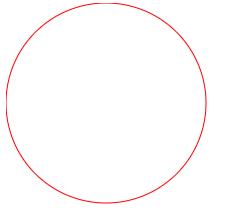
14.drawEllipse
| x |
The x coordinate of the upper left corner of the ellipse |
| y |
The y coordinate of the upper left corner of the ellipse |
| w |
Ellipse width |
| h |
Ellipse height |
    var shap = new createjs.Shape();
         shap.graphics.beginStroke("#ff0000"); //Line color is #ff0000 red
         shap.graphics.drawEllipse(100,100,50,100) //Draw an ellipse with a width of 50 and a height of 100 at the point 100,100
    shap.graphics.endStroke();
    stage.addChild(shap);
15.drawPolyStar
| x |
The x coordinate of the center point of the regular polygon (star) |
| y |
The y coordinate of the center point of the regular polygon (star) |
| radius |
The radius of the circumscribed circle where the regular polygon (star) is located |
| sides |
Number of sides (number of angles) of regular polygon (star) |
| pointSize |
Angle depth 0: regular polygon 0~1: multi-pointed star |
| angle |
The angle of the first point/corner, for example, a value of 0 means that the first point is drawn to the right of the center point |
    var shap = new createjs.Shape();
         shap.graphics.beginStroke("#ff0000"); //Line color is #ff0000 red
         shap.graphics.drawPolyStar(100,100,100,5,0.5,0) //Draw a five-pointed star with an circumscribed circle radius of 100 at the point 100,100
    shap.graphics.endStroke();
    stage.addChild(shap);
16.bezierCurveTo
| cp1x |
The x coordinate of the starting point of the Bezier curve |
| cp1y |
The y coordinate of the starting point of the Bezier curve |
| cp2x |
Bezier curve control point x coordinate |
| cp2y |
Bezier curve control point y coordinate |
| x |
The x coordinate of the end point of the Bezier curve |
| y |
The y coordinate of the end point of the Bezier curve |
    var shap = new createjs.Shape();
    shap.graphics.beginStroke("#ff0000"); //Line color is #ff0000 red
         shap.graphics.bezierCurveTo(10,10,110,10,110,110) //Draw a Bezier curve by starting point 10,10 and ending point 110,110 control point 110,10
    shap.graphics.endStroke();
    stage.addChild(shap);
17.quadraticCurveTo
| cpx |
Bezier curve control point x coordinate |
| cpy |
Bezier curve control point y coordinate |
| x |
The x coordinate of the end point of the Bezier curve |
| y |
The y coordinate of the end point of the Bezier curve |
    var shap = new createjs.Shape();
         shap.graphics.beginStroke("#ff0000"); //Line color is #ff0000 red
         shap.graphics.moveTo(10,10); //Move the control point to point 10,10
         shap.graphics.quadraticCurveTo(110,10,110,110) //Draw Bezier curve by starting point 10,10 and ending point 110,110 control point 110,10
    shap.graphics.endStroke();
    stage.addChild(shap);
18.setStrokeStyle
[caps=0]:End point type at the end of the line The default value is no end point "butt" or number 0
No endpoint: "butt" or number 0
Round end: "round" or number 1Square end point: "square" or number 2

The following two setting methods are to set the type of end point to round
    shap.graphics.setStrokeStyle(1,["round"])
shap.graphics.setStrokeStyle(1,[1])[joints=0]:Specify the type of connection appearance used for corners. Default sharp corner "miter" or number 0
Sharp corner: "miter" or number 0
Rounded corners: "round" or number 1
Bevel: "bevel" or number 2

The following two setting methods are to set the corner connection type to rounded corners
    shap.graphics.setStrokeStyle(20,[1],["round"])
shap.graphics.setStrokeStyle(20,[1],[1])[miterlimit=10]:A number indicating where the sharp corner will be cut off. The valid value range is 1 to 255 (values outside this range will be rounded to 1 or 255) This value can only be used
joints Set as"miter" In the case of
ignoreScale:Whether to ignore the effect of scaling on the thickness of the line Default false
true: Ignore the effect of scaling on the thickness of the line and always use the same brush for drawing
false: scaling will affect the line thickness
19.setStrokeDash
[segments]: specifies the array of dashed pattern, the form that alternates between links and gaps, for example, [20,10] means to draw a 20-pixel line segment first, then 10 pixels apart, and then draw 20 Line segments of pixels, and then leave a 10 pixel interval, and so on. Setting a null value or an empty array will clear the dashed line mode
[offset]: The offset of the dotted line can use this attribute to make the ant line effect
    var shap = new createjs.Shape();
         shap.graphics.beginStroke("#ff0000"); //Line color is #ff0000 red
    shap.graphics.setStrokeStyle(1)
    shap.graphics.setStrokeDash([20, 10], 10)
    shap.graphics.moveTo(10,50);
    shap.graphics.lineTo(100,50);
    shap.graphics.lineTo(10,100);
    shap.graphics.endStroke();
    stage.addChild(shap);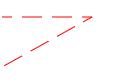
20.beginLinearGradientFill
colors : An array of color values, used to represent the colors of the gradient, for each color, please ensure that there is a corresponding value in the radios
radios : An array of color distribution ratios, with valid values ranging from 0 to 1. For example, [0.1, 0.9] will draw the first color as 10%, and then interpolate to the second color at 90%.
x0,y0,x1,y1 : Defines the gradient from point (x0, y0) to point (x1, y1)
The following example is to draw a gradient from point (10,10) to point (110,110), and fill the gradient into the rectangle
    var shap = new createjs.Shape();
    shap.graphics.beginLinearGradientFill(["#000","#FFF"], [0, 1], 10, 10, 110, 110)
    shap.graphics.drawRect(10, 10, 110, 110);
    stage.addChild(shap);
21.beginRadialGradientFill
beginRadialGradientFill(colors,ratios,x0,y0,r0,x1,y1,r1):Graphics
beginRadialGradientFill() radial gradient
colors :An array of color values, used to represent the colors of the gradient, for each color, please ensure that there is a corresponding value in the radios
radios :An array of color distribution ratios, with valid values ranging from 0 to 1. For example, [0.1, 0.9] will draw the first color as 10%, and then interpolate to the second color at 90%.
x0,y0,r0 : Define the inner circle of the gradientx1,y1,r1 : Define the outer circle of the gradient
The following example defines a red to blue radial gradient centered at (100, 100) and a radius of 50, and draws a circle to show
    var shap = new createjs.Shape();
    shap.graphics.beginRadialGradientFill(["#F00","#00F"], [0, 1], 100, 100, 0, 100, 100, 50)
    shap.graphics.drawCircle(100, 100, 50);
    shap.graphics.endFill();
    stage.addChild(shap);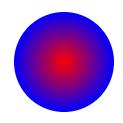
22.beginBitmapFill
beginBitmapFill(image,repetition,matrix):Graphics
beginBitmapFill() starts filling with the specified image
image : The image can be HTMLImageElement|HTMLCanvasElement|HTMLVideoElement
image object canvas object video object must be loaded before filling, otherwise the filling will be empty
repetition : An optional parameter Repeat method A string, "repeat" "repeat-x" "repeat-y" "no-repeat" The default value is "repeat"
matrix : Matrix2D an optional parameter specifies the conversion matrix filled with bitmap
23.beginLinearGradientStroke
beginLinearGradientStroke() sets a linear gradient line segment
Parameters see beginLinearGradientFill method
Next, create a black and white linear gradient rectangle
    var shap = new createjs.Shape();
    shap.graphics.beginLinearGradientStroke(["#000","#FFF"], [0, 1], 0, 20, 0, 120);
    shap.graphics.drawRect(20, 20, 100,100);
    shap.graphics.endFill();
    stage.addChild(shap);
24.beginRadialGradientStroke
beginRadialGradientStroke() draws a radial gradient line segment (the line segment should be thicker or you can’t see it)
Parameters see beginRadialGradientFill method
    var shap = new createjs.Shape();
    shap.graphics.setStrokeStyle(10)
    shap.graphics.beginRadialGradientStroke(["#F00","#00F"], [0, 1], 100, 100, 0, 100, 100, 50)
    shap.graphics.drawRect(50, 90, 150, 110);
    shap.graphics.endStroke();
    stage.addChild(shap);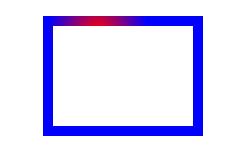
25.beginBitmapStroke
beginBitmapStroke() uses patterns to draw lines
parameter
image :The image can be HTMLImageElement|HTMLCanvasElement|HTMLVideoElement
image object canvas object video object must be loaded before filling, otherwise the filling will be empty
[repeatition=repeat]:String An optional parameter Repeat method A string, "repeat" "repeat-x" "repeat-y""no-repeat" The default value is "repeat"
26.closePath

Note: This method is called after the drawing operation is over
27.clear()
clear():Graphics
clear() Clear all drawing commands, reset all drawing settings, and reset the fill and stroke when you need to redraw
Intelligent Recommendation
Createjs entry
Createjs is a lightweight framework. With a little time and patience, you can see all the source code again, after all, there are only thirty JS files. Address: http://www.createjs.com/ The developmen...
createjs Ticker
...
createjs MotionGuidePlugin
html app.js...
Createjs picture unclear pit
AttentioncanvasIn the label, be sure to writewidth: 100%Otherwise, even if you zoom in on the canvas twice, it will zoom out by 0.5 times, and the picture will still be unclear. <canvas id='canvas'...
Cancel's createjs library of easeljs
UsingCanvas.js...
More Recommendation
H5 animation - createjs
Animation with H5 may use front-end game engines, known as CreateJS and PixiJS. CreateJS is produced by Adobe. Although there is no PixiJS in performance, the functions are relatively complete (PixiJS...
createjs use record
createjs library consists of several components: l, easeljs, this is the core, including the display list, the event mechanism; 2, preloadjs, for preloading pictures; 3, tweenjs, for easing the contro...

createjs game framework
1. Download create.js files or documents create.js csn remote connection; 2. Create a text object Text (): draw text; 3. Create a graphic object Shape (): Draw graphics; 4. Create an image on t...
Examples createjs snow
demo: http://output.jsbin.com/davixatona demo: http://output.jsbin.com/davixatona...