Reading notes on MySQL related books (4)
-
Table fragment
Cause: When the delete operation, MySQL does not delete the data file, but deletes the data file identifier, and does not organize the data file. It does not completely release the table space.Calculation: show table status like ‘%table_name%’;
mysql> show table status like '%overtime_allowance%';
+---------------------------+--------+---------+------------+------+----------------+-------------+-----------------+--------------+-----------+----------------+---------------------+-------------+------------+--------------------+----------+--------------------+----------------+
| Name                      | Engine | Version | Row_format | Rows | Avg_row_length | Data_length | Max_data_length | Index_length | Data_free | Auto_increment | Create_time         | Update_time | Check_time | Collation          | Checksum | Create_options     | Comment        |
+---------------------------+--------+---------+------------+------+----------------+-------------+-----------------+--------------+-----------+----------------+---------------------+-------------+------------+--------------------+----------+--------------------+----------------+
| overtime_allowance        | InnoDB |      10 | Compact    |    2 |           8192 |       16384 |               0 |            0 |         0 |            118 | 2019-02-28 13:15:44 | NULL        | NULL       | utf8mb4_general_ci | NULL     | row_format=COMPACT | Overtime subsidy     |
| overtime_allowance_detail | InnoDB |      10 | Compact    |    2 |           8192 |       16384 |               0 |            0 |         0 |            101 | 2019-02-28 13:15:44 | NULL        | NULL       | utf8mb4_general_ci | NULL     | row_format=COMPACT |  Overtime subsidy schedule |
+---------------------------+--------+---------+------------+------+----------------+-------------+-----------------+--------------+-----------+----------------+---------------------+-------------+------------+--------------------+----------+--------------------+----------------+
2 rows in set (0.34 sec)


mysql> show table status where name='overtime_allowance';
+--------------------+--------+---------+------------+------+----------------+-------------+-----------------+--------------+-----------+----------------+---------------------+-------------+------------+--------------------+----------+--------------------+------------+
| Name               | Engine | Version | Row_format | Rows | Avg_row_length | Data_length | Max_data_length | Index_length | Data_free | Auto_increment | Create_time         | Update_time | Check_time | Collation          | Checksum | Create_options     | Comment    |
+--------------------+--------+---------+------------+------+----------------+-------------+-----------------+--------------+-----------+----------------+---------------------+-------------+------------+--------------------+----------+--------------------+------------+
| overtime_allowance | InnoDB |      10 | Compact    |    2 |           8192 |       16384 |               0 |            0 |         0 |            118 | 2019-02-28 13:15:44 | NULL        | NULL       | utf8mb4_general_ci | NULL     | row_format=COMPACT |  Overtime subsidy |
+--------------------+--------+---------+------------+------+----------------+-------------+-----------------+--------------+-----------+----------------+---------------------+-------------+------------+--------------------+----------+--------------------+------------+
1 row in set (0.28 sec)
Solution: The first type: alter table table_name engine=innodb; the role is to reorganize the entire table data, the data continuity after finishing, the whole table scan becomes faster;
Second: back up the meta data, then delete it and re-import it into the new table (may be used when backup is restored); -
Table statistics
is to count the size of each library, the size of the table, the size of the data and index, etc.;Statistical database The size of each library in it; mysql> select table_schema,sum(data_length)/1024/1024/1024 as data_length,sum(index_length)/1024/1024/1024 as index_length,sum(data_length+index_length)/1024/1024/1024 as sum_data_length from information_schema.tables where table_schema != 'infomation_schema' and table_schema != 'mysql' group by table_schema; +--------------------+----------------+----------------+-----------------+ | table_schema | data_length | index_length | sum_data_length | +--------------------+----------------+----------------+-----------------+ | account_manager | 0.000564575195 | 0.000106811523 | 0.000671386719 | | activiti_001 | 0.000381469727 | 0.000442504883 | 0.000823974609 | | dbandcache | 0.000015258789 | 0.000000000000 | 0.000015258789 | | dbandcache2 | 0.000015258789 | 0.000000000000 | 0.000015258789 | | hyetec-portal | 0.003005981445 | 0.000701904297 | 0.003707885742 | | hyetec-urm | 2.418289184570 | 0.000183105469 | 2.418472290039 | | information_schema | 0.000152587891 | 0.000000000000 | 0.000152587891 | | moa | 0.529266357422 | 0.001052856445 | 0.530319213867 | | performance_schema | 0.000000000000 | 0.000000000000 | 0.000000000000 | | sdyy | 0.000045776367 | 0.000000000000 | 0.000045776367 | | substation | 0.004638671875 | 0.000106811523 | 0.004745483398 | | sys | 0.000015258789 | 0.000000000000 | 0.000015258789 | | zhgl | 0.002090454102 | 0.000000000000 | 0.002090454102 | +--------------------+----------------+----------------+-----------------+ 13 rows in set (1.02 sec) ## Count the size of each table in the library: mysql> select table_name,data_length,index_length,sum(data_length+index_length) as total_size from information_schema.tables where table_schema='sdyy' group by table_name; +------------+-------------+--------------+------------+ | table_name | data_length | index_length | total_size | +------------+-------------+--------------+------------+ | call_log | 16384 | 0 | 16384 | | sys_log | 16384 | 0 | 16384 | | t_user | 16384 | 0 | 16384 | +------------+-------------+--------------+------------+ 3 rows in set (0.12 sec) Count all database sizes mysql> select sum(data_length+index_length)/1024/1024/1024 from information_schema.tables; +----------------------------------------------+ | sum(data_length+index_length)/1024/1024/1024 | +----------------------------------------------+ | 2.963734141551 | +----------------------------------------------+ 1 row in set (1.26 sec) -
Method of collecting statistical information:
-
Common commands:
--View table structure
desc table_name;
--View the execution plan:
explain select * from table_name ;

-- Analysis: First look at the fifth column type, if it is ALL, it means full table scan, the other data behind can not be seen; non-ALLL, then look at the key column data; if it is NNULL means no index; Look at rows, see the number of rows you need to query; look at extra; see if you use using filesort or using temporary;
mysql> explain select * from year_vocation ;
+----+-------------+---------------+------------+------+---------------+------+---------+------+------+----------+-------+
| id | select_type | table         | partitions | type | possible_keys | key  | key_len | ref  | rows | filtered | Extra |
+----+-------------+---------------+------------+------+---------------+------+---------+------+------+----------+-------+
|  1 | SIMPLE      | year_vocation | NULL       | ALL  | NULL          | NULL | NULL    | NULL |    1 |   100.00 | NULL  |
+----+-------------+---------------+------------+------+---------------+------+---------+------+------+----------+-------+
1 row in set (0.15 sec)
--
How to optimize sql under the extension
-
First look at the data type of the table is reasonable, whether to follow the principle of selecting the data type is simpler and smaller;
-
Whether the pieces in the table are sorted out;
-
Whether the statistical information of the table is collected, only the statistical information is collected accurately, and the execution plan can help us optimize sql;
-
View the execution plan: check the usage of the index; if you are not using an index, consider creating an index; if there is an index, consider whether the index is correct;
-
Before creating an index, you also need to check the selectivity of the index to determine whether the field is suitable for creating an index. The index selectivity here refers to the ratio of the non-repeating index value (also becoming the cardinality) to the total number of records in the data table; the higher the ratio, the higher the query efficiency; the selectivity of the primary key index and the unique index is 1
Highest efficiency;
-
After creating the index, review the execution plan again, compare the results twice, and see if the index works.
-
Intelligent Recommendation
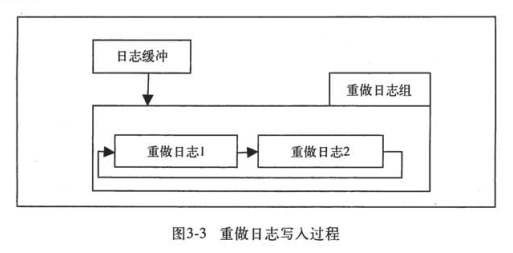
Mysql technology insider InnoDB storage engine reading related notes - file
First, MySQL log Regarding the log record, MySQL is not written directly in the file, but wants to write it into the log buffer, and then write it into the log file according to certain rules, such as...

[Books Series] "Dear Andre" reading notes
DATE: 2020.7.25 Article Directory 1. Parent-child communication 2. Parents 3. Mediocre 4. Recognition I have been reading "Dear Andre" intermittently for more than a month. I don't like to f...
vbs learning, books, reading notes (3)
navigation 1. The difference between ByRef and ByVal 2. Literal constants and named constants 3. Built-in constants such as msgbox 4. Loop for-next, for each-next-traverse the array, find small file c...
Source reading notes (1): "Algorithm 4" related to the C ++ implementation of the related API
Article catalog Source code 2. Summary 2.1 Usage of Resize functions in C ++ 2.2 More Flexible Data Input Method IFSTREAM GetLine () ifstringstream () ISTRINGSTREAM in C ++ C ++ GetLine function usage...
Reading books
Strong communication with no picture + greedy. Given the N this book, read similar books After a similar book reading time becomes half, find the shortest time....
More Recommendation
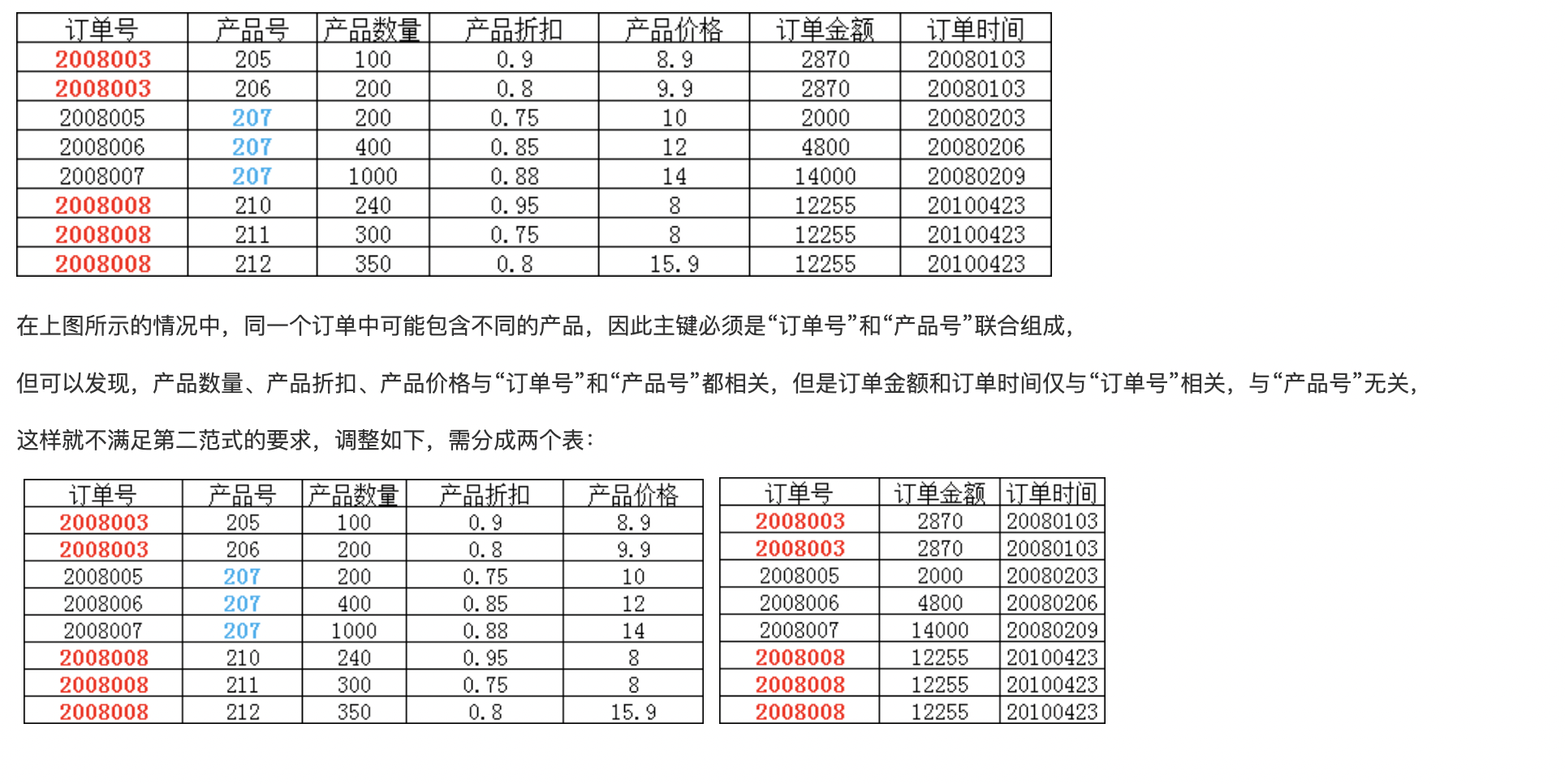
High-performance mysql third edition reading notes (Chapter 4)
Declare I am not a database engineer, so some things in the log that focus on database direction will not be recorded Schema and data type optimization Select the optimized data type Smaller ones are ...
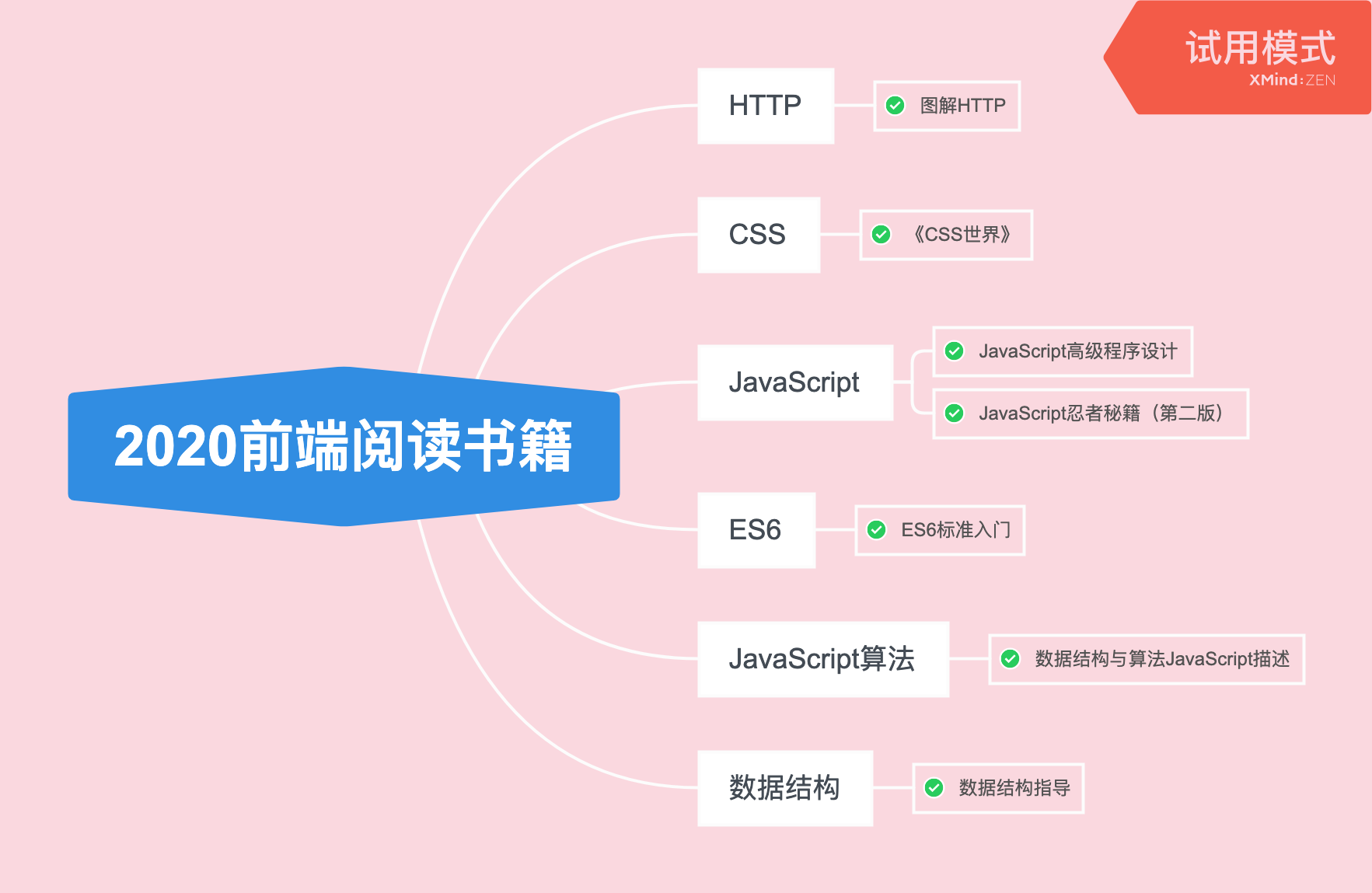
2020 front-end reading books and reading notes summary~
Since I came into contact with the front-end in 2020, I have stepped on pits of different sizes. Every time I fill a pit, I look for blogs on the Internet, know the answers, and sometimes visit github...
4.Mysql related
type of data: 1. Time (modification time, creation time) date – > 1000-01-01 to 9999-12-31 ------------Corresponding JAVA: java.sql.Date time – > 00:00:00To23:59:59 ------------Corre...
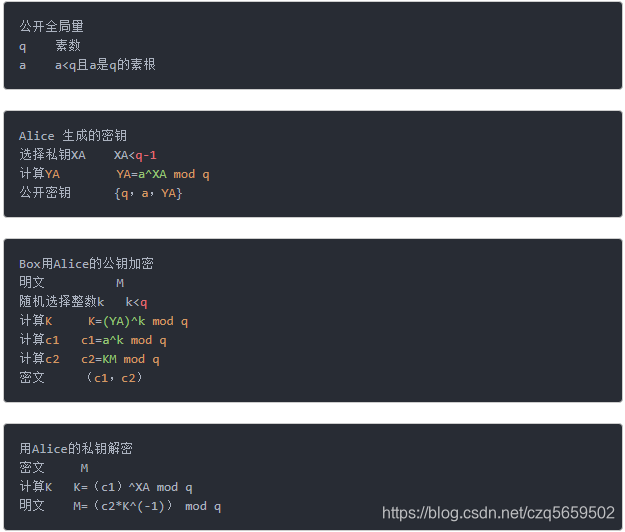
Cryptography reading notes - 4
[HKE Discrete Logarithmic Exchange and Elliptic Curve] [1, principle part] DHKE allows both parties to communicate through unsecured secret channels. The basic principle is k=(αx)y = (αy)x...
Chapter 4 reading notes
Multi-process processing client request framework as shown in the code The reason to call close(connfd) twice is because each file or socket has a reference count, and the reference count is maintaine...