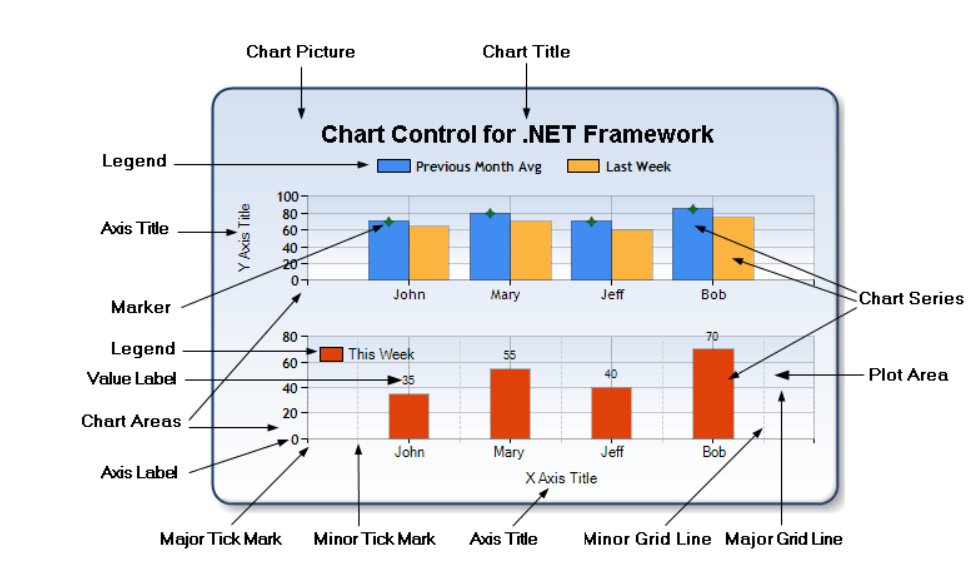
In the .Net4.0 framework, Microsoft has integrated the Mschart control. It has been used in the web before. The original Mschart control under winform is simpler and more convenient. Today we use mschart to draw a multi-curve graph. , directly on the effect chart:

Found that MsChart's display is still good.
The code is as follows for your reference:
public partial class FrmMain : Form
    {
        public FrmMain()
        {
            InitializeComponent();
            InitializeChart();
            this.Load += new EventHandler(FrmMain_Load);
            this.myChart.GetToolTipText += new EventHandler<ToolTipEventArgs>(myChart_GetToolTipText);
        }

        void FrmMain_Load(object sender, EventArgs e)
        {
            float[][] data = new float[3][];
            //First data
            data[0] = new float[10] { 1.3f, 2.5f, 2.1f, 3.3f, 2.8f, 3.9f, 4.3f, 3.6f, 4.2f, 3.6f };
            //Second data
            data[1] = new float[12] { -2f, -1.3f, 0.1f, 0.5f, -1.5f, 0.7f, 1f, 1.4f, 1.9f, 2f, 2.6f, 3.1f };
            //Third data
            data[2] = new float[10] { 7.8f, 9.2f, 6.5f, 8.3f, 9.0f, 5.9f, 6.3f, 7.2f, 8.8f, 9.8f };

            for (int i = 0; i < data.Length; i++)
            {
                //Horizontal time
                DateTime dt = DateTime.Now.Date;
                Series series = this.SetSeriesStyle(i);
                for (int j = 0; j < data[i].Length; j++)
                {
                    series.Points.AddXY(dt, data[i][j]);
                    dt = dt.AddDays(1);
                }
                this.myChart.Series.Add(series);
            }
        }

        private void myChart_GetToolTipText(object sender, ToolTipEventArgs e)
        {
            if (e.HitTestResult.ChartElementType == ChartElementType.DataPoint)
            {
                int i = e.HitTestResult.PointIndex;
                DataPoint dp = e.HitTestResult.Series.Points[i];
                e.Text = string.Format("Time: {0}; Value: {1: F1} ", DateTime.FromOADate(dp.XValue),dp.YValues[0]);
            }
        }

        /// <summary>
        ///  Initialize the Char control style
        /// </summary>
        public void InitializeChart()
        {
            #region  Set the properties of the chart
            //Background color of the chart
            myChart.BackColor = Color.FromArgb(211, 223, 240);
            //Gradient way of chart background color
            myChart.BackGradientStyle = GradientStyle.TopBottom;
            //The border color of the chart,
            myChart.BorderlineColor = Color.FromArgb(26, 59, 105);
            //Border line style of the chart
            myChart.BorderlineDashStyle = ChartDashStyle.Solid;
            //The width of the chart border line
            myChart.BorderlineWidth = 2;
            //Chart border skin
            myChart.BorderSkin.SkinStyle = BorderSkinStyle.Emboss;
            #endregion

            #region  Set the Title of the chart
            Title title = new Title();
            //title content
            title.Text = "Multi-curve demonstration";
            //Title font
            title.Font = new System.Drawing.Font("Microsoft Sans Serif", 12, FontStyle.Bold);
            //Title font color
            title.ForeColor = Color.FromArgb(26, 59, 105);
            //Header shadow color
            title.ShadowColor = Color.FromArgb(32, 0, 0, 0);
            //Header shadow offset
            title.ShadowOffset = 3;

            myChart.Titles.Add(title);
            #endregion

            #region  Set chart area properties
            //The name of the chart area
            ChartArea chartArea = new ChartArea("Default");
            //Background color
            chartArea.BackColor = Color.FromArgb(64, 165, 191, 228);
            //Background gradient
            chartArea.BackGradientStyle = GradientStyle.TopBottom;
            //Auxiliary background color for gradients and shadows
            chartArea.BackSecondaryColor = Color.White;
            //Border color
            chartArea.BorderColor = Color.FromArgb(64, 64, 64, 64);
            //Shadow color
            chartArea.ShadowColor = Color.Transparent;

            //Set the color and width of the X and Y axis bars
            chartArea.AxisX.LineColor = Color.FromArgb(64, 64, 64, 64);
            chartArea.AxisX.LineWidth = 1;
            chartArea.AxisY.LineColor = Color.FromArgb(64, 64, 64, 64);
            chartArea.AxisY.LineWidth = 1;

            //Set the title of the X and Y axes
            chartArea.AxisX.Title = "Horizontal title";
            chartArea.AxisY.Title = "Angular title";

            //Set the color and width of the horizontal and vertical lines of the chart area grid
            chartArea.AxisX.MajorGrid.LineColor = Color.FromArgb(64, 64, 64, 64);
            chartArea.AxisX.MajorGrid.LineWidth = 1;
            chartArea.AxisY.MajorGrid.LineColor = Color.FromArgb(64, 64, 64, 64);
            chartArea.AxisY.MajorGrid.LineWidth = 1;

            myChart.ChartAreas.Add(chartArea);
            #endregion

            #region  Legend and legend location
            Legend legend = new Legend();
            legend.Alignment = StringAlignment.Center;
            legend.Docking = Docking.Bottom;

            this.myChart.Legends.Add(legend);
            #endregion
        }

        //Set the Series style
        private Series SetSeriesStyle(int i)
        {
            Series series = new Series(string.Format("{0} data", i + 1));

            //Type of Series
            series.ChartType = SeriesChartType.Line;
            //Series border color
            series.BorderColor = Color.FromArgb(180, 26, 59, 105);
            //Line width
            series.BorderWidth = 3;
            //Line shadow color
            series.ShadowColor = Color.Black;
            //Shadow width
            series.ShadowOffset = 2;
            //Whether to display data description
            series.IsVisibleInLegend = true;
            //Is there any data display on the data points on the line?
            series.IsValueShownAsLabel = false;
            //Data point marker type on the line
            series.MarkerStyle = MarkerStyle.Circle;
            //Line data point size
            series.MarkerSize = 8;
            //Line color
            switch (i)
            {
                case 0:
                    series.Color = Color.FromArgb(220, 65, 140, 240);
                    break;
                case 1:
                    series.Color = Color.FromArgb(220, 224, 64, 10);
                    break;
                case 2:
                    series.Color = Color.FromArgb(220, 120, 150, 20);
                    break;
            }
            return series;
        }
    }
Also attach the download address of Microsoft Demo:http://archive.msdn.microsoft.com/mschart/Release/ProjectReleases.aspx?ReleaseId=4418
Demo is divided into WEB version and WinForm version. The style and chart content are very comprehensive, I hope to help everyone.