Docker notes 4-actual combat use cases
Install Virtual Machine
-
Install Virtual Machine
docker-machine create --engine-registry-mirror=https://nm7he5wc.mirror.aliyuncs.com -d virtualbox zdy -
View information
docker info -
Set up shared folders
Open virtualbox
Click on the settings of virtual machine zdy
Click on the shared folder
Click +
Add fixed or temporary distribution directory -
Add a bridge card
Click network-network card 3, change to network bridge, modify to allow all -
Login with putty tool
Log in with username = docker password = tcuser
After logging in, use sudo -i or sudo su to go to the root user
Install mysql
-
Download mysql image
docker pull mysql:latest
docker pull mysql choose the name with the highest start to download -
View mirror
docker images -
Run the container
-
Writing 1
docker run --name dockermysql -p 3307:3306 -e MYSQL_ROOT_PASSWORD=my-secret-pw -d mysql--name Set an alias for the mysql instance. -p 3307 is the externally exposed port. 3306 is the internal port -e MYSQL_ROOT_PASSWORD Set the mysql login password -d Run as a daemon (run in the background) The last mysql is the mirror name -
Writing 2
docker run -itd --name mysql1 -p 3306:3306 -e MYSQL_ROOT_PASSWORD=123456 mysql -
Writing 3
docker run -itd --name mysql1 -p 3306:3306 -e MYSQL_ROOT_PASSWORD=123456 -v /d/volume/mysql:/var/lib/mysql mysql
-v /d/volume/mysql:/var/lib/mysql means to mount the d drive/volume/mysql folder to the /var/lib/mysql path
-
-
Install mariadb (sister version of mysql)
docker run -p 3306:3306 -v /home/data/mariadb:/var/lib/mysql:/var/lib/mysql -e MYSQL_ROOT_PASSWORD=root --name mariadb -d mariadb:latest
-v /zdy/mysql:/var/lib/mysql `
The colon is in front of the host directory, followed by the path in the docker container.I tested it by sharing the window directory to the host, and then mounting to a certain path, unable to create a container
It just throws an exception after creating some files
docker logs mariadb just mentioned that when creating the database file, the binary file is in error. It is suspected that the ntfs and linux file formats are different. -
View running container
docker ps -
Into the container
docker exec -it mysql1 /bin/bash -
Login mysql
mysql -uroot -p123456 -
Authorize
grant all privileges on . to ‘root’@’%’ ;
flush privileges; -
Host connection mysql in docker
You can check ifip in ifconfig, usually beginning with 192.168.99
ip=192.168.99.* -
Upgrading from 5.7 to 8.0 will not change the authentication method of existing users, but new users will use the new caching_sha2_password by default.
The client does not support the new encryption method.
One of the methods, modify the user's password and encryption method
ALTER USER ‘root’@‘localhost’ IDENTIFIED WITH mysql_native_password BY ‘password’;
New features of mysql8.* caching_sha2_password password encryption method
The previous version of mysql password encryption used mysql_native_password
The newly added user password uses caching_sha2_password by default
If you upgrade based on the previous mysql, the password encryption used by the user is mysql_native_password
If the previous password encryption method is used, modify the file /etc/my.cnf
-
Database time zone issues:
There is a problem with serverTimezone=UTC parameter when linking to the database
Just change to serverTimezone=Asia/Shanghai! -
If you need to access the container in boot2docker outside the virtualbox
The port mapping of the virtualbox virtual host needs to be enabled for external programs to connect to the database in docker
Select the virtual host-settings-network-network card (NAT is usually network card 1)-advanced-port forwarding-port forwarding rules (pop-up window) + settings
| name | protocol | Host ip | Host port | Subip | Subport |
|---|---|---|---|---|---|
| mysql | TCP | 3306 | 3306 |
Install redis
	docker search  redis
	docker pull redis:latest
	docker run --name redis  -d -p 6379:6379 redis
	docker ps
	docker exec -it redis /bin/bash
Install tomcat
	docker pull tomcat:latest
	docker run --name tomcat -p 8080:8080 -v $PWD/test:/usr/local/tomcat/webapps/test -d tomcat
	docker exec -it tomcat /bin/bash
Install ngnix
	docker pull nginx:latest
	docker run --name nginx-test -p 8080:80 -d nginx
–Name nginx-test: container name.
-p 8080:80: Port mapping, mapping the local 8080 port to the 80 port inside the container.
-d nginx: Set the container to always run in the background.
Export container
cd the path to export
 docker export container name|container id> backup file name.tar
docker export mariadb > my_mariadb.tar
Import container backup into image, install image
cat file name.tar | docker import-image_name:tag
cat my_mariadb.tar |docker import - mymariadb:0.0.1
-
View imported images with docker images
Run after importing, the original operating parameters must be brought, otherwise it will not work normally,
and be sure to add the content of the command part (query via docker ps --no-trunc)
For example:
The following cannot be executed successfully
docker run --name mymariadb1 -d mymariadb:0.0.1 docker-entrypoint.sh - mysqld
The following can be started, but the host cannot connect to 3306
docker run -v /home/data/mariadb:/var/lib/mysql --name mymariadb -d mymariadb:0.0.1 docker-entrypoint.sh mysqld
The following can be executed successfully
docker run -p 3306:3306 -v /home/data/mariadb:/var/lib/mysql -e MYSQL_ROOT_PASSWORD=root --name mymariadb -d mymariadb:0.0.1 docker-entrypoint.sh mysqld -
View details of operation
$ docker top redis
Intelligent Recommendation
Docker actual combat - use Docker in the test
In the previous few chapters are the basic knowledge of Docker, what is the mirror, Docker's basic startup process, and how to operate a container, etc. The next few chapters describe how to use Docke...

Flume NG study notes (2) installation and deployment and actual combat cases
Install and deploy Flume 1. The installation of Flume is very simple, only need to decompress, of course, the premise is that the existing Hadoop environment uploads the installation package to the no...
Docker technical entry and actual combat (3rd edition) reading notes: (3) Use docker mirror images
1. Get the image docker [Image] PULL command: Name: Mirror warehouse name (used to distinguish mirror image) Tag: It is the label of the mirror (often used to indicate the version information. If you ...
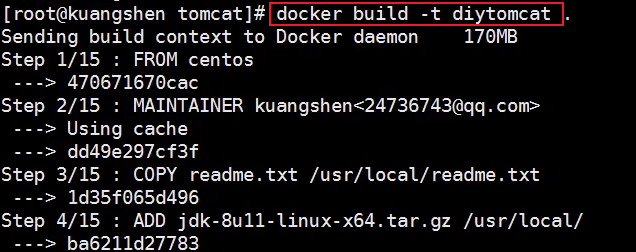
(Docker notes): Actual combat-Tomcat mirroring (to be continued)
Actual combat: Tomcat mirroring 1. Prepare the image file tomcat compression package, jdk compression package 2. Write dockerfile file, officially namedDockerfile, Build will automatically sear...
Reading notes - "Docker entry technology and actual combat"
Chapter One Virtualization The core is an abstraction of resources. It is often to run multiple systems or applications on the same host, thereby increasing the utilization of system resources, and br...
More Recommendation
[Summary] Docker actual combat start notes
Abstract: This article is mainly a combat, and you need you to have basic understanding of Docker before reading. I have learned Docker very early. I have always used it. I haven't worked it carefully...
Docker learning notes: container deployment actual combat
Docker installation nginx #pull pull mirror, Images View, Docker Run -d [] -Name [] -p []: [] Background running, named container, set port number server port number: container internal port number # ...

Spring actual combat notes Chapter 4
1. Aspect-Oriented Programming (AOP) 1.1 Question: The figure shows a typical application divided into modules. The core function of each module is to provide services for a specific business area, bu...
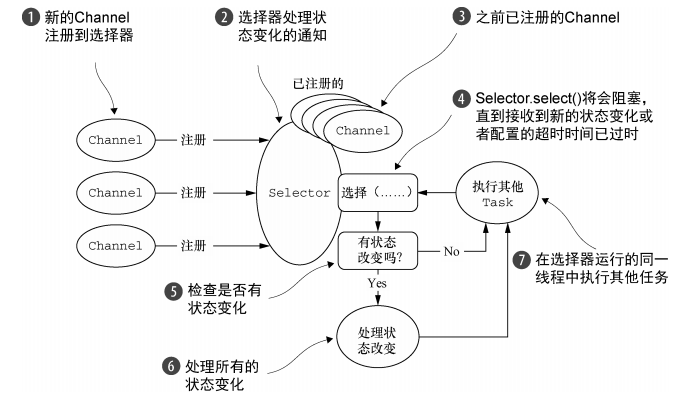
Netty actual combat reading notes (Chapter 4)
Netty combat Chapter 4: Transmission Compare Java's OIO, NIO, OIO provided by Netty, and NIO provided by Netty. OIO: NIO Netty's own OIO: Netty's own NIO: OIO and NIO that come with java JDK belong to...

JAVA RESTful WebService actual combat notes (4)
Preface In the JAVA RESTful WebService actual combat notes (3), I have completed the study of the 4 filters defined by JAX-RS2. Let's take a look at how to use filters comprehensively to complete an a...