Spring Cloud builds an enterprise-level bus-part 6 service gateway

In the previous article, we introduced that Eureka is used for service registration and discovery, Feign supports service invocation and load balancing, Hystrix handles service fusing to prevent failure from spreading, Spring Cloud Config service cluster configuration center, it seems that a microservice framework has been completed .
We still missed a question, how can external applications access various internal microservices? In the microservice architecture, back-end services are often not directly exposed to the caller, but are routed to the corresponding service through an API gateway according to the requested URL. When the API gateway is added, a wall is created between the third-party caller and the service provider. This wall directly communicates with the caller for permission control, and then evenly distributes the requests to the background server.
Why do we need API Gateway
- Simplify client call complexity
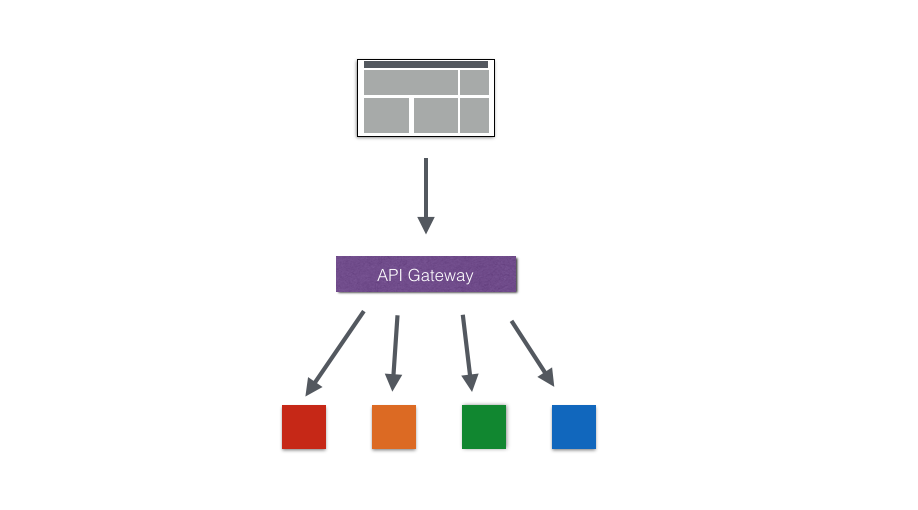
- Data tailoring and aggregation
Therefore, in order to optimize the client's use experience, API Gateway can tailor the general response data to meet the needs of different clients. At the same time, multiple API call logic can be aggregated, thereby reducing the number of client requests and optimizing the client user experience.
- Multi-channel support

- Micro-service transformation of legacy systems

Zuul introduction
Introduction
The service gateway is an indispensable part of the microservice architecture. In the process of uniformly providing REST APIs to external systems through the service gateway, in addition to the functions of service routing and load balancing, it also has functions such as permission control. Zuul in Spring Cloud Netflix plays such a role, providing front-door protection for the microservice architecture, and at the same time migrating these heavier non-business logic content of permission control to the service routing level, so that the service cluster body can have more High reusability and testability.Zuul is an edge service that provides dynamic routing, monitoring, resiliency, and security. Zuul is equivalent to the front door for all requests on the back end of the web site of the device and Netflix streaming application. Zuul can appropriately route requests to multiple Amazon Auto Scaling Groups.
Zuul execution process

The execution process can be clearly seen through the pictures. It is necessary to use zuul to make reasonable calls for various back-end references in microservices, such as load, current limiting, monitoring, security and other functions.
Use case
Ready to work
Before using Zuul, we first build a service registry and two simple services. For example, I built one service-A and one service-B. Then start eureka-server and these two services. By visiting eureka-server, we can see that service-A and service-B have been registered to the service center.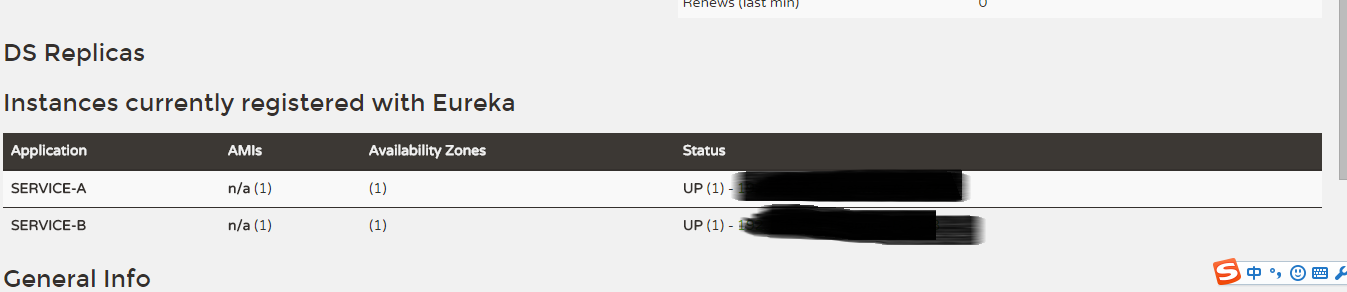
Start using Zuul
Introduce dependency on spring-cloud-starter-zuul, spring-cloud-starter-eureka, if not by specifying the serviceId, eureka dependency is not needed, but in order to be transparent to the details of the service cluster, serviceId is still used to avoid direct reference to the URL Way.Use the @EnableZuulProxy annotation to enable Zuul in the main application class
@EnableZuulProxy
@SpringCloudApplication
public class Application {
	public static void main(String[] args) {
		new SpringApplicationBuilder(Application.class).web(true).run(args);
	}
	@Bean
	public AccessFilter accessFilter() {
		return new AccessFilter();
	}
}Configure basic information of Zuul application in application.properties, such as application name, service port, etc.
spring.application.name=api-gateway
server.port=5555
Zuul configuration
After completing the above work, Zuul is ready to run, but how to make it serve our microservice cluster requires us to configure separately. The following describes some common configuration contents in detail. Service routing
Through the function of service routing, when we provide services to the outside world, we only need to expose the calling address configured in Zuul to allow callers to access our services in a unified manner, without knowing the specific host information that provides the service.
Two mapping methods are provided in Zuul:
# routes to url
zuul.routes.api-a-url.path=/api-a-url/**
zuul.routes.api-a-url.url=http://localhost:2222/Among them, the api-a-url part of the configuration property zuul.routes.api-a-url.path is the name of the route, which can be defined arbitrarily, but the path and url of a group of mapping relationships must be the same, and the same is true when we talk about serviceId below .
The method of url mapping is not particularly friendly to Zuul. Zuul needs to know all the addresses of our services in order to complete all mapping configurations. In fact, when we implement the microservice architecture, the relationship between the service name and the service instance address already exists in the eureka server, so we only need to register Zuul to the eureka server to discover other services, and then we can implement the serviceId mapping . For example, we can configure as follows
# routes to serviceId
zuul.routes.api-a.path=/api-a/**
zuul.routes.api-a.serviceId=service-A

zuul.routes.api-b.path=/api-b/**
zuul.routes.api-b.serviceId=service-B

eureka.client.serviceUrl.defaultZone=http://localhost:1111/eureka/Next, we start eureka-server, service-A, service-B and the service gateway implemented with Zuul here. In the control page of eureka-server, we can see that service-A and service-B are registered respectively And api-gateway

Try to access service-A and service-B through the service gateway, and access the following URLs according to the configured mapping relationship
- http://localhost:5555/api-a/add?a=1&b=2: Access the add service in service-A through serviceId mapping
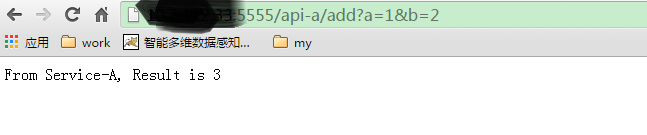
- http://localhost:5555/api-b/add?a=1&b=2: Access the add service in service-B through serviceId mapping

- http://localhost:5555/api-a-url/add?a=1&b=2: Access the add service in service-A through url mapping

- Service filtering
@EnableZuulProxy
@SpringCloudApplication
public class Application {
	public static void main(String[] args) {
		new SpringApplicationBuilder(Application.class).web(true).run(args);
	}
	@Bean
	public AccessFilter accessFilter() {
		return new AccessFilter();
	}
} to sum up
Intelligent Recommendation

Spring Cloud (6) Service Gateway - Gateway
First, introduction In the SpringCloud micro-service system, there is a very important component is the gateway. The Zuul gateway is used in the version of the version; but in the 2.x version, Zuul's ...
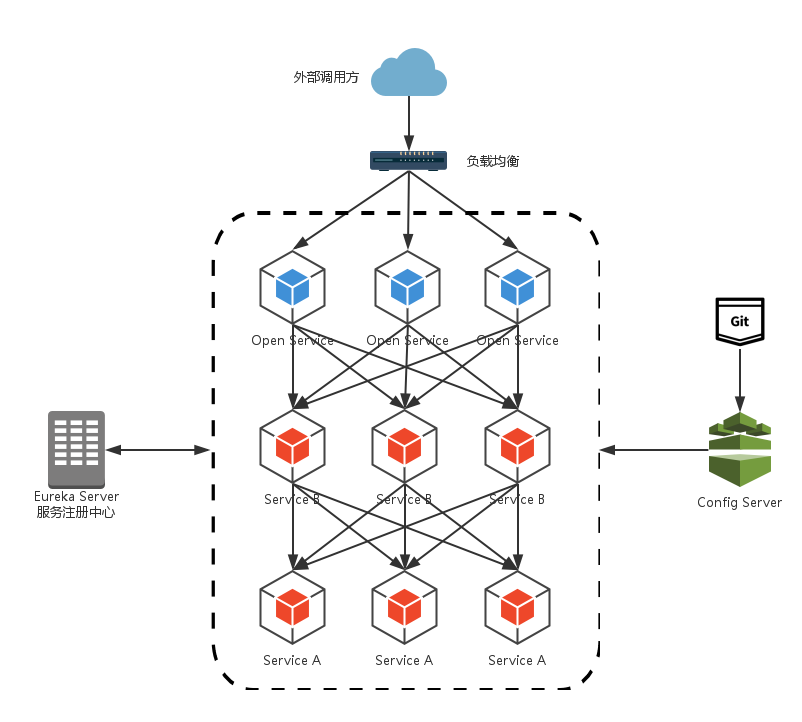
Spring Cloud builds microservices architecture--service gateway
Through the introduction of several core components in the previous Spring Cloud, we have been able to build a simple (not perfect) microservices architecture. As shown in the figure below: alt We imp...
Spring Cloud Zuul builds a micro service gateway
2019 Unicorn Enterprise Heavy Recruitment Python Engineer Standard >>> Why do you have a service gateway? When using a micro service architecture, a client's business needs may call multiple ...

Spring Cloud | Part 6: Routing Gateway (Zuul)
One: Zuul introduction Zuul is an open source microservice gateway for Netflix. He can be used with Eureka, Ribbon, Hystrix and other components. The core of the Zuul component is a series of filters,...

Implementing Microservices with Spring Cloud (6) - Service Gateway
1. Zuul Introduction Throughout the Spring Cloud microservices framework, Zuul plays the role of a "smart gateway." On the one hand, Zuul is the access gateway, acting as a reverse proxy and...
More Recommendation

Spring Cloud (6): service gateway zuul
Through the introduction of the previous articles, the Spring Cloud microservice architecture can realize service registration and discovery through Eureka, load balancing calls between services throu...
Spring Cloud builds micro service architecture ---- Service Gateway
2019 Unicorn Enterprise Heavy Recruitment Python Engineer Standard >>> API GATEWAY API Gateway package internal system architecture, providing API for clients. Cover function points, such as ...
Service Bus - Spring Cloud Bus
Service Bus - Spring Cloud Bus 1 Overview Reason: Introduction: What is a bus? 2, project configuration Configure the service center server Configure Service Center Client 3, test Dynamic refresh glob...

Spring Cloud and Microservices (6): API Gateway Service Spring Cloud Zuul
Background Implementing a highly available service registry with Spring Cloud Eureka as described above, as well as enabling registration and discovery of microservices, Spring Cloud Ribbon or Spring ...
Spring Cloud builds microservices architecture: service gateway (basic) [Dalston version]
Share the artificial intelligence tutorial of my teacher, God! Zero basis, easy to understand! You are also welcome to reprint this article. Sharing knowledge, benefiting the people and realizing the ...