[Css] Replace with ellipsis when the text is too long
tags: css
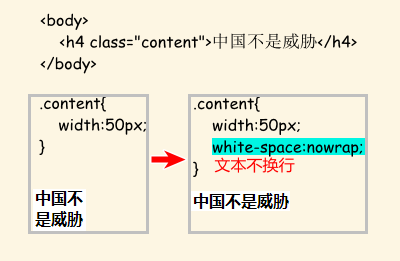
.content{
    width:50px;
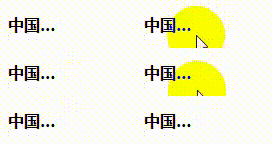
    overflow:hidden;
    text-overflow:ellipsis;
    white-space: nowrap;
}
.content:hover{
    overflow:visible;
}
<body>
    <h4 class="content">China is not a threat</h4>
</body>
Intelligent Recommendation
The text is too long to display the ellipsis (css control)
Add the following styles to the element: In addition, pay attention to adding width to the element: In this way, when the text in the element exceeds 100px, it will automatically display an ellipsis...
CSS text is too long and ellipsis appears
How does CSS set up a line beyond the display of the display? How to set CSS 2 rows beyond the display of the display elaborate number Recommend a Vue plug -in that is omitted by text vue-textellipsis...
Set the ellipsis to be displayed when the text is too long
In the process of web page development, we may encounter an area with a fixed width. At this time, the text may be too long. If the line break display is too ugly, increasing the width of the area vio...

Replace the ellipsis when the element-ui cell content is too long
1. How to omit the content in the cell is too long? A: Just add: show-overflow-tooltip='true' to the column that needs to be set E.g: <el-table-column prop="purchas...
More Recommendation
When the Qt text is too long, reduce the text and display an ellipsis at the end
Supposeui.labelIs smaller than the current fontstrDesIs displayed asThis is a......
Css control text is too long to hide, and finally with an ellipsis
Sometimes we want to achieve this effect: When the length of the text exceeds the width of the container, the excess is indicated by an ellipsis. At first it was thought to be very troublesome. I didn...
Css text is too long to realize the method of displaying an ellipsis
Provided that display: block Mixin it can package, called stylus or less in ...
CSS text is too long processing overflow, hidden displaying the ellipsis number
question Change Final effect...
[CSS] The text content is too long, and the use of ellipsis instead
Table of contents I. 2. Solution 1. Keep only one line 2. Keep multiple lines I. Sometimes we may encounter the problem of overflowing the fixed area with too long and overflowing. I have encountered ...