RGB conversion NV21 (a storage format for YUV) (code implementation)
tags: ISP Image Processing NV21 YUV
The second task of the internship is to convert RGB pictures to NV21 (a storage format of YUV, which is also the most common raw storage format for pictures in Android phones)
Let's take a look at NV21 and other similar storage formats~
Introduction of NV21 (YUV420)
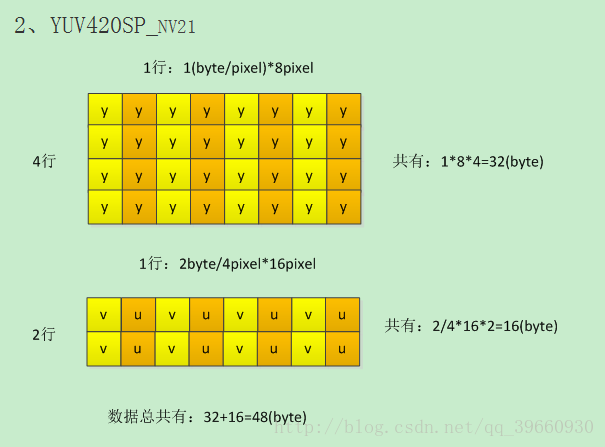
NV12 and NV21 belong to the YUV420 format (four Y per 2x2, sharing a group of uv), is a two-plane mode, that is, Y and UV are divided into two Plane, but CbCr) is interleaved storage, rather than divided into three planes. Store all Y first, then UV staggered storage: NV12 first U then V, NV21 first V then U.
The example format of YUV420sp is as follows:
NV21:
NV12:
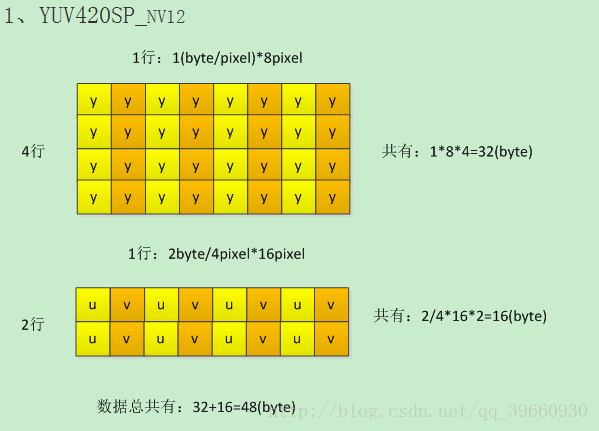
It can be seen that the storage format of NV21 and NV12 is the separation of Y component and U and V components, not the storage format like RBG storage format.
The function that I realized is to store the RGB format picture as the binary format of NV21, and then use the software specifically designed to open YUV-7YUV to open the file.
Come to Kang Kang effect first~
RGB.jpg (original picture)
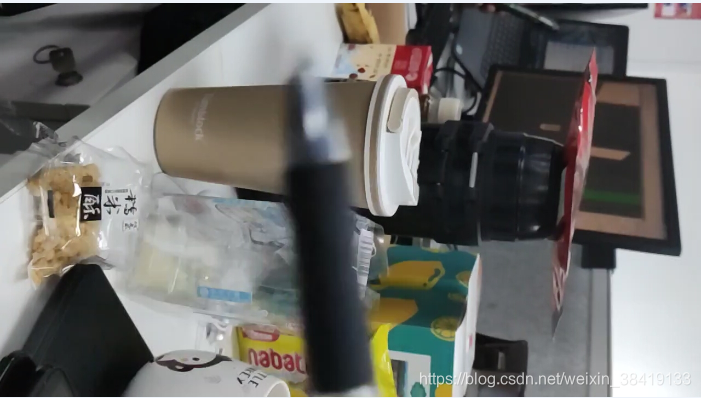
Open the pictures stored in NV21 with opencv:
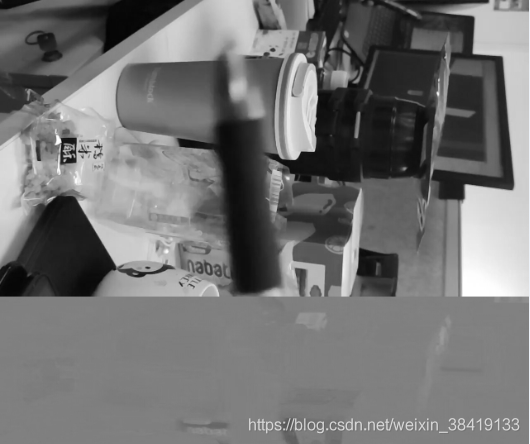
The gray space below is the manifestation of U and V components under opencv
The rendering after opening with 7YUV software:

The specific code implementation is as follows:
#include <iostream>
#include <opencv2/core/core.hpp>
#include <opencv2/highgui/highgui.hpp>
#include <opencv2/imgproc/imgproc.hpp>
#include <vector>
#include <fstream>
#include <string>
void RGB2NV21()
{
const char *filename = "yuv.yuv";
cv::Mat Img = cv::imread("RGB.jpg");
FILE *fp = fopen(filename,"wb");
if (Img.empty())
{
std::cout << "empty!check your image";
return;
}
int cols = Img.cols;
int rows = Img.rows;
int Yindex = 0;
int UVindex = rows * cols;
unsigned char* yuvbuff = new unsigned char[1.5 * rows * cols];
cv::Mat NV21(rows+rows/2, cols, CV_8UC1);
cv::Mat OpencvYUV;
cv::Mat OpencvImg;
cv::cvtColor(Img, OpencvYUV, CV_BGR2YUV_YV12);
int UVRow{ 0 };
for (int i=0;i<rows;i++)
{
for (int j=0;j<cols;j++)
{
uchar* YPointer = NV21.ptr<uchar>(i);
int B = Img.at<cv::Vec3b>(i, j)[0];
int G = Img.at<cv::Vec3b>(i, j)[1];
int R = Img.at<cv::Vec3b>(i, j)[2];
//Calculate the value of Y
int Y = (77 * R + 150 * G + 29 * B) >> 8;
YPointer[j] = Y;
yuvbuff[Yindex++] = (Y < 0) ? 0 : ((Y > 255) ? 255 : Y);
uchar* UVPointer = NV21.ptr<uchar>(rows+i/2);
//Calculate the values of U and V, and sample 2x2
if (i%2==0&&(j)%2==0)
{
int U = ((-44 * R - 87 * G + 131 * B) >> 8) + 128;
int V = ((131 * R - 110 * G - 21 * B) >> 8) + 128;
UVPointer[j] = V;
UVPointer[j+1] = U;
yuvbuff[UVindex++] = (V < 0) ? 0 : ((V > 255) ? 255 : V);
yuvbuff[UVindex++] = (U < 0) ? 0 : ((U > 255) ? 255 : U);
}
}
}
for (int i=0;i< 1.5 * rows * cols;i++)
{
fwrite(&yuvbuff[i], 1, 1, fp);
}
fclose(fp);
std::cout << "write to file ok!" << std::endl;
std::cout << "srcImg: " << "rows:" << Img.rows << "cols:" << Img.cols << std::endl;
std::cout << "NV21: " << "rows:" << NV21.rows << "cols:" << NV21.cols << std::endl;
std::cout << "opencv_YUV: " << "rows:" << OpencvYUV.rows << "cols:" << OpencvYUV.cols << std::endl;
cv::imshow("src", Img);//Original picture
cv::imshow("YUV", NV21);//The converted picture
cv::imshow("opencv_YUV", OpencvYUV); //Opencv converted picture
cv::imwrite("NV21.jpg", NV21);
cv::waitKey(30000);
}
int main()
{
RGB2NV21();
return 0;
}The above is the whole content of RBG to NV21
Intelligent Recommendation
RGB to NV21 format
RGB to NV21 format Read local pictures to generate Bitmap RGB to NV21 Save byte[] in NV21 format as a picture reference NV21 format belongs to the YUV420SP type, which is a mode in Android. Its storag...
NV21 and RGB conversion tools
nv21Tojpg jpg2nv21...
Format conversion of Android video stream (YUV --- RGB)
Android allows users to capture the camera's video stream in real time, which is very useful in AR applications that utilize cameras. You can use the camera stream to analyze the image of the screen i...
Conversion between YUY2(YUV) and RGB format pictures
[Copyright Statement: This article is the original article of the blogger, and it follows the CC 4.0 BY-SA copyright agreement. Please attach the link to the original source and this statement for rep...
Mutual conversion and error of YUV and RGB format
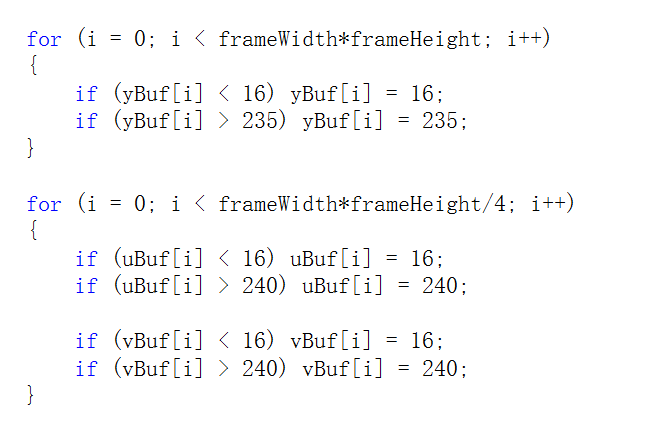
First, RGB turn YUV 1, principle A, YUV calculation formula: B, dynamic protection range: 2, source code Source code is omitted for the teacher 3, experimental results A, the original RGB: b, after co...
More Recommendation
Color space/format conversion: yuv-rgb
definition Baidu Encyclopedia definition: YUV is a color encoding method. "Y" means luminance (luminance or luma), that is, the gray order value, "U" and "V" represent th...
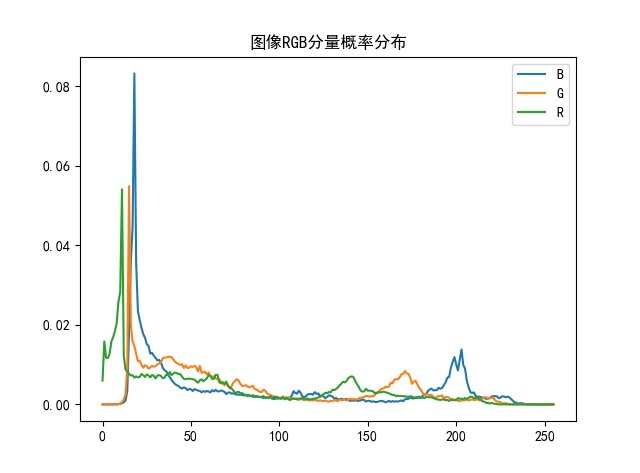
Analysis comparison image RGB format and storage probability distribution in YUV format
Analysis comparison image RGB format and storage probability distribution in YUV format Experimental ideas Both picture files Down.yuv and Down.rgb are two-binary stored image files, pixels are 256 * ...
Python RGB turn NV21 fast implementation ideas and partial code
Normal RGB turn NV21 ideas: 1: RGB transfer YUV (multiplying the coefficient matrix, specific Baidu) 2: YUV turn NV21 (At this point, the number of rows of YUV is 1.5 times the RGB, the last 1-1.5 mul...
The mutual conversion formula between YUV format and RGB format
The mutual conversion formula between YUV format and RGB format An industrial camera in use recently, the output image format is YUY2 format. The RGB format is required for display on a computer, so I...

YUV and RGB format analysis
come from : When doing embedded projects, it involves the conversion of YUV video format to RGB image. Although the previous contact with RGB is based on opencv processing, many things do not ne...