AIX fc Command
Purpose
Processes the command history list.
Syntax
To Open an Editor to Modify and Reexecute Previously Entered Commands
fc [ -r ] [ -e Editor ] [ First [ Last ] ]
To Generate a Listing of Previously Entered Commands
fc -l [ -n ] [ -r ] [ First [ Last ] ]
To Generate a Listing of Previously Entered Commands with Time of Execution
fc -t [ -n ] [ -r ] [ First [ Last ] ]
To Re-execute a Previously Entered Command
Description
The fc command displays the contents of your command history file or invokes an editor to modify and reexecutes commands previously entered in the shell.
The command history file lists commands by number. The first number in the list is selected arbitrarily. The relationship of a number to its command does not change except when the user logs in and no other process is accessing the list. In that case, the system resets the numbering to start the oldest retained command at 1.
If the numbers in the command history file reach a limit greater than the value of the HISTSIZE environment variable or 32767, whichever is greater, the shell wraps to 1. Despite this optional number wrapping, the fc command maintains the time-ordering sequence of the commands. For example, if three commands in sequence are given the numbers 32766, 32767, and 1 (wrapped), command 32767 is still considered previous to command 1.
The commands in the history file can be displayed using the -l (lowercase L) flag. When the -l flag is not specified and commands are edited using the -e Editor flag, the resulting lines are entered at the end of the history file and then reexecuted by the shell (the fc -e Editor command is not entered into the command history list). If the editor returns a non-zero exit status, this suppresses entry in the history file and command reexecution.
Any command-line variable assignments or redirection operators used with the fc command again invoke the previous command, suppressing standard error for both the fc command and the previous command. For example:
fc -s -- -1 2>/dev/nullFlags
| Item | Description |
|---|---|
| -e Editor | Edits commands using the specified editor. The Editor parameter should be a command name. The command is located using the PATH environment variable. The value in the FCEDIT environment variable is used as a default when the -e flag is not specified. If the FCEDIT environment variable is null or unset, the ed editor is used. |
| -l | (lowercase L) Lists the commands in your history file. No editor is invoked to modify them. The commands are written in the sequence indicated by the First and Last parameters, as affected by the -r flag, with each command preceded by the command number. |
| -n | Suppresses command numbers when used with the -l flag. |
| -r | Reverses the order of the commands listed (when used with the -l flag) or reverses the order of the commands edited (when the -l flag is not specified). |
| -s | Reexecutes a command without invoking an editor. If the First parameter is not also specified, the -s flag re-executes the previous command. |
| -t | Lists the commands in your history file along with there time of execution. The working is similar to -l flag but the time of execution of the command is displayed. NoteIf the time field is recorded previously by setting |
Parameters
| Item | Description |
|---|---|
| First or Last | Selects the commands to list or edit. The number of previous commands that can be accessed is determined by the value of the HISTSIZE environment variable. The First and Last parameters must have one of the following values: [+] Number Represents a specific command number. Command numbers can be displayed with the -l flag. A + (plus sign) is the default. -Number Represents a command that was previously executed, specified by the number of commands to back up in the history list. For example, -1 indicates the immediately previous command. String Indicates the most recently entered command that begins with the specified string. If the Old=New parameter is specified without the -s flag, the string from the First parameter cannot contain an embedded = (equal sign). When using the -s flag, omission of the First parameter causes the previous command to be used. |
When the -s flag is not specified, the following rules apply:
- When using the -l flag, omission of the Last parameter causes a default to the previous command.
- When using the -r, -n, and -e flags, omission of the Last parameter causes a default to the First parameter.
- If both the First and Last parameters are omitted, the previous 16 commands are listed or the previous single command is edited (depending on whether or not the -l flag is used).
- If both the First and Last parameters are present, all commands are listed (when the -l flag is specified ) or edited (when the -l flag is not specified). Editing multiple commands is accomplished by presenting to the editor all the commands at one time, each command starting on a new line. If the First parameter represents a newer command than the Last parameter, the commands are listed or edited in reverse sequence. This is equivalent to using the -r flag. For example, the following commands on the first line are equivalent to the corresponding commands on the second line:
fc -r 10 20 fc 30 40 fc 20 10 fc -r 40 30 - When a range of commands is used, it is not an error to specify First or Last values that are not in the history list. The fc command substitutes the value representing the oldest or newest command in the list, as appropriate. For example, if there are only ten commands in the history list, numbered 1 to 10, the commands:
list and edit, respectively, all ten commands.fc -l fc 1 99
| Item | Description |
|---|---|
| Old=New | In commands to be reexecuted, replaces the fist occurrence of the old string with the new string. |
Environment Variables
The following environment variables affect the execution of the fc command:
| Item | Description |
|---|---|
| EXTENDED_HISTORY | Used to control the recording of time of command execution in the history file. If the variable is set to ON then the time is recorded, otherwise, it is not recorded. |
| FCEDIT | When expanded by the shell, determines the default value for the -e editor variable. If the FCEDIT environment variable is null or is not set, the ed editor is the default. |
| HISTDATEFMT | This is used to control the format of the time displayed by the fc –t command. For example, if HISTDATEFMT=%Y, then fc -t will display the year when the command is executed. The formatting is similar to that done by date command. |
| HISTFILE | Determines the path name of the command history file. If the HISTFILE environment variable is not set, the shell may attempt to access or create the .sh_history file in the user's home directory. |
| HISTSIZE | Determines a decimal number representing the limit to the number of previous commands that are accessible. If this variable is not set, a default value of128 is used. |
Exit Status
The following exit values are returned:
| Item | Description |
|---|---|
| 0 | Successful completion of the listing. |
| >0 | An error occurred. |
Otherwise, the exit status is that of the commands executed by the fc command.
Examples
- To invoke the editor defined by the FCEDIT environment variable on the most recent command (the default editor is /usr/bin/ed), enter:
The command is executed when you finish editing.fc - To list the previous two commands that were executed, enter:
fc -l -2 - To find the command that starts with cc, change foo to bar, and display and execute the command, enter:
fc -s foo=bar cc - To list the previously executed commands along with there time of execution, type:
fc –t
Files
| Item | Description |
|---|---|
| /usr/bin/ksh | Contains the Korn shell fc built-in command. |
| /usr/bin/fc | Contains the fc command. |
Intelligent Recommendation
Aix command tar package command application
Package and compress the gzip format and transfer it to a remote server using ftp usePipe characterandsshPackaged to a remote server usePipe characterandsshPackage and compress to a remote server...
AIX
Check the system, the following error message appears in errpt: E87EF1BE 0322150010 P O dumpcheck The largest dump device is too small. errpt -aj E87EF1BE LABEL: DMPCHK_TOOSMALL IDENTIFIER: E87EF1BE D...
Compare file contents command @fc under Windows
Linux has a command diff that compares file content differences, so what about Windows? The corresponding command under Windows is @fc, and the usage method is E.g ...

The fc command under Windows is simple and practical.
FC command is DOSAnd WindowsThe next command line tool for comparing files, using this command to compare the differences between two similar files in detail. Practical dos to view the parameters of t...
-Bash: FC-Cache: Command Not Found error Solution
Reference blog When performing the fc-cache -fv command - Bash: FC-Cache: Command NOT FOUND Error, you need to install Fontconfig resolution. CentOS: Ubuntu/Debian:...
More Recommendation
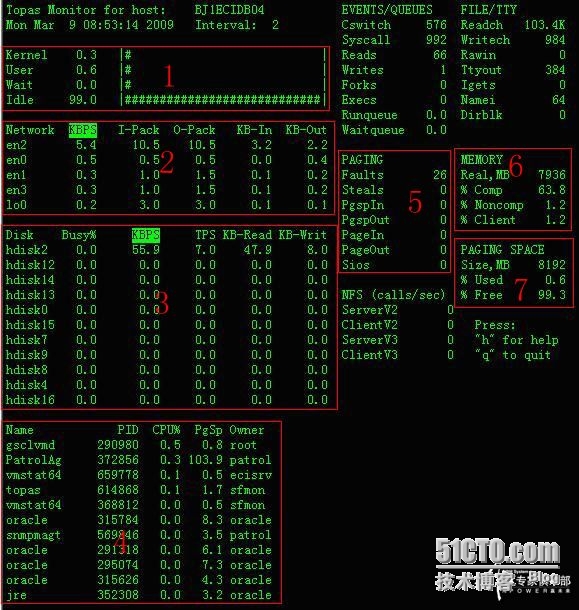
Detailed explanation of the topas command under AIX
The Topas command can monitor system activity - memory, I / O, paging space, cpu, process. This command is included in the perfagent.tools fileset. How to use the command: topas [ -d number_of_monitor...

Detailed explanation of the svmon -P command in AIX
svmon -P -t 3 -i 5, this command outputs the first 3 processes that consume the most memory every 5 seconds. (The output is omitted) Description (for the sake of clarity, the Chinese and English versi...

Detailed analysis of the AIX performance monitoring topas command
After executing the topas command as shown: #topas Area 1: Reflects CPU usage and working conditions Kernel: The CPU...
AIX command line to achieve automatic completion function
There are two ways: Method 1: Modify the environment variable Automatic completion implementation method (combination key): Esc + \ Implementation steps: Step 1: Add the following to the /etc/profile ...
Linux and AIX system query memory percentage command
Use the free command in the Linux operating system or the svmon command in the AIX system to view the memory and only display the total size and free size. How to clearly and intuitively display the p...