Docker CentOS 8 image uses systemctl command to report errors
Recently fiddledDocker, I found some problems that have not been encountered in the virtual machine, and now record them. If there are many problems encountered in the future, they may be integrated into a series and then classified
inDocker ContainerCentos 8 Open the firewall service in the mirror, execute the commandsystemctl start firewalldTimes error
System has not been booted with systemd as init system (PID 1). Can't operate.
Failed to connect to bus: Host is down
As shown below:

The Chinese meaning of the error message is:
The systemd has not been used as the initialization system (PID 1) to boot the system. Unable to operate.
 Unable to connect to the bus: host is down
CheckOfficial document

the reasonIt roughly means:Docker The container is by defaultRun as "unprivileged",in"Non-privileged"underDo not allow containers to access any devices, The access of the container to the host is different from the process running outside the container on the host. Only after "privilege"At runtime, onlyAllow container to access any deviceAnd can be inAppArmor OrSELinux Make some configuration in the host, allowing the container to access the host almost the same as the process running outside the container on the host.
solution:
Use "privilege"Run, the specific steps are as follows:
- First, to save the current container as a new image, use the command
docker commit container ID image name

As shown in the figure above, set the container ID to98 starts Save the container to the new imagemy-centos in - Create another one with "privilege"Run the virtual terminal (container), use the command
docker run -itd --privileged=true --name New container name New image name /usr/sbin/init #Use the mirror "my-centos" to run the container named "my_centos" interactively in the background with "privileged" to execute the "/usr/sbin/init" command and return the ID of the container
As shown below:

Use commandsdocker ps -aView all containers on this machine, you can see that there is already amy_centos The container

- Enter the container and use the command
docker exec -it my_centos /bin/bashUse the container name to enter here, you can also use the commanddocker exec -it container ID /bin/bashenter
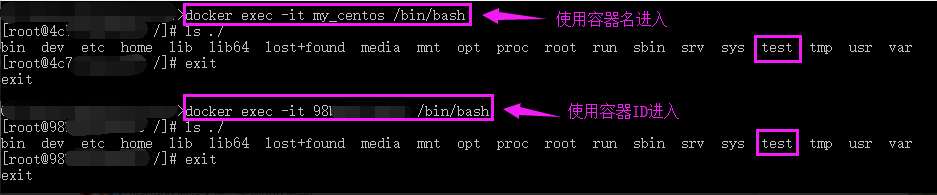
As can be seen from the above figure, it has successfully entered the container and used the commandls ./Check the file to find out before98 starts The contents of the container are consistent - Enter againmy_centos In the container and execute
systemctl start firewalldcommand

As you can see from the picture above, no more errors are reported
Intelligent Recommendation
Solving CentOS 8 Docker-Compose: Command NOT FOUND
1, install docker-compose Since Docker-Compose is naturally installed Take too slow on Github, it is recommended to pull in DAOCLOUD in China: PS: where the / usr / local / soft / docker-compose wants...
docker centos uses systemctl Failed to get D-Bus connection: Operation not permitted
We know that when Docker runs a container, it only provides you with a specific file system layer and process isolation. It gives you the feeling of a VM but not a VM, so you may occasionally want to ...
Centos8 uses Docker to start a Centos image
Centos8 uses Docker to start a Centos image 1. After pulling a Centos image, start it Go to https://hub.docker.com/ to find the Centos mirror #Run command This will start a Centos that has been runnin...
Docker installation uses nginx image (CentOS environment)
docker install using nginx image Install docker Install nginx image Get mirror View mirror Start the container Create a new container for deployment Create Mount Directory Remove old container Create ...
Docker uses Centos image to install Openssh service
demand By default, the Centos image downloaded from the docker hub does not have the Openssh function installed and does not provide the ssh service. However, in some scenarios, it is necessary to pro...
More Recommendation
CENTOS 8 executes the Python command to report an error -Python: Command Not Found
Foreword This article belongs to the column"Summary of Big Data Abnormal Questions", This column is original for the author. Please indicate the source for quotation. Please help in the comm...
[CentOS 8] [CentOS 7] [Docker] Add Dockerhub's image address
Foreword CentOS Linux release 8.2 CentOS Linux release 7.6 [CentOS 8] [CentOS 7] [Docker] Install RabbitmqWhen pulling the Docker Image phase is slow. In China, this issue often encounters this proble...
CentOS 7 uses systemctl to complete the function
How to complete the service name in CentOS 7 using systemctl Because the default installation type of CentOS7 is a minimal installation, there is no automatic completion function by default. To enable...
Systemctl command usage (CentOS 5 6 7)
1. Evolution of the init process 1. The development of init CentOS 5: SysV init, serial CentOS 6: Upstart, parallel, borrow from ubantu CentOS 7: Systemd, parallel, drawing on MAC 2. New features of S...